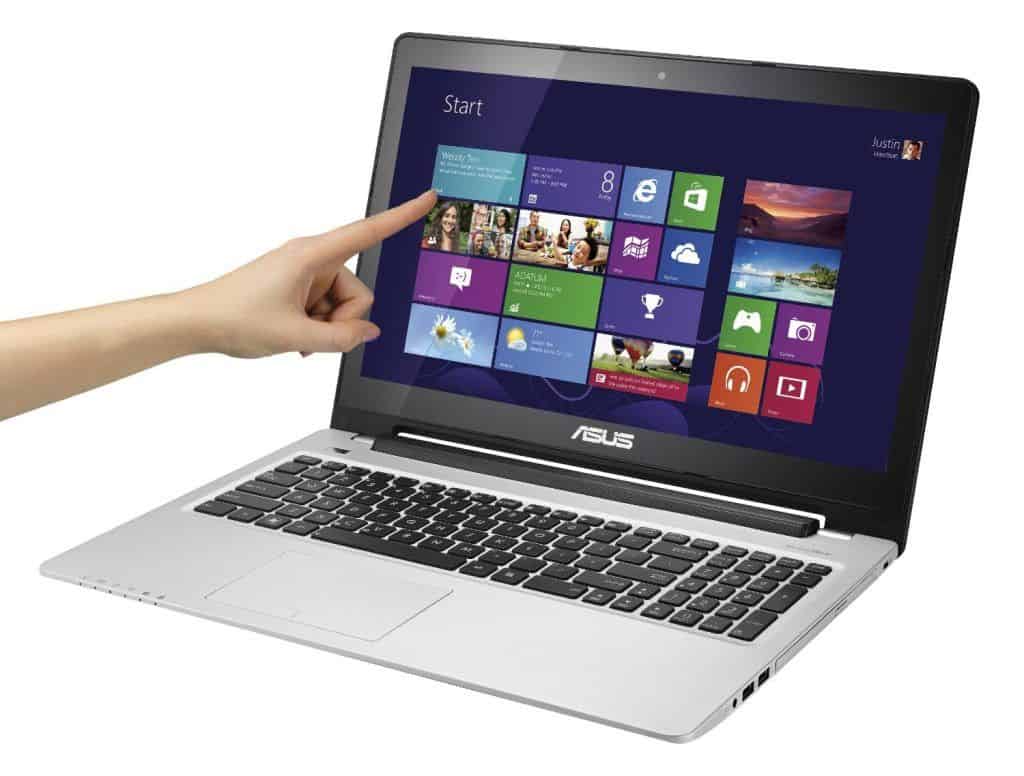

Biareview-tested, this is the Asus Vivobook S550CA-CJ013H with a 15.6-inch touch display, showing a resolution of 1,366 x 768 pixels. Overall the setup is pretty solid, you get a 1.8GHz Intel Core i3-3217U processor, 4GB of RAM, and a hybrid storage combo of 24GB SSD + 500GB HDD . It also comes with Intel HD Graphics 4000, plus an optical drive that can read or write DVD , depending on what you need.
The price is rather cheap compared to what you get , but the Asus Vivobook S550C is still packed with a sturdy alloy shell that usually only shows up in models over 1000 dollars. The design is solid but it feels heavy, even if it still checks the ultrabook boxes , for a 15.6 inch screen at 2.6 kg with a battery inside.
The size of the machine is quite large, even the horizontal surface is slightly larger than the normal computer model with the screen size is 15.6 inches. With the “measurements” of 38 x 26.6 x 2.2 cm, the S550C is not really suitable for frequent travel users. Targeted to desktop replacement users, it still needs sleekness and sometimes needs to be moving.
The front of the Asus S550C is still dark brown, which is characteristic of Asus, which is accompanied by a scratch layer. However, this surface is still sticky fingerprints and quite easily recognizable when there is light reflected. On the inside of the machine is a contrasting color tones to the bright silver color of the metal to create the product. The closest part to the hinge is the battery that comes with it.
On the sides, Asus cleverly uses a combination of light and dark metal connectors to give the viewer a very thin feel. The device is swept backwards and in the near-front position is the loudspeaker.
ASUS S550 15-Inch Laptop [OLD VERSION]: Buy it now
With its large size and spaciousness on both sides, the S550C offers users almost the most popular connectivity. On the left is HDMI, VGA, LAN, USB 3.0, power and heat sockets, while the right side is the presence of optical drives read DVD recorders, components that make the difference with the machine model other ultrabook in the market. In addition, there are two USB 2.0 ports and an additional SD memory card reader on the front.
In this position, the operation of SD memory card is quite difficult and sometimes have to turn the machine up to be used. Meanwhile, the connections on both sides proved quite reasonable because the HDMI and VGA ports are placed very close together because not used simultaneously.
Due to its large screen, the Asus S550C has sufficient space for a dedicated digital keypad. However, the layout of these keys is not uniform. The smaller size also includes navigation buttons that make users’ web or text feel a little discomfort. In return, Asus S550C has a pretty good sensitivity and sensation in the standard lettering on the left despite its slightly shorter stroke, which is often seen in ultrabook models.
Another big advantage of the S550C is the large size touch pad and seamlessly mimic both mouse buttons. The surface is a little bit rough and feels very handsome and does not slip even when slightly sticky sweat hand. Precise gestures and multi-touch support. Similar to MacBooks, users simply touch two fingers at a time to invoke the right-click menu, leaving the user less likely to use the mouse.
Performance
The way the Asus S550C “moves” is mostly thanks to its Intel Core i5-3317U chip, and yeah it belongs to the Ivy Bridge family. This dual core processor runs at 1.7 GHz as a starting point, then with Turbo Boost it can climb up to around 2.6 GHz. On the memory side, it includes 6GB of DDR3 RAM, which is, for the most part, enough for the usual multitasking habits people do. So with the i5 along with that plenty of RAM, day to day stuff feels pretty smooth for web browsing, office work, and even light photo editing.
Storage wise, the S550C ships with a 750GB hard drive, so you get plenty of room for documents, media, and installing applications. Still, because it’s a regular HDD not an SSD, you can expect slower read write speeds, and that tends to make the whole system feel less snappy than laptops with solid state drives. In practice, boot time, and app start up moments are longer, compared to machines that rely on SSD storage.
For graphics, the S550C comes with integrated Intel HD Graphics 4000. Honestly it’s pretty alright for everyday visual stuff and even for some casual gaming but it’s not built for heavy gaming marathons or professional level video work. It can handle HD video playback and lighter games without too much fuss, yet when it comes to newer, more graphically intense titles it will start to struggle , and the slowdown is usually noticeable.
Battery Life
Battery life matters a lot on any laptop, especially if you’re the type that works while moving around. The Asus S550C is fitted with a 4-cell lithium-polymer battery, and for its category that means it delivers a decent runtime. In normal day to day use, like web browsing, writing documents, and streaming media , you can typically expect around 4 to 5 hours per charge.
That kind of battery performance is fine for short trips and standard office style sessions, but it may not satisfy people who want all day power, without thinking about outlets. Windows 8 includes various power saving options , for example adaptive brightness and power management tweaks, which can stretch the runtime a bit. Still, if your schedule is long or you’re traveling you might end up bringing the charger, or you may want to use an external battery pack for safer coverage.
Connectivity
The Asus S550C comes with a bunch of connectivity options, kind of built to fit what people use now. On the left side, you get the power input, a proper full sized HDMI port, one USB 3.0 port and an Ethernet port. That HDMI connector makes it simple to plug into monitors or projectors, so it works well for showing slides, and also for watching multimedia stuff without too much hassle.
Flip it over to the right side and you’ll see two USB 2.0 ports, a VGA port, an SD card reader, plus a 3.5mm audio jack. Having both USB 3.0 and USB 2.0 is handy, because you can swap between faster peripherals and older stuff like external drives printers and mice. And the SD card reader is really there for anyone who moves files often, like photographers, or if you just transfer data from memory cards regularly.
For wireless, it includes Wi‑Fi 802.11b/g/n, along with Bluetooth 4.0. The Wi‑Fi signal tends to be dependable, giving stable and quick connections for browsing, streaming, or chatting online. Bluetooth 4.0 also makes pairing simpler, for wireless headsets speakers and even a phone.
Last, the laptop has a built in 720p HD webcam, and an integrated microphone, so it’s fine for video calls, and for online meetings. The webcam output is ok for casual use, though in darker rooms it may not look as crisp as you might hope.
Software and Operating System
The Asus S550C ships with Windows 8 pre-installed, so at the time of release it was basically the newest Microsoft operating system around. Windows 8 brings a touch oriented interface, you know with those live tiles, and it ends up being pretty compatible with the laptop’s touchscreen style of use. On top of that it comes with a bunch of built-in applications and services like the Microsoft Office suite, Skype, and OneDrive for cloud storage too.
Now, Windows 8 wasn’t universally loved, since it made a pretty big change from the classic desktop setup. Still, it does include a number of productivity focused functions that many people end up appreciating. For example the Start screen makes it easy to jump into commonly used apps, and also settings, faster than you might expect. Then there’s the Charms bar, which helps with navigation and multitasking in a fairly direct way, even if it takes some getting used to.
Asus also bundles some proprietary applications and utilities to go along with Windows. Among them are Asus WebStorage for cloud backup, and Asus Splendid Technology to tune the screen look, plus Asus Smart Gesture which helps with touchpad responsiveness. Some people find these little tools quite handy but other folks might prefer to switch them off or even remove them completely, mosty because they want the system cleaner, less cluttered, you know.
Audio and Multimedia
The audio output on the Asus S550C feels pretty all right, though it honestly doesn’t really shine as a big selling point. It comes with stereo speakers, but they sit on the underside of the chassis, which is kind of a mixed bag. Depending on where you set it down, the sound can get a bit muffled, especially if the laptop is on a soft surface like a bed, or couch.
When it comes to quality, it’s fine for everyday listening. You’ll hear clear mids and highs, however the bass is noticeably weak. So, if you’re picky about low end punch, you’ll likely want outside speakers or headphones. Those can be attached through the 3.5mm audio jack, or paired using Bluetooth which is convenient.
For visuals, the 15.6-inch display works well as a media screen. It’s good for movies, streaming clips, and checking photos, generally. The HD resolution covers most needs, but if you’re the type that wants sharper detail, you may feel restricted. Also, the touchscreen does help the multimedia experience, because it makes playback and browsing feel more direct, and a little more intuitive.
Upgradability and Maintenance
One of the advantages of the Asus S550C is that it feels pretty upgradable. The laptop gives you reasonably easy access to the internal components, so users can do upgrades and maintenance without too much trouble. In general, you can remove the bottom panel to reach the RAM , hard drive and a few other parts.
When it comes to upgrading the RAM, the whole thing is mostly straight forward, sorta easy. The S550C can handle up to 8GB of DDR3 RAM, and that can truly make a difference if you’re using heavier applications or you multitask quite a bit. On top of that, many folks also decide to replace the hard drive with a solid state drive (SSD) instead. That kind of swap should give you a stronger system performance, and it often makes everything feel more immediate, like the responsiveness improves in a noticeable way.
For maintenance, regular care matters. Cleaning the cooling fan and vents can help the laptop keep running smoothly, and it also helps prevent the usual dust and debris build up. Asus, for what it’s worth, includes detailed guides and support resources, so users can follow along if they’re not super confident at first.
Conclusion
In conclusion, the Asus S550C is a well-rounded mid-range laptop. It brings a good mix of performance, design , and day to day usefulness. Some of the strong points are the sleek yet durable build, a responsive touchscreen, and performance that’s adequate for everyday tasks. Still, it has limitations too, like the HD display resolution, average audio quality, and a shorter battery life compared to a few competitors.
For users who care about looking sharp, enjoying touchscreen control , and having some room to upgrade later, the Asus S550C really makes a solid case. Still, if you’re after a sharper resolution screen, punchier sound, or simply more time away from the charger, you may want to compare it with options like the HP Pavilion 15 , Dell Inspiron 15, or Lenovo IdeaPad 500, which can fit those needs better.
Pros:
It comes with a sleek, sturdy build and a brushed aluminum finish
The touchscreen feels responsive , and it’s pleasant to use day to day
The keyboard is comfortable , with that chiclet-style layout and a numeric keypad
Solid everyday performance thanks to the Intel Core i5 processor and 6GB RAM
Plenty of space, since it includes a 750GB hard drive
Decent ports and connections, including HDMI, USB 3.0, plus an SD card reader
You can upgrade certain parts so performance can improve over time
Cons:
The HD display resolution is not as high as competitors that offer Full HD
Audio quality feels average , with limited bass and not much depth
Battery life is shorter than some rival models you might find at the same level
Integrated graphics are not great for heavy gaming, or for demanding professional video editing work
So, overall, the Asus S550C is a dependable and flexible laptop that can suit everyone from students to working professionals. It doesn’t necessarily dominate every category, but it delivers a fairly balanced setup , the kind that often matches what many people want in the mid-range segment.
Related Posts



Tech Reviewer & Product Analyst
Định Bia has spent over 10 years testing consumer electronics with a focus on smart technology. He work as a product advisor at Biareview where he helped customers find the right devices for their needs. He personally tests every product featured on this site using a consistent evaluation framework covering quality, durability, and value. All reviews are based on experience, not influenced by the manufacturer.