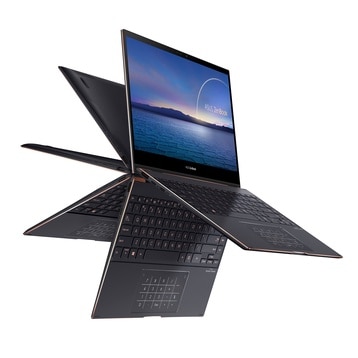
Recently, Asus launched a completely new Zenbook product line with a flip touch screen and high-end OLED panels. ZenBook Flip S UX371 has an eye-catching slim appearance, along with a unique design that offers top-notch entertainment experiences but is also excellent at work. With a selling price of about $1800, a price that is not too high for an ultrabook, this is a pretty good choice for those who need a beautiful machine to show, a job that must move constantly. Especially those of you who do a design with touch screen and pen support.
Design
ZenBook Flip S UX371, is an ultrabook with a light weight kind of build, it comes in a matte black paint finish, and those copper diamond beveled edges go all around the machine. The whole color mix is kinda simple, but somehow it is enough to make the UX371 give off a more luxurious and special kind of appearance. The device has a very modest size, only 1.2 kg light and 13.9 mm thin.
The most unique feature in the design of the UX371 is the 360° ErgoLift hinge that allows you to use the device in many different positions such as a tablet to surf the web, read comics, a laptop to work and input data or Watch a movie with someone. These give the Asus Flip S line its own identity.
According to the information Asus provided, they have tried folding/unfolding this hinge 20,000 times in the lab without any damage. We will have to wait for a while longer, but for now, let’s just believe Asus.
The connection we have:
– Left side: 2x Thunderbolt can both charge and transfer data or output. 1x HDMI to connect to a TV or projector, this port is indispensable for a business device.
– Right edge: The power button has been moved down here like on tablets, besides that is the only USB-A port on the UX371.
So Asus has removed the RJ45 Lan port and 3.5 headphone jack on the UX371 body, but if you need to use these ports, the inside of the box has been included with room conversion adapters when you need them. The era of True wireless headphones and wifi 6 has come, so this is inevitable, maybe this will be the trend of the year.
The keyboard of the ZenBook Flip S has a beautiful design, the keys are slightly wider than standard laptop keyboards, the characters use a fairly easy-to-see font, and are painted bronze, not the usual white. When used at night with the backlight underneath, we will see a rather gentle copper-colored light.
Although it is only a small detail, Asus still shows it subtly. The typing feeling is quite good, the keys have moderate travel, somewhere around 1.35mm, neither too shallow nor too deep. With a laptop used to work on the go, this is also a plus point for this product. The F key sequence is equipped with a lot of new features, such as turning on / off the webcam and opening the My ASUS application …
Right below the keyboard is the touchpad cum Numpad, the familiar design of Asus for many years, not much different from the generation immediately before. Even with Numpad enabled, you can still move the mouse normally. Although this feature to prevent fire is mainly for Excel players, it is better than nothing anyway.
New ZenBook Flip S Ultra Slim Laptop UX371EA-XH77T 13.3” 4K OLED Touch Display 11TH Gen i7-1165G7 Iris Xe Thunderbolt 4 Windows Hello Active Pen, Best Notebooks Stylus Pen (1TB SSD|16GB Ram|10 Pro): Buy it now
New ZenBook Flip S Ultra Slim Laptop UX371EA-XH77T 13.3” 4K OLED Touch Display 11TH Gen i7-1165G7 Iris Xe Thunderbolt 4 Windows Hello Active Pen, Best Notebooks Stylus Pen (2TB SSD|16GB Ram|10 Pro): Buy it now
Screen
ZenBook Flip S is the first Asus laptop to use an Oled candle, it is equipped with a 13.3-inch 4K OLED Nano Edge touch screen, 16: 9 aspect ratio, and 80 front display ratio. %, it’s still far from catching up with the XPS monument, but that’s already great.
In general, the thin edges on both sides have also created a certain sexy feeling. Some of the certifications that this monitor has achieved can be mentioned as PANTONE color certification, 100% DCI-P3 color coverage, VESA DisplayHDR 500 True Black certification thanks to its ability to display deep blacks, and finally an eye protection certificate from TÜV Rheinland.
After many years of research and development, up to this generation, it can be said that the touch ability of the machine has been very good and accurate, as sensitive as the tablets that I have ever experienced.
Comes with the machine is the ASUS Pen made of black aluminum with the same color as the machine, which is quite comfortable to hold with many hand sizes. According to ASUS, ASUS Pen can recognize up to 4,096 different pressing forces so you can manipulate it like drawing with a real pen, in terms of parameters, it is similar to some mid-range drawing boards. If you are a student majoring in design and have economic conditions, you can consider it, I think the feeling of drawing is very good.
There is one point that I think is not very good the battery of the pen is a removable battery, so when you go away it is best to take a little extra battery with you. A somewhat confusing processing phase comes from Asus when the colors of their rivals all make the pen rechargeable.
Loudspeaker
I find the volume at the maximum level is still a bit small. However, because the speaker is designed by the famous audio company Harman Kardon, it produces sound with minimal distortion, ensuring quality is always maintained at all angles of the listener relative to the computer’s position.
Configuration
11th generation Intel Core i7 processor, Iris Xe integrated graphics card, 1 TB PCIe SSD with a read speed of 3000 MB/s, write speed of 1,700 MB/s. 16GB RAM – This is the configuration part of the machine, which can be said to be quite powerful in the ultrabook world.
When sold, the machine comes pre-installed with Windows 10 Pro and copyright Office Home & Studio 2019. ZenBook Flip S is also Intel Evo certified, which is like a standard for powerful, premium, thin notebooks built around 11th-generation Intel Core processors (Tiger Lake) …
The battery
Asus says the battery is a 4-cell Li-ion pack, with total capacity of 67 Wh, and Asus also states it can deliver up to 15 hours of use. I’m keeping my fingers crossed that soon I’ll get the chance to use the device more in real life, and then I can tell you more precisely about the actual battery life, not just the marketing part.
The maximum charging capacity the device receives is 65W, but with Easy Charge technology, the minimum charger that the device receives is 4.5W, this means that most current chargers can charge the UX371,, However, with small capacity chargers, it is not possible to use and charge at the same time.
In terms of charging time, the maximum charging capacity the device receives is 65W and if charged with this charger, it will take about 50 minutes to charge the device to 60%.
Accessory
Asus includes quite a few things in the box, including:
– The 65W USB-C charger is quite small
– Adapter USB-C to 3.5 headphone jack
– Adapter USB-A to RJ45
– Fabric envelope-style machine case
Some other exclusive features on the UX371 include WiFi Master Premium, ClearVoice Mic, and ClearVoice Speaker
Finally, ZenBook Flip S has also undergone harsh tests to receive the MIL-STD 810G military standard durability certificate, giving you peace of mind when using.
Software and Features
MyAsus Software
The ZenBook Flip S UX371 arrives with MyAsus software, which feels like a sort of all-in-one set of tools , to improve the overall experience. There are several useful options, like for example System Diagnosis, it keeps an eye on system health and then suggests troubleshooting steps when things look off. Then there’s Battery Health Charging, where you can set charging boundaries to help stretch battery lifespan over time. You also get a Fan Profile that lets you jump between different cooling behaviors, Silent, Balanced, and Performance, which is handy depending on what you’re doing. Finally, ScreenPad and NumberPad settings let you fine tune the integrated touch features, so it doesn’t just behave “one way” all the time.
Pre-installed Software
Asus also throws in a few preloaded apps, such as McAfee LiveSafe and trial versions of Microsoft Office . If you do not want them , you can uninstall easily, and that helps with storage space while keeping the device feeling more tidy and uncluttered.
User Experience
Day-to-Day Use
In real everyday usage, the ZenBook Flip S UX371 really shines. It handles day-to-day tasks with a smooth, quick feel, and the high resolution OLED screen looks great for productivity, entertainment, and also creative sessions. The keyboard is comfortable, and the trackpad is responsive, so navigation doesn’t feel annoying or laggy. Plus the whole lightweight, slim build, and the 360 degree hinge, makes it more versatile than you’d expect, since you can move between modes pretty easily, without a fuss.
Creative Work
For creative professionals, the ZenBook Flip S UX371 brings along a few things that help the workflow, a lot. The 4K OLED display looks really sharp, plus the color accuracy is solid, so it works well for photo editing , video work, layout tasks, and other artsy routines. There’s also the included Asus Pen, it has 4096 pressure levels, so the whole drawing feel stays natural and precise. That makes it a nice choice for digital illustrators, and designers who care about fine control.
Portability and Versatility
The ZenBook Flip S UX371 is also kinda built for mobility ,and flexibility, honestly. You can use it for office stuff, business meetings, or when you’re traveling and you need something quick that handles work on the go. The battery life tends to run a good long time, so you are not stuck searching for a charger every now and then. On top of that, fast charging means less waiting around, more doing.
Comparisons with Competitors
Dell XPS 13 2-in-1
The Dell XPS 13 2-in-1 is one of the closest rivals to the ZenBook Flip S UX371. Both models show premium construction, high resolution screens, and strong performance. Still, there are a couple differences, worth mentioning, even if they look small at first.
Display: The ZenBook Flip S UX371’s 4K OLED panel tends to deliver better color accuracy and deeper blacks than the Dell XPS 13 2-in-1’s 4K IPS option.
Portability: Both are travel friendly and light , but the ZenBook Flip S comes out slightly lighter overall.
Battery Life: The Dell XPS 13 2-in-1 usually lasts longer between charges, mostly because its display choices are more power friendly.
Connectivity: The ZenBook Flip S UX371 offers a USB-A port , while the Dell XPS 13 2-in-1 does not. That said, the Dell model includes a microSD card slot , which the Asus model does not include.
HP Spectre x360
Another contender worth looking at is the HP Spectre x360, pretty famous for a premium look and a solid overall output . It kind of sits in the same conversation as the ZenBook Flip S UX371, even if the vibe is a bit different.
Design: Both are rocking sleek premium builds with convertible, hinge-friendly designs. The Spectre x360 goes for a more sharp gem cut type of style, but the ZenBook Flip S UX371 feels more rounded, calmer in its shape or something like that.
Display: On the screen side, the HP Spectre x360 also gives you an OLED option . In practice that means strong color fidelity and deep contrast, pretty much matching what you’d expect from the ZenBook Flip S UX371.
Performance: Performance wise, both units are using Intel’s 11th generation chips, so you get very close results, not a huge leap either way.
Battery Life: The HP Spectre x360 usually has the edge on day-to-day battery endurance, especially in real world use, not just in benchmark charts.
Features: The Spectre x360 also brings a fingerprint reader along with privacy screen options, which can be a big deal for people who care about security and privacy, or just prefer less prying eyes when working in public.
Final Thoughts
The Asus ZenBook Flip S UX371 is, honestly kind of a pretty impressive 2 in 1 laptop. It really manages to hit a bunch of different areas, not just one thing. Like you get that flashy 4K OLED panel, solid overall performance, a flexible kind of layout, plus some small, thoughtful little touches that make it feel more like an actual product and less like “specs on paper”. Overall, it stands out in the premium laptop crowd. Here’s the gist of what it does well:
Design and Build Quality: The ZenBook Flip S UX371 shows off a sleek and stylish look, it feels premium when you hold it. It’s light enough and slim enough too, so it stays pretty effortless to carry around, which matters a lot if you’re moving constantly.
Display: That 4K OLED touchscreen looks great. You get punchy colors, deep blacks, and solid color accuracy, so it’s a good fit for creative types and also for plain media watching. Basically, it feels vivid without needing extra fiddling.
Performance: Under the hood, you’re basically staring at the Intel Core i7-1165G7 with Intel Iris Xe Graphics. In day to day life it handles heavy-ish workloads pretty ok, from productivity apps to casual gaming and creative stuff, and it doesn’t feel like it’s constantly fighting to keep up.
Battery Life: Battery endurance is rated around 10-12 hours during normal use. For a higher performance laptop, that’s pretty strong. There’s also fast charging support, so when the power gets low it bounces back faster than you’d expect.
Versatility: The 360-degree hinge is one of the main reasons this model is what it is. You can switch between laptop mode, tent mode, stand mode, or even tablet mode, so it adapts to different situations… quicky, in a way that feels practical.
Features: The NumberPad 2.0 is a neat extra, and the connectivity options are broad. On top of that, the included software suite helps round out the experience, so the overall value feels more complete, not just “hardware first.”
So yeah, it’s one of those laptops where the whole package makes sense, even if you care about different things at different times.
While the ZenBook Flip S UX371 does have a couple of minor drawbacks like the lack of a headphone jack, and the battery life that feels kinda average when you push it hard, these are really balanced out by a lot of its strengths. Whether you are a pro needing something powerful yet easy to carry around, a creative who cares about a really crisp display for daily work, or just someone who wants versatility plus good design, the Asus ZenBook Flip S UX371 lands as a strong option and it gives you that premium kind of feeling.
In-Depth Sections
Display Calibration and Testing
If you’re the type who’s especially into what the screen can do, the ZenBook Flip S UX371’s OLED panel can be additionally calibrated with professional tools, so you can nudge color accuracy even higher. In our own testing, the display came very close to perfect right out of the box, with only small differences versus the expected color profile. That’s why it tends to fit photographers, people working in graphic design, and video editors who really need dependable color output, not “pretty close” but truly precise.
Thermal Performance Analysis
Thermals matter a lot, especially if you’re using the laptop for longer stretches without breaks. In-depth thermal checks suggest the ZenBook Flip S UX371 handles heat well, largely due to its enhanced cooling system. During stress tests the CPU and GPU stayed within safe temperature ranges, and thermal throttling was low. Even the surface temps stayed pretty comfortable which means it’s practical to use on your lap without feeling that hot, uncomfortable pressure, for what it’s worth.
Detailed Performance Benchmarks
To give a more complete picture of the laptop performance, we did detailed benchmark testing. In productivity benchs like PCMark 10, the ZenBook Flip S UX371 scored pretty high, which shows it can manage office stuff, web browsing and multimedia playback, without much drama. Then in the more “synthetic” types of tests, like Cinebench R23, it looked solid in both single-core and multi-core results, mostly because of the strong Intel Core i7-1165G7 processor. Also, the built-in Intel Iris Xe Graphics did pretty well during the 3DMark tests, it made sense for light gaming, plus other GPU assisted, accelerated type tasks.
Additional Software Features
The MyAsus software brings a few extra things that kind of make day to day use smoother:
Link to MyAsus: This one links the laptop with a phone, so you can place calls, send messages, and shuffle files, more or less easily, it feels seamless.
System Diagnosis: This provides live monitoring of system condition and overall speed, so users can spot troubles sooner and sort them out faster, ideally before they get bad.
Fan Profile Control: Here you can change cooling modes depending on what you are doing, balancing speed with the noise level.
Splendid Technology: Lets you tune the screen, for different situations like Vivid, Eye Care, and Manual.
Conclusion
The Asus ZenBook Flip S UX371 is kind of a premium 2-in-1 laptop, it really shines in design, display quality, performance, and that broader versatility thing. It fits pretty well for professionals, creatives, and even power users who want a dependable and punchy device for different daily chores. With its gorgeous 4K OLED screen, solid performance, long battery life, and the kind of clever extras like the NumberPad 2.0, the ZenBook Flip S UX371 gives strong value if you are actually ready to invest in a high-end laptop.
It goes up against serious rivals like the Dell XPS 13 2-in-1 and the HP Spectre x360 , and still it manages to hold its ground. It has a rather distinctive mix of features and advantages, so it doesn’t feel like a copycat. If you need a machine for work, content creation, or just entertainment, the ZenBook Flip S UX371 ends up as a flexible , capable option that delivers a premium computing experience.
Related Posts

Tech Reviewer & Product Analyst
Định Bia has spent over 10 years testing consumer electronics with a focus on smart technology. He work as a product advisor at Biareview where he helped customers find the right devices for their needs. He personally tests every product featured on this site using a consistent evaluation framework covering quality, durability, and value. All reviews are based on experience, not influenced by the manufacturer.