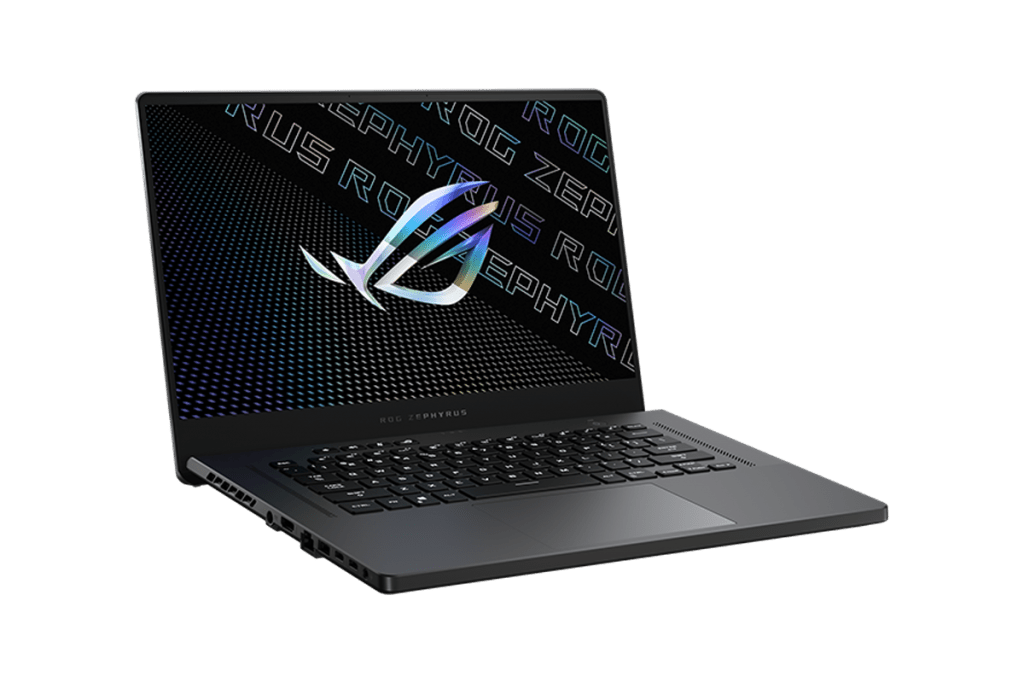

A little bit about the combination of ASUS and AMD, it can be said that ASUS has a “risky” phase when jumping into investing in many risky deals in search of breakthroughs. This time with continued investment in AMD by ASUS has paid off with the breakthrough in the power of the Ryzen Mobile 4000 series processor generation.
It can be said that in the microprocessor world, we have two opposing factions, the “green” side of Intel and the “red” side of AMD. Although the AMD name has many impressive breakthroughs and cheaper prices, users tend to choose the green team more because the performance is worth the money they spend, and AMD is not bad, just not strong. Last year, ASUS was the only company that invested heavily in AMD, even though the Ryzen Mobile 3000 showed acceptable performance. But this year, the continued combination and investment from ASUS in AMD has resulted in the ROG Zephyrus G15 with the Ryzen Mobile 4000 series processor, offering a monstrously powerful configuration that will be one of the gaming laptops worth mentioning. Especially in the segment of $1400, the most advanced version of G15 is located here with AMD Ryzen 7 4800HS configuration combined with GTX 1660 Ti Max-Q.
Speaking of the design quickly, ASUS focuses a lot on the inside, so the look of the G15 will only be slightly different from what has made the Zephyrus G brand. The Zephyrus G15 is still a thin gaming laptop. Lightweight, highly maneuverable with small dimensions, less than 20mm thickness, and only 2.1kg in weight. Although thin and light, ASUS has perfected the Zephyrus G15 very well with the metal surface made into two different texture tones, with an impressive and cool owl eye logo. The other parts of the machine are only made of plastic, but this is a sturdy, high-quality plastic, not cheap.
The two sides of the machine are still enough connection ports for users to use, such as 3 USB 3.2 gen one ports, 1 HDMI 2.0b port, 1 3.5mm headphone/mic port, one ethernet port. In particular, ASUS also provides a USB Type-C port compatible with 3.2 gen two transmission standards and supports DisplayPort 1.4 output to output the screen to play games.
The display on the Zephyrus G15 is also pretty impressive, with a 15.6-inch FullHD resolution (1920×1080) and it uses an IPS panel. The refresh rate can go up to 144Hz, and there is a response speed of 3ms. With these parameters, the machine screen just seems to give a smooth ride all the time especially when you are playing intense games, and the Zephyrus G15 also includes an Adaptive-Sync technology, that syncs fps and the refresh rate so you dont really have to worry about screen tearing. However, this screen does not have the same color standards as content creation laptops, but the display quality is good enough to experience the game.
ROG Zephyrus G15’s keyboard is designed in the form of a flat chiclet with a key travel of 1.4 mm; it can be said that this machine’s keyboard does not really give a good typing experience but still gives a good temporary typing feeling. It is a pity that the keyboard no longer has a multi-color RGB backlight but now only has a white LED. The machine’s trackpad is also not too prominent, enough for you to use when going out.
The battery life of ROG Zephyrus G15 is quite impressive with a 4-cell 76 Wh battery; of course, when users work in the office and use Silent mode, it will be about more than 5 hours. If users play games without plugging in the charger, the device can only last less than 2 hours. Because it is a gaming laptop, the battery life for such work is quite good, and for gaming, Biareview recommends that you plug in the charger when playing for the best performance.
In terms of machine performance, with the combination of the powerful Ryzen 4800HS and GeForce GTX 1660 Ti CPUs, our Zephyrus G15 can confidently max setting current eSport games and some top AAA games.
Overall, in terms of performance, it’s fair to say that the Nvidia GeForce GTX 1660 Ti Max-Q graphics card doesn’t make much of a difference in this segment. However, if you pay close attention, you can see that the extremely strong performance of the Ryzen 7 4800HS is shown very well with eight cores and 16 threads; the pulse rate fluctuates from 2.9 GHz to 4.2 GHz. It can be said that this CPU can handle even the highest RTX 2060 option of the Zephyrus G15.
Scoring with an application like Cinebench R20 CPU scores is impressive, with very high multi-core and single-core scores. Thanks to the Zen 2 architecture and 7 nm process, this CPU proves to be even more powerful than the once-famous desktop CPUs using the original Zen architecture. Not only does it make our Ryzen 4800HS CPU powerful, but the new Zen 2 architecture also makes it power-efficient. This combination also helps Zephyrus G15 strong in gaming tasks and is a bright choice for creative people with works such as editing and Auto CAD in the price segment of $1400.
Besides, ASUS also equips Zephyrus G15 models with national Intel 660p SSDs using QLC chips. Although the weakness of this SSD line is the handling of large files of 30 GB or more, this SSD is enough for users to load games quickly and start the machine in the blink of an eye. The standard version sold on the Zephyrus G15 will have a 512GB SSD, the version that Biareview experiences are 1TB.
However, despite being strong, the Zephyrus G15 still has a big minus point that the machine is quite hot, even though the machine’s cooling system is rated quite well with two 12V fans when running at full capacity, “roaring” very loudly. When playing games, the GPU temperature always fluctuates around 80 degrees, but on the contrary, the CPU is often very high with 90 degrees or more. According to AMD’s announcement, the Ryzen 7 4800HS CPU can withstand a maximum temperature of 105, so you can rest assured to use it, but anyway, users tend to “regret” the machine when the temperature exceeds 95 degrees.
One thing worth noting that Biareview learned is that in Turbo mode, the machine is really hot, the CPU sometimes jumps to 100 degrees. The reason is that this mode opens the limit of the CPU to serve purposes that need a strong CPU, such as video editing, rendering, etc. But if you only play games, the Performance mode is more than enough; the Ryzen 7 4800HS is more than enough to carry 1660 Ti Max-Q, so the fps improvement in Turbo mode is negligible.
Keyboard and Touchpad
The Acer Nitro 7 has a full sized keyboard, with a dedicated numeric keypad, which feels pretty solid overall. The keys are spaced out well and there’s a decent amount of travel, so typing feels comfortable, even after a while. The WASD area is highlighted for easier recognition, kinda a neat detail if you’re gaming. Plus, the whole board comes with red backlighting, it really boosts the gaming vibe and it also helps you see things in darker rooms. That said the lighting is not RGB, it stays to one single color, no switching around.
As for the touchpad it’s responsive and it supports Windows Precision drivers, so tracking stays accurate and multi touch gestures work smoothly. Size wise it’s adequate and it sits a bit left of the center, which makes reaching it simple but usually avoids accidental taps while you’re typing. For actual gaming most people would still use an external mouse, but for everyday tasks the touchpad holds up pretty well.
Audio
The audio quality on the Acer Nitro 7 is, well decent… not really exceptional, you know. It has dual stereo speakers, those are placed on the bottom front edge, sort of like hidden there. Sound output comes through fairly clear and loud enough for casual gaming and everyday media. Still, the bass response feels thin, and at higher volumes the whole thing can sound a bit tinny , like metallic almost.
For making the sound better , the Nitro 7 includes Waves MaxxAudio technology. It offers a bunch of audio presets and small customization options, which is nice if you like tuning things instead of leaving them alone. If you use a solid pair of headphones or even external speakers, the audio experience improves a lot, especially for gaming and while watching movies .
Battery Life
Battery life is always one of those concerns for gaming laptops, and the Nitro 7 doesn’t really dodge that. It’s fitted with a 58Wh battery, and in normal day use it lands around 4 to 5 hours. That’s for things like web browsing, word processing, and streaming or media playback. But once you start gaming, the numbers drop, quite noticeably, to about 1 to 2 hours depending on the title and the settings you chose.
If you want longer sessions , it’s best to keep the laptop connected to power, so performance stays consistent and the charge doesn’t empty too fast. The Nitro 7 also supports fast charging, so you can recharge the battery quickly when you actually need to.
Connectivity
The Acer Nitro 7 kind a brings a solid set of connectivity options overall. If you look at the left side , you get a Kensington lock slot, Ethernet, a USB 3.1 Type-A port, HDMI 2.0, USB 3.1 Type-C , and that 3.5mm headphone microphone combo jack. Then on the right side , there are two more USB 3.1 Type-A ports along with the power jack, which is pretty standard but still good to have there.
Having a USB Type-C port is honestly a welcome bit, it adds more versatility so you can plug in newer peripherals and devices without much fuss. Also the HDMI port supports 4K output, so connecting it to an external monitor or TV is pretty straightforward, whether you’re going for gaming sessions or regular productivity stuff.
Wireless options are handled via Wi‑Fi 6 (802.11ax) and Bluetooth 5.0, so it should translate to faster, and more dependable wireless performance. Also, the Wi‑Fi 6 support really matters for gaming, because it usually gives you better throughput, plus lower latency than older Wi‑Fi generations.
Software
The Acer Nitro 7 comes with Windows 10 Home already loaded, so you begin with a familiar operating system that feels sort of straight forward to use. Acer also throws in a few useful utilities ,and apps, designed to make the entire gaming experience feel smoother. The standout here is NitroSense, which helps you keep an eye on system performance, tweak the fan speed, and tune the keyboard backlighting to your preference.
NitroSense is about real time info, like CPU and GPU temperatures , clock speeds and system load so you can keep an eye on how the laptop is doing, performance wise. It also has various cooling modes , so depending on what you care about more you can either push for higher performance or try to keep the fan noise down, it kind of lets you choose.
There’s also other pre-installed software , such as Acer Care Center which includes system maintenance tools and regular updates. Plus there’s a trial version of Norton Security. Sure, there is a bit of bloatware in there, but honestly it feels fairly minimal and you can uninstall it if you don’t want it hanging around.
User Experience and Real World Performance
In day to day use, the Acer Nitro 7 feels like it gives a satisfying gaming experience. The Intel Core i7 processor, with the GTX 1660 Ti graphics card, kind of gives you solid muscle for most of today’s games. Stuff like “Fortnite”, “Apex Legends” and “PUBG” will play nicely on high settings, with frame rates that hover above 60fps most of the time. And yeah the 144Hz refresh rate display really helps, it makes the visuals feel more fluid, responsive too.
Multitasking kinda gets handled pretty well, especially thanks to the 16GB of RAM plus a fast SSD. When you switch between applications and you’re browsing the web, or streaming videos at the same time it feels pretty smooth, no obvious lag. The laptop stays cool and mostly quiet for normal stuff, but yeah the fans do ramp up during intense gaming. The whole advanced cooling system is doing its job, so the device doesn’t really overheat even when you’re putting it under heavy load.
The keyboard layout though, it can take a bit to get used to, particularly if you depend on the numeric keypad. Still, it feels comfortable for both typing and gaming. The red backlighting is handy for low-light gaming, but the lack of RGB customization could bother some people.
To summarize the ASUS ROG Zephyrus G15 if before, the saying that choosing AMD for a low price no longer applies to this powerful laptop. With Ryzen 7 4800HS, Zephyrus G15 is a real monster in the segment of $1400 with unprecedented CPU performance here. This laptop can meet eSport games and most AAA games today with high graphics settings. But not only gaming but creative users can also choose Zephyrus G15 to meet their work.
ASUS ROG Zephyrus G15 15.6″ QHD (2560 x 1440) IPS Gaming Laptop, Ryzen 9 5900HS, RGB Backlit KB, USB-C, GeForce RTX 3080 Graphics, Windows 10 Home + WOOV 32GB MSD (40GB RAM | 2TB PCIe SSD): Buy it now
2021 ASUS_ROG Zephyrus G15 3070 Gaming Laptop, 165Hz 3ms WQHD 15.6″, Ryzen 9-5900HS 8-Core, RTX 3070 8GB GDDR6, 24GB RAM, 1TB SSD, RGB KB, Mytrix HDMI Cable, Win 10: Buy it now
ASUS ROG Zephyrus G15 15.6″ FHD 1080P 144Hz IPS Gaming Laptop (AMD Ryzen 7 4800HS 8-Core (beats i7-1165G7), GTX 1660Ti Max-Q, 16GB DDR4, 1TB PCIe) Backlit, Wi-Fi 6, Windows 10, IST HMDI Cable, GA502IU: Buy it now
Asus ROG Zephyrus G15 Gaming Laptop, 15.6” 144Hz QHD (2560 x 1440), AMD R9-5900HS, RGB Backlit Keyboard, Wi-Fi 6, USB-C, GeForce RTX 3060 Graphics, Windows 10, 16G 3200 RAM 512G PCIe SSD + 32G WOOV SD: Buy it now
Related Posts





Tech Reviewer & Product Analyst
Định Bia has spent over 10 years testing consumer electronics with a focus on smart technology. He work as a product advisor at Biareview where he helped customers find the right devices for their needs. He personally tests every product featured on this site using a consistent evaluation framework covering quality, durability, and value. All reviews are based on experience, not influenced by the manufacturer.