Design and screen
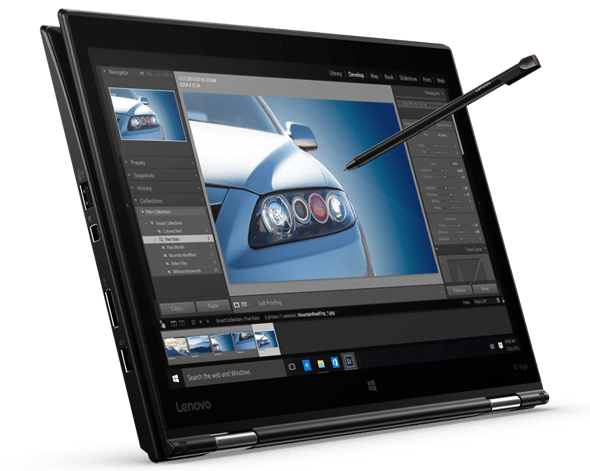
With a weight of just 1.27 kg, the Lenovo ThinkPad X1 Yoga is the world’s lightest “2 in 1” laptop in the size of 14 inches. X1 Yoga is characterized by the ThinkPad line of computers with black color, the surface is covered with a light coat with anti-grime and scratch resistance. The beveled edges and angles make the product feel square, powerful, suitable for business users.
It’s not about appearance, but like previous generations of ThinkPads, the X1 Yoga is still highly durable. Material is the combination of magnesium in the shell, so the lightest machine in the same segment. Water-spill-resistant keyboard, body built to withstand the impact or fall accidentally from the desk to the ground. Quality according to Lenovo is the MIL-STD 810G standard of the US military.
The keyboard is designed with a short and quiet passage when typing. In addition to the ThinkPoint’s distinctive red TrackPoint, Lenovo also equipped the X1 Yoga with a Synaptics wide grip, multi-touch support. However, a useful new device is the fingerprint sensor located just above the logo and close to the directional key cluster. Compared with traditional hand-held touch pads found on many laptops, the fingerprint sensor on the X1 Yoga is similar to that of today’s high-end smartphones, lightly touched to unlock.
The interesting point of X1 Yoga compared to other ThinkPad models is the flexible hinge design such as the Lenovo Yoga Series. It can open up to 360 degrees and squeeze tightly onto the back of your laptop, so Lenovo’s 14-inch laptop can turn into a large tablet when needed, as well as tent to show content if you want.
However, with the size of the 14-inch touch screen, the Lenovo ThinkPad X1 Yoga is not very useful and too big to use tablet-style, whether horizontal or vertical. Lightweight, weighing more than 1 kg also makes long hand held thin and uncomfortable hands. The best way is to put the machine on the lap to use.
The commendable point in Lenovo’s versatile design is the support for Wacom’s touch-sensitive stylus. The pen looks compact and shorter than its predecessor ThinkPads but is easier to hold than Apple Pencil or Samsung S Pen. It can be tucked to the left edge of the machine. Sensitivity is high, accurate, and also supports the touch screen (Palm Reject) touch screen. There is a built-in battery, but according to Lenovo, this pen only takes 15 seconds of charging (by plugging in the slot on the machine) was able to use 100 minutes.
Lenovo puts out three different options, and yeah the base one has the “lowest” IPS screen with resolution 1,920 x 1,080 Full HD. Then there’s the most advanced OLED screen , it goes up to 2,560 x 1,440 WQHD. After that the standard option is kind of the Biareview type IPS, with a 2,560 x 1,440 WQHD resolution , and it also includes anti-Glare, anti glare support. Sharpness, good color but easy to grip the screen and fingerprints, a little hard to clean.
Lenovo ThinkPad X1 Yoga 20FQ 14″ Flip Design 2-in-1 Ultrabook, i7-6500U, 8 GB RAM, 256 GB SSD, 14″ FHD (1920×1080) IPS Anti-glare, Back-lit, Windows 10 Pro (20FQ001VUS): Buy it now
Lenovo ThinkPad X1 Yoga 20FQ000QUS 14″ Flip Design Touchscreen Ultrabook (Core i7-6500U, 8GB RAM, 512GB SSD, Windows 10 Pro): Buy it now
Lenovo ThinkPad X1 Yoga 20Fq 14″ Flip Design Ultrabook, 8 GB RAM, 256 GB SSD (20FQ001WUS): Buy it now
2016 Lenovo ThinkPad Carbon X1 Yoga Convertible Laptop(Intel Core i7-6600U, 16GB RAM, 512GB SSD, 14″ WQHD Anti-Glare IPS Touch Display, Backlit Keyboard, ThinkPad Pen, Windows 7/10 Pro): Buy it now
Performance and battery life
As with the monitors, Lenovo offers many configuration options, even if you like, how you can select the processor and RAM, what hard drive and how much space. Only pin is fixed at 52 WHr. Theoretically, the long usage time is up to 11 hours.
But in fact, the usage time of the ThinkPad X1 Yoga is about 8 hours. Although the results are quite good, this battery life is acceptable when it is the lightest and slimest Ultrabook 14 inch model, the screen in the test also has a resolution of 2K higher than Full HD.
Lenovo ThinkPad X1 Yoga is out there with multiple kinds of configuration options, kinda like you can pick and choose. You can get it starting from the simple setup with a 2.8GHz Intel Core i5-6200U chip, 8GB LPDD3 memory, and 128GB SATA3 SSD, and then move up to more polished configurations such as the Intel Core I7-6600U at 3.4GHz, 16GB RAM, plus 512GB SSD. The above configurations are good for Windows 10 Pro and provide a smoother experience for most needs, both in work and play.
Compared with some models of the same configuration, the ThinkPad X1 Yoga performs pretty well when it comes to the highly rated Microsoft Surface Book. However, the performance of the Lenovo model is still under the Asus Zenfone UX303.
Slim design as well as focus on performance, so the X1 Yoga uses graphics processor integrated HD Graphic 520. ThinkPad from Lenovo is not an option for heavy gamers or graphic designers. Therefore, testing the graphics processing capabilities by 3D Mark 11 tool of the X1 Yoga yields good results.

The commendable point of the ThinkPad X1 Yoga is its quietness at work. While still using fan heat dissipation, Lenovo’s noise-canceling capability is good compared to other Ultrabook models. If in standby, the noise emitted by the fan is almost inaudible. For most of the operation, the sound level of the X1 Yoga fan at acceptable level, 35 dB, is slightly lower than the two competitors HP Specter X360 (38 dB) and Microsoft Surface Book ( 41 dB).
Not in terms of configuration and performance, but the connectivity on the Lenovo ThinkPad X1 Yoga is far more varied. It has three USB 3.0 ports, HDMI and a Kensington lock. On the plus side, aside from a USB 3.0 port, there is a miniDisplay Port, OneLink + interface. Right next to the hinge, Lenovo’s 4G LTE-A slot and memory card slot, just like the tablet. Inside, the handset supports Bluetooth 4.0 connectivity along with Dolby Audio technology.
Keyboard and Touchpad
Keyboard
The ThinkPad X1 Yoga comes with a full-sized backlit keyboard, and it feels quite comfy when you type, like really natural. The keys have a solid amount of travel and they also give tactile feedback, so overall typing is more efficient, and honestly less fatiguing. The keyboard layout feels ergonomic too, with keys that are well spaced, which tends to lower typing mishaps and boosts productivity, a lot.
For the backlight, it’s adjustable which means you can set the brightness level how you like depending on the room, or even based on the ambient lighting. As for durability, Lenovo reinforces the keyboard with their rigorous testing process, so it should handle heavy use over time.
Touchpad
The touchpad on the ThinkPad X1 Yoga is big , and it’s very responsive. The surface is smooth and it supports multi-touch gestures, so everything feels fluid. It’s also precise, which makes it easy to move around the operating system and do different gestures like scrolling, zooming, and all that. The touchpad buttons are built into the surface, so the whole thing looks clean , and it feels seamless . oth as expected, so the basic image quality is still sharp. However, it should be noted that the TN panel that Dell equips the Inspiron 7567 for viewing angles is no more comfortable than other IPS panel display products on the market.
Connectivity and Ports
Ports and Slots
The ThinkPad X1 Yoga has a bunch of ports and connectivity choices, for pretty different needs, depending on how you use it day to day. It’s not just one or two things it’s kind of a mix.
USB Ports: You get two USB 3.1 Type-A ports, plus one USB Type-C port that also has Thunderbolt 3 support, and then there’s another USB 3.1 Type-C port that is not Thunderbolt. In practice these allow you to attach all kinds of peripherals , like external drives, mice, or even a docking station. The Thunderbolt 3 connection is the fast lane too , it enables high speed data transfer , external screens , and charging.
HDMI: There is an HDMI 2.0 port there, for hooking up to outside displays like monitors or projectors. It tends to come in handy for slide decks, video playback, or just running an extended desktop, without extra drama.
Ethernet: The device does not ship with a built in Ethernet port, so if you really need a wired network, you’ll be looking at a USB-to-Ethernet adapter.
Audio Jack: For audio, there’s a combo headphone and microphone jack. So you can plug in regular headphones or an external mic, for both input and output.
SD Card Reader: There’s also an optional SD card reader, for people who need a straightforward way to move files from a digital camera, or similar gadgets.
Wireless Connectivity
The ThinkPad X1 Yoga does dual-band Wi-Fi (802.11ac) along with Bluetooth 5.0, so you get solid wireless connectivity for internet access and all kinds of add-ons. With dual band Wi‑Fi you can hop onto both 2.4GHz and 5GHz networks, which tends to boost overall performance and lessen interference. Bluetooth 5.0 also brings steadier pairing for wireless peripherals like keyboards, mouse, and headphones , that kind of everyday gear.
Battery Life
On the battery side, the ThinkPad X1 Yoga ships with a 51Wh or 57Wh pack depending on the setup you go for. To be honest the endurance feels kinda impressive, and in everyday use it can stretch around 8–12 hours per charge, roughly speaking, even when you’re doing small stuff for a few hours. Of course it can swing a bit based on stuff like screen brightness, how you work day to day, and your power profile.
There’s also fast charging built in , which helps you recharge fairly quickly. You can reach up to 80% in about one hour. This is especially handy for busy professionals who may need a quick top up during short breaks or while traveling.
Cooling and Noise
The ThinkPad X1 Yoga has an efficient kind of cooling setup, made to handle heat when you’re doing heavier work, like long calls or intense tasks. It uses dual fans plus heat pipes to move the warmth out in a steady way, so the laptop stays cooler, and yeah, performance should stay in that good zone.
In everyday use the fans tend to stay pretty quiet, but if you push it hard they can turn a bit more noticeable. The whole design seems aimed at that middle ground, performance on one side and noise levels on the other, so the experience feels comfortable without that constant, loud, fan sound in your ears.
Software and Features
Pre-installed Software
The ThinkPad X1 Yoga arrives with a bunch of pre-loaded software. You’ll see Lenovo utilities in there, and also some third party apps. The Lenovo side usually covers things like system diagnostics , plus updates, and support options, so users can keep the laptop running smoothly and also deal with any problems when they pop up.
On top of that, there’s a trial version of Microsoft Office. It gives you access for a limited time to productivity tools, such as Word, Excel, and PowerPoint. After the trial period, users can either buy a subscription to Microsoft Office, or just switch to an alternative office suite if that’s what you prefer.
Security Features
The ThinkPad X1 Yoga has multiple security features, that are meant to shield user data and privacy, basically. You get a fingerprint reader built into the power button, so authentication is both secure and also kinda convenient. This biometric method adds another layer of protection, on top of the classic passwords and all that.
There’s also a TPM 2.0 (Trusted Platform Module) chip, for hardware based security, so sensitive information is kept protected more reliably. Plus, the ThinkPad X1 Yoga supports Intel’s vPro technology, which brings advanced management features and security enhancements for business, especially enterprise setups.
Related Posts


Tech Reviewer & Product Analyst
Định Bia has spent over 10 years testing consumer electronics with a focus on smart technology. He work as a product advisor at Biareview where he helped customers find the right devices for their needs. He personally tests every product featured on this site using a consistent evaluation framework covering quality, durability, and value. All reviews are based on experience, not influenced by the manufacturer.