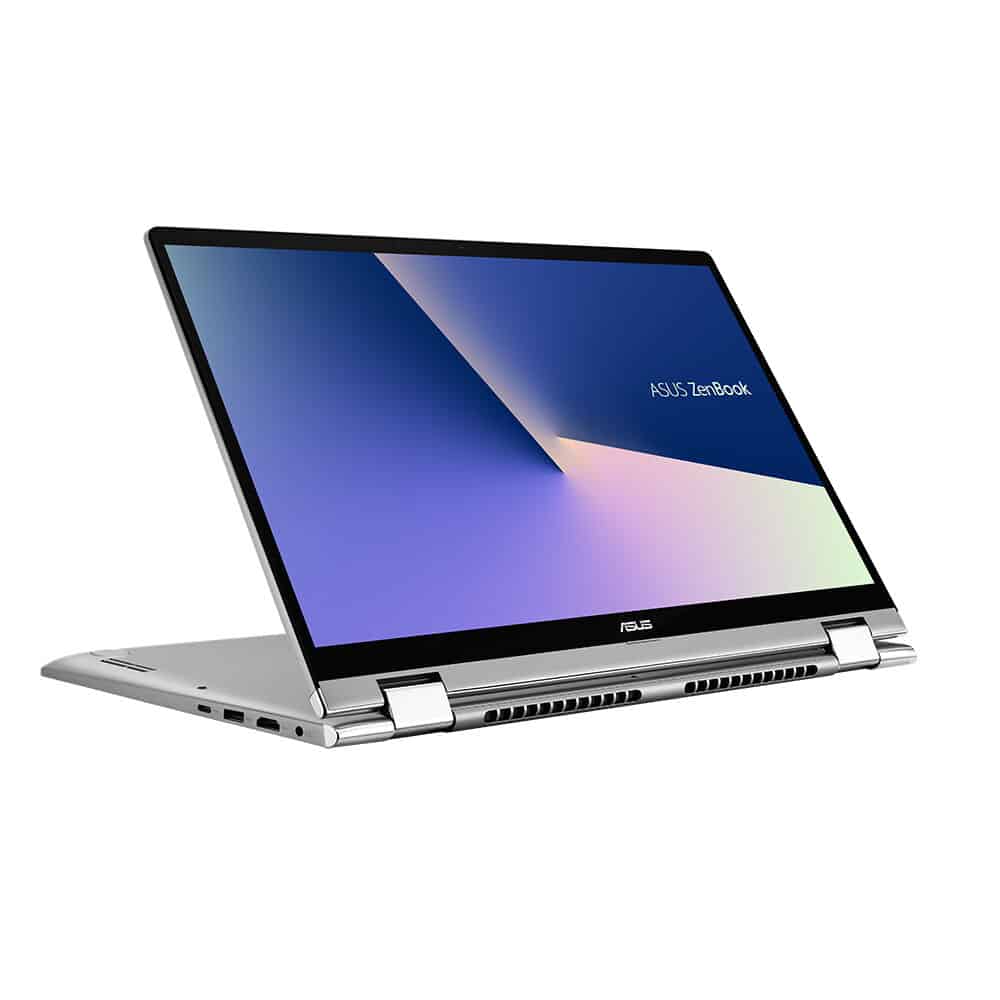
ZenBook Flip 14 comes with the newest 8th generation quad-core Intel Core i7 processor, 8GB RAM, Intel UHD Graphics 620 , plus a 512GB SSD , so yeah it keeps things moving smoothly.
It has a 14-inch touch display with NanoEdge, thin bezels , and it also supports the ASUS Pen stylus. With up to 13 hours of battery life, ZenBook Flip 14 should keep up with your creativity in tablet mode, handles documents in laptop mode, and stays useful no matter what, you know whatever mode you switch to.
The ultra-slim ZenBook Flip 14 (UX461) 2-in-1 series gives you a really strong yet light kind of performance , and a flexible 360-degree swivel, powered by the extra-durable, multifunction ErgoLift hinge. Made from unibody aluminum, ZenBook Flip 14 includes an ultra-compact slim 13.9mm body that weighs just 1.4kg. The well-known Zen-like concentric metal back cover , along with the Icicle Gold color, brings that extra polish to the whole device.
One key part of ZenBook Flip 14 is the 360 ° ErgoLift hinge, which lets users swap usage styles easily between a high-performance laptop and a flexible thin and light tablet. This hinge has a dual active mechanism that lifts and tilts the keyboard into a great position when the device opens to about 135 degrees. The keyboard tilt angle doesn’t only improve comfort for typing, it also helps with heat dissipation through convection airflow under the chassis, so ZenBook Flip 14 stays cooler while you use it in laptop mode. And for long-term durability, the precisely engineered mechanical portion uses solid steel elements, helping reduce warping for day to day use.
ZenBook Flip 14 is made for non stop, on the go lifestyles, it gives users the freedom to keep working all day , without worrying about charging too soon. The 57Wh Lithium-Polymer battery in ZenBook Flip 14 can last up to 13 hours, then add the 60% quick charge tech , and in just 49 minutes the “charging trouble” is basically handled.
For the best visual kind of experience, ZenBook Flip 14 also brings ASUS Splendid display tech, and it just adjusts itself, automatically, depending on whatever kind of image you are viewing. You get a 100% sRGB color gamut and 1000:1 contrast so visuals look vivid and close to real life. The Eye Care mode cuts blue light by as much as 30% , which can help reduce the risk of eye strain when you stare at the screen for longer stretches. ASUS Tru2Life checks every pixel in the frame then improves the brightness and crispness of each pixel, so videos appear clearer , more detailed, and honestly more realistic too, with a claimed 150% higher contrast. And ASUS TruVivid boosts brightness while also cutting screen glare by up to 67% , so the picture stays readable even outdoors.
Now, about sound, ZenBook Flip 14 comes with the Harman Kardon certified ASUS SonicMaster audio setup. It also uses custom hardware elements, including an intelligent amplifier approach for louder and clearer audio, plus software that tunes the whole listening experience.
On the connectivity side, ZenBook Flip 14 offers a full mix of I/O ports. There is the latest USB Type-C (USB-C) port for easy hookups and fast data transfers, and also 2 USB 3.0 Gen 1 Type-A ports plus an HDMI port and a MicroSD Card slot. You can connect all sorts of peripherals without making it a whole thing.
Display , Size and Resolution
The ZenBook Flip 14 comes with a 14-inch touchscreen display, and it s running at a Full HD resolution 1920 x 1080 pixels. Honestly the picture looks sharp, with plenty of detail,so it works for lots of things like browsing the web , typing up documents, or just watching videos ,and sure, even playing games too.
Color Accuracy and Brightness
What really stands out is how the display handles color accuracy and brightness. It covers 100% sRGB color gamut, so the colors look lively and close to reality. That s useful for design work where you do care about exact reproduction. Brightness is up to around 300 nits,which helps a lot when lighting is not so friendly, like in bright rooms or when you re out in daylight.
Touchscreen and Stylus Support
The touchscreen response feels fast and precise,so moving through the system is smooth. It s also compatible with the Asus Pen, which is an active stylus. With that, writing and drawing feels pretty natural,almost like you are using a real notepad. The pen helps with note-taking, sketching, and marking up documents ,so the laptop gets a bit more flexible for everyday tasks.
Performance
Processor Options
The Asus ZenBook Flip 14 is available in multiple setups, depending on the CPU options,including Intel Core i5 and i7 chips from newer generations. These processors bring solid performance for general use ,multitasking, and also heavier apps like photo and video editing.
Memory and Storage
The laptop includes up to 16GB of LPDDR4X RAM , which should help keep things feeling steady and responsive even if you’ve got more than a few apps going at once. And for storage, the ZenBook Flip 14 comes with fast SSD choices , typically from 256GB all the way to 1TB. That SSD setup does more than just hold your stuff , it also tends to speed up startup moments and make data retrieval feel snappier, like quicker access overall.
Graphics Performance
Depending on how it’s configured, the ZenBook Flip 14 can show up with integrated Intel Iris Xe graphics , or with discrete NVIDIA GeForce MX450 graphics . The integrated option is generally enough for everyday tasks, plus some light gaming and video work, while the separate NVIDIA GPU is the stronger route for when you need better graphics horsepower, and for more demanding apps , along with casual games that want a bit more.
Battery Life
Longevity
Battery life really matters on a portable computer, and this one kinda delivers. The ZenBook Flip 14 is fitted with a 67Wh battery that, in many cases, can last around 10-12 hours per charge, but yeah it depends on what you’re doing and how you’re using it day to day. So it can be a dependable partner for longer stretches, whether you’re working , studying , or just moving around while traveling.
Fast Charging
The ZenBook Flip 14 also includes rapid charging tech, so the battery can get topped up to 60% in around 49 minutes. Honestly it really helps, especially when you only get those short, in between moments, like taking a quick break, then hopping back in. It’s kind of a small thing but somehow you notice it right away, you’re less stuck waiting around , and the laptop is closer to ready right when you need it.
Keyboard and Touchpad
Keyboard Design
The keyboard on the ZenBook Flip 14 focuses on comfort and efficiency. The keys are spaced out nicely, and the travel feels solid which makes typing, kind of satisfying really. There is also a backlit keyboard , which is useful when the room is darker or lighting is weird. In low-light conditions the keys stay visible and you don’t have to guess as much.
Touchpad
The touchpad is large and responsive, giving you accurate control for the cursor. It also supports multi touch gestures, so navigation feels smoother. On top of that, it includes Asus’s NumberPad 2.0, which is basically a dual function touchpad. In practice, it can shift into an LED-illuminated numeric keypad, so you can enter numbers more easily. This is pretty handy for people who work with spreadsheets, accounting, or any lot of numeric data.
Connectivity and Ports
USB Ports and Thunderbolt 4
As for connections, the ZenBook Flip 14 provides a decent mix of ports. There are two USB-C ports , both with Thunderbolt 4 support. That means you get quick data transfer speeds, plus flexible options for other devices. You can use these ports for charging as well, linking to an external screen, and moving files at high speed.
HDMI and USB-A Ports
Besides the USB-C ports, the laptop also comes with a USB 3.2 Gen 1 Type-A port, and an HDMI port. This USB-A part is handy for connecting older gear, stuff you might still need in the long run. And the HDMI slot lets you hook the laptop up to outside displays or projectors, so it works pretty well for presenting, plus the whole extended desktop thing.
Audio Jack and MicroSD Card Reader
The ZenBook Flip 14 has a 3.5mm audio jack for headphones or even external speakers, and there’s also a microSD card reader. That reader helps for extra storage or for moving files over from cameras and some other devices. With these added connections, the laptop feels more adaptable, and it s easier to tie in different accessories without much hassle.
Audio Quality
Speakers
The ZenBook Flip 14 is set up with Harman Kardon certified stereo speakers, and honestly the sound coming out is pretty solid. They can get really loud too, while still staying clear, which makes music and movies feel a little more immersive. During video calls, it also sounds more than decent, not just background noise.
Audio Software Enhancements
It also includes Asus AudioWizard software, which is basically made for tweaking your sound. You can use presets, and even adjust an equalizer, so you can tune it for music, movies, or gaming. The idea is simple, you get a more personalized audio experience , and the overall output matches what you want, instead of one fixed setting for everyone.
Webcam and Microphone
HD Webcam
The ZenBook Flip 14 has a 720p HD webcam, which should be enough for video conferencing and those everyday video calls. The picture looks clear and fairly detailed , but in darker rooms it can get a bit less confident, you know low light and all that. If someone is aiming for better video quality for work that’s more professional, then using a separate external webcam might end up being a smart move.
Integrated Microphone
This laptop also comes with an array microphone, it captures audio in a clean and sharp way. The mic is built to reduce background distractions,so your own voice comes through with less fuss during calls or recordings. Because of that, the ZenBook Flip 14 works well for remote tasks , online classes and virtual meetings where dependable audio matters.
Privacy Features
To add a bit more security, the ZenBook Flip 14 includes a webcam cover you can slide in place. That means when the webcam isn’t needed, it can be physically blocked, which helps stop unwanted access. In practice this is a helpful extra for people who think about privacy , and want to guard against potential webcam misuse, or hacking.
Pros And Cons
Pros
Premium Design: Sleek , lightweight,and durable aluminum build with a bit of a polished look
Versatile 2-in-1 Form Factor: 360 degree hinge , so you get several ways to use it and that helps with overall flexibility
Vibrant Display: Full HD touchscreen, strong color accuracy , plus good brightness for everyday viewing
Strong Performance: New Intel Core processors, enough RAM, and a quick SSD setup, it handles a lot without too much lag
Long Battery Life: Up to 12 hours on a charge, and it also has fast charging support, which is nice
Good Connectivity: USB-C with Thunderbolt 4, USB-A, HDMI, audio jack , plus a microSD card reader for extra storage options
Responsive Touchpad and Keyboard: Comfortable key travel ,and a precise touchpad with NumberPad function baked in
Solid Audio Quality: Harman Kardon-certified speakers, and you can tweak the audio settings too
Cons
Bloatware: Comes with some pre installed third party apps and trial versions that might feel unneeded for some people
Gaming Limitations: Sure it can do casual gaming, but heavier AAA titles may cause trouble, especially at higher settings
Webcam Quality: 720p is okay , yet it might not satisfy folks who care about sharper video calls
Price: Higher-end configurations can get pretty pricey, so it’s more of a big commitment
Conclusion
The Asus ZenBook Flip 14 is kind of a versatile, and strong 2-in-1 laptop, it really shows up in the design, the speed, and the overall function too. The premium build, the vivid screen, and that steady performance, make it a solid option for pros, people creating things, and students who want something flexible, and dependable. Also the battery lasts a long time, the fast charging helps a lot, and the port selection feels pretty well thought through , so overall it’s a practical and comfy laptop for everyday use
Now sure, it has a higher price, but the mix of features and capabilities pretty much answers the “why” for anyone investing in a higher-quality all-around performer. Whether you’re using it for work, for entertainment, or for those more creative efforts, the ZenBook Flip 14 brings a package that’s hard to outmatch. Its adaptability and that premium touch make it stand apart , even with all the crowded 2-in-1 options out there, and it tends to give a smooth , enjoyable computing experience
To put it plainly, the Asus ZenBook Flip 14 is a well-balanced laptop that blends style, performance, and versatility without feeling forced. It’s a top contender in the 2-in-1 space, giving you a device that can shift with your needs and manage a lot of different tasks without much fuss. If you’re a professional, after a dependable workhorse, or a creative who wants a quick responsive creative surface, or even a student who needs a flexible study partner, the ZenBook Flip 14 is a solid pick, and yeah, it probably won’t let you down.
Asus Zenbook Flip UX461U 14″ Full HD Touch 2-in-1 Laptop: Core i7-8550U, 16GB RAM, 512GB SSD, , Backlit Keyboard, Fingerprint Reader, Windows 10 (Renewed): Buy it now
ASUS ZenBook Flip 14 Ultra-Slim Convertible Laptop, 14” Full HD IPS Level, 8th Gen Intel Core I5-8265U Processor, 8GB LPDDR3, 256GB PCIe SSD, Backlit, Fingerprint, Windows 10 Home – UX461FA-DH51T: Buy it now
ASUS ZenBook Flip Ultra-Slim – 14in FHD wideview display, Intel Core i7-8550U, 16GB RAM, 512GB NVMe PCIe SSD, Nvidia MX150, Windows 10 Home UX461UN-DS74T (Renewed): Buy it now
Related Posts

Tech Reviewer & Product Analyst
Định Bia has spent over 10 years testing consumer electronics with a focus on smart technology. He work as a product advisor at Biareview where he helped customers find the right devices for their needs. He personally tests every product featured on this site using a consistent evaluation framework covering quality, durability, and value. All reviews are based on experience, not influenced by the manufacturer.