Design and Build Quality
Sleek and professional-ish
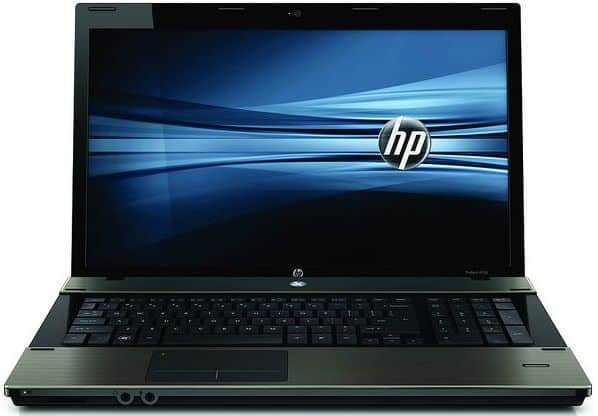
The HP ProBook 4420s comes with a sleek, professional design that sits pretty well in a business environment. The top cover has a brushed aluminum finish, so it looks polished, and honestly kind of more modern than you’d expect. The color scheme stays subdued too, most often you’ll see classic matte black or dark gray, and that helps it blend right in almost anywhere office related, without looking too loud or distracting.
Robust build
When it comes to construction, the ProBook 4420s is meant to take a bit of a beating for everyday business use, honestly. The body is made with durable materials, including a magnesium aluminum alloy , which gives it extra strength and a longer service life, it can handle regular wear and minor bumps. The hinges feel firm, the display opens smoothly, and it keeps a solid connection, which matters a lot if the laptop gets carried around often like daily work days. You know, that constant transport and plug-in routine.
Portability
In terms of getting around, the dimensions are about 13.2 x 9.1 x 1.4 inches, and it weighs roughly 5.1 pounds. So, it’s reasonably portable for a work laptop in this category. It’s not as feather-light as some ultrabooks or 2-in-1 devices, but it’s still easy enough for people who bounce between meetings , offices, or different work locations. The overall size and weight mean it is less of a burden in a laptop bag or briefcase, though it still feels like a real laptop rather than something “barely there.”
Display
So the ProBook 4420s comes with a 14-inch screen, that gives you 1366 x 768 pixels in resolution. It’s not exactly the top tier on the market, but really it’s pretty fine for normal office stuff, like web surfing, and general multimedia consumption. The clarity feels decent, and the colors look okay for daily use, yet it might not satisfy people who want high-definition visuals, or who do fine image work, that kind of thing.
Viewing Angles
This is basically a standard LCD panel, so it tends to have more limited viewing angles than an IPS setup. When you look from very off angles, colors and brightness can shift a bit, which can be annoying for teamwork , or when you’re presenting, and more than one person is trying to watch at the same time. Still, if it’s mainly for you at your desk, it handles the job well enough.
Brightness and Glare
Brightness is adequate for most indoor spaces, though if you’re in super bright rooms or outdoors it can feel weaker, especially since the surface is glossy. That glossy finish can bring reflections and glare, and those can get distracting in well-lit areas. If you regularly work across changing lighting , an anti-glare screen protector could help , or you might just want to stick to shaded corners when possible.
Performance
So, the HP ProBook 4420s really comes down to a few different processor and memory setups, and you’ll see Intel Core i3, i5, or i7 options from the second generation… yeah, the ones most people refer to as Sandy Bridge. In general it manages to juggle speed with power draw pretty well, so it tends to be useful for the kind of office work you do every day, plus multitasking and routine productivity stuff, the usual scenario. Most of the units you run across will come with 4GB or 8GB of RAM, and honestly that’s normally plenty for regular business needs and for bouncing between apps without having to constantly worry about slowdowns.
Storage
For storage, the ProBook 4420s mostly sticks with older school hard drives, while solid-state drives (SSDs) are more like a “sometimes you get lucky” upgrade. The standard drive capacity is typically in the 250GB to 500GB range, and that covers documents, office programs, and normal personal files without too much drama. If you do end up with an SSD configuration , you’ll usually notice the difference right away, faster startup, quicker access times, and that kind of responsive, instantly snappier feel where the whole system seems less heavy to use.
Graphics
On the graphics side, this laptop usually relies on integrated Intel HD Graphics 3000 or 4000. For standard office tasks and lighter media work it’s fine, like streaming video, basic photo edits, and maybe some casual gaming now and then. Still, if you’re trying to push more demanding visual applications , or if you want games with higher graphical intensity, then this model may not be the best fit. If graphics performance matters a lot to you, better results usually come from a configuration that includes dedicated graphics instead of depending only on what’s built in.
Keyboard and Trackpad
Comfortable typing experience
The HP ProBook 4420s comes with a full sized keyboard, and the keys feel pretty well spaced. You get a comfortable typing experience , with a decent amount of key travel and tactile feedback, so your fingers don’t feel as tired after long stretches. There’s also a dedicated numeric keypad, which is a nice touch for people doing spreadsheets or just work that’s number heavy.
Trackpad and input devices
The trackpad itself is responsive, and it supports multi touch gestures like pinch to zoom , and two finger scrolling. Cursor control feels accurate, navigation stays smooth, kind of effortless. Plus there are dedicated left and right mouse buttons, which some users might prefer if they’re used to a traditional mouse.
Connectivity
Ports and expansion
The HP ProBook 4420s provides a solid mix of ports and connection options, so it works well with a variety of peripherals. In most configurations you’ll find:
USB ports: three USB 2.0 ports plus one USB 3.0 port, which helps with faster data transfers
VGA port: useful for external monitors or older projectors
DisplayPort: for higher definition video output
Ethernet port: for a stable wired network connection
Smart card reader: adds an extra layer of security in business settings
Headphone / microphone combo jack: for both audio input and output
These ports give pretty ample connectivity options for most business tasks, but a few users might still run into that “where’s USB-C?” moment if they rely on newer add ons and more modern charging setups. it kind of feels behind there, even if everything else is doing its job pretty well.
Wireless Connectivity
The ProBook 4420s supports Wi‑Fi 802.11b/g/n together with Bluetooth 3.0, so you should get dependable wireless access for the internet and for common peripherals. In day to day use, the wireless performance is usually steady, with solid speeds and a range that is fairly workable. That said, if you’re actively looking for more recent wireless generations like Wi‑Fi 6, or you need Bluetooth 5.0, then it might feel wiser to shop around for a newer model instead of sticking here.
Battery Life
Longevity
For people who travel a lot, battery life is often one of the big deciding factors. The HP ProBook 4420s is typically bundled with a 6‑cell lithium‑ion battery, and this combination usually lands around 4 to 6 hours per charge. Of course, your actual time will swing based on what you’re doing, how bright the display is, and how strict your power management choices are.
Power Management
On the power management front, the ProBook 4420s includes options designed to stretch endurance a bit more. You can adjust settings from inside the Windows operating system, so when outlets are not around, it can run more efficiently. It also provides multiple power‑saving modes, which is handy for conserving energy when you’re on battery, instead of when you’re plugged in.
Audio and Webcam
Audio quality
On the HP ProBook 4420s you get stereo speakers , and most of the time they sound clear enough, with a fairly balanced output for day to day office use. For video conferencing, slide shows, and those casual clips you queue up between meetings, the audio quality is honestly adequate. That said, the speakers don’t really push deep bass, so it can come off a little flat , especially if you’re into louder music or you want fuller sound for movies , entertainment, and all that kind of stuff.
Webcam
The built-in webcam on the ProBook 4420s runs at 720p resolution, and overall it’s decent for video calls and team meetings. In standard lighting, the image looks fine, and it’s pretty easy to make out faces clearly. But when the room gets dimmer, it can start to struggle a bit, you might see grainy textures , or footage that feels less crisp, more blurred. So if you jump into video calls all the time, it’s often a better idea to go for an external webcam, for steadier results.
Software and user experience
Operating system
Usually, the HP ProBook 4420s shows up with either Windows 7 Professional or Windows 10 Pro, depending on the specific configuration and when you bought it. Windows 7 Pro feels steadier and more familiar for routine work stuff, while Windows 10 Pro brings additional features, and also keeps coming with regular security updates. Either way, both versions handle business apps well, and they’re generally fine for productivity work.
Pre-Installed Software
On most units , HP throws in a handful of pre-installed applications and utilities so the experience feels smoother right away. You might see HP Support Assistant used for system maintenance and troubleshooting, plus HP Recovery Manager for backup and recovery. There can also be a mix of trial versions of security software, depending on the configuration. Some people genuinely like having these things onboard, but others prefer a less cluttered setup, like… fewer extra programs, no random bloatware running around.
Value for Money
Pricing and Affordability
The HP ProBook 4420s is basically aimed at people who want a business laptop without paying premium prices. In the budget end of the market it tends to be priced pretty competitively , so it works well for small to medium-sized businesses and also for individual professionals who want something dependable but still cost-efficient. Between the sturdy build, decent everyday performance and the business-first features , the overall value feels like it adds up to a solid return on investment.
Longevity and Reliability
HP is well known for producing durable and reliable laptops, and the ProBook 4420s fits that reputation pretty well. The overall build quality is robust enough to keep things running efficiently over time , especially with the business-oriented features that are designed for daily use. Regular software updates also help, and HP’s support services matter here too, because they make troubleshooting less of a headache. In other words, it’s not just about lasting, it’s about staying functional in a practical sense.
Pros and Cons
Pros
Affordability: The ProBook 4420s seems priced pretty competitively, so it offers solid value for teams and professionals who are trying to keep an eye on the budget.
Durability: It’s built with sturdy, rugged-ish materials, which means it’s pretty capable for daily office work and also for those constant little trips here and there.
Keyboard: The full sized keyboard, plus the numeric keypad, gives a comfortable typing flow, kind of efficient too, once you get used to it.
Port Selection: There are a lot of connection choices, like USB 3.0 and DisplayPort, which is nice if you end up switching gear.
Business Features: Stuff like the smart card reader and extra security measures makes it fit business settings pretty well.
Cons
Display Quality: The 1366 x 768 resolution and glossy finish might be a let down for folks who want sharper clarity, or who work under bright lamps ,or sunlit areas.
Graphics Performance: Because it relies on integrated graphics, it may run into issues with more demanding visual tasks, or heavier applications.
Weight: It lands around 5.1 pounds, it’s a bit heavier than some newer ultra portable business laptops.
Battery Life: For many people it’s fine, but it might not last a whole day without you needing to plug it in, at least once.
Final Verdict
HP ProBook 4420s is, kinda a solid choice for businesses and working professionals who want a dependable and not too expensive laptop. It has a strong build quality, pretty good overall performance , and a set of business focused features that feel made for day to day work and mid level computing needs. Sure, it does not really bring the newest display tricks or top tier performance, but it does land in a nice middle place between what you pay and what you actually get , so value for money is still there.
If you’re after a pretty dependable workhorse that can smoothly handle routine office tasks , plus web surfing, and the usual business software, the ProBook 4420s gives a commendable sort of experience overall. It has a professional look, and the durable build kind of helps it keep up with the pace of a busy office, day after day. Still, if you need a higher resolution screen, better graphics muscle, or you really care about getting something light and easy to carry around, then you might want to look at more modern models or maybe higher end alternatives.
In the end, the HP ProBook 4420s really shows up as a trustworthy, budget minded business laptop that does what it’s meant to do, without too much fuss. That’s why it’s worth considering for a lot of users in professional circles and small business environments where reliability matters.
4420s i5-450M 14.0 500/4GB PC: Buy it now
Related Posts

Tech Reviewer & Product Analyst
Định Bia has spent over 10 years testing consumer electronics with a focus on smart technology. He work as a product advisor at Biareview where he helped customers find the right devices for their needs. He personally tests every product featured on this site using a consistent evaluation framework covering quality, durability, and value. All reviews are based on experience, not influenced by the manufacturer.