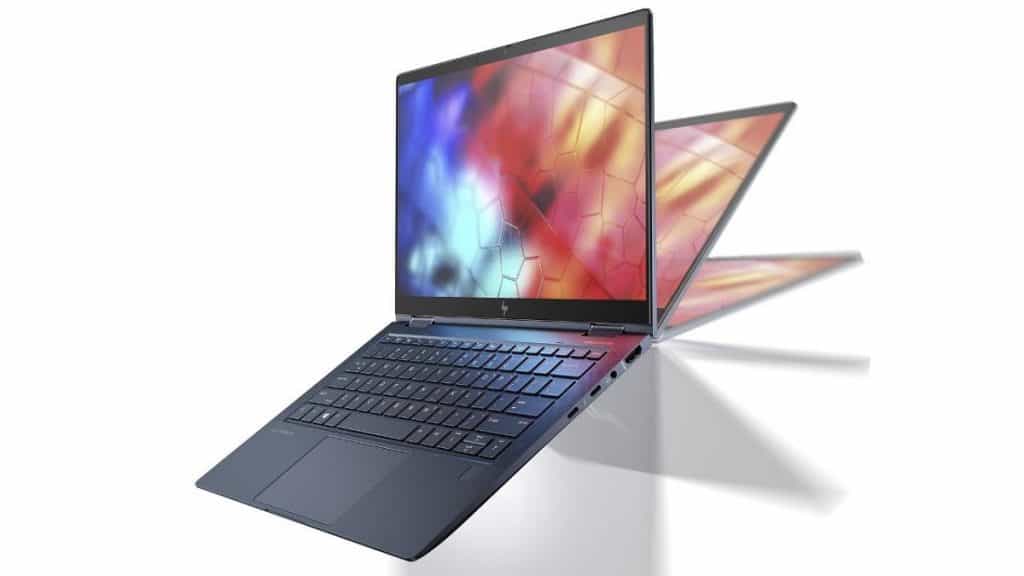
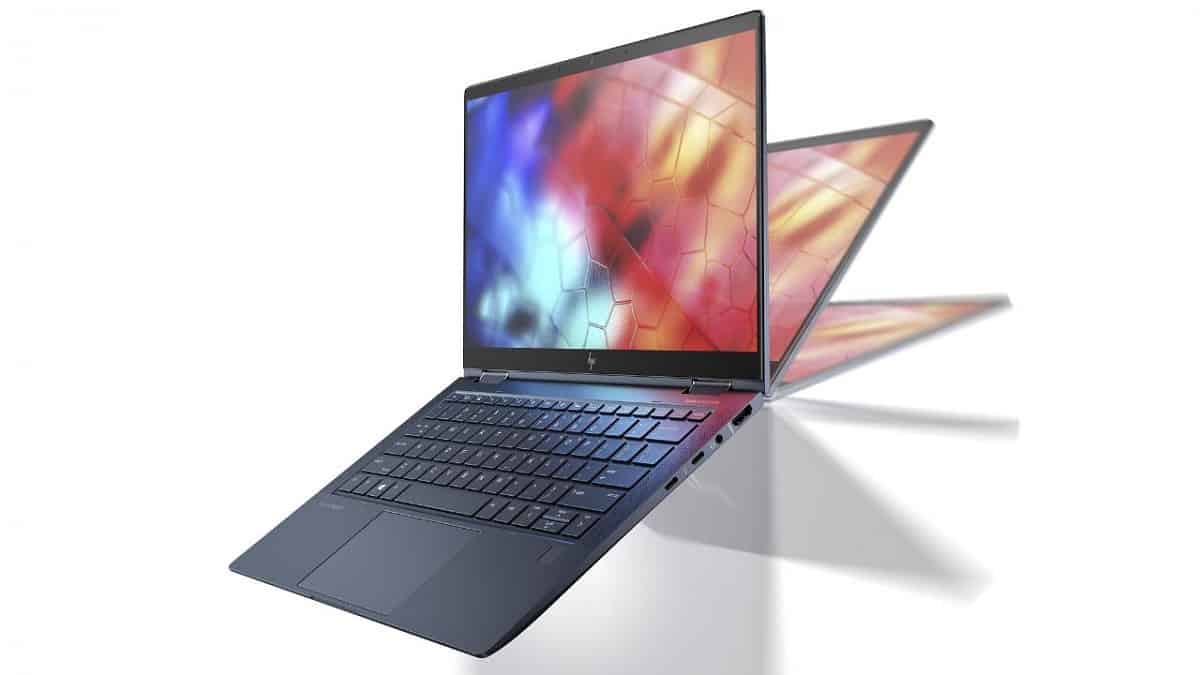
HP Elite Dragonfly laptop is a product of the EliteBook line, HP classified as the high-end segment for business people. It has all the features that business people need: Aesthetic design, ultra-thin, and easy to carry, powerful configuration, and classy appearance.
- Close-up of slim and elegant design
HP Elite Dragonfly impresses at first sight because of its sleek, slim appearance. The case is made from a dark green magnesium alloy. This color choice is not as boring as the familiar black, yet elegant and luxurious enough. The shell is also covered with an oleophobic, fingerprint-resistant, dust-resistant coating. In addition to the HP logo in the default middle, the machine doesn’t have any cumbersome details. A few silver-plated details on the edge of the hinge are unobtrusive but still create a slight accent.
One of the most impressive parameters of the product is its weight less than 1kg. This is a great number for users who often have to bring their devices to work or travel. Located in the Ultrabook segment, users can hold the device in their hands quite gently like holding a tablet.
Display Quality
The HP Elite Dragonfly has a 13.3-inch Full HD (1920 x 1080) touchscreen screen, plus a few optional setups , like a Sure View privacy screen, or a much sharper 4K display option for people who want extra clarity and stronger color accuracy. On top of that, the touchscreen panel is compatible with HP’s Active Pen, so you can do precise stylus input, which makes it a solid choice for jotting down notes, digital sketching, and other creative kind of work.
HP also includes an optional Sure View Reflect idea, it gives built in privacy protection by lowering what others can see from side angles, so your work stays confidential during sensitive tasks or when you are in public spaces. Both the Full HD and the 4K versions use IPS technology too, for wider viewing angles, vivid colors , and sharp details, which really helps with multimedia enjoyment as well as daily productivity.
Performance
Inside, the HP Elite Dragonfly runs on 10th or 11th generation Intel Core processors, with configurations that can go up to the quad-core Intel Core i7 vPro model. This combination is meant to keep things responsive for multitasking, productivity tools, and heavier CPU workflows , like photo editing or software development. Intel vPro technology also adds better security features and easier manageability, so the Elite Dragonfly fits enterprise environments where protecting data and keeping system integrity matters.
Graphics performance is handled by the integrated Intel UHD Graphics, or if you pick the configuration with it optional Intel Iris Xe Graphics, giving enough muscle for business work, multimedia stuff, and some casual gaming. It is not really built for heavy gaming or hardcore 3D rendering though. Still, the integrated graphics keep things looking smooth while also staying efficient, which helps with longer battery life and better overall efficiency, without turning everything into a power hungry mess.
Keyboard and Trackpad
The HP Elite Dragonfly comes with a premium backlit keyboard with keys that are nicely spaced, and a comfortable key travel that makes long typing sessions feel pretty natural. The layout brings dedicated function keys, plus optional backlighting, so low-light use is easier. That means professionals who lean on keyboard shortcuts and productivity features get a workflow that stays fast and predictable, even when the lighting is not great.
For touch input, the precision glass touchpad supports multi-touch gestures and gives accurate cursor control, so navigation feels smooth and responsive with Windows 10/11 gestures. The touchpad is great for everyday tasks, but the Elite Dragonfly also supports HP’s optional Active Pen for precise stylus work, letting users annotate documents, or sketch ideas, or even move through touch based interfaces with a lot of ease.
Battery Life
Battery life on the HP Elite Dragonfly is one of those standout points that they really push, it’s meant to run for a long stretch on just one charge. In normal use, it can last as long as 24.5 hours, assuming you’re using the standard Full HD screen setup , so in practice you get all day work without having to lug around a charger. That strong endurance doesn’t just happen by luck, it comes from efficient power management, low-power components, and several tweaks that lean hard on energy saving while still keeping performance in a good place.
Then there’s HP’s Fast Charge feature, which lets you top up the battery rather quickly. Users can reach about 50% charge in roughly 30 minutes , which helps reduce downtime when you’re traveling or you know, you have back to back meetings. On top of that, adaptive battery settings and different power-saving modes add extra protection for longevity, so the Elite Dragonfly keeps going between charges for extended periods.
Connectivity Options
On the connectivity side, the HP Elite Dragonfly gives a decent mix of ports and options for plugging in peripheral stuff and accessories, or using external gear if you need it. The main ports usually include two USB 3.1 Gen 1 Type-A slots for older devices and legacy bits, plus two Thunderbolt 3 ports (USB Type-C). Those Thunderbolt 3 connections also support Power Delivery and DisplayPort, for snappy data transfer, speeds up to 40Gbps , external screens, and docking stations.
More connectivity choices can be bundled in too, like an HDMI 1.4 port for video out to outside displays or even projectors, a headset combo jack (headphone and microphone) for audio in and out, and a microSD card reader for extra storage, or just moving multimedia files around quickly. Wireless connectivity usually covers Wi‑Fi 6 (802.11ax) for snappy, stable internet access, Bluetooth 5.0 for linking wireless peripherals, and there may also be optional LTE or 5G connectivity so you get basically seamless mobile broadband all the time.
Screen advantages and disadvantages of the HP Elite Dragonfly laptop
The Elite Dragonfly comes with a 13.3 inch screen size, so if you really like big panels, yes, this could be a point to think about. Still since it is an Ultrabook design, you cant really demand a gigantic display. When it’s folded, it works like a touch sensitive tablet, and you get a 4K resolution screen. The screen-to-body ratio is 86% which sounds like a lot, and in practice it gives a really crisp look. Over the display there is a Corning Gorilla Glass 5 coating, pretty solid protection. And if you want stronger privacy, users can check the optional SureView layer with anti-theft, or at least it’s marketed that way.
Acceptable setup, higher security
As a high-end business product, the HP Elite Dragonfly laptop is expected to carry serious specs. Overall the configuration is not worse than most rival products, though it may not always feel totally exceptional compared to the best in class. You’re looking at an Ice Lake CPU, 16GB of RAM, and it supports a 512GB SSD. On top of that there are Thunderbolt 3 and LTE ports, plus WiFi 6, because well… that’s kind of mandatory here. To use the LTE option HP also built in an integrated SIM slot inside the chassis.
Battery life also comes in two versions: 38 Whr and 56.2 Whr. Both can use fast charging, and claims say you can charge up to 50% in about 37 minutes, which is pretty handy when you’re running late.
HP Elite Dragonfly laptops will be installed with Sure Sense by default. This is artificial intelligence (A.I) software that protects owners from viruses, malware, and the risk of lack of exclusive protection of HP. The company is also very psychological when optimizing the HP Workwell software in the machine. Workwell is a virtual assistant whose daily mission is to give advice on nutrition, scientific sleep, and rest to employers. It also has many useful tips to balance life, protect your health. Busy entrepreneurs definitely need this feature.
Software and Security Features
The HP Elite Dragonfly comes with Windows 10/11 Pro or Enterprise, that gives a secure yet productive workspace for business users. HP also adds a bunch of proprietary utilities, and one of the key ones is HP Sure Start, which helps guard against BIOS attacks and blocks unauthorized changes to system firmware. In general this supports data security and overall system integrity, even when things get… well, complicated.
On the privacy side, the device includes HP Sure View Reflect screen technology. It trims screen visibility from side angles so visual hacking is harder, and so sensitive information stays protected when you’re working on confidential tasks. There are also other layered protections like HP Sure Click for safer web browsing, and HP Sure Sense which is more about detecting advanced threats. Optional options, like Intel vPro technology, can help with remote management, plus BIOS verification, which further reduces the risk from malware and cyber threats.
Audio and Multimedia
For sound, the HP Elite Dragonfly is fitted with premium Bang & Olufsen speakers that are tuned for immersive audio quality. The result is clear reproduction across multimedia content, streaming, video calls, and even those longer conference calls. For daily use, the built-in speakers usually handle volume and clarity well enough, but if someone wants stronger audio fidelity , plus better bass response, they can always connect external speakers or headphones.
There are also dual array microphones, made to capture voice with good clarity during conference calls and even virtual meetings. With noise cancellation tech on board, background noise gets minimized and voice clarity improves, so the spoken parts stays more understandable. It’s kind of why the Elite Dragonfly turns out to be a solid pick for remote work, for teleconferencing, and for virtual presentations where accurate audio is basically required, for communication that actually works.
Pros and Cons
Pros:
Nice convertible style with a lightweight frame, feels premium.
Dragonfly Blue color looks really striking ,plus it uses a magnesium alloy build.
You can choose Full HD , or go for an optional 4K touchscreen.
Intel Core performance is solid , and vPro tech helps for business management.
Includes a backlit keyboard and a precise glass touchpad.
Battery life is excellent, up to about 24.5 hours ,and Fast Charge makes it easier to top up quickly.
Connectivity is fairly complete too , including Thunderbolt 3 ports.
Comes with Windows 10/11 Pro , plus HP security and productivity tools.
Bang & Olufsen speakers deliver a more immersive sound experience.
Cons:
It costs more than standard business laptops , so the budget matters.
RAM and storage upgrade paths are kind of limited.
The integrated graphics , may not cut it for gaming or demanding creative work.
That glossy touchscreen can be a magnet for fingerprints smudges, you’ll notice them.
Conclusion
The HP Elite Dragonfly really stands out ,as a premium convertible laptop. It kind of feels like it nails design, performance, and security, for business professionals who need mobility, productivity, and that everyday flexibility from their computing device. And yeah, with its light body, nice display choices, solid internal hardware, plus a wide range of connections it delivers a better overall experience when you’re constantly moving around.
Sure, it comes with a premium price tag, but the Elite Dragonfly earns that money, thanks to advanced features, strong protection tools, and battery performance that holds up in real modern business life. Whether you’re traveling for work, handling remote work, or getting into some creative tasks, the HP Elite Dragonfly sets a pretty high bar for convertible laptops, mixing style, practical function, and performance in a compact portable format.
HP Elite Dragonfly Home and Business Laptop-2-in-1 (Intel i5-8265U 4-Core, 16GB RAM, 1TB PCIe SSD, Intel UHD 620, 13.3″ Touch Full HD (1920×1080), WiFi, Bluetooth, Webcam, Win 10 Pro) with USB Hub: Buy it now
HP Elite Dragonfly Home and Business Laptop-2-in-1 (Intel i5-8265U 4-Core, 16GB RAM, 512GB m.2 SATA SSD, Intel UHD 620, 13.3″ Touch Full HD (1920×1080), WiFi, Bluetooth, Win 10 Pro) with USB Hub: Buy it now
New Elite Dragonfly Multi-Touch 2-in-1 Laptop Intel Core i7-8665U 4.8 GHz vPro 13.3″ FHD IPS Sure View Integrated Privacy Screen Active Stylus Pen Webcam 4G LTE Win 10 PRO: Buy it now
HP Elite Dragonfly Notebook PC: Buy it now
HP Elite Dragonfly Notebook PC: Buy it now
Related Posts



Tech Reviewer & Product Analyst
Định Bia has spent over 10 years testing consumer electronics with a focus on smart technology. He work as a product advisor at Biareview where he helped customers find the right devices for their needs. He personally tests every product featured on this site using a consistent evaluation framework covering quality, durability, and value. All reviews are based on experience, not influenced by the manufacturer.