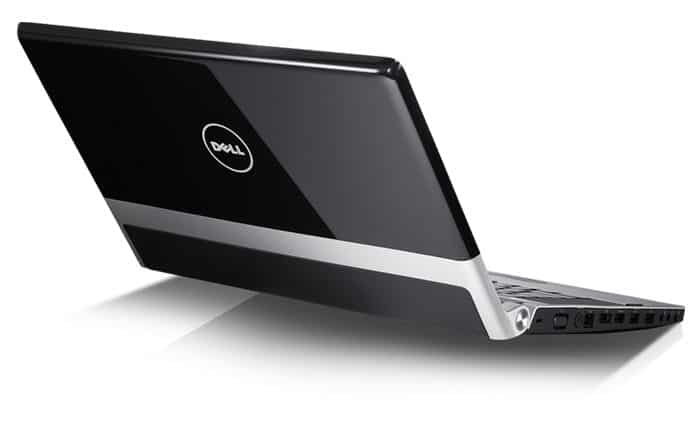
Equipped with Intel Core i7-720QM processor, 4GB DDR3 memory, 500GB hard drive, 15.6″ screen similar to Studio 1557, but XPS 1645 equipped with ATI Mobility Radeon HD 4670 graphics card with graphics memory capacity Up to 1GB and replace your regular DVD burner with a stylish Blu-ray drive. The Dell case is polished in glossy black with some silver and leather on the lid (near the battery) to create a noble look. The keyboard of the machine is easy to manipulate, the keypad is a series of multimedia controls, turn off Wi-Fi / Bluetooth to add to the elegance of the machine; Touchpad on the machine also supports handy multi-touch. The speaker system on the machine is a highlight with the subwoofer so the XPS 1645 represents a good variety of music, including the bass is quite strong; The volume of this speaker system is large enough for you to watch movies as well as listen to music in room and outdoor.
In terms of performance with tests in PCMark Vantage, the machine achieved very high results, especially graphics-oriented tests such as TV & Movies (4,174), Gaming (5,399). With WorldBech 6, the machine also quickly completed the component tests, but also crashed incompatible with Studio 1557 (the Roxio VideoWave Movie Creator 1.5 could not be tested), so the machine accepted the final result of 97 points. On battery, the machine can run the DVD continuously 2 hours 9 minutes, read the text 3 hours 38 minutes and run multi-task to 3 hours 16 minutes. The machine has a Windows 7 Home Premium 64-bit operating system and software similar to the two machines, but the Roxio version on the machine supports the Bluray disk.
Design and Build Quality
The Dell Studio XPS 1645 kind of sticks out right away, with this slick, more “put together” vibe that feels… you know like it was actually planned. You spot the black brushed aluminum lid first , and yeah it has that glossy finish too, not just a flat look. After that, there are leather accents that kind of wrap around the palm rest and the whole keyboard area, which makes it feel nicer than a lot of similar laptops. Overall it gives off a premium, a bit modern, sort of professional sort of energy, and honestly the Dell logo is placed in a pretty subtle way on the lid so it doesn’t really shout, but it still looks good.
For build quality, the Studio XPS 1645 feels solid in your hand. The chassis is sturdy, durable , robust—call it what you want it’s just not flimsy. The dimensions land around 380 x 258 x 36.8 mm and it tips the scales at about 3.06 kg. So yeah it’s on the heavier side compared to ultra portable laptops, but it feels pretty normal if you think of it as more of a desktop replacement, or like a multimedia powerhouse, you know that kind of deal. The hinges also feel strong, they give you a secure open and close motion, without creaking , or wobbling too much.
Display
The display is really one of the big highlights. You get a 16-inch RGB LED-backlit screen with Full HD, 1920 x 1080 pixels. The picture looks sharp , and the visuals feel lively, so it works well for watching media, photo and video editing, and even gaming if you’re into that.
Colors look accurate and the viewing angles are fairly wide, largely because of the RGB LED tech. That means colors stay consistent and vibrant even when you’re not staring straight on, like if you view it from the side at an angle. Also the screen is glossy, so you get stronger color impact, but it also tends to catch reflections and glare, especially in bright rooms , or if you’re sitting near windows.
Keyboard , Touchpad
On the Dell Studio XPS 1645 you end up with a full sized keyboard, with that chiclet sort of look, which is honestly pretty neat and kind of clean. The keys are spaced out well , they have solid travel, and there’s tactile feedback too so typing feels comfortable, most of the time, yeah it’s actually enjoyable. There is also keyboard backlighting, and that’s a big deal if you end up working in darker rooms. You can tweak the glow to a couple brightness levels, or just switch it off completely , depending on how you like it.
As for the touchpad, it’s on the larger side, and it supports multi touch gestures, things like pinch to zoom , and two finger scrolling. The surface feels smooth, and it responds quick, so keeping the cursor in the right spot stays fairly precise. The mouse buttons are integrated along the bottom edge of the touchpad, and every press gives you this satisfying click, like every time, no surprises.
Performance
Inside, the Dell Studio XPS 1645 runs on an Intel Core i7 processor so it’s a real performer for that era. By default it includes the Intel Core i7-720QM at 1.6 GHz, but you can step it up using higher tier choices like the Core i7-820QM, or even the Core i7-920XM. These chips are quad core, and once you match them with up to 8 GB of DDR3 RAM , which can be upgraded to 16 GB, the system has plenty of muscle. Demanding apps, plus everyday multitasking tends to stay smooth , with out too much hassle.
For graphics, the Studio XPS 1645 is usually equipped with an ATI Mobility Radeon HD 4670, yeah? That card typically comes with 1 GB of dedicated video memory. It’s a kind of mid-range GPU , so it gives decent speed for multimedia work like photo , and video editing, and it can run modern games on medium to high settings depending on the game you pick and how demanding it is.
On storage, the laptop comes with either a 500 GB or 640 GB 7200 RPM hard drive. That should be pretty ample for documents, media files, plus day to day applications. If someone wants snappier performance, they can go for an SSD upgrade , and honestly that tends to improve boot times and how quickly apps load , quite a bit.
Operating System and Software
The Dell Studio XPS 1645 originally shipped with Windows 7 Home Premium. This OS is still a pretty well known one , with a user friendly layout and stable performance. So the experience is pretty familiar, and it feels intuitive, which makes it easier for most users to organize their workflow, without too much fuss.
Dell also bundles a set of proprietary software and utilities to round out the experience. There’s Dell Stage, which gives quick entry to multimedia content, and Dell DataSafe for backup and recovery. Plus, you’ll find a mix of pre installed applications for productivity, protection features and also entertainment, so it’s not totally bare out of the box.
Connectivity
The Dell Studio XPS 1645 gives you this pretty broad set of ways to connect, you know, for different daily use. On the wired side it has three USB 2.0 ports, and one of them is an eSATA/USB combo, so you can plug in things like flash drives, external hard drives, and those usual peripherals without to much hassle. Then there is an HDMI port for external screens or HDTVs, plus DisplayPort and also VGA for older monitors ,and projectors that still use that connector.
Wireless wise, it comes with 802.11n Wi‑Fi for solid web access, and you also get Bluetooth 2.1. That makes it easier to link up Bluetooth enabled devices, like phones, headphones, and even speakers.
There’s also a multi format card reader, supporting SD, MMC, MS, and xD cards. This is handy when you need to move files from a digital camera or similar gadget. For chatting and calls, the built in webcam sits in the bezel above the display, it’s a 2.0 megapixel camera, and there’s a microphone included too, so video calls and online meetings work smoothly.
Audio
Ok so the audio quality on the Dell Studio XPS 1645 is pretty impressive, mainly because it has those integrated JBL stereo speakers along with a built-in subwoofer. The speakers sit at the very front edge of the laptop, so when you hit play you get clear, almost vivid sound which works well for all kind of multimedia, like movies, music sessions, and even games, depending on what you’re doing.
There’s also SRS Premium Sound, and yeah that’s the kind of tech that tries to make everything sound more defined, with extra depth. If you want something more immersive, the laptop gives you a 3.5mm audio jack so you can plug in outside speakers, or if you prefer, headphones.
Battery Life
Battery life matters a lot on any laptop, and the Dell Studio XPS 1645 does a decent job here. It comes with a 9-cell lithium-ion battery, and that usually translates to around 4-5 hours on one charge, though it really depends on what you’re running, and how the power settings are configured. It’s not the absolute king in the long-runtime category, but honestly it feels fair for a high-performance machine, especially with that big screen and stronger components inside.
If you need more time unplugged, Dell also provides an optional battery upgrade, like a 6-cell option or another 9-cell setup, which can stretch the runtime a bit more. You can also squeeze out extra endurance by tweaking power settings and using power-saving modes, you know, the usual smart adjustments.
Honestly, the whole user experience on the Dell Studio XPS 1645 feels pretty solid, like it kind of leans into solid performance and a sleek looking design, and then that whole multimedia side where it really shines. The high resolution display is great, the keyboard is comfortable enough, and the touchpad reacts in a way that feels responsive not laggy or strange. So whether you’re doing day to day productivity, or slipping into entertainment mode it’s pretty enjoyable, even if you’re just browsing around.
On the performance side, the Studio XPS 1645 doesn’t just “sort of” work, it actually handles heavier applications and multitasking with surprising ease. For work, for study, or even for play, the laptop keeps everything smooth and quick which fits both power users and people who are more casual about it. It’s like you get a steady rhythm, without the system constantly pushing back at you.
Value for Money
As for value for money, the Dell Studio XPS 1645 feels like a strong pick, especially if you want something capable and flexible, yet still good looking. When it first came out it was priced competitively, so it was kinda tempting for folks who wanted a high end machine without, you know completely draining their wallet.
You also get a pretty solid mix of components, the Intel Core i7 processor paired with dedicated ATI graphics, plus that stunning full HD display , which together form a pretty convincing setup for a lot of different tasks. On top of that, the premium design and sturdy build give you that extra bit of reassurance, so overall the value feels more than justified.
Limitations
Even though the Dell Studio XPS 1645 has a lot going for it, it also comes with a few limitations that potential buyers should really notice. For starters, the whole weight and overall size means it is not quite as portable as ultrabooks, or those lighter everyday laptops. So if you’re constantly traveling, and you need something for on the go computing, this could feel like a bit of a hassle.
Then there’s the battery life. It’s not bad, but “reasonable” is maybe the right word here, because it might not stretch far enough for people who want long sessions without finding a power outlet. Also, the glossy display is definitely vibrant and sharp, but it has that classic glossy trait: reflections and glare show up, and in brightly lit rooms it can become annoying, fast.
Another small concern is cooling. Since the guts in this machine are pretty strong, intensive tasks can cause a noticeable amount of heat. The cooling system is described as efficient, but in real use you may still hear fan noise, and feel that heat output when you run demanding work for a while.
Conclusion
In conclusion, the Dell Studio XPS 1645 is kinda a well-rounded, powerful laptop that really shines when you look at performance, design, and multimedia stuff. It has a sleek yet sophisticated look, plus a high resolution display, a comfortable keyboard, and a solid build quality, so it feels like a good pick for people who want something premium and also versatile, not just “one thing”.
On the inside, the Intel Core i7 processor, paired with a dedicated ATI graphics card, gives impressive results across a pretty wide range of uses. You can do productivity tasks, watch content, and even handle entertainment activities without feeling like it’s dragging. Basically, whether you’re working, studying, or relaxing, the Studio XPS 1645 gives that smooth, responsive experience , the kind that suits both power users and casual users.
That said, there are a few limitations, like the heavier weight, battery life that’s not amazing, and the possibility of heat output under load. Still, it provides excellent value for money and stays a dependable, capable option for anyone aiming for a higher end laptop. In the end, the Dell Studio XPS 1645 kind of shows Dell’s commitment to strong and stylish computing solutions, made to fit the diverse needs of everyday users.
Dell Studio XPS 1645 15.6-inch Black Laptop – Up to 3 Hours of Battery Life (Windows 7 Home Premium): Buy it now
Related Posts





Tech Reviewer & Product Analyst
Định Bia has spent over 10 years testing consumer electronics with a focus on smart technology. He work as a product advisor at Biareview where he helped customers find the right devices for their needs. He personally tests every product featured on this site using a consistent evaluation framework covering quality, durability, and value. All reviews are based on experience, not influenced by the manufacturer.