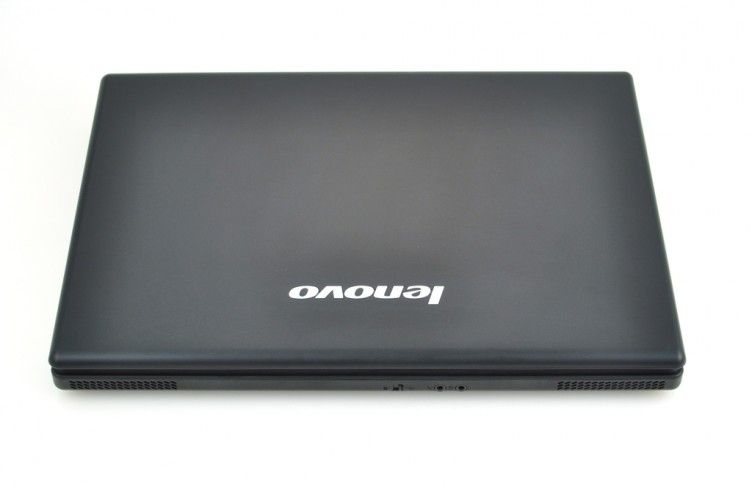
Lenovo has three main laptops are ThinkPad, IdeaPad and G series. If ThinkPad is a popular brand for business people, the IdeaPad is aimed at digital entertainment enthusiasts, and the Lenovo G series is a high-end mobile device for the masses and businesses, small business. The G530 is the typical representative of this machine.
The Lenovo G530 is simple, clean and square, with a flat plastic lid and rubber grip for added durability. Like the ThinkPad line, from the outside, the G530 is a homogeneous black. The body is made entirely from plastics.
The 15.4-inch LCD has comparable quality to brightness, color rendering, and viewing angles, compared to other 15.4-inch laptops. Screen resolution WXGA 1,280 x 800 pixels, with the 16:10 ratio that people call traditional , while the new model is usually shipped with a 16: 9 screen, 1,366 x 768 pixels. Mirror screens help increase contrast and provide sharper colors but they are more prone to glare and reflections , so you may notice that in bright rooms. However, it should be avoided directly outdoors. The vertical viewing angle is best at 30 degrees, while the horizontal angle is better, the image is not distorted even in the corner position.
The keyboard has a moderate bounce, giving you the feel and comfort of a ThinkPad T60, but it’s about the layout. The flat keys, smooth to use, do not emit unpleasant minor scratches. The G530 is only equipped with touch sensitive media keys that switch the loudspeaker on and off, just above the keyboard. The Synaptics touch pad is really very sensitive to rough surfaces, even right from the start with a wet , or slightly sweaty fingertip. Two large, smooth and responsive mouse buttons, with emphasis, only produce very small clicks. On the keyboard there is a function key to activate the Touchpad display state via the LED between the two mouse buttons. When used, the LED is green, when the red light is not activated.
Lenovo G530 15.4-Inch Laptop (Black Matte): Buy it now
The G530 is also equipped with the most essential ports and connectivity, with four USB ports, a VGA-out output, a headphone / microphone jack, an ExpressCard / 54mm expansion slot, a DVD burner, LAN, Broadcom WiFi (802.11b / g). On the front there is a Wi-Fi card toggle switch. Many people use this machine and find it more convenient if the G530 is equipped with modern connectivity such as eSATA and HDMI ports. But perhaps to match the price, these new features have been reduced.
Integrated speakers of medium quality with Bass sound almost none, this is still an inherent weakness of the laptop, but also good for occasional listening to music or movies. In small rooms, sound quality is acceptable but perhaps with a headphone would be a more reasonable choice.
The performance of the G530 is pretty good even with only the “low-end” Intel Pentium T3400 processor, but not upgraded to the Core 2 Duo as the new “popular” models currently. Limited graphics capabilities with integrated graphics as well as Intel X4500 chipset. Not suitable for gaming but with basic applications like Microsoft Word, Firefox, iTunes or other commonly used G530 media software. In addition, the G530 can play video files or watch HD movies, but the ability to output only limited VGA-out.
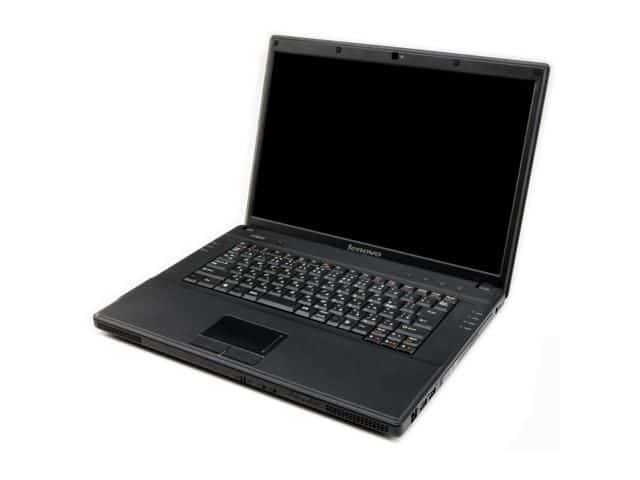
Machine quiet and cool with good heat dissipation thanks to the thick body, only use the “midrange” processor and integrated graphics card. Thanks to that the cooling fan system is not “attempt” so no noise. The hottest place is probably the location of the hard drive on the bottom. The Lenovo G530 uses a 11.1-volt 53WHr 6-Cell battery with a modest 3 hours 29 minutes of on-the-go Wi-Fi, 70% of screen brightness, and a “balanced” On power usage on Vista operating system.
Performance
Processor
Depending on the configuration, you get either a Core 2 Duo or Core 2 Quad. Both handle browsing, word processing, and light multimedia fine. Neither was cutting-edge even when this launched, but for general use, they get the job done.
Memory and Storage
RAM ranges from 2GB to 4GB of DDR2 depending on the config you buy go for the higher end if multitasking matters to you, because 2GB shows its limits fast. Storage is a standard hard drive, 160GB to 320GB. Enough room for documents and photos, though by today’s standards it’s on the smaller side and you’re not getting SSD speeds here.
Graphics
Integrated Intel Graphics. Fine for web browsing and office apps, not fine for anything resembling a modern game. If gaming’s part of your plan, this isn’t the laptop.
Thermals
Cooling is handled by a fan and heat sink combo that mostly does its job — the laptop gets warm under heavy load, as most do, but it stays within reasonable limits and doesn’t seem prone to overheating.
Ports
Multiple USB 2.0 ports, HDMI, VGA, Gigabit Ethernet, separate headphone and mic jacks, and an SD card reader. It’s a decent spread for the era, VGA included for older projectors and monitors. Wi-Fi covers 802.11b/g/n; Bluetooth is hit or miss depending on which configuration you end up with.
Battery
6-cell lithium-ion, and battery life lands at 3 to 5 hours depending on how you use it. That’s on the shorter end even for the time enough for working on documents or browsing, not enough to get through a full day untethered. Charging takes about 2 to 3 hours from empty, which is standard.
Keyboard and Everyday Use
Keyboard’s comfortable for long stretches, touchpad does what it needs to for daily use. Build quality is better than you’d expect at this price. The 15.4-inch screen gives you room to watch stuff, though don’t expect great resolution or wide viewing angles, this isn’t that kind of laptop. Speakers get the job done for background noise; if you actually care about sound, just use headphones.
Business Use
Nothing exciting going on here, but between the keyboard, the ports, and the build, it handles office work: email, browsing, docs without complaint. It’s not going to impress your coworkers. It’s also not going to slow you down.
Pros and Cons
The good stuff: it’s cheap, feels pretty sturdy, the keyboard is comfortable, and it doesn’t really choke on normal everyday tasks.
The bad stuff: the graphics are weak, the screen is kind of average, ports are on the thin side, and you probably won’t be upgrading much later.
Bottom Line
The G530 kinda knows what it is, a budget laptop doing budget-laptop things fairly well. If you’re not hunting for gaming performance or trying to get all day battery life, it’s a decent pick. Just don’t expect it to be anything other than what it is.
Related Posts

Tech Reviewer & Product Analyst
Định Bia has spent over 10 years testing consumer electronics with a focus on smart technology. He work as a product advisor at Biareview where he helped customers find the right devices for their needs. He personally tests every product featured on this site using a consistent evaluation framework covering quality, durability, and value. All reviews are based on experience, not influenced by the manufacturer.