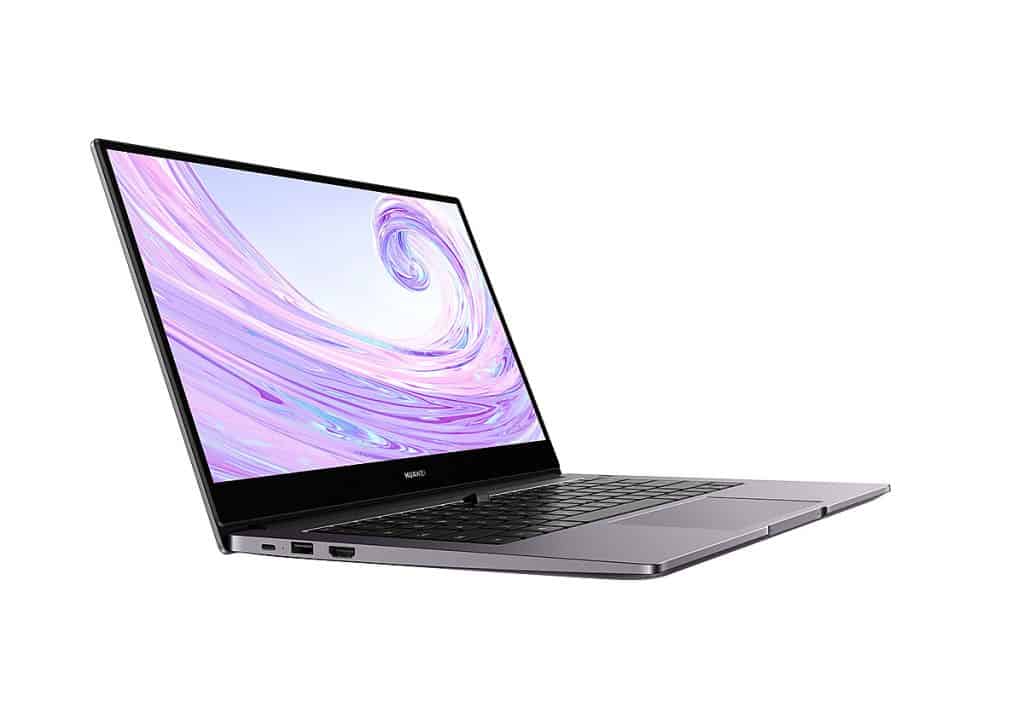
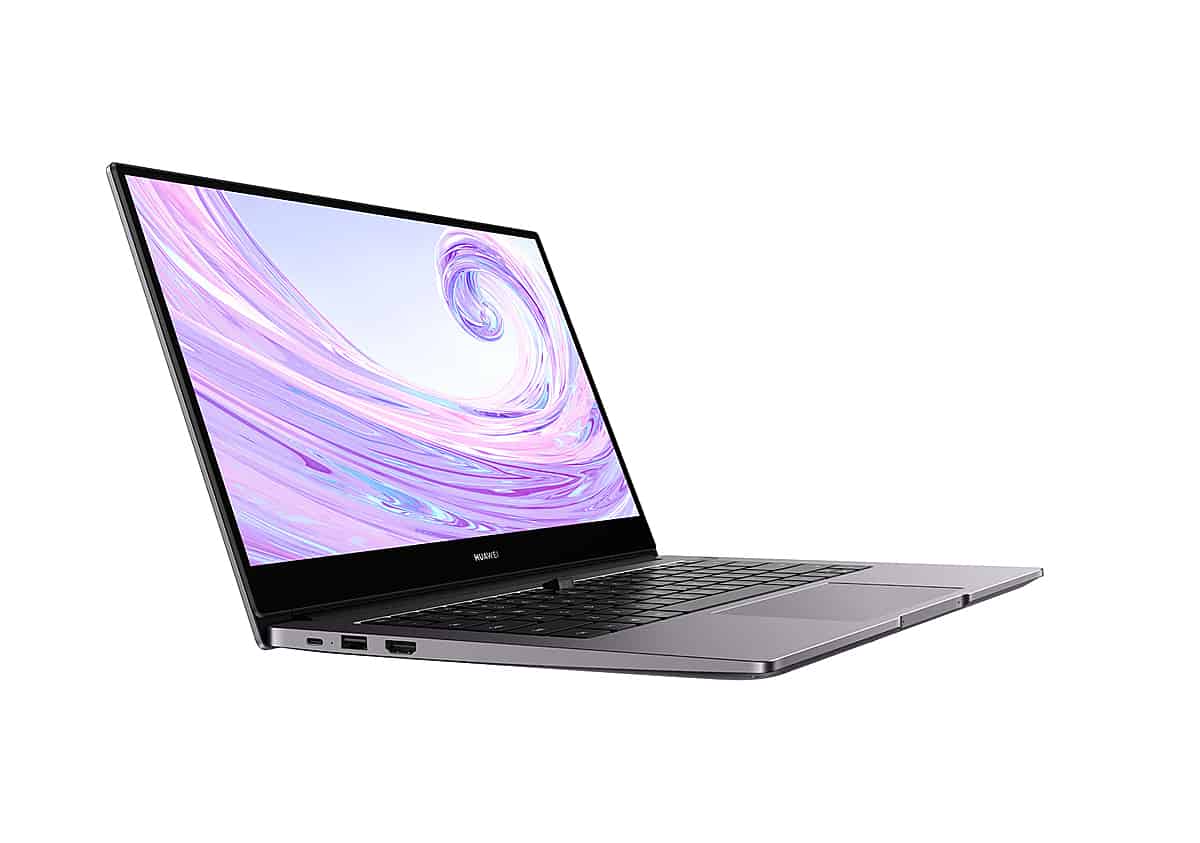
MateBook D 14 is Huawei’s latest laptop product of the MateBook D series that has just been launched. The device continues to inherit the highlights on the previous D 15, such as a thin-bezel screen, a “jumping” webcam, a metal shell, a fingerprint that is always integrated into the power button.
Facing difficulties in the smartphone segment due to the ban from the US government, Huawei is looking for new directions. From last year until now, Huawei has continuously explored more product areas such as smartwatches and headphones.
The MateBook D 14 kind of looks like a tuned variant of the MateBook D 15, with Huawei pushing portability even further, mostly because the screen is smaller. So basically from that step Huawei can trim down weight and overall size to pull in people who are always on the move, you know, commuting and such.
The ‘full metal’ design is similar to the senior, inspired by the MacBook.
The design of the MateBook D 14 is completely similar to its brother D 15. The MacBook Pro heavily influences the machine with a minimalist style; the entire shell and frame are made of silver-gray aluminum alloy, flat edges, square inside. Only the border area surrounding the screen is made of Mylar plastic. That is the type of plastic commonly used to make yogurt lids or foil coffee bags.
Huawei’s laptop model is relatively slim with a thickness of 15.9mm and a weight of 1.38Kg, flexible enough to carry with you without being cumbersome for backpacks and bags. Holding the device with one hand and the other hand to manipulate the mouse or keyboard when needed is also completely possible without much difficulty. Previously, the MateBook D 15 used to have a thickness of 16.9mm and a weight of 1.62Kg.
The device continues to attract attention with its slim bezel on all three sides, rare in the $800 segment when most only have thin bezels on two sides.
Huawei describes it as a Full View edge-to-edge screen, with three equally thin left and right margins; the overall thickness comes in at just 4.8 mm, and that supports a big screen-to-body ratio of 84%. With the bezel being so slim, the device feels pretty modern, and it draws attention in a way that’s kind of eye-catching, while also giving the display content more breathing room, more spacious, more airy. Because of that thin border, the MateBook D 14 ends up with a roomy 14-inch panel, yet the body size stays not that much larger than older 13-inch machines that use thicker rims.
There is a convenient Huawei Share feature, but it’s still only compatible with Huawei Honor phones.
Huawei really highlights Huawei Share on the MateBook D 14, basically letting the laptop link up with Huawei and Honor smartphones fast, using NFC. Huawei also puts a fairly large logo right on the palm rest, like it is there for you to notice it immediately. That same area, it includes the NFC chip, which is what makes Huawei Share work.
Practical experience with the Huawei P40 Pro phone model, I need to touch the back of the Huawei Share area of the MateBook D 14. Immediately on the laptop, a connection confirmation message will appear on the laptop. Then it takes about 5 seconds for the machine to process, and the entire phone image will be transferred to the computer. At this point, you can use the MateBook’s trackpad and keyboard to control the P40 Pro, answer messages, receive calls, chat messengers, etc. Even drag and drop images, videos, document files or copy text content, share clipboard back and forth from phone to computer, very convenient.
The speed of control and file transfer is quite fast and smooth. Try dragging and dropping a 4K 60fps video file, for 1 minute duration and weighing roughly 260MB, from the phone to the laptop. In my case it only takes about 12 seconds for the copy process to wrap up, so the transfer rate lands around 20MB/s, pretty close to a wired connection really. The nice part is that Huawei Share does not require an Internet connection, and the two devices do not have to be on the same WiFi network together either.
One note is that to use Huawei Share, you will need to have the PC Manager software enabled with WiFi and Bluetooth connectivity on the MateBook D 15 and turn on NFC on the phone. In addition, Huawei Share currently only supports mid and high-end phones of Huawei and Honor running EMUI 10 or Magic UI 3.0 or higher, equipped with NFC connectivity.
Fast fingerprint, responsive touchpad, average keyboard
A feature that got really popular on phones, but is only now being added to laptops, is the fingerprint sensor. On the MateBook D 14 the fingerprint is placed right into the power button so once the laptop is on, you can get into Windows with a touch, there is no need to type out a password. Fingerprint recognition speed is fast, accurate, just a light touch, can receive fingers at many different angles, but the finger needs to be dry. The advantage of Windows 10 compared to Android and iOS is that you can install as many fingerprints as you like; there is no limit to the number, so you can add all ten fingers and even toes if you want.
Besides the appearance, the MateBook D 14 shows that Apple influences it is keyboard part. The key layout, fonts, colors, icons to tweak the brightness, volume, or shape of each key are more or less reminiscent of MacBooks.
Using the D 14 is kind of uneasy, I mean the typing, it feels a bit uncomfortable like the key travel is shallow, and the bounce is low too. Because of that it’s easy to miss a keystroke, and then you end up applying a lot of force, so your hands get tired pretty fast. The key layout looks a lot like a desktop keyboard, so I didn’t need ages to get used to it or anything.
This keyboard also includes a backlight, with two brightness levels, which helps when you work in the dark, though honestly the brightness level is rather low. One thing to keep in mind is that you can still use the Fn key combo + the arrow keys for navigation, to reach Home, End, Page Up, Page Down, even if those symbols aren’t actually shown on the keyboard itself.
The large-sized touchpad is where Huawei continues to “learn” from Apple, although in terms of “supergiant,” it is not equal to the opponent. The MateBook’s touchpad offers a good drag experience, high sensitivity, smoothness, fast response, smooth scrolling, full support for multi-touch operations, and precision touchpad compatibility. The spacious area is a big plus, making it very comfortable to drag the mouse, freely drag and drop files. If I only use office tasks, browsing the web, I almost rarely have to use a separate mouse, in addition to when I edit photos, edit videos, play games that need high accuracy.
On the front edge, Huawei continues to be influenced by Apple, with the edge being completely concave inward, helping to create a fulcrum, supporting the more convenient and quick opening of the device. The hinge of the MateBook D 14 is made firmly, allowing the device to open 180 degrees, but it still can’t open the device with one hand.
Of course, at less than half the price, the MateBook’s perfection is hard to compare with its rival from Apple. There is still a slight flex when pressing the lid or the center of the keyboard (the position of the G, H keys). The metal surface is not sophisticated because it seems to be covered with a layer of paint instead of an anode treatment. But overall, at the price range of $800, the MateBook’s perfection is still at a good level, the palm rest area, the two sides of the keyboard or the bottom of the machine are sturdy, the full metal material is cool and solid.
The display quality has improved.
As announced by Huawei, the screen brightness reaches 250 nits and is practically enough to display outdoors or under a strong light source shining directly on the screen. Huawei claims the device’s screen is TheV Rheinland certified, which helps reduce the blue light that is harmful to the eyes. The screen can be opened to a 180-degree angle, so you can comfortably fine-tune the viewing angle in many working situations or when you need to exchange work with the opposite person.
The drawback of this screen is that the colors are less fresh, the contrast is not high, only 800:1, so the displayed image is somewhat pale. Color coverage is also only about 40% AdobeRGB and 60% sRGB, so it is not suitable for photo editing and video editing tasks that require high color accuracy.
The speakers of the MateBook D 14 are arranged on the bottom; the volume is good, there is no distortion or distortion when turned up to the maximum. The speaker is equipped with Dolby Atmos technology to optimize the sound for each content; the quality is enough to enjoy light music or game shows, YouTube videos are not too demanding. Of course, adding headphones or external speakers is still a more reasonable solution.
The interesting point is that to achieve a slim screen border on the top edge, Huawei has switched to using a “jumping” webcam hidden under the keyboard, located between the F6 and F7 keys. This webcam only pops up when the user taps it.
When not in use, the webcam can be hidden to avoid the risk of revealing sensitive images. The handy point is that when the webcam is on, it is still possible to fold the device normally without fear of hitting the screen because the camera will automatically sink a bit. This mechanism helps that when the device is turned on, the webcam remains on without being closed, reducing the number of times you have to click to turn it on.
The image quality obtained from the “jumping” webcam of the MateBook D 14 is similar to most laptops today, stopping at the “have” level due to a resolution of only … 1MP equivalent to 720p HD. Because the webcam is located in the keyboard section, it must be tilted from the bottom up, so the image obtained will mainly be double chin and fingers when typing. This webcam also does not support Windows Hello infrared face unlock. The mic section for good, clear sound recording quality effectively filters noise.
Huawei Kepler MateBook D 14″ – AMD R5 – 8GB+256GB, Mystic Silver: Buy it now
Agile performance, powerful integrated graphics
On the configuration side, the MateBook D 14 variant BiaReview runs on for this review is coming with a 12nm AMD Ryzen 7 3700U CPU. It’s a processor with four cores, eight threads, base clock at 2.3GHz, and it can be pushed to around 4.0GHz in boost mode. The standard TDP sits at 15W, but you can tune it somewhere between 12W and 35W which is kind of nice. Now, there’s no dedicated GPU inside, so instead it leans on the integrated graphics setup, AMD Radeon RX Vega 10 Graphics, with ten cores operating at about 1400 MHz.
Other parameters include 8GB DDR4 Dual Channel 2400 MHz RAM, soldered, no upgrade support, Samsung PM981a 512GB NVMe PCIe 3.0 x4 M.2 2280 SSD storage, Windows 10 Home SL pre-installed.
The connection ports are relatively complete, with the left side having 1 USB Type-A 3.0 port, 1 USB Type C 3.0 port that also charges the battery and transmits data (does not support image and audio output), and 1 HDMI port.
The right side has an additional USB Type-A port, but unfortunately, only type 2.0. Next to the USB port is a headphone/mic combo port.
The MateBook D 14’s performance was responsive in nearly all of my daily tasks as a technology reporter. From browsing the web with Firefox with about 20 tabs, almost 20 pre-installed Add-ons, and simultaneously turning on Chrome and Edge with 4-5 more tabs, image processing with Lightroom, Photoshop, or Full video editing. HD with Premiere Pro, Huawei’s laptop still proved undeterred.
I also tried playing some familiar games like League of Legends, Fifa Online 4, and CS: GO on this machine, and they all run well at 60fps, Full HD resolution with graphics settings from medium to high. With 3A offline games, this GPU will “give up,” having to lower all settings to low, 720p resolution can temporarily play at 30-40fps. That is still a pretty respectable result for a thin and light office laptop with only an integrated graphics card.
The one thing to note is that the AMD Radeon RX Vega 10 GPU performance is pretty dependent on RAM, like it really matters a lot. So you should make sure that there is as much free memory as you can when doing graphics-heavy tasks, for instance video editing or stuff like that. Unluckily, the MateBook D 15 can not be upgraded with extra RAM. Right now it comes with 8GB, but only 6.94GB is actually usable , while 1.06GB goes to the GPU. To compensate somewhat, Huawei has set up Dual Channel dual channels, so it’s temporary enough for basic needs.
With efficient heat dissipation, the machine runs smoothly, does not “poke” performance.
Regarding heat dissipation, the surprise is that despite its strong performance, the MateBook D 14 runs very quietly and coolly. Although continuously running benchmarks, squeezing system power with 100% CPU and GPU Full load for a long time, the maximum recorded temperature is only 91 degrees Celsius; the machine does not emit any annoying noises from the radiator fan. In the entire palm rest area, the keyboard is only slightly warm.
THEREFORE, the CPU and GPU performance is very stable, keeping a high pulse rate and not experiencing the phenomenon of overheating like most U-series Intel chips. At the same time, even when running on battery power, do not plug in the charger; the machine’s performance is still not degraded.
That is probably because the MateBook has a large heatsink on the bottom, seeing the heatsink and exposed copper pipes. The heat dissipation is much more effective than many other laptops, which usually only have a heatsink in the screen hinge.
Significantly improved battery life, compact and convenient fast charging
Battery life on the MateBook D 14 has improved significantly compared to the D 15. The screen is smaller, the battery capacity is larger, reaching 56 WHr, and basic tasks such as browsing the web, typing Word, screen. 40% brightness in Better Battery priority mode, the device can last up to about 7-8 hours. When using heavier applications such as Photoshop, Lightroom, the battery life will decrease to only about 4 hours. That is a good battery level, enough to meet a working day before needing to be charged.
Another valuable point is that the MateBook D 14 is equipped with a compact 65W USB-C charger, only half the size of regular laptop chargers and about as big as two phone chargers comes with a USB-C 2 cable head. According to Huawei, this charger supports fast charging and can fully charge 46% of the battery in 30 minutes when the device is in a sleep state.
Actual testing shows that, in about 30 minutes of charging starting from 0% (the device stays off, it just shows that icon begging for power), I reached 45% battery, basically close to Huawei’s claim. For a full 100% it usually takes around 2 hours, give or take. Also, the charger for the MateBook D 14 supports the PD standard, so it should charge compatible phones in a fast, pretty efficient way.
Summary
In the latest “occupying the yard” to the laptop “stage,” Huawei shows that they are not “a novice.” MateBook D 14 continues to converge many elements to create an attractive laptop. The device has an eye-catching, solid metal design. Slim design, easy to carry. Modern, airy 3-sided thin screen border. Features Huawei Share useful phone connectivity, a one-touch fingerprint sensor integrated with a handy power button. Spacious touchpad, high sensitivity, fancy “jumping” webcam. Battery life is enough for a working day. If you like the design of the MacBook but don’t like the macOS operating system, this could be a reasonable choice.
The performance of the MateBook D 14 is also good, especially the graphics processing ability, which helps to play popular games with high graphics settings or when it comes to basic photo editing and editing. The machine also runs smoothly and coolly, keeping high performance even when running on battery only.
The drawback of the MateBook D 14 is the low-bounce keyboard, shallow travel, easy typing to miss, and hand fatigue. Screen color and color coverage average, less fresh. The machine also does not allow RAM upgrades; the Type C port cannot output images or sound.
At the price range of $800, Huawei MateBook D 14 will compete with rivals such as Lenovo IdeaPad Slim 5 15ITL05, Asus VivoBook S433EA, HP Pavilion 14 dv0010TU, or Dell Vostro 3500. 3-sided metal, while competitors mainly only use metal for the top and palm rest. MateBook also owns many unique features such as Huawei Share, hidden webcam, 3-sided Full View thin border screen, agile performance, cool machine, and quiet running.
Related Posts

Tech Reviewer & Product Analyst
Định Bia has spent over 10 years testing consumer electronics with a focus on smart technology. He work as a product advisor at Biareview where he helped customers find the right devices for their needs. He personally tests every product featured on this site using a consistent evaluation framework covering quality, durability, and value. All reviews are based on experience, not influenced by the manufacturer.