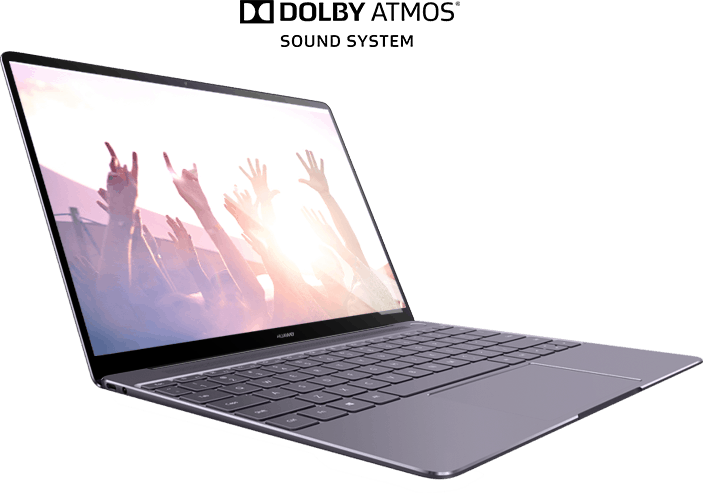
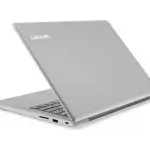
Huawei MateBook X laptop has an impressive design, slim design, minimal thickness to be able to plug in the headphone jack. This is a laptop running Windows 10 operating system has reduced all the excess detail, 13 inch screen is eliminated as much as possible, the keyboard full of functional buttons.
However, the exterior design is just one aspect to assess the strength of a laptop and Huawei needs to prove that its company can do well in laptop manufacturing as well as smartphone manufacturing. To prove its worth, Huawei has adopted attractive rates for this MateBook X. The laptop will cost $ 1,099 starting with an Intel Core i5 processor, a 256GB hard drive, 8GB of RAM, a high-resolution screen and support for Dolby Atmos audio technology. This version is rated Prestige Gold, priced at $ 1,299, and is upgraded to a Core i7 processor with 512 GB SSD. Both versions are not much difference and are eye-catching.
This laptop has an outer shell made of solid aluminum. Special features such as manufacturer logo, polished border to create a highlight for the product. With such a thin laptop, the keyboard is fully integrated with the keys. Despite its slim dimensions, the keyboard’s buttons are quite large, well-organized, covering the entire width of the keyboard. The keyboard of the MateBook X can be considered more luxurious than the latest keyboard that Apple applies to the Macbook. The minus of this keyboard is the uneven brightness of the keys. Make users feel like there is dust on the keyboard when using. Next up is the touchpad. Although it supports Windows Precision touchpad, it is difficult to use it effectively. When users manipulate the touchpad, sometimes the laptop does not understand what this operation.
The USB-C port is located on both sides of the machine, but only one port can be used to charge the battery
On the phone, there are two USB-C ports on each side, sort of, but basically only the USB-C port on the left is meant to charge the device. It sits right next to the headphone jack , so thats the correct spot. If a user plugs the charger into the right side USB-C port instead, the screen comes alive and shows a prompt, kind of like it is requesting the user to power up, the USB-C port on the opposite side. With its thinness, this MateBook X lack of connectivity is not too difficult to understand. Knowing this, Huawei has supported the USB-C adapter to HDMI, VGA, USB-B, and a USB-C pass-through.
It can be said that this laptop is designed quite strong configuration but the software deployment is too sloppy. Most of the dialogs in the dialog are written in English quite a bit. Huawei’s MateBook Manager software will output messages advising users not to use a USB port, instead using the same basic functionality of Windows and using a lot of system resources.
Huawei has been compiled with Windows 10 Signature Edition installed, to avoid bloatware that slows down your device. If you do not use the touchpad then you can see this laptop works quite smoothly and meet the needs of the user. Equipped with an Intel Core i7-7500U and 8GB of RAM, this device can only handle simple tasks and web browsers, but should not use multimedia tools such as Adobe’s Lightroom. When running at full capacity, the laptop is quite big heat making the body quite hot during use. Therefore, this latop is only suitable for simple tasks, light. It can be seen that this laptop was created to cater to those who have a neat demand, often have to travel as tourist guides, students.
Huawei MateBook X Signature Edition 13″ Laptop, Office 365 Personal Included, 8+512GB / Intel Core i7 / 2K Display, MateDock v2.0 included (Prestige Gold): Buy it now
Huawei MateBook X Signature Edition 13″ Laptop, Office 365 Personal Included, 8+256GB / Intel Core i5 / 2K Display, MateDock v2.0 included (Space Grey): Buy it now
Huawei 13.0″ Laptop MateBook X Signature Edition 2.50GHz Intel Core i5 7200U 8GB LPDDR3 Memory 256GB SSD Intel HD Graphics 620 Windows 10 Home 64-Bit (US warranty) Model Watt-W09B: Buy it now
Huawei 13.0″ Laptop MateBook X Signature Edition Intel Core i7 7th Gen 7500U 2.70GHz 8GB LPDDR3 Memory 512GB SSD Intel HD Graphics 620 Windows 10 Home (US warranty) Model Watt-W19A: Buy it now
The screen displays 2K images but the battery life is low
Battery life of this laptop is not really high. With light text editing and web browsing, the battery life of just over 6 hours is exhausted. With a compact laptop, but with less battery life, the battery life is only 5.449mAh, making users must consider about buying this product.
The screen of this laptop has a resolution of up to 2160 x 1440 with the borders removed to the maximum, but the higher the resolution, the more battery life is affected. It is necessary to increase the brightness to the maximum to experience this product at the best level, which is similar to the latest MacBook Pro. The user should turn off the default brightness of the laptop automatically because it is not really effective but only fool the user by reducing the screen brightness.
Uses Dolby Atmos audio technology and integrated fingerprint sensor on the power button
With the use of Dolby Atmos technology, the MateBook X has good quality speakerphone. The sound is clear even when the volume is set at a high level. The bass is a bit small but still gives the best sound quality. The fingerprint sensor is integrated right on the power button, but it does not really work.
Performance
Efficient Processor Options
The HUAWEI MateBook X is kept going by Intel’s 10th generation Core i5 or i7 processors . These chips aim for a sort of middle ground between speed and power savviness , so your day to day stuff runs pretty smoothly. Like multitasking , office apps, or streaming videos, everything tends to move along without that noticeable stutter, at least for most everyday use.
Adequate RAM and Storage
You’ll find 8GB or 16GB of LPDDR3 RAM inside the MateBook X, and that helps it juggle multiple applications at the same time . Switching between tabs and programs feels easy, not jittery or stuck. As for storage it includes a 512GB PCIe NVMe SSD, which gives quick read and write speeds. In real life this usually means quicker start-ups and faster moving of big files, you know, the usual benefits.
Integrated Graphics
For visuals, the MateBook X depends on Intel’s integrated Iris Plus graphics. It does the job decently for casual gaming , plus multimedia tasks like watching content or handling basic creative workflows. Still, it’s not built for heavy gaming , nor is it meant for professional-grade graphic design . If you need extra graphical oomph, using an external GPU through the USB-C port could be worth considering , depending on your setup.
Keyboard and Touchpad
Comfortable Typing Experience
The MateBook X comes with a full-sized keyboard, the keys are fairly well spaced, and the travel distance is pretty solid. This combo makes it comfortable for typing, especially if you write a lot. The keys feel soft, and there’s a tactile vibe that can make longer sessions less tiring. There’s also backlighting, so typing in darker rooms works without squinting.
Large & Responsive Touchpad
The touchpad on the MateBook X is kinda generously sized, and it feels very responsive. You can use multi touch gestures, and that really helps productivity, because scrolling is smooth, pinch to zoom works nicely, and other subtle movements are there too. The glass top is smooth and accurate, it gives this premium feeling when you move around on it, almost like it reads your intentions a bit faster.
Audio
Impressive Audio Quality
The HUAWEI MateBook X doesn’t just sound “good”, it sounds honestly impressive. That’s largely because of its quad speaker setup. The speakers are angled in a way that pushes audio toward you, so conversations, music and video audio stay clear and pretty immersive. With Dolby Atmos support, you get stronger bass along with brighter, crisp highs, which is great if you’re watching media or joining video calls for a while.
Connectivity
Modern Connectivity Options
Even with that slim profile, the MateBook X still brings a solid set of ports. It has two USB C ports , and both cover data transfer, charging, and display output, which is convenient. There’s also a 3.5mm combo jack for headphones and microphone, so quick headsets are no problem. And if you need more, HUAWEI sells the MateDock 2 adapter, it includes USB A , plus HDMI and VGA ports, which comes in handy with older projectors and setups.
Wireless Connectivity
On the wireless side, the laptop supports Wi Fi 6, so internet stays fast and steady. Bluetooth 5.0 is there as well, letting you connect devices without much fuss, like mice, keyboards ,and headphones. Overall it feels quick to pair, and stable during use.
Battery Life
Long-Lasting Battery
Inside, the HUAWEI MateBook X packs a 42Wh battery. In real day to day use, for example web browsing, typing documents, or playing media, it can stretch out to roughly 9–10 hours per single charge. That means you can take it through a full workday, or keep it running while traveling without constantly hunting for an outlet, or whatever.
Fast Charging
So the laptop supports fast charging , yeah, and the battery can get to roughly 50% charge in about 30 minutes . Honestly, this kind of thing is great when you have a short break and you just need a quick “top up” without waiting around too long.
Thermals and Noise
Efficient Thermal Management
The MateBook X uses a more modern thermal management approach, it mixes fans with heat pipes to move the heat out in a efficient manner. In everyday use it stays rather cool , and the fans are pretty quiet running in the background . But when things get heavy, like long video editing sessions or gaming, the fans will sound more present. Still, the noise stays in that acceptable zone, not overly chaotic or anything.
Software and Features
HUAWEI Share
One of the better highlights is HUAWEI Share . It helps create a smooth connection between HUAWEI devices , so there’s less friction when you want to move stuff around. With just a simple tap, users can transfer files, share a screen, and even work together across a HUAWEI smartphone and the MateBook X. For people already living in the HUAWEI ecosystem , this feature feels like it boosts daily productivity and convenience at the same time.
Windows 10 Pro
The MateBook X ships with Windows 10 Pro already installed. It gives you a steady and pretty secure operating system ,for both work and personal use. Windows 10 Pro offers more sophisticated utilities such as BitLocker encryption, remote desktop access, and additional protection measures, so it fits well in professional settings as well.
Fingerprint Sensor
The laptop comes with a fingerprint sensor built into the power button, so you can do fast , and more secure logins with Windows Hello. Not only does this improve protection, it also feels more convenient because you do n’t have to type in passwords all the time.
Upgradability
Limited Upgradability
A bit of a trade off with the MateBook X ultra slim design is limited upgradability. The RAM is soldered onto the motherboard, so after purchase it cant really be swapped out . Still , the SSD is upgradeable, so you can boost capacity later if you run out of space. Since the laptop is aimed at professionals and everyday users, the built in specs should cover most needs without much hassle.
Comment
This is a compact and elegant laptop. Picture quality is good as well. The minus point of the MateBook X is the touchpad and low battery life. Huawei needs to leverage its existing technical strength by offering basic utilities to fit the daily needs of its users. A larger battery, a more efficient touchpad will help users bravely invest in a laptop with Dolby sound quality and luxury design.
- Advantage:
Compact design, eye catching, sure.
Excellent sound quality, using Dolby Atmos technology.
Thin border.
The keyboard is wide, comfortable
- Disadvantage:
Touchpad not useful.
Low battery capacity.
Always carry charger cables, adapters when in use.
Related Posts



Tech Reviewer & Product Analyst
Định Bia has spent over 10 years testing consumer electronics with a focus on smart technology. He work as a product advisor at Biareview where he helped customers find the right devices for their needs. He personally tests every product featured on this site using a consistent evaluation framework covering quality, durability, and value. All reviews are based on experience, not influenced by the manufacturer.