Design
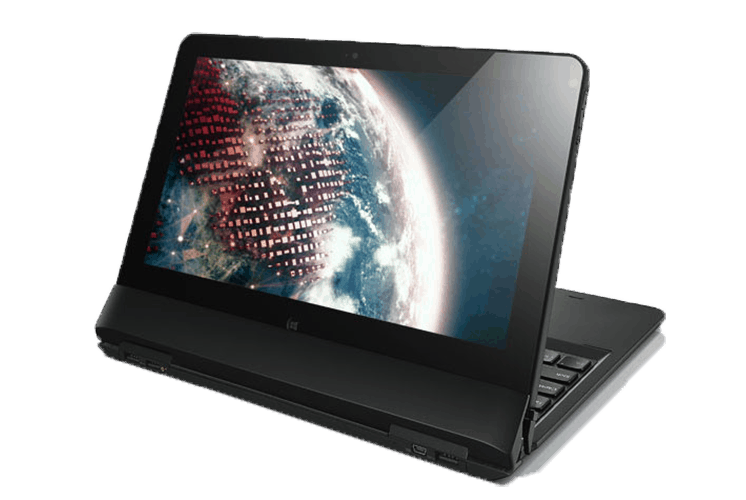
The business-oriented design requires a lightweight, highly secure and reliable computer. Lenovo ThinkPad Helix not only comes with a touch screen display, but also supports 1.920×18080 (full HD) resolution. The “2 in 1” design impresses with the entire hardware behind the screen, removable keyboard to use as a tablet.
Soft plastic casing outside and carbon fiber underneath, the structure of the chassis with magnesium alloy honeycomb structure, the overall machine is quite light compared to standard ultrabook but still achieve the necessary rigidity, high reliability.
In terms of design, Lenovo’s hybrid laptop looks like an ultrabook with “measurements” of 29.6 x 18.7 x 2.04 cm and weighs 1.7 kg, with the keyboard docks weighing in at 865 grams) due to the addition of a 28-watt 4-cell sub battery to extend the battery life of the device. In fact, Lenovo’s hybrid laptop has hit 8 hours and 31 minutes in the MobileMark 2007 Productivity Test, the maximum screen brightness (100%), the highest in Test Labs ever tested.
Unlike the ThinkPad Twist, with a 180-degree flip and roation display, Lenovo adopts a “rip and flip” design for the new hybrid laptop, specifically removing the screen from the laptop. The keyboard stand and back for easy collaboration, sharing information displayed on the screen or use as a tablet. Comes with a digitizer stylus that is more convenient for taking notes, processing images or creating graphic designs.
In addition, the Helix also has a number of function buttons such as Windows switch quickly between the screen mode, volume up and down keys, screen rotation lock button, power button and headphone connector microphone at the border screen.
Designed for business users, the ThinkPad Helix security mechanism is also more concerned with the diagnostic center, which helps users manage passwords, backups and system restore. The machine also incorporates a Trusted Platform Module (TPM) chip to ensure hardware authentication, startup protection, and smart card authentication. Some of the security and remote management features of the Intel vPro platform allow users to configure different layers of security to better protect their computers and corporate networks.
2016 Lenovo Thinkpad Helix 11.6-inch Detachable 2 in 1 IPS Touchscreen Ultrabook (11.6″ FHD 1920 x 1080 Touchscreen, Intel Core M 5Y10c, 4 GB RAM, 128 GB SSD, 5MP Camera, Windows 8.1: Buy it now
Lenovo ThinkPad Helix 2nd Gen 20CG000QUS (11.6″ FHD Touchscreen, Intel Core M 5Y70 1.10GHz, 8GB RAM, 256GB SSD, 5MP Camera, Windows 8.1 Pro 64): Buy it now
Lenovo ThinkPad Helix 36984SU 11.6-Inch Convertible 2 in 1 Touchscreen Ultrabook (2 GHz Intel Core i7-3667U Processor, 8GB DDR3, 256GB SSD, Windows 8): Buy it now
Lenovo Thinkpad Helix 36984MU 12-Inch Notebook (1.8 GHz Intel Core i5-3427U processor, 4GB RAM, 180GB Hard Drive, Windows 8): Buy it now
Lenovo ThinkPad Helix 20CG000SUS 11.6-Inch Laptop (Black): Buy it now
Communication port, ability to upgrade
Similar to other ultrabook hybrids, combining many of the features of tablets and laptops in a limited space requires the manufacturer to select, shrink or remove some of the less important components. However, Helix still has 3 USB: 2 USB 3.0 and 1 USB 2.0, HDMI 1.4a video signal port and mini Display Port.
It also does wireless connectivity like Bluetooth 4.0, Centrino Advanced-N 6205 Dual-band WiFi, and 3G (HSPA +) which goes through the SIM card slot on the bottom side, plus NFC (Near Field wireless communication) which kind of works over short distances.
Hardware upgradeability is tricky, because basically the full component package sits behind the screen, and some core parts , such as the CPU and RAM, are soldered in or integrated on the motherboard. So users can really only swap out the stylus and charger. But things like SSDs , batteries, or the wireless modules, they usually need hardware know how, or direct technical support from service.
Interaction with users
The Helix comes with an 11.6-inch capacitive touch screen display, full HD resolution at (1,920 x 1,080 pixels), and a Gorilla Glass-enhanced surface meant to boost durability and keep scratches down. Computers will be better shielded from external impact, or at least that is the intention.
The main point is that the picture shown on an 11.6-inch full HD screen can look noticeably smaller than it would on a 11.6-inch display with a weaker resolution, for example 1,366 x 768 pixels. Users therefore need some time to adjust, to work more precisely in the Modern UI setup, and also in the classic interface.
Experimental shows that the image shows sharp, bright, less glare when used outdoors or in the office. Color gradations, as well as gray and white colors are easy to distinguish, making it easy to work with text documents. Equipped with a mirror screen capable of absorbing light and screen brightness of up to 400 NITs, when used outdoors, the display image remains bright, crisp despite the decline compared to the office.
About the touch screen sensitivity and user interaction of the Helix also leave a similar impression Vaio Duo 11. With two classic games Angry Birds and Plants vs Zombies, smooth feel due to low friction. It’s easy to operate on the touch screen, and the gameplay is more flexible when using the touchpad or mouse.

Keyboard and touchpad
The Precision keypad is also one of the highlights of the ThinkPad line, with soft, curved keys and good elasticity for clear keys. Users can easily surf the keyboard when typing text without the keyboard. Unfortunately, the keyboard does not have built-in LED backlight, so it’s not convenient to work in dark environments.
Helix retains its distinctive mouse pointer, with nostalgic styling combined with the modern touchpad’s multi-touch interface. The smooth feel due to low friction makes the mouse move precisely, and the scrolling, zooming and rotating functions are also easier to do.
Performance
Under the hood, the Lenovo ThinkPad Helix is sort of powered by Intel’s 3rd generation Ivy Bridge processors, with options that can go from Core i5 over to Core i7. You also get memory choices like 4GB or 8GB RAM, and then a solid-state drive (SSD) in sizes somewhere around 128GB up to 256GB. In practice, these specs mean the Helix can deal with a range of things, from daily office work to a bit heavier applications too.
When it comes to real world performance, the ThinkPad Helix does pretty well. The Intel Core processors paired with an SSD keep things moving, so boot time feels quick and apps open up fast. Multitasking stays smooth, and if you’re bouncing between spreadsheets, document editing, and multiple programs at once, the device still feels responsive , and generally efficient.
For visuals, the integrated Intel HD Graphics 4000 is adequate for most business style tasks and casual media. Sure it’s not meant for high end gaming or heavy graphics work but it still handles video playback, web browsing, and light photo editing without much fuss.
Battery Life
Battery life honestly matters a ton on anything portable, and the Lenovo ThinkPad Helix does a decent job there. It has two separate batteries, one is built into the tablet, and the other sits inside the keyboard dock. The tablet’s own cell is 42Wh, then the keyboard dock adds an extra 28Wh, so you end up with more staying power than the typical single-battery setup.
In regular day to day use, the Helix can last about 6–8 hours on a charge, especially if you mostly treat it like a tablet. Once you pair it with the keyboard dock though, the runtime can stretch to around 10–12 hours. In practice it kind of becomes a reliable companion for a full day of work or traveling without you constantly chasing a charger.
Charging is also pretty quick because of Lenovo’s RapidCharge technology. You can get the Helix to about 80% in around one hour, which is pretty handy if you need a quick top up during a short break.
Software
The Lenovo ThinkPad Helix originally came with Windows 8 Pro, and it leaned into the operating system’s touch-friendly interface plus those productivity features that just feel natural. It’s also compatible with Windows 10, and that brings better performance , security, and an overall smoother user experience, you know the kind
Lenovo bundles several software tools and utility features to improve the overall flow. Among them is Lenovo Companion, which handles system updates and gives support resources. There is also Lenovo Settings, which lets you tweak things like power management display options, and more along those lines.
On top of that, the Helix supports the Lenovo Active Pen , a stylus that gives very accurate input for note-taking, sketching , and other creative tasks. The pen works nicely with Windows Ink, and that makes the experience feel natural and intuitive for people who prefer handwriting or drawing rather than typing everything out.
Connectivity and Ports
The Lenovo ThinkPad Helix seems pretty loaded when it comes to connectivity options. On the tablet side you get a USB 2.0 port, a mini DisplayPort, a micro HDMI port, and there’s also a microSD card slot. Then the keyboard dock brings two USB 3.0 ports along with another mini DisplayPort, plus an Ethernet port. With all that in place, it feels like users can hook up lots of different add-ons, and even external displays without too much hassle.
For wireless, the Helix includes Wi-Fi 802.11n and Bluetooth 4.0, so connections stay solid for internet access as well as everyday peripherals. There’s also optional 4G LTE support, which means you can remain online while moving, without always chasing after Wi‑Fi hotspots or those awkward public networks.
Usability
One of the more noticeable points with the Lenovo ThinkPad Helix is how versatile it feels overall. You can shift between laptop and tablet modes, which gives a lot of flexibility, for different kind of situations, like work then later on something more casual. In laptop mode, you basically get a familiar computing experience, with the ThinkPad keyboard bringing comfort and precise control. In tablet mode it turns into a slimmer portable setup that’s well suited for reading, browsing, and watching media.
The keyboard dock kind of stands out on its own too, mainly because the typing experience feels comfy and responsive . The keys have a decent travel distance and that tactile push, so longer writing sessions tend to feel smoother overall. The trackpad looks right and it behaves well as well, it has smooth accurate movement, and it also supports multi-touch gestures, which adds a little more convenience for everyday use.
In tablet mode, the Helix kind of stands out as a productivity tool. The touch screen feels responsive and reasonably exact, plus the included Active Pen makes the whole thing smoother, because it gives a precise, and kinda natural way to input. So whether you’re jotting things down in a meeting, sketching something on the side, or editing and marking up documents, the stylus just works nicely.
Another plus is the dual battery setup, it delivers a longer battery life that can realistically stretch across a full workday. Also, being able to detach the tablet fast from the keyboard dock really helps portability, so switching between modes is quick, without turning it into a chore.
Audio and Camera
For audio, the Lenovo ThinkPad Helix comes with stereo speakers, and they manage to sound decent for something this size. The output isn’t really all that powerful, but it stays pretty clear, and honestly it works fine for video calls, watching media and general casual listening. If you want something more balanced, you can go with external speakers or headphones by plugging into the 3.5mm audio jack, seems simple enough.
Camera wise, there are two cameras. You get a 2MP front-facing camera for video calls, and a 5MP rear-facing camera for photos and recording videos. The front camera does its job well for conferencing, especially when the lighting is good, the image looks sharp and clean. The rear camera is fine for casual shots and scanning documents but it’s not meant to replace a dedicated camera, or even a smartphone.
Security
Security is kind of a big deal for business users, so the Lenovo ThinkPad Helix also brings some built in tools that aim to protect sensitive data and keep privacy in check. The device works with Intel vPro, which gives hardware based protection features, plus remote management functions that can help IT teams stay on top of things without so much hassle. There is also a Trusted Platform Module, or TPM, used for secure encryption and authentication, so the basics are covered.
On top of that, the Helix has a fingerprint reader. This means you can sign in in a quick and fairly secure way, just by tapping with your finger, not a long procedure. That extra layer helps make sure that only authorized people can reach the system. And there’s more, because the ThinkPad Helix also includes a physical lock slot, which lets you anchor it with a cable lock if you need.
Conclusion
The Lenovo ThinkPad Helix really is a versatile and pretty inventive device. It manages to blend the portability of a tablet with that laptop-like productivity feel, which is honestly the whole point. The build quality is robust, the display looks solid, the performance stays dependable ,and the battery just keeps going longer than you’d expect. So for business professionals and for students, it comes across as a compelling option. Plus the way you can swap between laptop and tablet modes, with the Active Pen included, makes it feel more like a daily productivity companion rather than just a novelty 2-in-1.
Of course, it has its downsides too. The price is on the higher side, and there’s no dedicated graphics, so if you’re doing heavy visuals or gaming, your expectations might need adjusting. Still, the overall balance is good, efficient computing is delivered, and it’s not trying to be something it isn’t. The connectivity choices, the security setup ,and just general usability also help it stand out as a dependable and adaptable ultrabook-style 2-in-1.
At the end, the Lenovo ThinkPad Helix is a pretty well-rounded piece of hardware it aims at users who want mobility and output, at the same time. The design choices feel thoughtful, for day to day use performance keeps up and the feature set is kind of complete though. If you’re thinking about a versatile, sturdy 2-in-1, then honestly it looks like a reasonable investment. Whether you’re a business user, a student, or even someone more creative, the Helix gives you the flexibility and functionality to fit what you’re doing ,and support your productivity instead of getting in the way.
Related Posts

Tech Reviewer & Product Analyst
Định Bia has spent over 10 years testing consumer electronics with a focus on smart technology. He work as a product advisor at Biareview where he helped customers find the right devices for their needs. He personally tests every product featured on this site using a consistent evaluation framework covering quality, durability, and value. All reviews are based on experience, not influenced by the manufacturer.