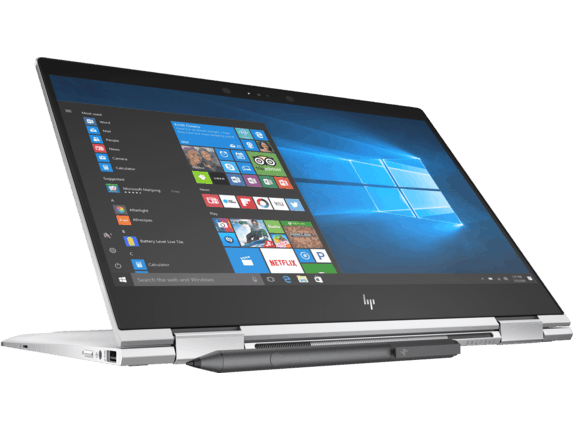
HP Specter x360 13 2018 can be considered a noticeable upgrade from its predecessor, which was shaped in the high-end 2-in-1 Specter x360 13 laptop segment introduced by HP last year. Although the appearance has not shown significant changes in the overall design language, but with Specter x360 13 2018, HP has shown a strong hand in “pruning” to make it slimmer and lighter than its predecessor. Specifically, the HP Specter x360 13 2018 is only 13.8mm thick and weighs 1.32 kg. The reason for getting a “slimmer” model is because the 2-in-1 HP Specter x360 13 2018 laptop model has been refined by the CNC manufacturer, giving the dark hardware components the best possible arrangement more favorable for forming a slender product, optimized for mobile use.
Naturally, to get the look of a supermodel, the HP Specter x360 13 2018 will also have to sacrifice some full-sized communication standards that were present on the 2017 version. HP Specter x360 is still not inferior to competitors because it still supports USB 3.1 Type-C (Gen 2) that supports both Thunderbolt 3, Display Port 1.2 and fast charging capability. HP still favored with the traditional USB connector and 3.5mm headphone jack. With the HP Specter x360 13 2018, users still have security options to protect their privacy when using an out-of-office machine such as SureView, fingerprint security and infrared cameras that are compatible with Windows Hello.
For the 2017 version, HP chose the fingerprint recognition layout on the side of the device, with the HP Specter x360 13 2018, the fingerprint reader position was rescheduled to the palm rest, making it more user-friendly and convenient. It is noteworthy that the 2018 version of the HP Specter x360 series is also equipped with a function button that completely turns off the integrated webcam, giving users confidence regardless of the bad guys installing the application to track and track through hardware small. This function button, once activated, will not only disconnect the entire power source to the webcam, but also remove the device driver on Windows.
As a 2-in-1 design product, the HP Specter x360 13 2018 is naturally equipped with a touch screen and offers an included stylus. Naturally, a product launched to serve the needs of daily work and entertainment like the Specter x360 13 2018 will not be without the Bang & Olufsen loudspeaker system and the internal hardware of the machine is also more competitive with those Strong opponents in the market. Strong hardware is not enough, HP also boldly ensured that the 2018 version of the HP Specter x360 13 high-end 2-in-1 laptop series is drastically improved on battery life, which can reach more than 22 hours of use.
Performance
Performance is kinda the strong point of the ZenBook 15 UX533FD, running on Intel Core i7 processors along with NVIDIA GeForce GTX graphics choices. With these setups you get mostly seamless multitasking, quick data crunching, and a smooth feel even when apps get heavy, like video editing, 3D rendering, and gaming.
For memory, options are usually in the ballpark of 8GB up to 16GB DDR4 RAM, so you still get decent memory bandwidth when you’re juggling multiple tasks or pushing around big files. Then the SSD storage brings fast read and write speeds, plus a snappy system response, so apps load sooner and files open without that annoying waiting time.
And yeah, the dedicated NVIDIA GPU does more than just “look good”, it helps with graphics-intensive work and boosts overall visual handling. That’s why the ZenBook 15 UX533FD fits creative professionals, especially those who need accelerated graphics processing and a fluid workflow for content creation.
Keyboard and Trackpad
The ZenBook 15 UX533FD includes a full-size backlit keyboard with a pretty comfortable typing experience, giving you good key travel , and tactile feedback that helps with accurate input. The layout also comes with dedicated function keys and a numeric keypad, which can be really handy for anyone who enters numbers often, or who relies on keyboard shortcuts frequently.
The precision touchpad kinda supports multi touch gestures and responsive navigation, giving accurate cursor control and a more intuitive way to interact with Windows 10/11. ASUS’s touchpad tech helps keep things smooth , with palm rejection too, so you can move around and work in apps pretty seamlessly without much fuss.
Battery Life
Battery life on the ZenBook 15 UX533FD is kind of all over the place, it depends on how you use it ,and what configuration you’ve got. ASUS focuses on power efficiency using battery management tech, and it can reach up to 10-12 hours of use on one charge with moderate workload conditions, assuming you’re not pushing it too hard.
Also, the laptop handles power consumption pretty efficiently, and it has fast charging, so you can stay productive most of the day without constant recharging. The quick charge feature means you can top up the battery to a notable level in a short time, keeping downtime low, and workflow uninterrupted.
Connectivity Options
On the ZenBook 15 UX533FD, the connectivity options are pretty broad, with a solid mix of ports plus wireless support. Usually you’ll see USB Type-A and USB Type-C ports for flexible connections, HDMI out for external screens, a headphone jack for audio accessories, and a microSD card reader, giving you extra storage space when you need it.
Some variants might come with Thunderbolt 3 ports, for fast data moving and external screen support, helping quick transfers and also multi monitor setups for more day to day output. On the wireless side you can get Wi‑Fi 6 (802.11ax) which keeps the connection quick and dependable, so you get smooth coverage in lots of different places, coffee shop to office floor.
Software and Additional Features
The ZenBook 15 UX533FD usually ships with Windows 10/11 Home or Pro operating systems. This gives a familiar and fairly secure computing feel, for most users. ASUS also bundles a bunch of extra utilities and features like ASUS Battery Health Charging and ASUS Splendid Display, which help the battery last longer and tune the display settings for sharper viewing, more pleasant clarity overall.
There can also be optional security add ons, like a fingerprint reader, or sometimes an IR camera for biometric logins. That means the device stays more private and your data is better guarded. ASUS’s own software ecosystem, often improves the whole experience with productivity tools, handy system utilities, and even entertainment apps, so it fits different preferences as well as work needs.
Audio and Multimedia
On the ZenBook 15 UX533FD, the audio quality is improved thanks to ASUS SonicMaster technology, giving clearer, more involving sound for multimedia playback and video calling. The integrated speakers are enough for everyday entertainment ,and those quick online meetings too , while the noise-canceling microphones help keep your voice readable. It’s kind of the whole “hear me, hear it” setup, you know.
There’s also the built-in webcam which gives a pretty normal video standard for video conferences and team collaborations , so it works well with most conferencing software and remote communication tools. Overall, ASUS’s audio and multimedia tuning aims to let you get a stronger media experience, plus better communication, whether you’re working or just unwinding.
Pros and Cons
Pros:
Sleek, lightweight body with a premium aluminum unibody build
Strong Intel Core i7 performance and NVIDIA GeForce GTX graphics
Vivid NanoEdge display with very thin bezels for a more immersive look
Comfortable backlit keyboard, and yes it includes a dedicated numeric keypad
Good battery endurance, plus fast-charging for longer stretches of productivity
Ports and connectivity options are solid, including Thunderbolt 3
ASUS SonicMaster audio tech adds better overall sound
Cons:
Not many upgrade options because the design is sealed and many parts are soldered in
The price is higher than most typical consumer laptops
The keyboard layout can feel cramped if you’re used to a larger board
Fan noise can show up, especially when the workload gets heavy
In conclusion, the ASUS ZenBook 15 UX533FD really shines as a versatile, and also quite powerful laptop, it blends premium looks with high level internal components for people that want both style and real productivity. The sleek aluminum chassis , plus the vibrant NanoEdge display, and the solid performance ability gives that kind of smooth day to day feeling, especially when you are doing creative work, watching media, or just handling everyday computing.
So whether it is content creation, more professional programs, or multimedia entertainment, the ZenBook 15 UX533FD brings the kind of speed, mobility, and long lasting build that modern users seem to need. It also mixes a clean design with strong performance and some smart advanced features, which honestly makes it a persuasive option for professionals who want something reliable for work , and also for leisure later on.
Newest HP Spectre x360-13t Quad Core(8th Gen Intel i7-8550U, 16GB DDR4, 512GB PCIe NVMe SSD, IPS micro-edge Touchscreen Corning Gorilla, Windows 10 Ink)Bang&Olufsen 13.3″ 2-in-1 Convertible – Dark Ash: Buy it now
HP Spectre x360 13t Touch Laptop i7-8550U Quad Core,16GB RAM,512GB SSD,13.3″ IPS FHD Touch, Gorilla Glass, Win 10 Pro Pre-Installed by HP, Dark Ash Silver, 3 YRS McAfee Internet Security Antivirus: Buy it now
HP Spectre x360-13t Quad Core(8th Gen Intel i7-8550U, 16GB RAM, 512GB PCIe NVMe SSD, IPS micro-edge Touchscreen Corning Gorilla, Win 10 Ink)Bang&Olufsen 13.3″ 2-in-1 Convertible Stylus – Silver: Buy it now
2018 HP Spectre x360 13-ae012dx 13.3″ 2-in-1 TouchScreen Laptop – Intel Core i7-8550U Processor 16GB Memory 512GB SSD Windows 10 (Certified Refurbished): Buy it now
Related Posts



Tech Reviewer & Product Analyst
Định Bia has spent over 10 years testing consumer electronics with a focus on smart technology. He work as a product advisor at Biareview where he helped customers find the right devices for their needs. He personally tests every product featured on this site using a consistent evaluation framework covering quality, durability, and value. All reviews are based on experience, not influenced by the manufacturer.