
Design
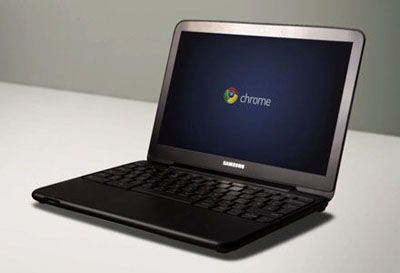
Chromebooks have designed a simple but beautiful and brings a touch of elegance. The outside of the machine is coated with white paint (in addition to the black version), and the Samsung logo with Chrome.
The size and spacing of the keys to Chrome than other conventional laptops. Fn function key is removed by Chrome OS has its own buttons to change the volume or switch tabs. Part trackpad is also made wider than usual, and there is a slight difference in usage: touching a finger to the left mouse, the mouse have 2 fingers.
Salient features
Chrome OS is an operating system based on web and thus it requires an Internet connection. Chromebooks will be fully operational functions best if you have WiFi or 3G connection. This is a completely different point than the existing laptop market and users need to register 3G network contract, otherwise the device will be very limited features. If the specter of conventional laptops is running out of power then for Chromebooks, the new network is losing the most frightening thing. Partly by this device length up to 8-9 hours of use thanks to the Chrome OS operating system consumes very little power. Not only that, Chrome OS is streamlining a lot and look leaner than Windows or Mac.
Chromebook Series 5 is only 16 GB of hard drive capacity for this device will store key data on the “cloud”, where users can access if an Internet connection. This is an advantage but also a huge downside of Chromebooks because just standing where no 3G users will have to “give up”. In addition, Samsung’s laptop also has ultra-fast booting. Usually these laptops like the Acer Aspire One 721 or Samsung NC110 it takes about 3 minutes to start up and connect to the Internet, Chromebook only takes less than 10 seconds.
In view mode, thumbnail is displayed just right of the screen with the option to take photos in the Picasa online albums. If you select a group of photos to see the operating system will open a new tab allows users to move between the images with the arrow keys. However while browsing images sometimes lag machine.
Chromebooks also disappointed with the video test, the machine does not support formats like .wmv .mkv and DivX .AVI. This is a pretty serious minus points of this operating system. With files that Chromebooks run screens for bright colors and quite brilliant. To full screen with HD may be aware of the weaknesses of the machine configuration when frequent stutters.
Web browsing is fine on this thing. But run the SunSpider 0.9.1 benchmark and the gap is startling: 1452.1ms here versus 351.7ms on desktop Chrome. Higher is slower, so that’s a big miss.
Display
12.1 inches, 1280×800. Low by today’s standards, obviously, but back when this shipped it covered browsing, docs, and video just fine. The matte coating actually reduces glare well — useful if you’re near a window a lot.
Color and brightness are middling. Viewing angles hold up until you push them, then colors start washing out at the edges. It’s a screen for spreadsheets, not for bragging rights.
Performance
Intel Atom N570, dual-core, 1.66GHz, 2GB DDR3 RAM. Enough for Chrome OS to feel snappy day-to-day. Ask more of it — a dozen tabs, anything CPU-heavy — and it starts to choke.
16GB of storage. That’s it. The whole point is you’re supposed to live in Google Drive instead, though there’s an SD slot if local storage is non-negotiable for you.
Browsing, email, docs — no complaints there. Load up too many tabs at once, though, and things get sluggish fast.
Battery Life
This is the one place the Series 5 actually earns some credit: 8 hours off a 6-cell battery. A full workday, roughly, if you’re not doing anything demanding.
Light stuff — browsing, typing — gets you near that number. Stream video or run several things at once and it drops noticeably. Still, for what this machine is, that’s a genuinely good result.
Software and User Experience
Chrome OS, Google’s browser-first, Linux-based system. Updates itself, has antivirus built in, doesn’t ask much of you.
First boot: a shelf at the bottom for pinned apps, settings tucked away, and otherwise it’s just the browser. That’s the whole interface. Some people will find that refreshing. Others will find it thin.
Boots in under 10 seconds, wakes from sleep almost instantly — genuinely fast. Gmail, Drive, Docs are one click away, and the Web Store covers most of what’s missing.
But it’s still a browser wearing a laptop costume. No video editing, no gaming, no niche desktop software. If your workflow depends on something that only runs natively, this machine will get in your way — sooner rather than later.
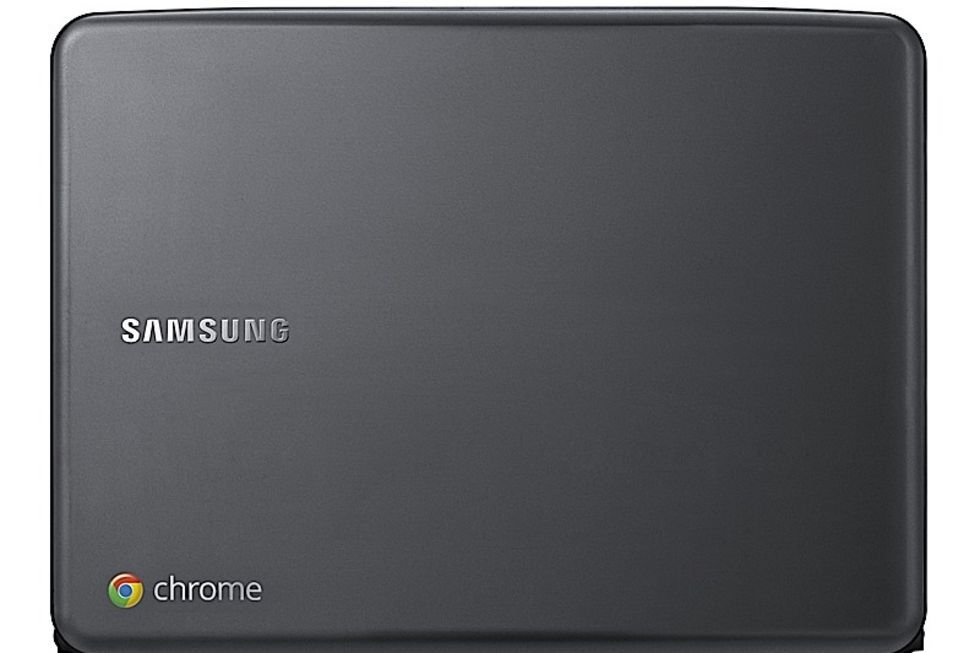
Samsung Series 5 Chromebook 3g WWAN (Unlocked) Celeron 867 1.3ghz 16gb Ssd 4gb 12.1″ Chrome Os Webcam Silver: Buy it now
Samsung Series 5 550 Chromebook (3G): Buy it now
Connectivity and Ports
Two USB 2.0 ports, mini-VGA, an SD slot, a headphone jack. That’s genuinely it. No USB 3.0, forget USB-C, even at launch this felt a step behind. Fine for a mouse or a flash drive though, so no real complaints there.
Wireless is 802.11n Wi-Fi plus Bluetooth 3.0, and it doesn’t drop connections during normal browsing or streaming. No Ethernet port at all, if you need a wired connection, this laptop just can’t do it.
Some versions throw in a SIM slot for 3G, a nice touch if you travel a lot or end up somewhere without Wi-Fi, assuming you’ve actually got a data plan for it.
Keyboard and Trackpad
Here’s the pleasant surprise: the keyboard is actually good. Chiclet keys, properly spaced, real tactile feedback — typing on this doesn’t feel like a compromise. The function row is swapped out for Chrome shortcuts (brightness, volume, back/forward), which makes more sense here than a normal F-row would.
The trackpad matches it — big, responsive, handles multi-touch gestures cleanly. Cursor control is precise enough that you stop thinking about it, which is really all you want from a trackpad.
Audio and Webcam
Speakers live on the bottom of the machine and sound clear but flat — no bass, not much volume. Good enough for a Zoom call, not something you’d choose to listen to music on.
The webcam is 1 megapixel. That number looks rough today because it is rough today, but it handles casual video chat fine as long as the room’s well-lit. Dim the lights and the image falls apart fast. The mic, at least, comes through clearly.
Conclusion
This was Google’s first real swing at proving Chrome OS could be a daily laptop, not just an experiment. Light, long battery life, deeply wired into Gmail and Drive — for the right person, that was enough. It’s also slow the moment you ask more of it, useless offline, and thin on ports.
Better Chromebooks came along not long after and made this one obsolete. But it proved the idea worked. If all you need is a browser and a battery that lasts the day, it still does that — it’s just not the machine anyone would actually recommend buying now.
Related Posts

Tech Reviewer & Product Analyst
Định Bia has spent over 10 years testing consumer electronics with a focus on smart technology. He work as a product advisor at Biareview where he helped customers find the right devices for their needs. He personally tests every product featured on this site using a consistent evaluation framework covering quality, durability, and value. All reviews are based on experience, not influenced by the manufacturer.