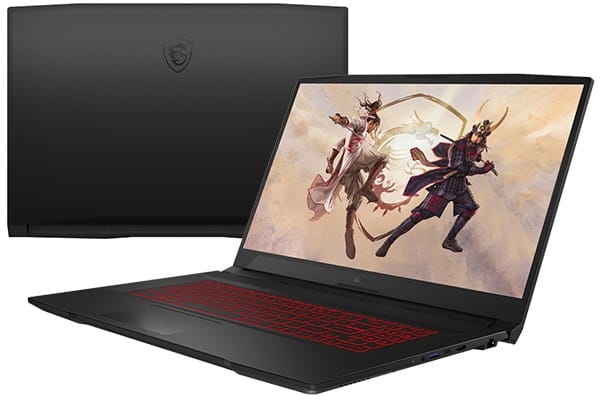
MSI Katana GF76 is, sort of a mid-range gaming laptop but still comes with pretty high power and a big screen. It uses an 11th gen Intel Core i7 processor, plus an Nvidia GeForce RTX 3060 graphics card, and it supports up to 64GB of ram which is nice. With all that, you can run the newest games that show up today pretty smoothly, most of the time.
Because of the performance level and the screen size it brings, the MSI Katana GF76 is also among the cheapest laptops in its segment, or at least it feels that way compared to others.
Specifications
CPU: Intel Core i7-11800H
GPU: Nvidia GeForce RTX 3060
RAM: 16GB
Memory: 1TB SSD
Display: 17-inch, 1080p, 144 Hz
Dimensions: 15.6 x 10.5 x 1.0 inches
Weight: 2.31 kg
Design
The MSI Katana GF76 is a larger gaming laptop with a 17-inch screen, the casing looks familiar. You get a matte black plastic outer shell with an imitation metal finish, it kinda blends in and doesn’t draw too much attention but it still looks gaming.
The keyboard set is a bit small compared to the body size, it doesn’t look very eye-catching. The screen is wrapped in a slightly thick bezel compared to today’s laptop standards, but because the machine belongs to the popular segment, this is acceptable.
MSI Katana GF76 is quite bulky, the length of 3 sides is 15.6 x 10.5 x 1 inch, and weighs 2.31 kg. This makes carrying the laptop quite difficult, if you often have to move you can refer to the GF66, a smaller version of this machine.
Even for its big size , the MSI Katana GF76 does not come with a whole lot of ports compared with many others in the same class. On the left side, the notebook has 2 USB Type-A ports, also 1 USB Type-C port , plus a 3.5mm headphone jack, so yeah it covers the basic needs without being overly generous.
Keyboard and touchpad
Although the key travel is not too deep, I still have a pretty good experience with the MSI Katana GF76 keyboard. The main reason lies in the number pad cluster located on the side, and the function keys of the machine are full-sized, such as the Backspace, Delete, and Enter keys and the arrow button cluster.
The touchpad of the device has a fairly small area, and it is quite difficult to operate, but I think it is not too important because most of you who use gaming laptops already have a wireless mouse. MSI Katana GF76 is a practical gaming laptop with high usability value.
Screen
The strength of the MSI Katana GF76 monitor lies in its 144Hz refresh rate, coupled with a performance level powerful enough to let you make the most of the monitor’s full potential while gaming.
On the other hand, the Katana GF76 is not equipped with an excellent one, with the ability to cover 62% of the sRGB color gamut, this machine can only be used for entertainment and for tasks that are not too important color accuracy.
Performance
Using the Katana GF76 can give a surprisingly quite good performance, way better than some competitors in the same segment, but it still doesn’t really pull strong results in benchmark tests. Because of that you may not be able to run every new game that comes out today at the maximum settings , and even if you can, it might feel a little limited. Also the laptop may not run smoothly if you connect it to a display with a higher resolution than 1080p. Below is a sort of table with frame results across various games, when I tested at 1080p.
Even so , the Katana GF76 is a cheaper gaming laptop than both the Blade 15 and the m15 R4, but the performance gap is still worth looking into. In my tests, it managed to push frames over 60 fps in Assassin’s Creed Valhalla, Grand Theft Auto V, and Shadow of the Tomb Raider. Only Red Dead Redemption 2 stayed below 60 fps, unless I adjusted things a bit, so yes you’d need to tweak the configuration a notch or two.
Honestly, “downgrade” is almost the right word for how it felt overall with the Katana GF76. I kept checking the graphics processing limits of the machine with high profile titles like Age of Empires III: Definitive Edition, Doom Eternal, Baldur’s Gate III, and Final Fantasy XIV. To keep up with higher frame rates and get more smoother gameplay, I had to lower the visual settings, slightly in several cases, because otherwise it just felt kinda stuttery, even when I expected it to handle everything. At that right level, though, I did get a very good experience, especially when playing on the laptop’s 144Hz screen.
However, the laptop has a bit of a limitation in terms of processing performance in work tasks. Although equipped with a high-performance chip and a large amount of RAM, the Katana GF76 cannot run Windows or daily work applications smoothly.
In the data write speed test, the MSI Katana GF76 copied a 25GB file with an average speed of 651 MBps. This speed is slower than the Blade 15 (890 MBps) and m15 R4 (1147 MBps).
Heat dissipation ability
The performance hiccups you might notice on the Katana GF76 could really come down to the laptop’s heat handling that feels, a bit inefficient. When I tested it during gaming, the highest temperature hit around 53.3 degrees Celsius and then, if you just leave it sitting on the main screen , it sits at about 37.7 degrees Celsius. With a heat level that high, you basically can not comfortably rest the laptop on your lap for long, at least not in any relaxed way.
To get it under control, MSI has pre-installed an app, so you can tinker with the ventilation fan speed. Thing is, the choices inside that tool are kind of narrow. It lets you reduce the fan rotation, or push it all the way to max speed. Still, that route isn’t really workable for everyday use , because the fan becomes extremely loud.
Battery life
And yeah, as a high-performance gaming machine, the battery endurance on the Katana GF76 lands in the middle of the road. While gaming, it only runs for roughly 1 hour. In the basic battery test, the system lasted around 2 hours and 30 minutes with continuous web browsing over Wi‑Fi , with the screen set to 150 nits.
Summary
Overall, the MSI Katana GF76 includes current, strong components, so it should let you play a lot of games smoothly and keep frame rates up. But the overall package has a bulky body , performance that can feel unstable, and heat levels that run on the high side. So, you’ll want to think twice before you buy, especially if you care about day to day comfort. Even so, the MSI Katana GF76 still looks like a pretty solid option if you’re hunting for a high-performance gaming laptop at a mid-range price.
Advantage
Affordable price
Smooth gaming performance
Display 144Hz
Disadvantage
The design is not too impressive
Mid-range performance
There is a heat level that is hot in the hand
Mid-range battery life
MSI Katana GF76 17.3″ 144Hz FHD Gaming Laptop: Intel Core i7-12700H RTX 3060 16GB 512GB NVMe SSD, Type-C USB 3.2 Gen 1, High-ResoluTion Audio, Cooler Boost 5, Win11 Home: Black 12UE-026: Buy it now
MSI Katana GF76 17.3″ 144Hz FHD Gaming Laptop Intel Core i7-11800H RTX3050TI 16GB 512GBNVMe SSD Win11 – Black (11UD-663): Buy it now
MSI Katana GF76 17.3″ 144Hz FHD Gaming Laptop Intel Core i5-11400H RTX3050 8GB 512GBNVMe SSD Win11 (11UC-492): Buy it now
MSI Katana GF76 17.3″ 144Hz FHD Gaming Laptop: Intel Core i9-12900H RTX 3070 Ti 16GB 1TB NVMe SSD, Type-C USB 3.2 Gen 1, High-ResoluTion Audio, Cooler Boost 5, Win11 Home: Black 12UGSK-831: Buy it now
MSI Katana GF76 11UD-001 17.3″ 16GB 512GB SSD Core i7-11800H 2.3GHz Win10H, Black: Buy it now
Related Posts

Tech Reviewer & Product Analyst
Định Bia has spent over 10 years testing consumer electronics with a focus on smart technology. He work as a product advisor at Biareview where he helped customers find the right devices for their needs. He personally tests every product featured on this site using a consistent evaluation framework covering quality, durability, and value. All reviews are based on experience, not influenced by the manufacturer.