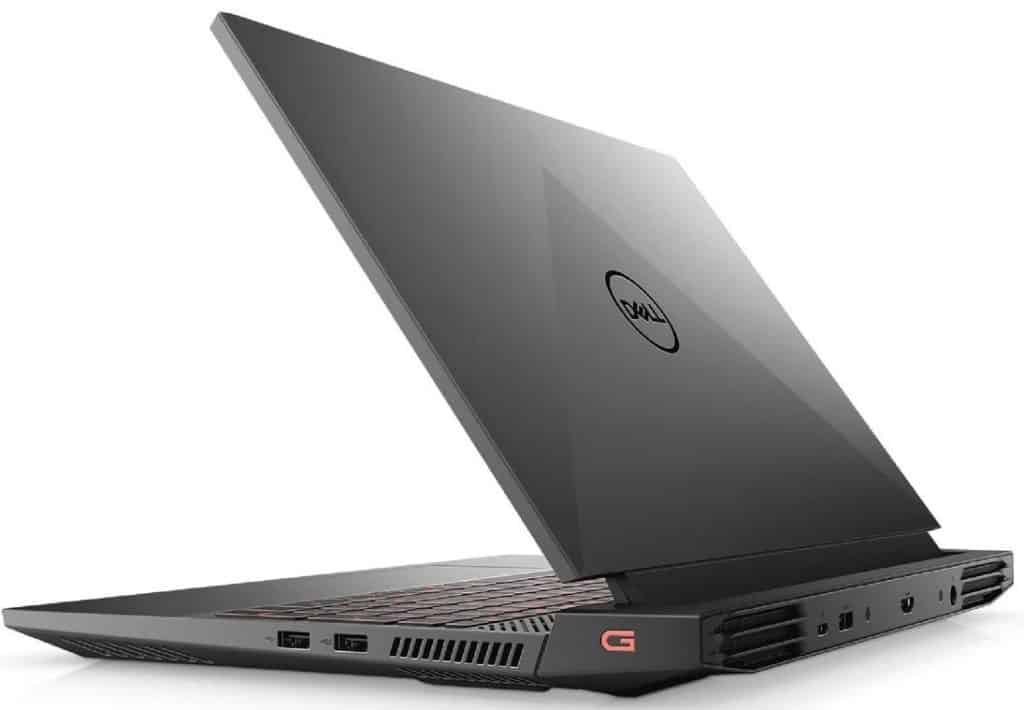
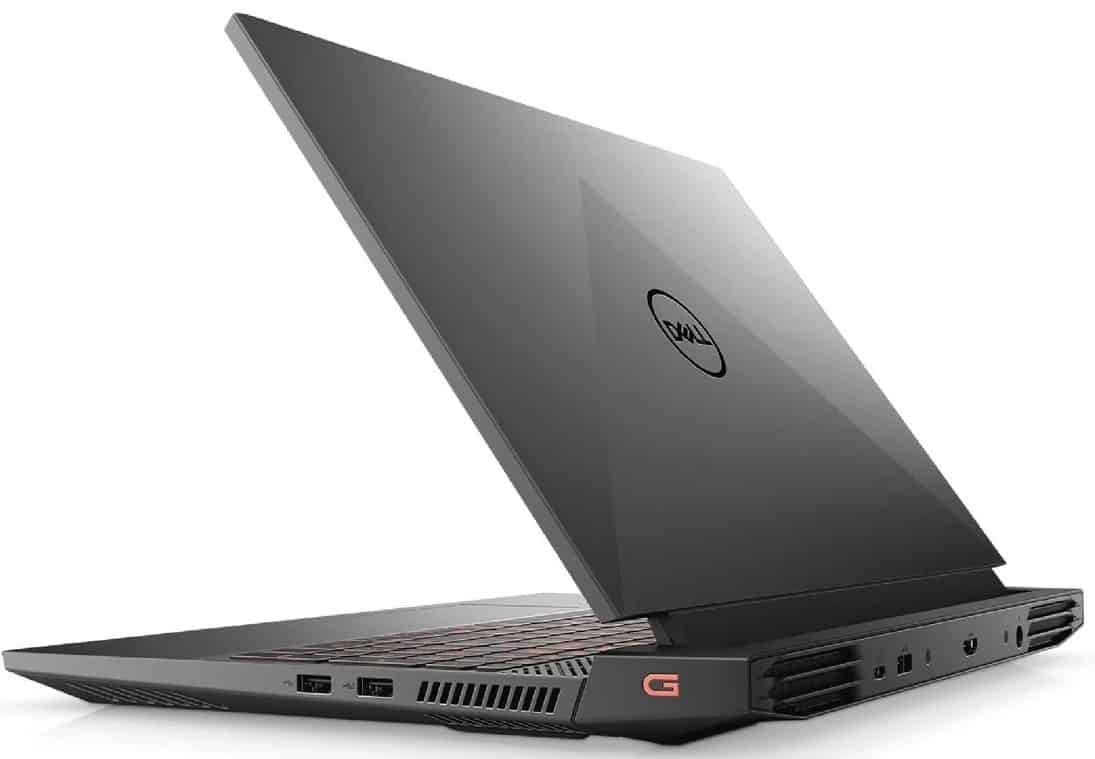
In this review, Biareview will introduce to you the best gaming laptop, suitable for those of you who are looking for a laptop that can serve well for work as well as entertainment, and play games but can’t afford the high price tag. Model G15 5510, prepared by the Dell brand for the best gaming device category at a good price.
Especially in the gaming space with NVIDIA’s recent introduction of RTX graphics cards to the market, ray tracing and very high graphics expectations will delight gamers, but the price of these laptops This graphics card is very high and not everyone has the budget to own it, so NVIDIA has another great option, the GTX 1650.
While the GTX 1650 graphics card is just a pure price/performance-oriented graphics solution, the games don’t disappoint and it performs very well. Dell has also chosen this graphics card in the Gaming Laptop G15 5510, thus creating a more budget-friendly option as well as solid performance for gamers.
Specifications
15.6-inch screen size
Resolution 1920 × 1200px
NVIDIA GeForce GTX 1650 graphics processor
Graphics capacity 4GB GDDR6
SSD 512GB
USB 2.0 port 2
HDMI: No
Ethernet: Yes
Bluetooth: Yes
Wi-Fi 802.11ax
Design
Dell G15 5510 is a pretty neat model for its design honestly. The G15 5510, with a 15.6-inch screen, it really answers what people expect when they are after a smooth screen experience, thanks to a 120Hz refresh rate. The Full HD panel looks crisp enough, with 250 nits brightness too, and it is treated with an anti glare coating which helps the display stay usable in everyday ambient light conditions.
By the way, the overall design of the laptop looks nice. Inspired by Dell’s Alienware line of laptops, the G15 5510 also takes Alienware as a model with a heatsink design. Dual air intakes just above the keyboard and below the G15 maximize airflow through copper tubes inside the laptop’s inner surface to ensure optimal heat dissipation and cooling, allowing air to escape outside through 4 side and rear vents. Remember, when buying a laptop, its cooling design is just as important as its specifications.
Display
Screen Size and Resolution
Dell G15 5510 has a 15.6-inch display, which is kinda a classic for gaming laptops, you know. It comes with a Full HD (1920 x 1080) resolution , and that generally gives you sharp, clean visuals for gaming, videos ,and also day to day productivity stuff. This Full HD setup usually lands in a decent sweet spot between raw performance and visual clarity, so games look nice without you feeling like the system is getting overly taxed.
Color accuracy and brightness
On the G15 5510, the screen manages decent color accuracy and brightness, though it’s not exactly the top choice in its category. The colors show up lively and are accurate enough for gaming plus casual use. Still, if you’re doing professional photo or video work ,it might feel a bit limited. Brightness is fine indoors, but outside in strong sunlight the display can have trouble , like it just can’t push enough. So overall, you get a good screen for gaming and general tasks, and the experience feels pretty immersive.
Refresh rate
A really notable thing about the G15 5510’s display is the 120Hz refresh rate. That’s a clear upgrade compared to the standard 60Hz panels you see on a lotta laptops. With 120Hz, movement looks way more smoother and kinda fluid, and fast action scenes don’t feel as choppy. The higher refresh rate helps reduce motion blur as well, which makes a real difference in competitive games. In short, it’s a solid plus for players who want a bit of an edge and actually notice how smoother refresh rates improve gameplay.
Performance
The laptop is powered by an Intel Core i5-10200H processor. This processor, with 4 physical cores and 8 threads, operates at a base frequency of 2.40 GHz and can boost performance up to 4.10 GHz under load. This is an ideal parameter for programs and applications that demand performance as well as games. While Core i7 and even Core i9 processors are thought of when it comes to gaming, the Core i5 is a good choice in the price/performance balance.
As Biareview said at the beginning, the graphics card in the laptop is NVIDIA GeForce GTX 1650 backed by 4GB GDDR6 memory. A quality graphics card will let you run many games at high graphics settings with results above 60 fps in BattleField V, one of the games I tested on a laptop.
The laptop, on the other hand, also manages to produce 110 fps results at high graphics settings in Valorant, so that it can perform at a level that meets expectations in the game. Even with some tweaking in the graphics settings, you can get 80 fps in Death Stranding, 50 fps in Cyberpunk 2077, and 75 fps in Far Cry New Down. In this sense, we can say that it is in a very good equilibrium for its segment.
Dell G15 5510 comes with 8 GB of RAM, running at a 2933 MHz frequency. The storage side is given over to a 512GB PCIe NVMe SSD as well. Also this Dell laptop includes Game Shift tech, aimed more at gamers. With Game Shift , you can trigger it by pressing the FN key + Game Shift, and it turns on the dynamic performance mode inside the Alienware Command Center, so that turbo mode is activated. Even though this shortcut boosts processor power , it simultaneously pushes the highest fan speed to keep the system cooler.
Connectivity
Ports
The Dell G15 5510 brings a solid mix of ports, so you can handle most connectivity needs without really thinking about it too much. You get three USB 3.2 Gen 1 Type-A ports , plus one USB 3.2 Gen 2 Type-C port that also includes DisplayPort 1.4 support. There’s an HDMI 2.0 output too , along with a standard Ethernet port. For audio, it has a 3.5mm headphone/microphone combo jack, and for storage it includes a full size SD card reader. With all that, hooking up things like peripherals, extra screens, or removable drives feels straightforward, no real hassle , and no awkward adapters needed.
Wireless Connectivity
When it comes to wireless, the G15 5510 supports Wi-Fi 6 802.11ax, plus Bluetooth 5.1. Wi-Fi 6 tends to deliver quicker, more dependable connections, especially when the network is crowded. That helps with online matches staying smooth , and downloads finishing faster than you’d expect. Bluetooth 5.1, meanwhile, supports easier pairing with wireless gear, like mice, keyboards, and headphones.
Additional Features
There’s also a Killer E2600 Gigabit Ethernet controller inside, it’s basically tuned to favor gaming traffic , which helps reduce latency. In practice this can mean a smoother online gaming session with less delay, and it’s a nice bonus for competitive players who want the most stable, low-latency internet possible.
Battery Life
Longevity
Battery life is honestly one of the first things people worry about with gaming laptops, and the G15 5510 is pretty similar. It comes with a 56Wh battery , so for everyday stuff it’s pretty decent, but the moment you start gaming it kind of… drops, like fast. For normal use, web browsing, document work, and watching videos, you can usually expect something around 5–6 hours per charge. Still, when you get into heavier games, it often ends up around 1 to 2 hours , so yeah, for “gaming on the go” you should be ready to either bring the charger or hunt down a plug somewhere nearby.
Charging
Now the charging side is better, at least in terms of speed. The G15 5510 includes a 180W power adapter that supports rapid charging. With it, charging from 0 to 50% takes roughly 30 minutes , which is pretty helpful when you only have a short window before leaving. Also, the adapter feels relatively compact for a 180W brick, so it’s easier to throw in a bag without it taking over everything.
Keyboard and Trackpad
Keyboard Layout and Comfort
On the keyboard front, the Dell G15 5510 gives you a full-sized setup, plus a separate numeric keypad, which is nice if you do spreadsheets or just like the extra keys. The layout is spaced out well , the keys feel comfortable for typing, with decent key travel and that tactile response you want. There’s also keyboard backlighting, and the RGB effects can be customized, using the Alienware Command Center software. The lighting makes a noticeable difference in darker rooms, and it also adds a bit of personality to the whole machine, without going overboard.
Trackpad Responsiveness
So yeah the laptop trackpad is big, and it feels pretty responsive, it also supports Windows Precision drivers which helps with accurate tracking and those multi touch gestures. The top surface is smooth, you can glide around easily, and it makes moving through the operating system kind of effortless. I mean, if you are into gaming you might lean toward an external mouse, still, the trackpad holds up pretty well for daily stuff, plus productivity work.
Software and Features
Operating System
The Dell G15 5510 arrives with Windows 10 Home already installed, so you get a familiar and flexible setup right away. Windows 10 has a bunch of features, and it stays compatible with both gaming and work apps. Also it feels tuned for gaming, with options like Game Mode and the Xbox Game Bar, those do help improve the whole experience.
Pre-Installed Software
Dell does keep the pre installed software fairly minimal, which helps the experience feel clean, sort of streamlined too. You still get the key drivers and utilities, plus a handful of Dell specific apps, like Dell Power Manager and Dell Mobile Connect. Together they add extra value, giving power control options and smoother pairing with your phone, or more precisely, mobile devices.
Alienware Command Center
One of the most noticeable software features on the G15 5510 is the Alienware Command Center. It acts like a kind of central “control place” for managing and tweaking different sides of the laptop, including RGB lighting, performance moods, and game profiles. With it, users can set up their own custom profiles for specific games, and fine tune things such as fan pace, power management, plus the screen’s refresh rate. That way, you can dial it in so the machine feels more responsive when it matters.
Audio and Webcam
Speakers and sound
Sound quality
The Dell G15 5510 comes with stereo speakers that give you pretty solid audio for a gaming laptop. The speakers are positioned on the front corners of the chassis , so the sound gets aimed more toward you instead of bouncing around the room. Overall the output is clear, with decent midrange and clean high frequency reproduction, which makes it useful for gaming, everyday multimedia, and also for video calls. Still, there’s no real deep bass here because of the speaker size , so if you want heavy low end, you’ll likely need external speakers. For casual gameplay and watching movies though, they do the job without feeling too weak.
Audio Software
Dell packs the Nahimic 3D Audio software with the G15 5510, and it’s meant to kind of tune up your overall listening feel by adding virtual surround sound, plus a handful of audio enhancements. Through the Nahimic app users can tweak things like bass boost, voice clarity, and surround sound effects . It tends to be quite helpful if you game a lot, because it improves spatial awareness , and for movies too it makes the whole experience feel more absorbing and immersive.
Webcam
On the G15 5510 you get a 720p HD webcam placed on the top bezel of the display. In practice it gives solid enough video quality for video conferencing, online meetings , and those casual video chats people do. In brighter rooms the image comes out pretty clear, with decent details that work well for calls and streaming . Still, as with most laptop cameras it doesn’t really play nice in low light , so images can look grainy or rather dim. If you care a lot about video quality , especially for professional calls or streaming, an external webcam would probably be a better route.
Cooling System and Thermal Performance
Cooling Design
Good cooling matters a lot for keeping performance stable , and for extending the overall life of gaming laptops. The G15 5510 arrives with a sturdier cooling approach. It runs a dual fan cooling layout and heat pipes that shuttle heat away from the CPU and GPU, pretty effectively. With two fans pushing airflow through the case, it helps cut down thermal throttling , and keeps performance output more even during longer gaming marathons, instead of sort of fading after a while.
Thermal performance
While you’re gaming or doing heavier tasks, the G15 5510 handles heat pretty well, honestly. Its cooling setup manages the heat output in a way that keeps temperatures in a pretty acceptable range during load. Sure, the laptop can feel quite warm during long and demanding sessions, especially around the exhaust vents, but it doesn’t usually climb to those “too hot” levels that would hurt performance or annoy your hands and comfort. Dell’s tuning of airflow plus fan control seems to help it find a middle ground between cooling efficiency and noise restraint, so it’s not just blast-cooling all the time.
Fan noise
Fan noise is kind of the usual story with gaming laptops, and here the G15 5510 sits in the moderate zone. When you start playing, the fans spool up to push heat out, so you can hear them during active gameplay. That said, it’s not overly loud or distracting, especially when you compare it to a lot of other systems in the same general price-and-class area. You might notice it during intense gaming, though for most people it’s still manageable, and if you want to dial it down you can use performance profiles inside the Alienware Command Center.
Gaming experience
Gameplay performance
The Dell G15 5510 gives a pretty dependable gaming experience across a range of titles, mainly because the hardware setup is up to the job. The pairing of the Intel Core i7 processor with the NVIDIA GTX 1650 Ti graphics card helps support smooth sessions in popular AAA games as well as esports games. Titles like “Fortnite”, “Apex Legends”, and “Valorant” tend to run really well when you crank things up, giving you a decent equilibrium between visuals and that responsive sensation you re after while playing. Also, the 120Hz refresh rate panel helps a lot, because it cuts down motion blur, then everything feels more fluid overall.
Graphics performance
So, the GTX 1650 Ti GPU does pretty well in gaming benchmarks, it gives enough graphical grunt for most current games running medium to high settings. It probably won’t hit ultra-high settings in the most brutal, heavy titles but honestly it keeps a decent balance between performance and efficiency. That balance is what casual players, and also more competitive folks, seem to like. In day to day use you can generally expect stable frame rates and solid visual clarity across a lot of games, so the G15 5510 ends up feeling like a dependable budget gaming option.
Connectivity and multiplayer gaming
The G15 5510 also covers connectivity in a way that actually helps during online play. With Wi‑Fi 6 onboard you get quicker and steadier connections, which can mean less latency and smoother action in multiplayer matches. And then there’s the Killer E2600 Ethernet controller, it helps by prioritizing gaming traffic ,so network congestion doesn’t get in your way as much. Whether you are jumping into first-person shooters, hopping between MOBAs ,or grinding in MMOs, these networking features support a more reliable and responsive experience overall.
Conclusion
In the end, the Dell G15 5510 feels like a pretty well matched gaming laptop when you compare performance with price , it s kind of surprising how well it fits together. It has a solid technical base, including the GTX 1650 graphics card and the Intel Core i5-10200H processor , plus a 15.6-inch display and a 120Hz refresh rate. If you’re looking for a good gaming laptop , but you do not want to burn all of your budget.
Dell G15 5510 Gaming 15 Laptop 15.6″ FHD 120Hz Display 10th Gen Intel 4-Core i5-10200H (Beats i7-8750H) 16GB RAM 512GB SSD GeForce GTX 1650 4GB Backlit Nahimic Win10: Buy it now
Related Posts

Tech Reviewer & Product Analyst
Định Bia has spent over 10 years testing consumer electronics with a focus on smart technology. He work as a product advisor at Biareview where he helped customers find the right devices for their needs. He personally tests every product featured on this site using a consistent evaluation framework covering quality, durability, and value. All reviews are based on experience, not influenced by the manufacturer.