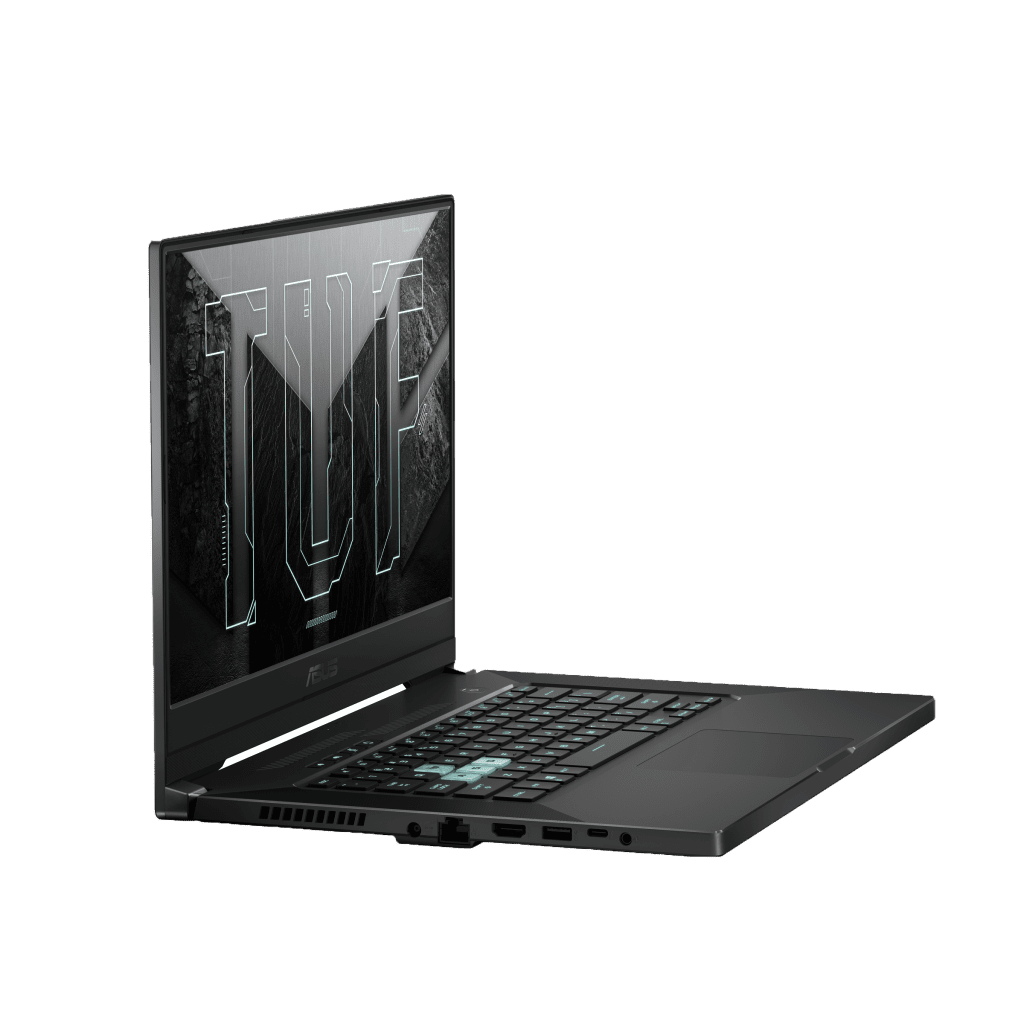

The moment I first saw this TUF Dash F15 through the photos at CES 2021, I had to wonder: “Is this Zephyrus?” Because that is probably the first time, a TUF Gaming product appearing in front of my eyes can be so neat, tidy. That is also the main reason that a while later, the name Dash F15 is still mentioned with the same frequency as Flow x13 – another success of ASUS at the event earlier this year.
When I unboxed this product, that’s right; this is a Zephyrus – and the presence of TUF Gaming can only come from a few small factors. That can be a step backward for those of you who love creativity, but it’s the right thing to do for me. Making the TUF line worthy of the price is not cheap when prices are increasing, so it no longer has to stand behind the huge shadow of the “brother” ROG.
In terms of appearance, be a little observant; you will recognize many of the lines of the Zephyrus G15 2020 on the TUF Dash F15: Back design, rear radiator slot, keyboard layout, and more again. Instead of copying the same and leaving the logo in the middle as on TUF Gaming F15 2020, TUF Dash F15 has also been given a few elements to increase identity. I like the way ASUS made them.
On the A-side now, TUF Dash F15 is adorned with a large text placed along the body, instead of dividing the array-like Zephyrus G15 or leaving it blank like TUF Gaming F15 2020.
In addition, the logo of the series has also been redone, still the letter U and wings, but stylized and simplified with square blocks. I am especially satisfied with this new logo: Less flashy, modern, and easier to remember than the old version.
Instead of being small under the logo, as usual, this year, the word TUF was enlarged to its fullest extent to attract attention. Will 2021 be the year this machine “upgrades,” with impressive changes no less than the giant text? We will probably need to wait until the launch date of TUF Gaming A15 2021 – another TUF option with a very competitive price and configuration – to get an answer.
Opening the device, TUF Dash F15 shows the spirit of learning from Zephyrus with a new hardware layout. The air intake, keyboard, touchpad, etc., all are neatly arranged instead of overflowing near the edge like previous TUFs. Although it will have to change the number pad, the writer does not see any loss because there is no need to use it. These are all decent tweaks to the look; make the device more fashionable, accessible to users, and more suitable for the multi-use trend on current gaming laptops.
If I had to point out a few minus points, the first would probably be that the device’s body is easy to stick to sweat and fingerprints. It’s also hard to blame when most of the body is still made of plastic, except the lid. In addition, it seems that the TUF Dash F15 learned the Zephyrus design a bit too deeply, to the point of “removing” even the webcam cluster that has always existed on TUF Gaming before.
All will be encapsulated in a slim, portable body – which is also the factor that ASUS especially emphasized on this year’s TUF Dash F15. With a medium weight of 2kg and a thickness of 19.9mm, this can be considered the thinnest and lightest TUF Gaming product ever.
Display Quality
The ASUS TUF Dash F15 has a 15.6-inch IPS type display, running Full HD at 1920 x 1080 pixels. It gives crisp visuals and pretty vivid tones, so gaming plus multimedia feels more immersive , even when you are just scrolling through videos. The panel itself moves fast too, with a refresh rate reaching up to 240Hz and a 3ms response time, that combination helps keep motion looking steady and cuts down motion blur during those quick, chaotic matches. Because of that, it’s the kind of setup that competitive players tend to like, those who really care about fluid input and quick reactions.
On top of all that, the screen includes Adaptive-Sync. Basically, it matches the display refresh rate to the GPU output, so the image doesn’t jump around as much, and you get less tearing , along with fewer stutters. This helps gameplay feel smoother overall. Since it’s IPS based, you also get broad viewing angles, meaning multiple people can look at the display from the side without the colors turning weird. That makes it handy for group sessions, or for teamwork when you’re sharing what’s on screen.
About the screen frame , TUF Dash F15 keeps that slim three-bezel look, it’s still built to feel tidy and modern. It also sticks with familiar display tricks that support gaming, like a 144Hz refresh option, 3ms latency, and AdaptiveSync so tearing stays controlled. The writer also did color checking using SpyderX Elite , though the results were only average.
If you are after a better color vibe, readers might want to look at the 240Hz screen version , where the color index is then a bit more extensive and accurate (100% sRGB). Still, unfortunately, to distance itself from the ROG line , the TUF Dash F15 will not come with the kinds of standout choices you might expect, like FullHD 300Hz or QHD 165Hz.
As for setup, the TUF Dash F15 I currently have will go with the standard package, meaning an Intel Core i7-11370H CPU with 4 cores and 8 threads, plus an NVIDIA RTX 3050 Ti 4GB graphics card. These parts are all relatively fresh on the market, and yes especially the RTX 3050 Ti since it was only officially released about two weeks ago.
Performance and Hardware
Inside, the ASUS TUF Dash F15 is kind of built around up to an 11th Gen Intel Core i7‑11370H chip, so you get solid performance for heavier apps, gaming, and just plain everyday multitasking too. That CPU is matched with NVIDIA GeForce RTX 3060 or RTX 3070 graphics , and these are set up to push strong in‑game results plus smooth rendering. With those graphics options in play you can chase high frame rates, keep solid visual fidelity in AAA titles , handle VR sessions without too much fuss, and also cover creation tasks like 3D rendering, alongside video editing work.
For memory and storage, the laptop comes with setups offering up to 32GB of DDR4 RAM and PCIe NVMe SSDs somewhere between 512GB to 1TB. The quick SSD means faster boot times, rapid data access, and smooth application launches, which together help the whole system feel more responsive , and support better day to day productivity.
Keyboard and Touchpad
The ASUS TUF Dash F15 has a full-size backlit keyboard with customizable RGB lighting , so you can dial in lighting effects and make the vibe feel more immersive. The layout includes dedicated function keys, a numeric keypad (depending on region) and keys that are spaced out nicely , with decent key travel for a tactile feel and comfortable typing. The RGB backlighting makes it easier to see in dim rooms, and it also adds a kind of clean stylish touch to the laptop’s overall design look.
The precision touchpad on the ASUS TUF Dash F15 feels quick and it supports multi-touch gestures , so moving around is more intuitive and controlled. You get smooth cursor travel, plus accurate input recognition, which helps when you are jumping between applications, web pages, and documents, pretty much without hesitation.
Cooling System and Thermal Management
One of the more impressive things on the ASUS TUF Dash F15 is its advanced cooling approach, made for intense gaming stretches and for keeping performance steady even while the system is under load. It uses an efficient cooling setup with several heat pipes, dual fans, and vents placed in a way that improves heat release, and overall airflow . There s also a self-cleaning cooling mechanism that reduces dust accumulation, so thermal efficiency stays reliable over time , and the system doesn’t wobble as easily.
ASUS also leans on its own HyperCool technology, to kinda fine tune fan speeds and cooling profiles based on CPU and GPU temps. This helps reduce the heat buildup , and it lowers thermal throttling, when you’re gaming for long sessions. With that thermal design, the notebook can stay on roughly the same performance and avoid overheating , so you get dependable gaming outcomes and system stability even when things get real demanding.
Battery Life and Efficiency
For battery life, the ASUS TUF Dash F15 gives fairly decent endurance for a gaming laptop, like it can reach up to 8 hours on one charge depending on how you use it and what your power settings are doing. So, it’s kinda useful if you want longer productivity stretches or gaming sessions without constantly hunting for an outlet. On top of that, it supports fast charging tech, meaning you can get back to around 50% capacity in about 30 minutes, so downtime is reduced , and you stay more productive even during short breaks or when you are moving around.
Connectivity and Ports
The ASUS TUF Dash F15 also brings a solid mix of ports and connection options, meant to fit a bunch of peripherals and outside devices. You get several USB Type-A ports as well as USB Type-C, an HDMI output, a Gigabit Ethernet port, and a 3.5mm combo jack for headphones and a microphone. There are USB Type-C connections that back Thunderbolt 4, which helps with quicker data movement, connecting an external screen, and even device charging. All of that makes the laptop feel more ready for gaming setups, but also for professional workflows where you need dependable connections.
Wireless connectivity is handled with Wi-Fi 6 (802.11ax) support, for stable , quick wireless internet that helps with online play, browsing, and multimedia streaming. Bluetooth 5.1 is included too, which makes it easier to wirelessly pair with Bluetooth accessories like gaming mice , keyboards, headphones, and phones. This adds a bit of flexibility so the system works well in different everyday or on-the-go situations.
Audio and Multimedia Experience
The ASUS TUF Dash F15 sort of comes with dual speakers that use DTS Ultra tech, so you get this immersive audio vibe and that spatial sound vibe too. It’s built for gaming, multimedia watching ,and just general entertainment stuff. The speakers sound pretty clear and nicely balanced, with stronger bass plus brighter treble, so game soundtracks, movies, and everyday music end up feeling more enjoyable, less flat and more lively.
Software and Gaming Experience
On the software side , the ASUS TUF Dash F15 is shipped with Windows 10 or Windows 11, giving you a familiar, secure place to run everything for gaming, work , and media. It also includes ASUS’s own utilities…especially Armoury Crate, which lets you tweak RGB lighting effects, check performance stats, and dial in game profiles for better play. Then there is ASUS Aura Sync, which syncs the RGB lighting across compatible gear and accessories, so the whole setup looks coordinated, like one consistent lighting theme rather than random blinking.
Regarding the i7-11370H CPU, this is an option from the Tiger Lake-H35 lineup announced by the Green team earlier this year, with the destination will be thin and light gaming / high-performance products. That is also quite reasonable because if you look at the essence. The i7-11370H is an increased version of the pulse and power of the i7-1165G7 on the ultrabook. Since receiving the device, I have also tried to pull a few AAA games that have recently come out. The biggest impression that i7-11370H leaves are the temperature, with most of the time staying around 80.
As for the RTX 3050Ti, this will be one of the first mainstream graphics card options to be equipped with NVIDIA’s advanced Ray Tracing capability – which enhances the light quality and reflection effects to make the game “real.” Maybe the RTX 3050Ti isn’t as powerful as the 3060 or 3070, but in an age of rising prices, it’s a highly pragmatic option – making the discussion around it more valuable. In addition, with a price of about $1400, TUF Dash F15 3050Ti will have to compete with several products equipped with RTX 2060 or GTX 1660Ti – with very competitive performance/price.
In terms of ports, the TUF Dash F15 is quite fully equipped for the current experience of connecting gaming gear, peripherals, or presentations. Specifically, we will have 3 USB-A 3.2 Gen1 ports, 1 USB-C port with integrated Thunderbolt 4, HDMI 2.0b, RJ-45 LAN port, and a combo 3.5mm headphone jack.
Finally, about the battery, ASUS will equip the TUF Dash F15 with a 4-cell 76Wh battery – significantly more than the 46Wh on last year’s TUF Gaming F15.
That’s my first experience with the TUF Dash F15 – a slightly more “popular” version of this year’s Zephyrus G. It’s great to have the many advantages of the ROG lineup, but can they work together for a truly satisfying experience?
2021 Newest ASUS TUF Dash F15 Ultra Slim 15.6″ Gaming Laptop, 144Hz FHD, Intel i7-11370H, Nvidia Geforce RTX 3050 Ti, 24GB DDR4 RAM, 512GB + 1TB NVMe SSD, Thunderbolt 4, WiFi 6, Windows 10: Buy it now
ASUS TUF Dash F15 Gaming Laptop Computer, 15.6″ 144Hz FHD, Intel Quad-Core i7 11370H, 24GB DDR4 RAM, 1TB PCIe SSD, RTX 3060 6GB, WiFi 6, BT 5.2, Thunderbolt 4, Windows 10, BROAGE 500GB External HD: Buy it now
Related Posts




Tech Reviewer & Product Analyst
Định Bia has spent over 10 years testing consumer electronics with a focus on smart technology. He work as a product advisor at Biareview where he helped customers find the right devices for their needs. He personally tests every product featured on this site using a consistent evaluation framework covering quality, durability, and value. All reviews are based on experience, not influenced by the manufacturer.