Introduction
The Dell Inspiron N5010, also sometimes called the Inspiron 15R on a few pages, is kind of a flexible mid range notebook that showed up in the early 2010s. It was meant for a wide group, students, office people, and even folks who just want something for day to day surfing and the basic stuff. In a nutshell it aims to sit right in the “sweet zone” between performance that doesn’t quit too soon, affordability, and a build that doesn’t feel like it will snap if you breathe wrong, you know, without turning every little task into a problem. In this review, we’ll go through the main sections of the Dell Inspiron N5010, starting with the general appearance, the display, how responsive it feels in use, the keyboard, touchpad, ports and connectivity, speakers, battery endurance, and that big “is it really worth it” question.
Design and Build Quality
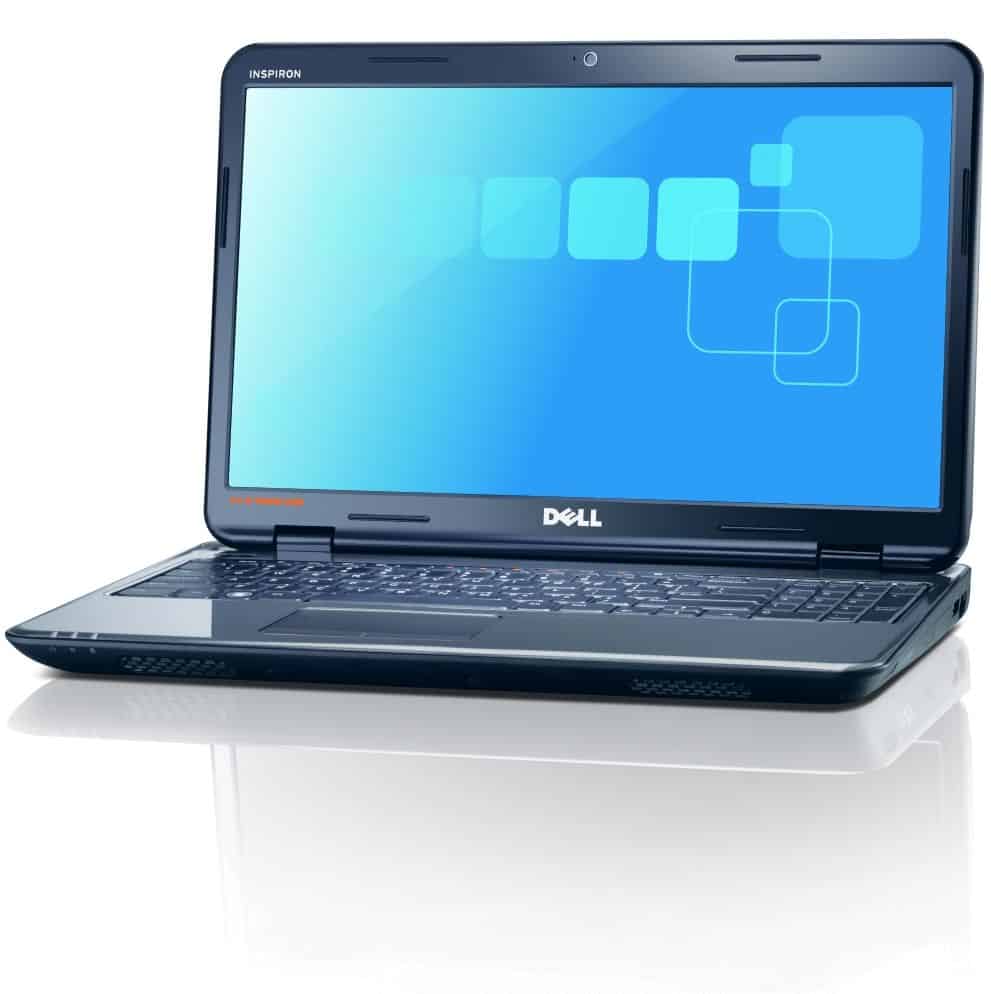
The Dell Inspiron N5010 lands with a clean, modern vibe and it has a glossy plastic coating on the lid, and kinda around the palm rest area too. You can get it in a few color options, black red blue and pink, so if you care about a touch of visual flair it feels a bit more personal than some plain office style variants. The outer shape is sleek and it still looks current, which makes it a pretty straightforward pick for anyone who wants a laptop that looks decent while staying practical.
The body is mostly plastic, sure, but it feels firm enough and fairly well put together, with only limited give if you press around with your fingers. Overall, the build quality feels pretty solid, so it should handle everyday life without too much fuss. The Dell Inspiron N5010 measures about 376 x 260 x 34 mm and it weighs roughly 2.7 kg, which is pretty typical for a 15.6 inch machine. It isn’t the featherweight champ, but it hits a decent compromise between screen size and carry comfort, for normal stuff like book bags, commuting, or using it at home where it doesn’t need to move every ten minutes.
The hinge mechanism is pretty sturdy an it lets the lid open pretty smoothly, with a max angle close to 135 degrees or so. The glossy finish though, it’s kinda touchy it picks up fingerprints and smudges rather fast, so you might end up cleaning it more often, just to keep that “as new” look. On the underside there are vents for cooling, plus access panels, so you can upgrade the RAM and storage. We’ll come back to that later in the review.
Display
The Dell Inspiron N5010 comes with a 15.6-inch LED-backlit display, running at 1366 x 768 pixels. For daily work and general media, that resolution is fine… but it really doesn’t stack up to Full HD, which has kinda become the default in newer models. Since the pixel density is lower compared to what you see on more recent machines, text and images can end up looking a bit softer, less crisp overall.
Still, the panel quality is decent. Colors show up in a nice way, brightness feels solid, and the contrast is acceptable for a laptop in this price band. The catch is the viewing angles, they’re not amazing; when you look from the side, or even a little from above, or below, you’ll notice color shifting and a brightness drop.
Also, that glossy screen coating makes colors seem more vivid, but it can backfire because it increases reflections and glare. In brighter rooms, or if you’re trying to use the laptop near a window, the screen can feel more distracting. If you plan to use it outdoors, or in a well lit space a lot, that reflective behavior might be a real downside.
Performance
The Dell Inspiron N5010 comes with a few processor options, like Intel Core i3, i5, and i7, all tied back to that first generation Arrandale crowd. For this review we’ll mostly focus on the configuration with an Intel Core i5-450M, because it sort of lands in the middle, you know—between raw speed and energy use. It’s a dual core chip with a base clock near 2.4 GHz, and it can turbo boost up to 2.66 GHz, so it’s generally enough “push” for multitasking and more demanding programs you might toss at it on a normal day.
In terms of internals, you get 4 GB of DDR3 RAM, which is pretty solid for many users. If you feel like it, you can upgrade up to 8 GB too, which gives the system more breathing space, without constantly making things feel heavy. With that amount of memory you can usually keep multiple applications running at the same time, and it doesn’t turn into a sluggish mess that often.
For graphics, the Dell Inspiron N5010 uses integrated Intel HD Graphics. This kind of setup works for everyday tasks, media playback, and casual lighter gaming. It’s not the best match for graphically intense games or professional, graphics heavy software, but for simpler games and watching videos it stays fairly steady, and it doesn’t really let you down.
Storage-wise, there are several paths you can choose from , typically classic HDD drives in the range of about 320 GB up to around 750 GB. Since hard drives spin slower than newer solid state storage, you might see longer load times and slower data movement compared with an SSD. If you want a noticeable bump in performance, switching to an SSD is a sensible upgrade , it usually speeds up boot times and makes day-to-day responsiveness feel a lot better, like noticeably faster.
Keyboard and Touchpad
The Dell Inspiron N5010 has a full sized chiclet keyboard, and yes it also includes a dedicated numeric keypad. That combination is kinda good for folks who deal with numbers a lot, or for anyone who just wants a more relaxed typing setup. The keys are spaced out in a way that feels thoughtful, you get good travel and a tactile sort of feedback, so typing feels fluid, and honestly it’s pretty enjoyable. The layout is pretty standard too, like there’s nothing too odd about where the keys are placed, so most people adapt fast.
One small detail worth calling out is the spill resistant design for the keyboard. It helps shield the internal parts if you get some random accidental drink situation, which is useful if you’re planning to keep using the laptop for long stretches. It keeps things cleaner and the keyboard stays responsive, instead of slowly becoming a headache.
Touchpad wise, it’s on the larger side and it supports multi touch motions. You can do two finger scrolling, pinch to zoom, and you can also try a three finger swipe. The surface feels smooth, it reacts quickly, and it delivers pretty precise cursor control. The mouse buttons are integrated along the bottom of the touchpad, and each press feels solid every time. Overall the touchpad works well, and it blends nicely with the keyboard , like they were designed together or something.
Connectivity
So, the Dell Inspiron N5010 kind of covers a wide set of connectivity options , so it kinda fits different needs and whatever peripherals you have. On the left side of the laptop, there are a few ports you’ll probably use pretty often, like the VGA port, which is for plugging into external monitors and projectors. Then there’s the HDMI port, for connecting to HDTVs and other HDMI compatible devices. Also you get an Ethernet port, for a proper wired internet connection, not just Wi‑Fi. Plus a USB 2.0 port for stuff such as a mouse keyboard , and also external drives. And lastly, there is the 3.5mm audio jack, which works with headphones or even external speakers.
On the right side, it’s a bit more “storage and security” focused. You’ll find an optical drive, specifically a DVD-RW drive that can read and write CDs and DVDs. After that , there are two USB 2.0 ports for extra peripherals, and a Kensington lock slot for keeping the laptop more secured in public places.
Also there’s a multi-format card reader along the front edge, and it supports SD, MMC, MS, and xD cards. That’s pretty handy for moving files from digital cameras , or other small devices that use memory cards.
For wireless, the N5010 includes 802.11b/g/n Wi‑Fi and Bluetooth 3.0 , so you get dependable wireless internet, plus the ability to pair Bluetooth-enabled gear like smartphones , headphones, and speakers.
Audio
Honestly, the audio quality on the Dell Inspiron N5010 is pretty decent for a laptop at this price. it comes with stereo speakers sitting up above the keyboard area, so the sound comes through clear enough , and also loud enough too , depending on where you’re sitting and how big the room is. For everyday multimedia stuff like watching movies , listening to music, and even some casual gaming, it usually does the job.
Still, the built in speakers don’t really bring much bass, or that deep, truelayering you might expect, so the whole thing can start to feel kinda thin, especially when you compare it to external speakers or a solid pair of headphones. If sound quality is a big deal for you , like for music tracks or movie playback, then you may end up shopping around for external options , or just choosing headphones with stronger drivers, for a more immersive listening kind of experience.
The laptop comes with SRS Premium Sound technology, which usually sharpens the perceived clarity and adds a touch more depth. Also, on top of that, there’s a 3.5mm audio jack, so you can connect speakers or headphones pretty much right away, and the output feels noticeably better.
Battery life is kinda the main thing you’ll actually notice with a laptop, and the Dell Inspiron N5010 does a pretty decent job overall. It includes a 6-cell lithium-ion battery, rated around 4400mAh, and in everyday use it typically runs about 4 to 5 hours, give or take , on a single charge. Of course, this depends on what you’re doing, and also which power settings you chose.
If you mostly stick to the usual routine, like browsing the web, using office apps, or playing multimedia, the N5010 tends to keep going for a couple of hours before it starts asking for charging. But if you go into heavier modes, like gaming sessions or video editing work, the battery drains way more quickly.
To squeeze out more runtime , people can tweak the power settings and turn on energy saver modes when it’s needed. Dell also includes the Dell Battery Meter utility, and that makes it easier to monitor battery condition and swap power profiles, in a way that helps extend endurance for as long as possible.
Cooling and Noise
The Dell Inspiron N5010 comes with a pretty capable cooling setup, it is meant to deal with the heat those internal parts create. You can spot vents on the bottom panel, and then there’s an exhaust vent on the left side, so the air gets pushed out in a more smoother kinda way. During normal, everyday use, it usually stays fairly cool ,and it feels quiet enough since the fans run at low speed most of the time.
That said, when you start stressing it, like gaming or video editing, the temperatures can slowly rise, that’s when the fan sound gets easier to notice. The cooling system still does its job and keeps everything inside within safe temperature ranges, but people still tend to hear the fans during longer, heavier sessions. This kind of pattern is pretty common on laptops that use integrated graphics, especially when the processor is really pushing hard.
User Experience
Overall, the user experience with the Dell Inspiron N5010 feels kind of steady with a mix of reliable performance, a comfortable keyboard, and flexible connection choices. The Intel Core i5 processor, plus integrated graphics, gives you enough oomph for plenty of everyday tasks like office work , watching media, and even some casual gaming. It also handles photo and video editing fairly well, as long as it’s not the most intense workload, you know the extreme kind.
The 15.6-inch display , while it isn’t the absolute highest resolution you can find, still manages pretty solid color output and bright levels, so it feels right for most everyday stuff. The keyboard plus the touchpad are pretty well put together and comfortable in practice , which quietly makes the whole laptop easier to live with.
The connectivity side is pretty wide ranging , so people can attach peripherals and outside devices without too much hassle, and that helps the N5010 feel like a versatile setup for both work, and play too. On top of that , the battery keeps going a reasonable amount of time, and the cooling system stays efficient enough, so the user experience stays positive overall.
Upgradability and Future-Proofing
One of the nicer advantages of the Dell Inspiron N5010 is that you can upgrade parts. Like, you can bump the RAM up from the usual 4 GB, to a max of 8 GB, and it makes multitasking feel sort of smoother and more responsive, specially when the heavier apps start acting up. Also the storage is swappable, so the typical HDD can be replaced with a faster SSD. That helps with quicker boot ups and gives the whole system a more snappy kinda feel.
These changes can stretch the laptop’s usable life , and make it more future-proof in the sense that it can stay relevant as software demands shift. That said, it’s worth remembering that the processor and graphics can’t be upgraded, and that could restrict how well the machine keeps up with new tech trends over the long run.
Real-World Performance
If you want a real, comprehensive sense of what the Dell Inspiron N5010 is actually able to do, it’s better to check out a few real daily situations, not only the spec list on a page. Like first, for office work and that kind of stuff, this laptop really feels good when you’re writing documents , sorting spreadsheets, and putting together slide decks. With the Core i5 processor, plus 4 GB of RAM, most normal apps seem to stay pretty steady while you move through Microsoft Office, Google Docs, or other similar productivity tools. Also , the full sized keyboard with the numeric pad is kind of a big deal if you end up handling numbers often, even for smaller things like invoicing or basic budgeting.
For web browsing and multimedia , the N5010 is also pretty dependable. It can keep several browser tabs open, without turning into a laggy mess, so it suits people who jump between web pages, email, and social media all day. Streaming wise, videos on YouTube and Netflix usually run smoothly, and both the audio and video quality are good enough that it’s not just “watchable”, it’s actually enjoyable. The built in Intel HD Graphics handle HD video playback pretty well too, so the whole media experience comes across as comfortable.
Light Gaming: The Inspiron N5010 isn’t really built as a gaming laptop, but honestly it can still deal with light gaming, and older games, with kind of decent performance. You should be able to play casual games and not-so-demanding titles like Minecraft, League of Legends, plus older FIFA or Call of Duty versions, as long as you dial the settings down a bit so it looks “fine” and feels playable. Still, anything newer, or more graphically intense, won’t feel smooth, like at all, or it may stutter, just not consistently.
Photo and Video Editing: If you’re doing basic photo and video editing, the N5010 can get you through a fair amount. Stuff like Adobe Photoshop and Premiere Pro often runs well enough for simpler projects, but once you pile on heavier edits, lots of effects, and longer exports, the timeline can start dragging, and rendering takes more time than you’d like. That said, a RAM bump, plus replacing a standard drive with a SSD for storage, can make a noticeable difference in speed for these tasks.
Pros and Cons
So yeah, to sum up the better bits and the weaker bits of the Dell Inspiron N5010, here’s the main view (kinda):
Pros:
Solid performance, with an Intel Core i5 processor and 4 GB RAM on board, it still does dependable day to day work. It handles light multitasking with out too much fuss, which is kinda the point.
Comfortable keyboard: the full sized chiclet style setup, plus the numeric keypad, feels nice for typing, and that helps a lot for work stuff, notes, and productivity in general.
Versatile connectivity, there are a bunch of ports and options, like HDMI, VGA, multiple USB ports, and even an optical drive too.
Decent audio quality, the built in stereo speakers sound clear enough, and they can get fairly loud for normal videos, music, and casual multimedia.
Upgradability, you can upgrade RAM and storage, which helps the laptop stay useful longer. it can also improve the overall speed over time, if you keep it fresh.
Affordable: the Inspiron N5010 is typically priced reasonably, so it can be a good pick if you are budget minded, and you just want something practical, without overthinking.
Cons:
Lower resolution display: with 1366 x 768 it’s not as crisp as newer Full HD screens, plus that glossy finish can feel a bit too reflective and prone to glare, so yeah it may catch light from the side.
Limited viewing angles: colors can start to look different, and brightness drops when you’re not looking straight on,so this could bother people who share the screen, or sit a little off center.
Bulkier design: the laptop’s size and weight makes it less portable than ultrabooks, and those thin-and-light models.
Non upgradable CPU and GPU: you can’t swap the processor or the graphics card later, which kind of limits how long it stays relevant over time.
Fan noise during intensive tasks: when you run demanding apps the cooling fan can get quite audible, and that might be distracting while you’re working.
Conclusion
The Dell Inspiron N5010 is a pretty versatile and also affordable mid-range laptop, it somehow manages to give a decent balance of performance, build quality and day-to-day usability. You get solid performance, a keyboard that feels comfortable enough, and connectivity options that cover most situations, so it ends up being a dependable pick for students , professionals, casual users, and even light gamers.
That said, the lower resolution display can feel a bit limiting, and the lack of CPU/GPU upgradability is a genuine drawback. Still, the overall value and the fact that there are some upgrade paths help smooth that out. If you upgrade RAM and storage, you can stretch the laptop lifespan and keep performance more in line with what you actually need later on, not just at the start.
For people who want a sturdy laptop for everyday computing , watching multimedia stuff, and doing light gaming, the Dell Inspiron N5010 still makes sense, even if it was first out, a while back. It has a solid build, fairly quick performance and a nice looking price that can fit when budget is tight . Worth a look, overall, when you need the basics and not much more.
All in all, the Dell Inspiron N5010 really shows Dell’s ability to produce laptops that fit a broad audience, with a reliable and enjoyable computing experience over time. Whether you’re a student, a professional, or a casual user, the Inspiron N5010 brings the kinds of features and performance that let you handle your daily tasks with ease, and with less fuss.
Dell Inspiron N5010 15.6″ Laptop PC Core i5-460M 500GB HDD 4GB RAM Windows 7: Buy it now
Related Posts

Tech Reviewer & Product Analyst
Định Bia has spent over 10 years testing consumer electronics with a focus on smart technology. He work as a product advisor at Biareview where he helped customers find the right devices for their needs. He personally tests every product featured on this site using a consistent evaluation framework covering quality, durability, and value. All reviews are based on experience, not influenced by the manufacturer.