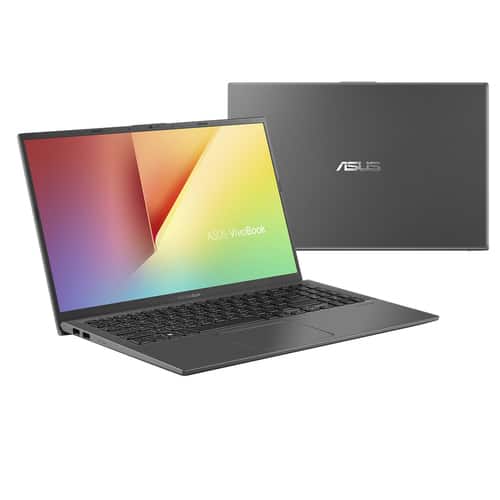
ASUS VivoBook F512FA-AB34 gives you most of the stuff you want in a budget full-size laptop, from a crisp display to an ErgoLift hinge that basically makes typing feel more natural, and you notice it right away.
The Asus VivoBook 15 is also one of the better recent laptops we’ve looked at. They argue, that when you replace something—like a phone or even an SUV—there has to be some controversy, but somehow the VivoBook stays pretty steady anyway. The Asus F512FA-AB34 model we’re checking today follows that current movement toward ultraportables, with a smaller and lighter form factor than it used to be.
Design
The ASUS VivoBook 15 F512FA has a newer look compared to its predecessor, and it still manages to squeeze in a handful of “premium-ish” design bits you usually see on more expensive Asus gear. For instance, it includes an ErgoLift hinge that tilts the keyboard a bit, so the whole typing experience feels easier, kind of like what you’d expect from the Asus ZenBook UX333FA series.
Instead of a dull, black box vibe like most other budget 15-inch laptops, the new VivoBook 15 goes with a gray brushed aluminum lid, plus a shiny gray deck with a cross-section that’s barely noticeable. The same little bit of style shows up around the keyboard deck and it’s also pushed along by the Chrome “Asus” logo sitting on the lid. It comes in at about 14.2 x 9.1 x 0.7 inches and weighs 3.5 pounds, which is pretty typical for a latest-gen 15.6-inch laptop. And yeah, the ErgoLift thing on a value model is what will surprise you, because it’s not just looks, it’s actually about comfort and everyday usability.
The connection is fine, as you have most of the ports you normally need. Here we are talking about two USB 2.0 ports, a microSD card slot, and LEDs for charging and battery status, all located on the left side. On the right side, there’s a charging port, a USB 3.1 port, a USB Type-C port along with a headphone/mic combo jack.
Asus has a good reputation for its VivoBook brand, and it will only gain more fans here, with its full HD (1920 x 1080) resolution display. It uses In-Plane Switching (IPS) panel technology to deliver vibrant colors and clear images, something we’ve only seen in higher-priced laptops. The full HD display is a pleasure to use, both for serious office tasks and for watching movies, with excellent viewing angles.
It’s a NanoEdge display that has an 80% screen-to-body ratio, giving you more screen real estate than the bezel. Asus claims that this VivoBook uses their in-house Splendid Image Optimization technology, which aside from being a marketing gimmick, I don’t see any major improvements that would set it apart from the competition with other low-end IPS panels.
On the ASUS VivoBook F512FA-AB34, the design and display should be the main attraction before you look at the performance evenly. Another thing should be its weight. It is light. Seriously, it doesn’t feel flimsy because of the lightweight profile.
If there’s one thing I need to criticize, it’s probably the standard VGA, which won’t be supported by anyone. In 2018, we simply expect things to get better. Especially when Asus decided to design a complete system at a very reasonable price. The speakers are surprisingly good, with good max volume management and a bit of bass. You can happily watch YouTube and Netflix with these speakers, they can fill a small room and the music plays well.
Keyboard & Trackpad
The same material used in the body is reproduced in the keyboard and touchpad deck. It does offer a good amount of key travel and a comfortable feel, though, the keys themselves aren’t particularly luxurious. They take another take on this laptop’s premium build, but it’s a design you won’t see in similarly priced systems.
Despite the laptop’s compact size, the keyboard is large in all the right places, with nicely sized alphanumeric keys. The Backspace and Enter keys are large enough, and the Shift key is the same size as the rest of the keys, sometimes a bit hard to press but you will get used to it over time. As for the trackpad, it’s pretty good, but it doesn’t give you the same instant feel as Dell’s XPS 13 and MacBook Air.
Packing inside the Asus VivoBook F512FA-AB34 is an Intel Core i3-8145U processor , 8GB of RAM , an integrated Intel UHD Graphics 620 graphics card and then a 128GB SSD. The Core i3 has two processing cores and runs anywhere from a base frequency of 2.1 GHz up to a turbo frequency of 3.9, with a 4M cache. In everyday use the device feels fast, especially during common Windows tasks like multitasking, with several apps and browser tabs running at the same time .
Still, the cooling fan will kick in once you have lots of apps and tabs going in the background ,and it gets even more noticeable when you stream video. It is kinda not overly loud ,or at least not obnoxious, but it is definitely attention grabbing. The processor here is a pretty common pick in budget laptops and Chromebook-style devices, so we are honestly not surprised by its performance level at all.
On the VivoBook F512FA side the spec sheet points to very solid results for ordinary stuff, like watching videos, browsing the web, and editing spreadsheets. As for games, you can do the basic stuff in simple terms, mainly online games and other easy titles like Minecraft.
Battery life
The Asus VivoBook 15 has an energy-leaning CPU, which helps quite a bit, but it still doesn’t reach that super high battery life. In testing it ran for 8 hours and 24 minutes, longer than the IdeaPad 530s, 7 hours and 43 minutes, yet it’s still a bit behind the Aspire 5 which went 9 hours and 27 minutes on a single charge. The mainstream laptop average sits at 7:28, so that’s roughly an hour less than what the VivoBook 15 managed
Conclusion
ASUS VivoBook F512FA-AB34 gives you most of the stuff you’d actually want from a low-cost full-size laptop, including a sharp looking display, plus an ErgoLift hinge that sort of makes typing feel more natural. Sure, there are a couple things you may want to dodge, like a touchpad that feels a little less reliable, and the fairly limited storage, but the price feels fair enough to offset it.
Thanks to its pretty powerful Intel core i3 processor, VivoBook F512FA-AB34 is even better if you take a gradual approach to replace an old machine or buy a new laptop for work or university.
If you can make a few compromises and expand your wallet, both the Acer Aspire 5 (A515-54-51DJ) and the Lenovo Flex 14 offers better performance and they are their top picks. I’m in the budget category. But if the form factor of a large laptop is what you’re after and your budget constraints can’t last, the ASUS VivoBook F512FA-AB34 is a great value.
ASUS VivoBook 15 Thin and Light Laptop, 15.6” FHD, Intel Core i3-8145U CPU, 8GB RAM, 128GB SSD, Windows 10 in S Mode, F512FA-AB34, Slate Gray: Buy it now
Related Posts


Tech Reviewer & Product Analyst
Định Bia has spent over 10 years testing consumer electronics with a focus on smart technology. He work as a product advisor at Biareview where he helped customers find the right devices for their needs. He personally tests every product featured on this site using a consistent evaluation framework covering quality, durability, and value. All reviews are based on experience, not influenced by the manufacturer.