
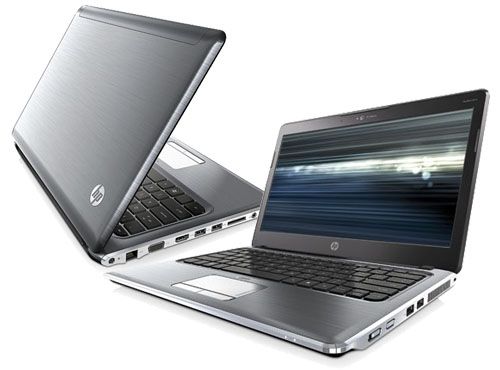
The HP Pavilion dm3 has a modern design in an aluminum alloy casing that protects the screen but remains light in weight and fashionable. This design helps protect against windshield adhesion and scratches during use.
The product is designed to break the door with the power button and turn the wireless connection on and off to the side. The keyboard is chiclet design, the distance between keys is reasonable and easy to familiar when used, and convenient for cleaning. HP does not integrate external multimedia shortcuts but is located right on the keyboard with F1, F2, F3 keys … To use the function keys must be used concurrently with Fn. In addition, putting the number keys into the full desktop sub is a small improvement but useful to people who often have to work with numbers. The touchpad is designed with wide frame, strong body contour and personality.
The HP Pavilion dm3 has a 13 inch display, running at 1366 x 768 pixels so the visuals look bright and crisp… not bad at all. On the left side you see the LAN port, VGA , HDMI, and USB plus the memory card reader, microphone and headphone jack, with power on and wireless on controls, too. There’s also a USB and a Kensington lock all in place , pretty full setup really.
Altec Lansing speakers are also a highlight. This speaker is designed at the bevel between the bottom and front. Good sound output quality, bass and especially treble sound clear. The volume of this speaker system is also good enough for personal service in the room of about 25 m2.
The specific unit I tested came in at the low end: AMD Athlon MV-40 at 1.6GHz, 1GB of RAM, 160GB hard drive. That 1GB of RAM is rough. A handful of browser tabs plus anything running in the background and things start to lag, you’ll see the beachball-equivalent stutter more than you’d like.
Gaming’s about what you’d expect from an ATI Radeon HD 3200. I ran PES2010 and got roughly 24fps at default settings — playable if you’re patient, not smooth by any real measure. Mid-tier chip, mid-tier result.
Video’s a different story. 720p content plays cleanly on this thing, no stutter, no dropped frames, which honestly surprised me given how the RAM struggled elsewhere. If you’re using this dm3 mostly to watch stuff rather than do stuff, the graphics chip is doing its job fine.
The most prominent feature is the in-built SIM slot for 3G cellular access. SIM card installation is easy, just remove the battery, users immediately use the phone SIM of the network is 3G to plug into the SIM slot is usable.
HP Pavilion dm3-1130us 13.3-Inch Laptop (1.6GHz AMD Athlon Neo X2 L335 Processor, 4GB DDR3, 320GB HDD, Windows 7 Home Premium) Silver: Buy it now
HP Pavilion DM3-3012NR Notebook Pc: Buy it now
In addition, HP Pavilion dm3 also has a special feature is web access, chat, email, music and photo viewer without having to boot through Windows. This system automatically runs when the computer is turned on and if after 15 seconds the user has no active, the machine will automatically switch back to Windows.
The HP Pavilion dm3 is equipped with state-of-the-art shock and security technologies to help protect your data and keep it safe and secure.
The HP Pavilion dm3 has a 57Wh 6-cell battery. When tested with screen brightness at about 80%, high definition video, speakerphone on, continuous use for nearly 4 hours continuously. If you turn off the connection and use the normal text-application operation, this time is up to 4.5 hours.
Built-in Windows 7 licensing, built-in SIM card slot with 3G alternative to ADSL, and 3G USB will certainly revolutionize the way users work and play. The mind is not limited to space and time.
The HP Pavilion dm3 is aimed at users who are reporters, editors, media workers, marketing or those who require frequent travel or off-campus work that can access the Internet anytime, anywhere.
Related Posts




Tech Reviewer & Product Analyst
Định Bia has spent over 10 years testing consumer electronics with a focus on smart technology. He work as a product advisor at Biareview where he helped customers find the right devices for their needs. He personally tests every product featured on this site using a consistent evaluation framework covering quality, durability, and value. All reviews are based on experience, not influenced by the manufacturer.