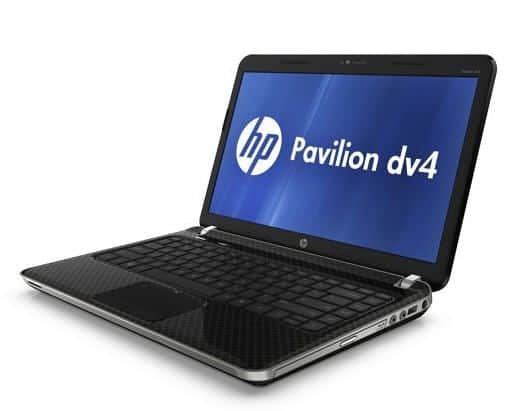
With a weight of 2.5 kg, the HP Pavilion dv4 is lighter than the HP Pavilion dv5 and Toshiba Satellite A300. The line comes with a super bright 14-inch display, so it ends up being smaller than the dv5 that has a 15-inch screen, and it is simple to navigate while still keeping real life visibility. Symbols and text are not small but clear, lively. The high resolution mirror screen, combined with the “flat endless” design, makes movie and image quality smoother and brighter. Many people use laptops that are quite sensitive to the mirror screen, but Pavilion dv4 does not make users worry because no glare and refraction of light as other models. The 1.3 megapixel webcam is very neatly positioned above the screen.
This laptop has a pretty solid plastic frame construction, flex folding cover that is usually found on high end laptops. Single hard couplings make the display stable. Like dv5 and dv7, this line is also equipped with silver-plated keyboard and chrome-plated surround.
HP Pavilion dv4 is also a line of high-end entertainment devices, so high-light multimedia keys are arrayed with touch-sensitive technology. In addition to the usual media keys, there are separate volume control sliders, mute buttons, Wi-Fi and QuickPlay separately. All of these buttons are silver-plated, and the Mute and Wi-Fi buttons automatically turn yellow when muted or have Wi-Fi signals. Getting QuickPlay out is highly appreciated because the QuickPlay button allows instant media applications to run without booting Windows. This is a function that helps users to access entertainment applications very effectively. Although modern design, but compared with the Toshiba Satellite L300 price range, the design of the L300 is more impressive in the circle of adjustment.
The dv4’s touch pad has a flashy design that contributes to the overall design of the machine, however, its size is quite small, only 38.1 x 76.2 mm, with two mouse buttons at the bottom. The dv4 keyboard, on the other hand, looks very natural, in line with the 14-inch Pavilion dv4. The keys are silver plated the whole surface, when the feel is very light and sensitive but slightly slippery. The machine is equipped with Altec Lansing speakers and two headphone jacks.
The connections on the dv4 are 3 USB 2.0 ports, eSata, multi-format card reader and HDMI. The only connection not available at dv4 is Bluetooth and Wi-Fi N technology that only has 802.11 b / g Wi-Fi.
HP Pavilion dv4-4141us Entertainment Notebook PC (Intel Core i3-2330M CPU, 4GB Memory, 640GB Hard Drive, 802.11bgn WLAN, Bluetooth, DVD±RW): Buy it now
HP Pavilion dv4-1313dx Entertainment PC: Buy it now
Performance
Processor Options
Depending on the config, you got either a Core 2 Duo or a Core i3. Both get through browsing, docs, casual multimedia fine.
Core 2 Duo is the cheaper, more basic pick — does what you need without much fuss. Core i3 costs a bit more but multitasks better and runs more efficiently, worth it if you’re the type who leaves fifteen tabs open.
Memory and Storage
3GB to 4GB of RAM, DDR2 or DDR3 depending on the model — fine day to day, but load it up with heavier multitasking and you’ll hit the wall fast. Storage is a regular hard drive, 250GB to 500GB. Plenty of space, not much speed. If you want that, you’re swapping in an SSD yourself.
Graphics
Integrated Intel Graphics. Browsing, docs, light video — no problem. Gaming or anything demanding — don’t bother, it just wasn’t built for that.
Thermal Management
Fan and heat sink keep it in check under normal use. Gets warm under heavier loads like any laptop does, nothing that suggests it’s about to overheat.
Ports
USB 2.0 (a few), HDMI, VGA, Gigabit Ethernet, separate audio jacks, SD reader. Decent lineup for the time, VGA still handy if you’re plugging into an older projector. Wi-Fi’s 802.11b/g/n; Bluetooth depends on which model you’ve got.
Battery
6-cell lithium-ion, 3 to 5 hours in real use. Enough for browsing or doc work, not enough to trust for a whole day without a charger nearby. Recharging from empty takes about 2-3 hours.
Everyday Use
For daily stuff — browsing, docs, casual media — the dv4 just works. It’s not exactly cutting edge, but the whole build feels solid, the keyboard is comfy, the touchpad tracks pretty well, and the screen looks clear enough for everyday stuff. If dependable is what you want, then this one delivers that, no real complaints.
Related Posts

Tech Reviewer & Product Analyst
Định Bia has spent over 10 years testing consumer electronics with a focus on smart technology. He work as a product advisor at Biareview where he helped customers find the right devices for their needs. He personally tests every product featured on this site using a consistent evaluation framework covering quality, durability, and value. All reviews are based on experience, not influenced by the manufacturer.