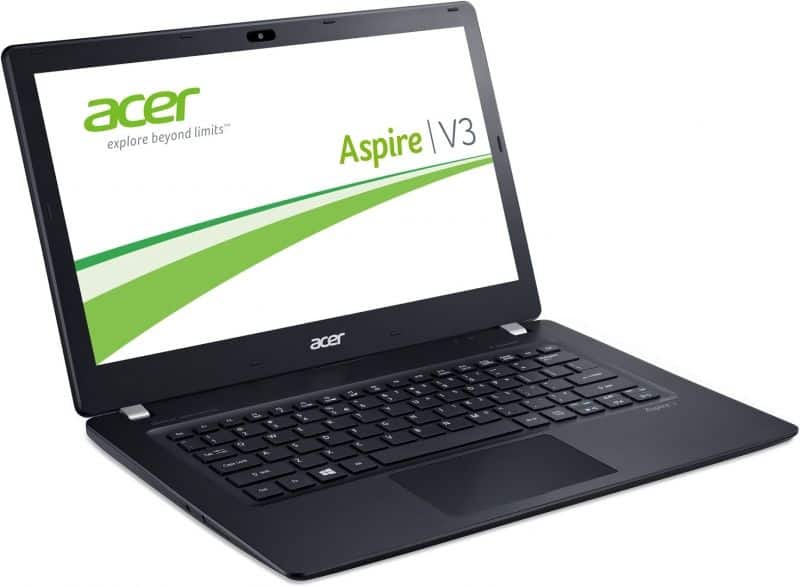
The Acer V3-371 is one of the most notable laptops. In addition to the Broadwell chips, this product also brings a new breath to the price range of $500 to $700 with SSDs. This is a very important equipment to start the machine very fast, the speed of file copying and the application is also faster.
Acer V3-371 is sold in market with 8 different configurations including 4 samples using Haswell chip and 4 others using the latest Broadwell chip. Most models, kind of have 128 GB SSDs. Two models that use the 2.4 GHz Core i7-5500U chip include a 240GB SSD. The starting price for this model is around $500, with a setup that includes a 1.7GHz Core i3-4005U processor. You also get 4 GB RAM and Intel HD Graphics 4400 chip, in the same package.
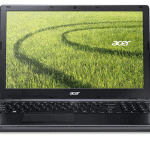
Considering the overall design, Acer V3-371 does not have much change compared to the model launched in the second half of last year. However, instead of a completely plastic shell, the new product has replaced a 3-layer aluminum finish with ruffles to make the machine less dirty and more luxurious. This product is also highly mobile with a weight of just 1.49 kg (compared to other 13-inch laptops weighing about 1.8 kg) and a slim 19.8 mm. If users want to find a lightweight laptop but not enough money, the V3-371 can be considered one of the worthy models at the moment.
On the connectivity side, the V3-371 is quite well equipped with USB 3.0 ports, USB 2.0, HDMI, LAN, SD card slot. Although there is no VGA port to connect the projector, Acer has a handy built-in transfer port. The lack of a DVD optical drive makes the machine lighter but not too big a drawback.
The bounce and sensitivity of the keyboard is good, but the size of the navigation keys is small, so it’s hard to see long texts or surf the web. Meanwhile, Acer’s touchpad is quite impressive thanks to multi-touch support. In the web surfing experiment, using two fingers to scroll up and down the web page or zoom in is very responsive. The surface of the touchpad has a slight rug to help prevent slipping, but the feel about mouse’s speed is quite accurate.
However, the most striking feature of the V3-371 is its performance. Previously, SSDs only appeared on laptops priced at over $1000, now available on V3-371, even on the model with a starting price of $500. Upgrading SSDs is even more important to users than RAM. Thanks to this device, in the V3-371 test takes only more than 4 seconds to enter the login screen, if the shell through the login step (without using the password), the machine takes only 6 seconds to complete. This number for laptops using a typical HDD is about 20 seconds.
Acer Aspire V3-371-596F 13.3-Inch Laptop (Steel Gray): Buy it now
In addition to booting, SSDs also help speed up data backup faster. The read speed in the test with HD Tune Pro is 290 MB per second, which is four times higher than the average for laptops using HDDs previously tested. The speed of launching popular applications like Word, Excell, Photoshop … is only one to two seconds.
With the trial version of the Core i5-5200U, 4 GB RAM, the machine works smoothly. Use the Chrome browser to open about 15 windows (with 2 flash video windows), but it still works well. The screen of this product is 13.3″ in normal HD resolution but noticeably in speaker stand against mirror screen in most competitors. However, the sharpness of the image is still quite good.
Performance
Under the hood, the Acer Aspire V3-371 sort of runs on Intel’s 4th generation Core processors, and the options go from Core i3 all the way up to Core i5. The unit we reviewed had an Intel Core i5-4210U inside, plus 8GB of DDR3 RAM and a 256GB SSD. That combo gives you a pretty decent middle ground between speed and power saving, so the laptop basically fits a range of everyday stuff.
On a day to day basis, the V3-371 kind of does web surfing, writing documents, and watching multimedia ,all without too much fuss. The SSD keeps everything ticking along, giving faster startup and quicker openings for apps, so the overall feeling becomes smoother. Moving between apps is usually pretty relaxed too, largely because it has 8GB of RAM, but if you like to juggle heavier, resource hungry programs, then you could run into a few limits.
When you push it a bit harder, like light photo editing or casual gaming, the integrated Intel HD Graphics 4400 does the job. It’s just that it won’t really power through the newest AAA releases on maxed settings, however older games, and simpler titles should still run at reasonable frame rates.
Battery Life
Acer Aspire V3-371 has one really standout thing, and that is the battery life . It comes with a 48Wh battery, and when you pair that with the power-friendly Core i5 processor you get surprisingly solid endurance. During our testing , the V3-371 stayed going for about 8 to 10 hours of mixed everyday use, like web browsing , watching video , and doing document editing . So for people who want a notebook that gets them through a whole day of work or classes, without always needing to be stuck near a power outlet, this feels like a dependable option.
Keyboard and Touchpad
The keyboard on the Acer Aspire V3-371 is comfortable enough for long stretches, with keys that are spaced out well and travel that feels decent . The chiclet-style keys have a slightly textured top, which helps with grip and can lower the chances of annoying mistyping . Typing is also pretty quiet, so it works well in calmer settings, such as libraries or meetings.
As for the touchpad, it is fairly large and it supports multi-touch gestures like pinch-to-zoom , plus two-finger scrolling. The response is quick, and it tracks accurately, so moving around feels smooth and controlled . The built-in buttons are also easy to press, and they give good tactile feedback.
Connectivity
The Acer Aspire V3-371 has a pretty decent set of ports for something this size, and yeah it feels balanced for everyday use. If you look at the left side you get one USB 2.0 ,an HDMI port, and a 3.5mm headphone jack. On the right side it’s two USB 3.0 ports, an SD card reader, plus the power connector. Having those multiple USB 3.0 ports is kinda a real win, because it means quicker data exchange and easier pairing with modern peripherals, like external drives and fast accessories.
As for wireless stuff, the V3-371 uses Wi‑Fi 802.11ac and Bluetooth 4.0. The Wi‑Fi experience is steady, you can expect solid signal and decent speeds even when you are not right next to the router. And Bluetooth 4.0 plays nicely with a lot of gadgets. Think about mice, keyboards, and wireless headphones.
Software
The Acer Aspire V3-371 arrives with Windows 8.1 already installed, and you can upgrade to Windows 10 for free. In daily use the system feels smooth enough, and the overall experience is pretty positive. Acer also didn’t overload it with too much pre-loaded bloat, there are only a few handy utilities and apps sitting there from the start. That keeps things snappy, and the laptop feels cleaner from day one.
One utility worth mentioning is Acer Care Center, it gives you ways to handle system upkeep, updates, and simple troubleshooting. For example, you can check for updates, run hardware checks, and handle backups. It’s not mandatory though, but it can be useful if you are not super technical and just want the device to behave, without constant manual fussing.
Audio
The audio performance on the Acer Aspire V3-371 is pretty decent for a laptop of this kind of size. The stereo speakers are set on the bottom of the chassis, and i guess that can make things sound sort of muffled when the notebook is sitting on a soft surface. But if you place it on a hard surface the sound comes through clear, and it’s loud enough for casual music and videos.
There is enough volume for watching clips or listening in general, yet the audio feels a bit thin , with limited depth and bass. So for a more enjoyable experience, headphones or external speakers are the way to go. The built in microphone also does its job well, especially during voice calls and video conferencing, it keeps speech clear, and easy to understand.
Related Posts

Tech Reviewer & Product Analyst
Định Bia has spent over 10 years testing consumer electronics with a focus on smart technology. He work as a product advisor at Biareview where he helped customers find the right devices for their needs. He personally tests every product featured on this site using a consistent evaluation framework covering quality, durability, and value. All reviews are based on experience, not influenced by the manufacturer.