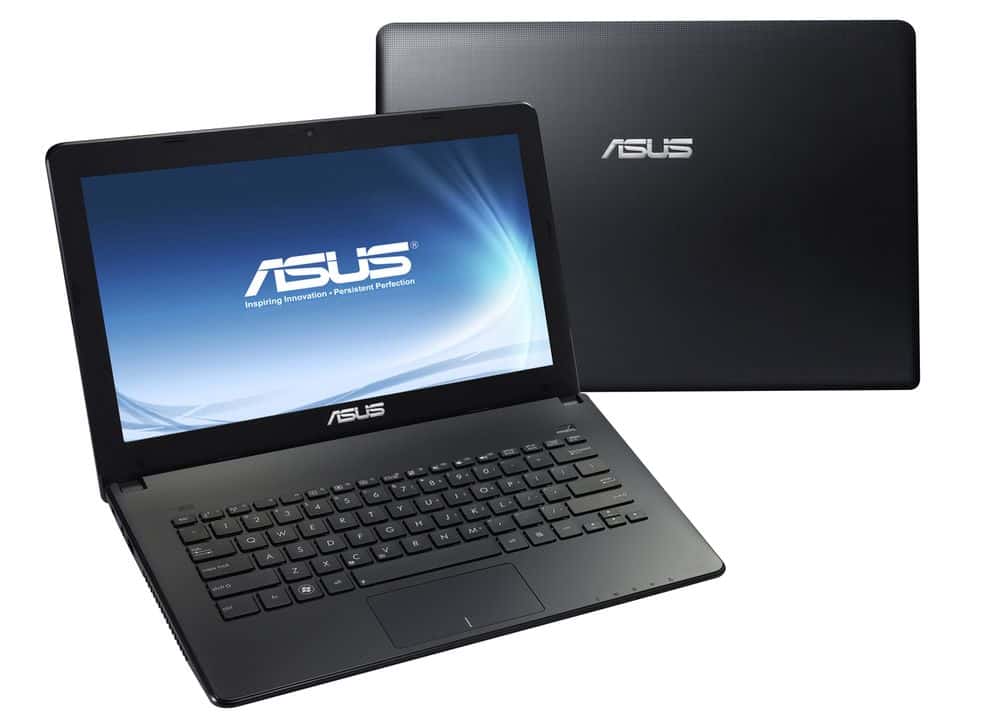
Simple design, slim design with many bright colors and battery life is quite good, X401A is one of the attractive options for students in the first years.
DESIGN
Designed for young and dynamic, the Asus X401A has four versions with bright colors such as bright white, greenish, fresh pink and the traditional “gray” mouse coat as the Test Lab model receives.
With a size of 34.4×24.1×2.65 cm and weighing just 1.85 kg, the X401A seems even slimmer and lighter then some other notebooks in the same series.
The unit is fitted with a 14-inch LED display, 1366×768 resolution. There is a 0.3MP VGA camera and an SD card reader, (SDSC, SDHC SDXC) which is more convenient for sharing files with other digital devices. The point to note is that the X401A is not equipped with an optical drive due to its size limitations.
Chiclet keypad, soft key with short movement. Although the sensitivity of the keys is not good enough but still enough to Test Lab “surf” on the keyboard when typing text at fast speed.
Touchpad supports multi-touch, integrated both mouse button (left, right), light button, easy to use.
Because of its seamless solid-state design, the space above is quite open, with only one power button, while the function keys, such as Wi-Fi connectivity on / off, custom screen brightness, Dynamic or multimedia controls are integrated into the Fn keypad.
Port numbers, peripheral interfaces on the right edge include: standard VGA and HDMI video output, USB 3.0, 100Mbps RJ-45 network port, card reader and headphone jack, microphone ).
The left side has an additional USB 2.0 port and power supply. In addition, the X401A is equipped with an expansion card that supports 802.11n high-speed Wi-Fi and Bluetooth 3.0 connectivity.
Compared with some laptops in the same line, the port number, communication support of the machine less and mainly focus on the right side of the machine. Practical experience shows that connecting peripheral devices through the ports on the right-hand side of the body is often inconvenient, easily entangled; Especially when using external mouse via USB interface.
Underneath, there are hot runners at the hot spots, detachable lids, easy to use when upgrading RAM, hard drive.
ASUS X401A-BCL0705Y 14″ Ultrabook Notebook 1.8GHz Intel Processor 4GB DDR3 SDRAM 320GB Hard Drive: Buy it now
PERFORMANCE
Overall, the X410A performance is kind of average, but it s still fully in line with the hardware setup too. It includes the Intel Core i3-2320M processor (2.4GHz, 3MB cache) and the built in graphics, specifically HD Graphics 3000. On top of that there s 4GB DDR3 1333MHz RAM plus a 500GB HDD, with SATA 3Gbps.
Test results with the overall performance evaluation tool PCMark 7, configuration testing reached 1936 points.
ATTO’s hard disk component score shows that the system partitions have fast data access speeds of 99.15MB / s and 104.55MB / s, respectively.
The graphics capabilities of the X410A is quite modest with 3,623 points 3DMark 06.
Like the Cinebench R11.5 (64 bit), the X410A came in at 9.68 fps (fps) on the OpenGL pass and 2.29 on the CPU round.
If you dont really need a whole lot of graphics processing power, the X401A can still manage some gentle fun, like for example with Street Fighter IV; there the test setup lands at 33.37 fps at 1366×768 (WXGA), with the usual default graphics settings.
Check the actual battery life with MobileMark 2007, the X410A reaches 5 hours and 34 minutes in the multi-task test; A relatively high performance compared to other popular configurations. Thus, readers can rest assured when going to class or sitting library throughout the session.
Advantage
Compact design, colorful fresh young.
The battery life is good.
Soft price, suitable for students
Disadvantage
Plastic case is easy to stick to fingerprints.
No optical drive.
Only 2 USB ports.

Related Posts




Tech Reviewer & Product Analyst
Định Bia has spent over 10 years testing consumer electronics with a focus on smart technology. He work as a product advisor at Biareview where he helped customers find the right devices for their needs. He personally tests every product featured on this site using a consistent evaluation framework covering quality, durability, and value. All reviews are based on experience, not influenced by the manufacturer.