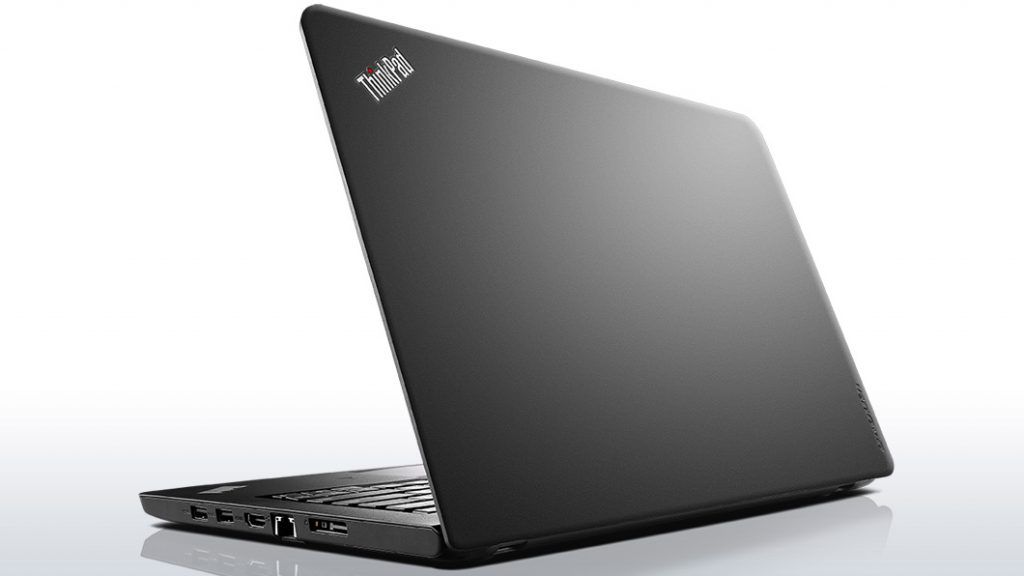
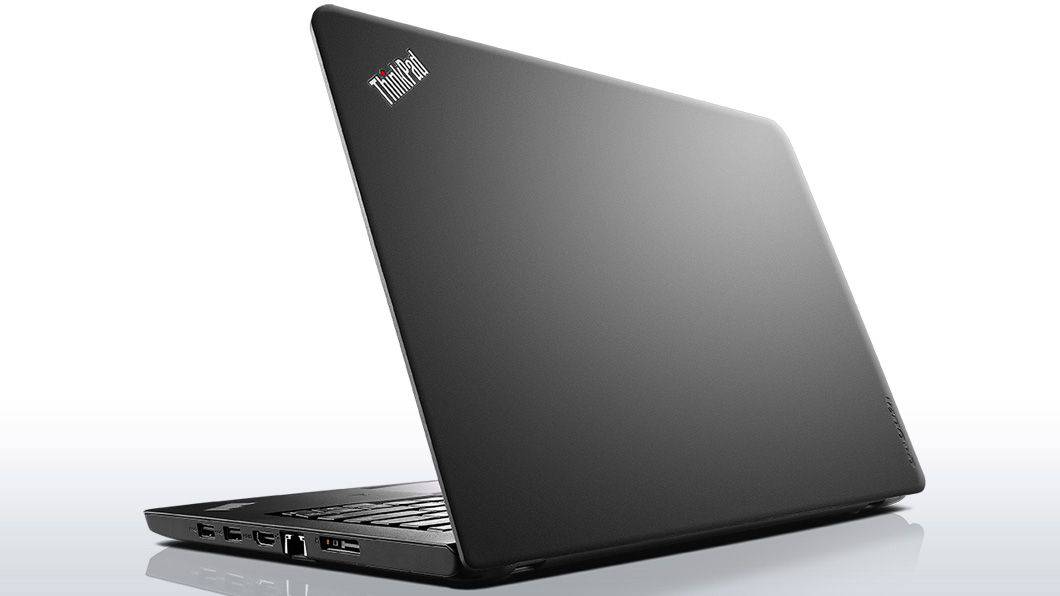
Lenovo laptops have never had aesthetic appeal, so the design of the ThinkPad E450 is simple, the outer shell with plastic is covered with a smooth, black-gray finish to limit fingerprints and dust stains. The rounded corners feel soft, in the upper left corner is the ThinkPad logo with the red LED on the letter “i” and it lights up every time you turn on the machine. The lid and screen are kept by a large silver hinge, with great durability, so you do not have to be very careful every time you open and close the screen.
The ThinkPad E450 is 337.8 x 238.8 x 22.9 mm, and it weighs 1.8 kg, so it’s kinda not too huge for a 14-inch laptop. You can pretty much slide it into a backpack, then bring it to your office or lecture hall. The black keyboard wraps around the edges, with that same color arrangement as the rest of the body. The key is the trackpoint button and the right mouse button left mouse button.
Powerful configuration on ThinkPad E45
The Lenovo ThinkPad E450 is run by an Intel Core i5-5200U processor working at around 2.2 GHz, which is part of the fifth generation of Intel’s high performance, energy efficient chips with low heat output. It’s also supported by 4GB of memory , so everyday multitasking feels more fluid. For storage, you get a 500 GB HDD, which gives a decent amount of space for your documents and for saving data, videos, as well as your photos. This configuration is also equipped with Intel HD Graphics 5500 graphics processor enough for you to have the experience of playing high-end graphics or watching HD movies.
Keyboard and Touchpad and fingerprint sensor handy
Just like other ThinkPad laptops, the E450 has a very comfortable keyboard. The large keys are designed to fit the tip of a finger, the depth of the key press is 1.8mm and the feedback power of 70 grams, giving the feeling of typing easily and accurately. One of the missing features on this keyboard is that it does not have a light, but the function keys such as increase the volume, screen brightness, Wi-Fi connection is extremely useful. The touch pad has a large area and high sensitivity so that actions such as swiping, zooming, rotating are made easily and accurately, in addition to the touchpad there is a click very handy mouse. Between the G, H and B keys are the trackpoint buttons that move the cursor. Fingerprint sensor allows you to save 10 fingerprints to help you access your laptop easier and safer.
Performance
Processor and Graphics
The ThinkPad E450 runs on Intel 5th gen Core chips, mainly the Broadwell-U line, going from Intel Core i3 all the way up to Core i7 choices. These CPUs were built more for energy efficiency than for outright power, so they tend to fit well with day to day work , office stuff, normal web browsing, and usual multimedia playback. The built in Intel HD Graphics cover the basics for everyday visuals, but if you throw heavier software at it or try more demanding games , things can feel a bit limited.
RAM and Storage
Most of the units that shipped came with either 4GB or 8GB of DDR3 RAM, and depending on the specific setup, you could sometimes upgrade the memory up to 16GB. When it comes to storage, you’d usually get the more typical HDD drives, in sizes that run about 500GB all the way to 1TB, or every now and then there is also an SSD option, which just feels more snappy and responsive. SSD setups generally mean quicker boot time , faster app launches, and overall better system responsiveness , so the laptop feels more awake in daily use.
Keyboard and Trackpad
Lenovo ThinkPads are kind of famous for their keyboards, and the E450 really keeps that vibe. There’s a spill-resistant keyboard with Lenovo’s ergonomic key feel , so typing stays comfortable even if you’re on it for longer periods. The layout also includes dedicated function keys plus the TrackPoint (that red pointing stick) for accurate cursor movement, and on top of that there’s a regular touchpad that supports multi-touch gestures.
Connectivity And Ports
When it comes to connectivity , the ThinkPad E450 has a pretty solid grab-bag of ports—so you get USB 3.0, USB 2.0 , HDMI , VGA, Ethernet (RJ-45), plus a headphone/microphone combo jack and that 4 in 1 card reader (SD, SDHC, SDXC , MMC). That mix helps with hooking up all kinds of stuff , plus external monitors too. So overall its kind of well suited for office work and learning environments, you know the usual business classroom kind of needs
Battery Life
Battery life on the ThinkPad E450 sort of depends on what you picked for the configuration and how you use it, but most reports point to a moderate pace of performance. If you have the usual 6-cell battery, it can last around 6 to 8 hours per charge, in everyday routines like web browsing, or writing documents. But real world results can shift if the screen brightness is higher, the workload is heavier , or the battery has started to age with wear over time.
Security Features
On the security side , the ThinkPad E450 offered optional fingerprint readers for biometric logins. That adds another layer of protection and improves overall system security, especially when dealing with documents that are not meant to be exposed. For people in business roles this was helpful, it basically gives extra authentication beyond just passwords, and it helps safeguard sensitive info.
Software And Operating System
Most of the time the laptop shipped with Windows 7 Professional or Windows 8.1 Pro , and there were options to upgrade to Windows 10 Pro during the free upgrade window. Lenovo also included a bunch of pre-installed utilities, for example Lenovo Solution Center, which is for diagnostics, Lenovo Companion for day to day system management, and Lenovo Settings to fine tune hardware related options.
Durability and Portability
With a weight of roughly 1.8 kg (4 lbs), the ThinkPad E450 sort of struck that nice middle spot between portability and durability, so it worked well for people who kept moving their laptop from home to office, and even into classrooms. The matte finish on the outer casing helped keep fingerprints , and those annoying smudges, down to a minimum. Result … it stayed looking neat and more professional, even after daily handling.
Use Cases
Business Users
The ThinkPad E450 was built keeping business users in mind. You got dependable performance, plus security options, along with a keyboard that feels comfortable during long typing stretches. Because it was durable, and also the keyboard area was spill-resistant, it kind of fit the usual office routine pretty well. Battery life wasn’t blazing, but it was moderate enough for moving around during meetings, commutes, and those short travel days.
Students and Educational Institutions
For students, the ThinkPad E450 came across as a practical, cost-aware option for school use. The sturdier build, combined with a solid range of ports, made it easier to plug in gear like projectors and external monitors, which is pretty common in classrooms. Also , the spill-resistant keyboard helped in less-than-perfect situations, like when someone is rushing, or a drink goes slightly sideways.
Casual Users
Casual users who needed a reliable, still affordable laptop for everyday stuff kinda liked the ThinkPad E450. It did the usual things—web browsing, media streaming, and basic productivity apps—pretty smoothly, and the whole feel was responsive, like it actually kept up.
Upgrade Options
About upgrades, the ThinkPad E450 is a bit tricky, mostly because of its internal layout. Typically, people can swap in extra RAM and, when possible, upgrade the storage to add more space or improve how things load. But changing the processor, or the graphics capability, wasn’t really a thing since those parts are integrated right into the motherboard , so yeah, no easy fixes there.
Pros and Cons
Pros
Solid build quality: It feels sturdy with a professional kind of look.
Excellent keyboard: Comfortable for typing, and it includes spill-resistant features too.
Comprehensive connectivity: Lots of ports, even with some legacy options mixed in.
Security features: There’s an optional fingerprint reader for extra data protection.
Affordable price: Usually priced fairly, which helps budget-minded buyers.
Cons
Average display: Color accuracy isn’t great, and the viewing angles feel kinda mediocre versus newer screens.
Limited graphics performance: The integrated graphics work for basic tasks, but don’t expect much beyond that.
Upgradability constraints: You basically get limited room to upgrade the CPU and GPU side.
Older hardware: It uses earlier-generation processors and DDR3 memory.
Conclusion
The Lenovo ThinkPad E450, honestly , did its job pretty well as a reliable and budget-friendly laptop during the time it was actively used. It mostly aimed at business users, students, and also casual folks who just want a dependable computing solution without all the fuss. The build felt sturdy enough, the keyboard was actually comfortable, and the ports were pretty complete , so it stayed practical and easy to live with in different everyday situations. Still, as the years passed, the hardware started feeling old,and the graphics situation is limited, so newer software and current applications might not feel smooth or friendly.
If someone is thinking about buying a used or refurbished ThinkPad E450, it can still make sense as a secondary device. It can also work well for narrower jobs where the “good stuff” matters more, like durability, keyboard quality, and the security functions. But if you’re aiming for stronger performance, or you want more up to date features across the board, it might be better, to glance at newer ThinkPad models—or just weigh different alternatives instead.
Lenovo ThinkPad E450 20DC004CUS 14-Inch Laptop (Black): Buy it now
Lenovo Thinkpad E450 Business Notebook, Black, 14″: Buy it now
Related Posts


Tech Reviewer & Product Analyst
Định Bia has spent over 10 years testing consumer electronics with a focus on smart technology. He work as a product advisor at Biareview where he helped customers find the right devices for their needs. He personally tests every product featured on this site using a consistent evaluation framework covering quality, durability, and value. All reviews are based on experience, not influenced by the manufacturer.