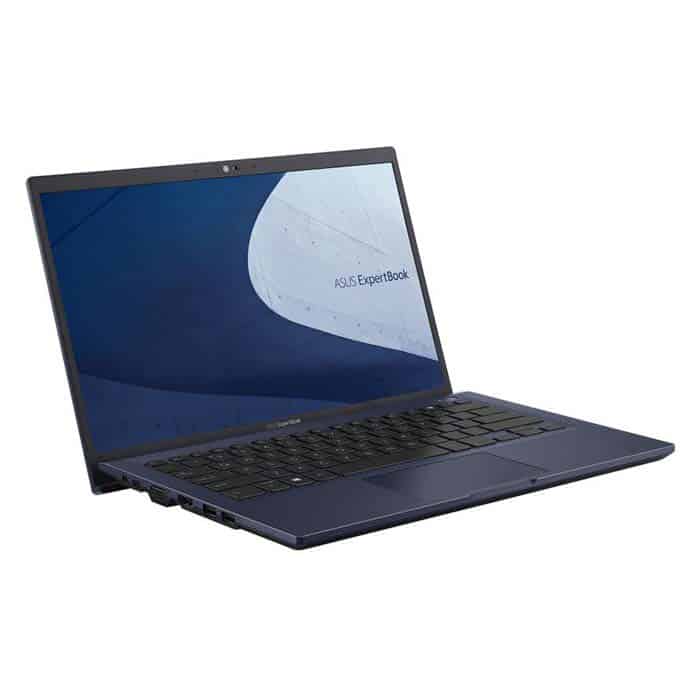
Luxury design standard office
Asus ExpertBook B1 B1400 is designed to be as minimalistic as possible, keeping only the Asus logo in the center of the outside of the machine. Although simple, if you look at this machine, it exudes something high-end and luxurious.
Next we can kind of see that the ExpertBook B1 B1400 has a thickness of only 19.2 mm and it weighs around 1.45 kg. Compared to the previous models, it looks a little heavier ,but overall, thanks to those delicate beveled lines, the whole body stays compact though.
ErgoLift hinge (which tilts when you open the lid) is sturdy with the right tilt for each angle when opening the lid.
Sacrifices thickness to ensure adequate connectivity
As I said, this office laptop is up to 19.2mm thick, although thick, it still ensures users a full range of the most common connection ports today. What if an office laptop doesn’t have the most basic connections of an office?
The first is the right edge of the machine we have in turn 1 3.5mm Jack port, 1 USB 2.0 port, 1 RJ45 port, and 1 Kensington slot.
Next on the left side, we will have 1 power port, 1 USB-C 3.2 Gen 1 port, 1 D-Sub VGA port, 1 HDMI port, and 2 USB-A 3.2 Gen 2 ports.
The fact that Asus revives two technologies, VGA D-Sub and RJ45, ensures continuous connectivity as well as expands the workspace without any hindrance.
Deep travel keyboard and TouchPad with virtual number keys
Maybe the keyboard of the ExpertBook B1 B1400 looks old-fashioned and not as beautiful as other laptops on the market today, but in my opinion, this is the strongest highlight.
The journey of the key is deep, creating a very good feeling when typing. Although there are many keyboards with shallower key travel, many of you feel that having a deep keystroke will slow down your typing speed. However, believe me, the typing speed remains the same, the key sensitivity is still quite high, not reduced as rumored.
The TouchPad has a size that is quite suitable for a 14-inch screen office laptop like the ExpertBook B1 B1400, here I say quite suitable because a lot of you have told me that this TouchPad is quite small for their hands.
During use, I found the TouchPad to have good sensitivity, a sense of touch, and glide and also integrate the NumberPad 2.0 virtual number pad that is activated with only one touch button. To make it more convenient for users during use, Asus ExpertBook B1400 is equipped with 2 physical buttons that can turn on / off the microphone and activate the AI noise cancellation feature (exclusive technology from Asus). With this duo, your meetings will become much better.
Built-in fingerprint sensor, camera, and anti-glare 14-inch full HD screen
The power button is integrated with a fingerprint sensor to help you unlock the screen to resume work quickly. With this feature, it can be seen that Asus is quite attentive to security, especially for business models. In addition to the fingerprint sensor, Asus is also equipped with a TPM 2.0 chip and the Asus Business Manager security application, these features will help encrypt, and protect data as well as lock connection ports immediately when available signs of data leakage.
Perhaps the most impressive is the thickness of the screen edge, with the two sides being only 6.4mm thick and the top edge being 12.55mm, despite having to integrate a 720p HD camera set (integrated with a camera cover to ensure privacy for the user). The ExpertBook B1400 screen has a spacious display space and up to 84% body-to-body ratio.
Despite being an office laptop, Asus still equips it with a 14-inch IPS panel with FHD 1920×1080 resolution, 250 nits brightness, coated with an anti-glare layer of Anti-Glare.
According to my assessment, the screen of the B1400 has a pretty good display quality and bright and clear colors. Good contrast helps display texts, illustrations, and graphs smoothly.
The screen can be extended to a 180-degree angle to facilitate information exchange with colleagues, which can also help you avoid breaking the hinge if you accidentally push a little too hard when opening the laptop lid. However, there is one point that I do not like very much because almost all business laptops use a 16:10 screen ratio while the B1400 uses 16: 9, creating a cramped feeling in displaying data text on the screen.
Stable performance, can do basic graphics and play games
Although it is an office laptop, Asus strongly equips it with a powerful Intel Core i5-1135G7 chip (4 cores 8 threads), integrated into the chip is the latest Intel Iris Xe onboard graphics card from Intel. Don’t underestimate this Intel Iris Xe onboard card, it can help you handle 2D graphics tasks, and play some average games smoothly.
The machine itself will be installed with 8 GB of DDR4 RAM, but if there is a need, the machine also supports up to 48 GB of RAM. As for the hard drive, we have a 256 GB SSD for storing the operating system as well as data. ExpertBook B1400 can upgrade the storage hard drive with an additional 2.5″ slot in the machine.
With the above configuration, the ExpertBook B1400 is more than enough to handle office tasks such as World, and Excel, … as well as help you complete tasks using 2D graphics smoothly. In addition, you can also have good entertainment with Full HD movies, or popular online games today.
Asus seems to understand the security concerns of businesses when using a laptop, so they integrate with this machine many applications such as MyASUS, ASUS Business Manager, and ASUS BIOS to help users Optimize data management and security. These applications are designed with an intuitive interface that users can easily manipulate and use.
Impressive battery life of up to 1 day without charging
Battery life is something that any office laptop user will be interested in, no one wants to carry a big charger with them at all times, right?
When I ran the battery test on the Asus ExpertBook B1 B1400 , I basically turned on all the office tasks, opened the movie page on Full HD mode and used external speakers plus max brightness too. At the end, it lasted around 5 hours, then I had to plug it in, so yeah pretty close to a full work block. So if I enable the battery optimization mode, it should be usable all day before it needs another recharge.
Software Ecosystem
Windows 10/11 Compatibility
The Asus ExpertBook B1 works with Windows 10 or Windows 11 , so you get a familiar and pretty straightforward interface for day to day productivity and business apps. People can rely on Microsoft Office integration, run enterprise-level tools, and still access the Windows Store to pick up extra software, utilities and what not.
Asus Business Center
Asus also sends over its own suite , like Asus Business Center, which kind of wants to cut down on the everyday hassle of IT administration while keeping business productivity moving. It’s a centralized platform so admins can stay aware of system status, roll out updates, and send security controls across multiple Asus devices within the same organization. Kinda like a calm control room that you don’t have to babysit quite as much.
Audio and Camera
Integrated Speakers
The ExpertBook B1 comes with integrated stereo speakers, and they seem to deliver clean sound for multimedia playback and video calls, plus those virtual meetings where you really need to hear everything. It s mostly built for business use though, but honestly the audio still feels good enough for watching slides, joining webinars, or just listening to online content in general.
HD Webcam
There is also a built in HD webcam , it helps with high definition video conferencing and virtual meetings , so users can stay engaged with colleagues, clients, or even remote teams. The picture quality is crisp and the clarity works well for daily communication, facial expressions, and those visual demos you do during professional conversations. Sometimes it feels, like everything stays in focus.
Portability and Durability
Lightweight and Portable
At around 1.45 kg (3.2 lbs) and only about 18.5 mm thick, the Asus ExpertBook B1 is made to be easy to bring, without completely sacrificing durability or overall performance. That compact body shape makes it convenient to slide into a backpack or briefcase, which is good for people that travel a lot, moving between offices, client meetings , and remote work spaces.
MIL-STD-810H Durability
The laptop’s MIL-STD-810H certification kind of guarantees durability and overall reliability in tough surroundings, including pushback against vibration, shock, and extreme temperatures. That rough built design helps it last longer and stay dependable, so the chance of damage during everyday use or when it’s being moved around, goes down noticeably.
Environmental Responsibility
Eco-friendly Design
ASUS also leans into sustainability, using energy saving parts and more responsible materials inside the ExpertBook B1. The device follows broad environmental standards and required rules, and it supports energy conservation, recycling related efforts, and careful manufacturing processes.
Conclusion
The Asus ExpertBook B1 stands out as a flexible business laptop, with strong performance , solid durability, and security features that fit the needs of working professionals and people running a business. The thin look, the comfortable keyboard feel, and the extended battery time make it a good match for lots of business situations, from office work and juggling tasks to remote duties and customer style presentations.
With a clear focus on steadiness reliability, security, and comfort for the user, the ExpertBook B1 mixes business class speed with current connectivity options and software compatibility. So whether you’re a corporate leader, an entrepreneur, an instructor, or a person who’s always on the move, the Asus ExpertBook B1 delivers a dependable computing experience that helps productivity and backs business outcomes.
Pros
Robust Performance : It can handle up to Intel Core i7 processors, plus plenty of RAM so you can multitask more or less smoothly.
Durable Construction : Built with MIL-STD-810H military-grade durability, and a magnesium alloy chassis that feels solid enough.
Long Battery Life : Expect up to 12 hours of use, and it also supports fast charging so you’re not stuck waiting.
Comprehensive Connectivity : You get multiple USB ports, HDMI output, and Wi‑Fi 6 support for the usual fast connections.
Enhanced Security : There’s a TPM chip, biometric authentication options, and a Kensington lock slot, kind of reassuring.
Ergonomic Design : The ErgoLift keyboard, backlit keys, and a precise touchpad aim for comfort during long sessions.
Windows 10/11 Compatibility : Tuned for business apps and day to day productivity tools.
Cons
Limited GPU Options : The integrated graphics, while convenient, may not be ideal for heavy graphical work.
Moderate Display Resolution : Full HD is fine but for people chasing higher pixel density, it might feel a bit plain.
Standard Audio Output : Built in speakers can sound a little thin, so multimedia lovers might want something deeper.
Who Should Buy the Asus ExpertBook B1?
Business Professionals
Good option for business executives, consultants and other professionals who need a steady, secure laptop for day to day output , remote tasks , and client showings. It fits pretty well, if you tend to move around but still want dependable results.
Educators and administrators
This works for teachers administrators, and school staff too, because it’s portable enough for lesson planning and classroom duties, plus it handles educational applications without much fuss.
Mobile professionals
Great for people who are always on the move, freelancers, and entrepreneurs who want a laptop that stays sturdy but still easy to carry. For travel, client meetings, and remote work it’s a solid fit. The Asus ExpertBook B1 has a light frame and durable build , so it suits professionals who care about mobility, yet do not want to sacrifice performance or security.
Small business owners
Recommended for small business owners and entrepreneurs who need a flexible computer for handling operations, communication, and growth related work. The ExpertBook B1 supports reliable day to day use, has useful connectivity options , and includes security features that help keep business data protected.
Corporate IT Deployments
This laptop is suited for corporate IT deployments and enterprise environments where teams want a cost-effective but still capable machine for employees. It comes with manageability features like Asus Business Center, which helps centralized IT management , so IT teams can roll out security protocols, push software updates, and handle device deployment across many laptops at once.
ASUS ExpertBook B1 Business Laptop, 15.6” FHD, Intel Core i5-1135G7, 256GB SSD, 8GB RAM, Military Grade Durable, AI Noise canceling, Webcam Privacy Shield, Win 10 Pro, Star Black, B1500CEA-XH51: Buy it now
ASUS ExpertBook B1 Business Laptop, 15.6” FHD, Intel Core i5-1135G7, 256GB SSD, 16GB RAM, Military Grade Durable, AI Noise Cancelling, Webcam Privacy Shield, Win 10 Pro, Star Black, B1500CEA-XH53: Buy it now
Related Posts

Tech Reviewer & Product Analyst
Định Bia has spent over 10 years testing consumer electronics with a focus on smart technology. He work as a product advisor at Biareview where he helped customers find the right devices for their needs. He personally tests every product featured on this site using a consistent evaluation framework covering quality, durability, and value. All reviews are based on experience, not influenced by the manufacturer.