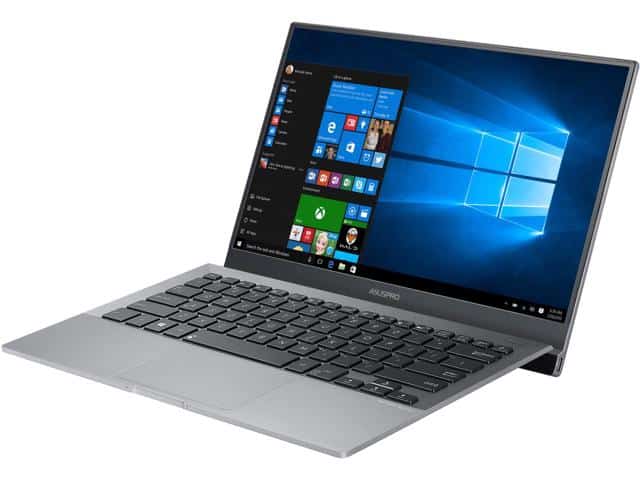
Asus Pro B9440 is a slim and lightweight business laptop, at a very competitive price. The $ 1000 laptop features a 14-inch screen with a pretty thin bezel, Intel’s 7th-generation Core-I processor, a fingerprint scanner, and good battery life.
Compared with many other business-class laptops such as the Apple MacBook Pro or HP EliteBook x360, the Asus Pro B9440 has a much lower price tag, but does not feature many advanced features such as 4K screen and full communication ports. This laptop has sacrificed quite a lot of things, including the removal of the webcam.
Overall design
Asus Pro B9440 is not a typical business laptop, but it has a nice design with a lot of highlight, which is impressive and lightweight. The lid is made of magnesium alloy feel quite luxurious, under the keyboard is raised about 7 degrees compared to the horizontal plane. This gives a more natural feel to the keyboard and makes the user more comfortable working in the long run.
With a weight of only 1.1 kg, this is one of the lightest laptops currently available. Only two laptops weigh less than the Asus Pro B9440 is Lenovo LaVie Z and LG Gram.
The fingerprint sensor is located in the upper right corner, above the keyboard. This sensor makes it easy for users to use the Hello feature on Windows 10 and makes it easier for users to use Hello to log in to the computer more frequently than using a regular ID and password. As advertised, the fingerprint sensor on the Asus Pro B9440 is very stable with a success rate of up to 98%. Because of the lack of a built-in Webcam, you can not use the Hello login by face detection feature.
Due to the lack of a built-in webcam, the Asus Pro B9440 will not be able to conduct online video meetings. Anyway, this is not a big omission because you can use external webcams to compensate. And especially, the removal of the webcam has contributed to make the screen border thin and eye catching.
The machine is also equipped with two speakers at the bottom by taking advantage of the design is quite angular. Especially, the Asus Pro B9440 achieves the MIL-STD-810 endurance rating, which is more durable than a regular notebook.
Screen
The Asus Pro B9440 features a 14-inch full HD display with a fairly thin bezel. This screen has good display quality, sharp image but brightness is not strong enough and color is not really brilliant. This makes entertainment experiences like watching movies, playing games or doing design work on the Asus Pro B9440 will not really satisfy the user.
Anyway, doing normal tasks like editing and surfing the web with this monitor is not that bad, especially since it has a pretty good coating with anti-glare in a fairly light environment. However, this screen is just a normal screen type and has no touch features.
Two communication ports only
Unfortunately, the Asus Pro B9440 has only two ports of communication – two USB-C ports are located on either side of the screen and only the left port can charge the device. Asus Pro B9440 is compatible with many different types of dock chargers available in the market. Being aware that this USB-C port is fast rechargeable – one of my favorite features of this notebook. Only after half an hour of charging since the power is gone, the battery can reach 50-60%.
Keyboard and Touchpad
The keyboard on the Asus Pro B9440 feels made for comfort and also for efficiency. You get a full-sized, backlit layout, keys that are pretty well spaced, and they still give that decent travel plus tactile feedback . The key tops are a little concave, which in practice helps with both typing accuracy and overall speed. The illumination is adjustable too, so you can dial it up or down depending on the lighting where you are working.
One more interesting thing about this B9440 keyboard is the ErgoLift hinge design. Basically when you open the laptop, the back of the keyboard lifts up a bit, and it kind of gives you this nicer, more ergonomic typing angle. That small shift can help lower wrist strain ,and it makes longer sessions feel less demanding as well, sorta a subtle win you notice after a while.
The touchpad is large and responsive with a smooth finish that supports precise movement. It also handles multi-touch gestures and it works with Windows Precision drivers, so the tracking is reliable . The actual click buttons are built under the pad surface, which keeps the look clean and minimal, while still working as expected.
Audio
About the audio… it’s honestly a bit surprising for how slim the laptop is. There are stereo speakers with Harman Kardon-certified audio, and the output comes through clear, with a crisp tone. The speakers sit on the bottom, but they use the base surface to bounce sound upward, so the listening experience feels more immersive than you’d think.
That said, the speakers are not really meant to be “big bass” performers. You may notice limited low-end depth. Still, for conference calls, presentation audio, and everyday video or music, it holds up well . If you want more punch, you can always plug in headphones or external speakers using the laptop’s audio jack.
Connectivity
On the Asus Pro B9440 the connectivity options are kind of…not huge, mostly because the ultra thin layout. It comes with two USB Type-C ports, and one of them does power delivery plus display output, the other is more data focused. There is also a 3.5mm headphone/ microphone combo jack, pretty standard but at least it is there.
Since there is no real traditional port selection, Asus throws in a USB Type-C to USB Type-A adapter in the box so you can still use older gear. If you need more expansion, you can also pick up an optional dock or dongle, these usually open up HDMI , Ethernet , and extra USB ports. So the whole idea is sort of “connect via adapters” rather than direct ports.
For wireless, the laptop uses an Intel Dual Band Wireless-AC 8260 card. This gives solid Wi‑Fi performance, plus Bluetooth 4.1. The Wi‑Fi stays stable and fairly quick which makes it easier to do browsing, streaming , and video calls without constant interruptions.
Battery life
Battery life is, like, a major factor for any portable laptop and the Asus Pro B9440 does fairly well here. It comes with a 48Wh battery and in real day to day use you can usually get something around 8 to 10 hours on one charge with normal business stuff. I mean, web browsing, word processing, even video playback, that kind of routine.
When the workload gets more demanding though , like video editing or you’re running several applications all at once, the runtime can fall closer to 6 to 7 hours. So it’s not the absolute longest lasting model in its class but it’s enough to carry you through a normal workday without hunting for an outlet every few hours.
It has fast charging, which lets the battery hit about 60% in roughly 49 minutes. This is handy for people who need a quick boost, topping up between meetings or during short breaks.
Thermals and Noise
Ok so, the thermal management on the Asus Pro B9440 is pretty well-handled, mostly because of the cooling arrangement that works efficiently, you know. The notebook uses a single fan plus a heat pipe setup, which spreads and sends the heat away from the CPU and a few other sensitive bits. In day to day use it stays cool, and it’s also quiet, with the fan spinning at low speeds most of the time.
When things get heavy, like while video editing is running or when several applications are open at once, the fan noise shows up more clearly. Still it feels within reasonable bounds though. As for the chassis, the surface temperatures remain comfortable enough, so you can set it on your lap without feeling that hot, distracting discomfort after a while.
ASUS B9440UA-XS74 Pro Thin and Light Laptop, 14 FHD Narrow Bezel, Intel i7, SSD, 16GB Ram, Win10 Pro, Fingerprint, 10hrs Battery Life, Mgcote Slab Grey: Buy it now
ASUSPRO B9440 Ultra Thin and Light Business Laptop, 14″ Wideview Full HD Narrow Bezel Display, Intel Core i5-7200U 2.5 GHz Processor, 512GB SSD, 8GB RAM, Win 10 Pro, Fingerprint, 10hrs battery life: Buy it now
ASUS B9440UA-XS51 Business Class (i5-7200U, 8GB RAM, 512GB SATA SSD, 14″ Full HD, Windows 10 Pro) Ultrabook: Buy it now
Function
Windows 10 Pro also offers more advanced features, suitable for all types of users, including the ability to access remote computers through a particular type of connection. With this operating system, the Asus Pro B9440 can do way more than a typical Windows 10 Home laptop. That said for a lot of people, these extra functions are kind of redundant.
Asus Pro B9440 can run smoothly while running multiple tasks at the same time. When pushed to the maximum limit, this laptop began to be “hot” slightly. And it only takes 10 seconds from pressing the boot button until the login screen appears.
On the battery life test when video (video streaming), Asus Pro B9440 hit a very impressive number – 10 hours. I also used this laptop for a full day of intense work and found that it perfectly responds to battery life without charging. Even if it’s charging at a very fast charging rate, you will also feel very comfortable.
Overall, for a mere $ 1,000, the performance of the Asus Pro B9440 is still high, although it can not be compared to the super-product like Apple MacBook Pro or HP Elite x360 with extreme performance and high performance. If you are not too dependent on webcams and communication interfaces, the Asus Pro B9440 is still a worthy replacement for high end laptops. This laptop is not for gaming purposes or movie watching because the screen is not good enough, but with certainty and dedicated features, the Asus Pro B9440 is still enough to satisfy the needs of most people who use as businessmen.
Software and Features
The Asus Pro B9440 comes with Windows 10 Pro already on it, kinda like pre-loaded, so you get a sturdy and reasonably secure operating system right away, meant for business type work. Asus also throws in a handful utilities and applications to smooth the day-to-day experience, among them:
Asus Business Manager: basically a bundle of instruments meant to help run the laptop day after day, with system monitoring , plus backup and recovery bits , also some security related features in the same package.
Asus Splendid: a screen tuning utility that lets you tweak color warmth and different display profiles for separate moments, like reading sessions, gaming time, or movie watching .
Asus AudioWizard: an audio optimization tool, it gives you presets for various listening moods, like music, films, and gaming.
There is also a fingerprint reader built in, for a quicker and more secure sign-in via Windows Hello. That adds another fence around the device, so access stays with approved people and not random others.
Upgradability
A bit of a trade-off with the Asus Pro B9440’s ultra-thin style is the upgradability side of things. The RAM is soldered onto the motherboard , so you cannot upgrade it later once you’ve bought the unit. Still, the storage portion is upgradable, because the laptop has an M.2 slot that supports NVMe SSDs. So if you ever need more space, you can increase capacity without replacing the whole setup.
Even though limited upgradability can feel like a drawback for some, the B9440’s overall performance and specs should still fit most office and business users pretty well, which means fewer reasons to chase upgrades in the near future.
Value Proposition
The Asus Pro B9440 kind of has a compelling value proposition if you’re a business professional who cares about something light, durable, and that still feels fast. The ultra-thin, easy to carry design, plus a solid build, and strong overall performance, really put it in the running as a business ultrabook. It’s not just about looks either , it feels practical in day to day situations, if that makes sense.
You also get a higher resolution display that looks sharp, a keyboard that’s actually comfortable, and audio that doesn’t sound cheap. On top of that, there’s a full bundle of business oriented software and features that makes the laptop feel “ready” rather than needing extra setup. Connectivity is a bit on the limited side though, but having a USB Type-C to USB Type-A adapter in the box helps smooth things over a little, at least for most common devices.
Conclusion
Overall, the Asus Pro B9440 comes across as a well planned, high-performing business ultrabook that really shines when it comes to portability and durability. Its sleek profile, light weight, and solid construction , along with dependable performance, make it a good fit for people who want a laptop that works every day and still looks polished.
Sure, it has a couple of downsides like limited connectivity and restricted upgradability. Still, the strengths outweigh the weak spots, quite a lot in my view. Between the excellent screen, comfortable keys, decent battery longevity, and the robust security features, it feels like a versatile and dependable partner for business use while you’re moving around.
Related Posts


Tech Reviewer & Product Analyst
Định Bia has spent over 10 years testing consumer electronics with a focus on smart technology. He work as a product advisor at Biareview where he helped customers find the right devices for their needs. He personally tests every product featured on this site using a consistent evaluation framework covering quality, durability, and value. All reviews are based on experience, not influenced by the manufacturer.