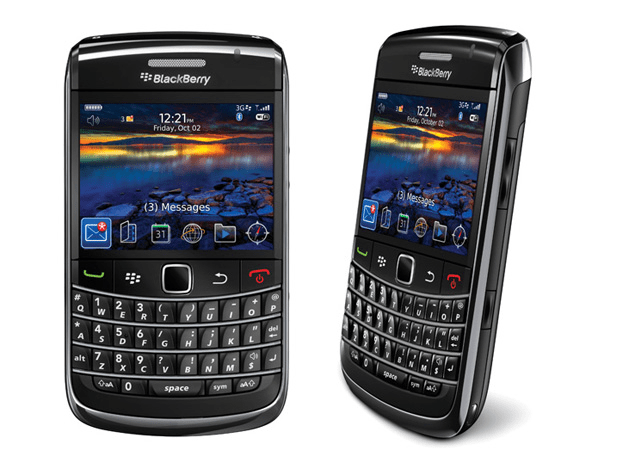
Compact in the pocket
The BlackBerry Bold 9700 and BlackBerry Curve 8900 are sort of the smallest BlackBerry smartphones you can find right now , at about 4.39 inches long and 2.36 inches wide. The Bold 9700 is 0.56 inches thick, and it weighs 121.9 grams , batteries included. The Bold 9700 has that “supermodel” vibe, almost like the Curve 8900, in a way that’s hard not to notice.
Fully equipped with the latest technology
Without considering external features, the BlackBerry Bold 9700 is very similar to its predecessor (BlackBerry Bold 9000) with full connectivity features such as 3G, Wi-Fi, Bluetooth 2.0, GPS … 2.6 inches screen. Half-VGA (480 x 360 pixels), 3.2 megapixel camera, better than the traditional camera of the Bold (2.0 Megapixel). The internal memory is 256MB, with an external memory of 2GB (microSD). The card slot is quite smart, it can be easily removed without removing the battery. Maximum memory capacity that the 9700 supports up to 32GB, an impressive number but not very practical.
The operating system running on the Bold 9700 is version 5.0 of the BlackBerry OS. Basically, it is no different with previous versions of 4.X but there are some changes that have been noted, such as the Resize function of the image before sending it.
BlackBerry Bold 9700: Buy it now
BlackBerry Bold 9700 White WiFi Unlocked GSM QuadBand 3G Cell Phone: Buy it now
Blackberry Bold 9700: Buy it now
Some other highlights
Trackpad replaces Trackball: Trackball is a feature that is unique to all BlackBerry models, but with the BlackBerry Curve 8250, the BlackBerry Bold 9700 uses a lightweight TrackPad.
This is an interesting improvement, you can use the finger to control the trackpad as when hovering on the laptop. Although not as flexible as the trackball, but the trackpad is accurate, convenient, difficult to stain and not easy to degrade as a trackball. That’s why the Trackpad dashboard phones have received positive reviews from tech enthusiasts.
The Bold 9700’s keyboard is a bit hard to find: a slightly smaller keyboard size is the biggest downside with the slimness of the Bold 9700. However, RIM’s smart design keeps you entertained. Work easily. Three keypads are separated by metal dotted lines while each button is nicely cut, while also enhancing comfort in confined spaces, as well as providing users with the ability to edit text. Instant messaging and accurate.
High capacity battery: RIM equipped with Bold 9700 battery capacity 1,500 mAhr enough to talk in 6 hours or put the standby machine in 21 days.
Call quality: Although the small keypad makes it a bit difficult to make dial-up calls, the BlackBerry Bold 9700 speaks for itself when it comes to voice quality. Several tests have been conducted to test the Bold 9700’s sound optimization capabilities, and the results have confirmed the quality of the call is another strong point of the Bold 9700.
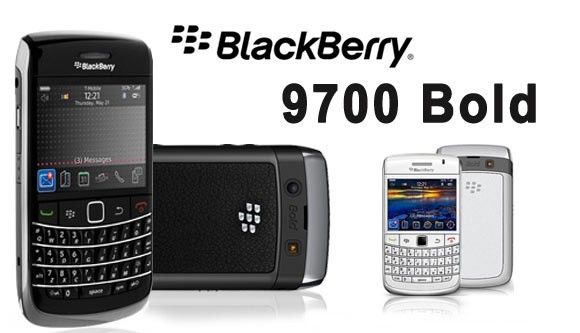
Performance
Processor and Memory
On the BlackBerry Bold 9700, there was a 624 MHz Marvell Tavor MG1 processor, it was honestly a solid pick for what the phone was supposed to do. That setup was paired with 256 MB of RAM, which helped keep everything feeling fairly smooth when you were juggling emails , text messages, and the usual basic apps.
Storage wise, the Bold 9700 shipped with 256 MB of internal memory. However , it could be expanded using microSD cards, up to 16 GB. With that extra space, people could keep more stuff on the device like music tracks , photos and documents too.
Operating System
The phone worked on BlackBerry OS 5.0, which is basically a more current version of BlackBerry’s operating system and it brought in a bunch of small but important changes compared to earlier releases :
Email and Messaging: The Bold 9700 kept BlackBerry’s well known focus on email and messaging that many people actually liked. It supported several email accounts, plus SMS, MMS, and BlackBerry Messenger (BBM). The email program was often described as quick , secure , and reliable, so it made sense for business users who needed dependable daily communication.
Web Browser: The BlackBerry OS 5.0 came with an updated web browser, and in a way it made things feel faster with better rendering power. I mean it was definitely usable for basic web browsing, but then it got kinda stuck when websites got more complex, or when modern web technologies showed up. Sometimes you could load things, but other times it was just a messy experience, like things didn’t quite behave how you expected.
Applications: Through BlackBerry App World you could reach a range of apps, though honestly the catalog was pretty narrow when you compare it to newer app store ecosystems. Still, the Bold 9700 could run several third party applications, including productivity related tools and games, so it wasn’t totally empty.
Performance and Usability
The overall performance of the BlackBerry Bold 9700 was usually smooth, especcialy for what it was meant to do. It handled emails, text messages, and daily routine basic applications pretty efficiently, and most of the time it felt steady. With that 624 MHz processor and 256 MB RAM, the phone could manage typical work tasks and everyday communication needs without too much hassle.
A big highlight was its physical keyboard. It gave that tactile, responsive typing feel that people just notice right away. The keys were spaced out well, and the feedback was solid, so typing felt quick and accurate. This kind of thing really mattered for users who favored a physical keyboard rather than virtual keyboards. Like, it just clicked for them, and they stayed with it.
User Interface and Features
Physical Keyboard
The BlackBerry Bold 9700 came with a full QWERTY keyboard and honestly that was kinda one of the most defining thing on the whole device. The buttons were respected for their ergonomic layout, clear tactile feedback, and for that smooth, everyday ease of using it. The keys were spaced out so typing felt pretty natural, plus it gave a satisfying experience when you were composing messages. That was especially useful for writing emails and text messages, since you could type without constantly second guessing each keystroke.
Touchpad Navigation
Besides the actual keyboard, the Bold 9700 also came with a trackpad sort of for moving around. Honestly it felt like a real step up compared to the trackball used on earlier BlackBerry models, you know, the old style. The trackpad gave smoother and more exact cursor control, so it was easier to scroll through menus , and to work with apps without too much fuss.
Multimedia and Entertainment
As for multimedia and entertainment, the BlackBerry Bold 9700 had a few built in things, including :
Media Player: It included a built in media player, which could handle a range of audio and video formats. It worked well enough, but it didn’t really include the more advanced options you’d see on newer , more modern devices.
Camera: The Bold 9700 had a 3.2 megapixel rear camera, with autofocus and an LED flash. The camera could capture photos and videos that were pretty decent, but it still wasn’t close to the higher resolution cameras people got on current smartphones.
Music and Video Playback: The device supported music as well as video playback, so users could keep their media going on the go. Overall it was fine for its era, though it missed some of those bigger multimedia upgrades that newer gadgets bring.
Battery Life
Battery Specifications
The BlackBerry Bold 9700 showed up with a 1500 mAh lithium-ion battery. The capacity felt a bit modest, but it basically fit what the phone wanted and that everyday rhythm most people live by.
Battery Performance
Battery life on the BlackBerry Bold 9700 was pretty okay , for usual day to day use. Most users could expect around 6 to 8 hours of call time, and maybe as much as 17 days on standby. Of course the actual performance was not just one thing it depended on little stuff like screen brightness, how heavy the network usage was ,and which apps you kept running. In general the Bold 9700 gave dependable battery stamina, and it seemed to match what most users needed.
Connectivity
Network and Connectivity Options
So the BlackBerry Bold 9700 came with a bunch of options for connecting, like cellular in the background.
Cellular Connectivity: It supported 3G networks, which meant you usually got solid mobile data access for web browsing, email, and other online services. The 3G support worked well enough for its era, but nowadays it has been, kind of overtaken by more current technologies.
Wi-Fi: There was also Wi-Fi included, so you could hop onto wireless networks for quicker internet, especially when you didn’t want to rely so much on cellular data. That was handy for data heavy tasks, and yeah it can help when you’re syncing stuff.
Bluetooth: Plus Bluetooth 2.1 showed up in the device, letting you pair with compatible gadgets for wireless audio streaming, file sharing, and a few related uses.
GPS and Location Services
The BlackBerry Bold 9700 had built in GPS, and that gave users location based features plus navigation style support. For most situations the GPS seemed accurate enough, so mapping applications and other location features worked without too much hassle, even if it wasn’t always perfect, you could still use it effectively.
Software Updates And Support
Software Updates
The BlackBerry Bold 9700 launched with BlackBerry OS 5.0 at first, though later it got a few software updates aimed at upping performance, adding new bits, and fixing issues. One of the more notable jumps was to BlackBerry OS 6.0 , that one brought along assorted improvements, including smoother daily use and steadier system behavior.
Support and Ecosystem
For help, the Bold 9700 leaned on BlackBerry App World , where users could choose from different apps and games then download and install them. The whole app ecology felt a bit tighter than the newer app stores we have today, but the 9700 still managed to run a decent mix of third-party software, work related tools included and also a few games.
Software Updates And Support
Software Updates
The BlackBerry Bold 9700 launched with BlackBerry OS 5.0 at first, though later it got a few software updates aimed at upping performance, adding new bits, and fixing issues. One of the more notable jumps was to BlackBerry OS 6.0 , that one brought along assorted improvements, including smoother daily use and steadier system behavior.
Support and Ecosystem
For help, the Bold 9700 leaned on BlackBerry App World, where people could pick from different apps and games then download + install them. The whole app eco system felt a bit narrower than the newer app stores today, but the 9700 still managed to run a decent set of third party software, productivity tools included, and also a small bunch of games.
Related Posts




Tech Reviewer & Product Analyst
Định Bia has spent over 10 years testing consumer electronics with a focus on smart technology. He work as a product advisor at Biareview where he helped customers find the right devices for their needs. He personally tests every product featured on this site using a consistent evaluation framework covering quality, durability, and value. All reviews are based on experience, not influenced by the manufacturer.