Introduction
Gaming headsets are now kind of an indispensable part of the gamer setup. It not only helps with better sound quality, but also lets you get pulled into the game in a more natural way, mostly thanks to directional sound cues. In this piece we will be reviewing the Cooler Master MH650 Gaming Headset. The MH650 is basically a successor to the well known MH630 headset, made for gamers who want a competitive edge while keeping that strong sound quality. Here we will cover the MH650’s features and specs, compare it with other gaming headsets that are out there, then go through how it performs in actual use, and finally do a deeper look at the strengths and also the weaknesses.
Scope of Article
The goal of this article is to give a fairly unbiased review of the Cooler Master MH650 Gaming Headset. We will examine its features and specifications pretty exhaustively and also compare it to other models currently on the market, then we’ll check real-world usability and overall day to day experience. After that the headset’s strengths and weaknesses will be appraised, and opinions will be provided on who should consider buying it, plus the reason behind that.
Features and Specifications
So the Cooler Master MH650 Gaming Headset is wired, and it also ships with a 2m long USB Type-A to USB Type-C cable, yeah. In the box you find 50mm neodymium drivers that are meant to deliver clear, immersive sound, like it sort of wraps around you, in a really smooth way.. It lists a frequency response in the 20Hz-20kHz range, with 32 Ohms impedance, and sensitivity rated at 107dB +/-3dB.
Visually the MH650 looks sleek and quite stylish too, with that gunmetal finish going on, and the ear cups have RGB lighting . The RGB lighting configuration is customizable using CM’s MasterPlus software, if you want it brighter, calmer, or just in some other vibe. It’s also lightweight, and generally comfortable for longer sessions. There’s a padded headband plus ear cups that use soft leatherette so, it stays comfortable when you sit for a while.
And for the surround part, it offers built-in virtual 7.1 surround sound, for a more immersive gaming experience. You switch the virtual 7.1 on and off using the button on the left ear cup . On that same left side you’ll also find a mic mute button, plus a volume control wheel , so everything is easy to reach without fumbling.
Comparison with Other Headsets in the Market
There are lot of gaming headset available in the market, I mean, so many options. The Cooler Master MH650 is kind of a mid range headset , it is competing with other models in the same price area like the HyperX Cloud II, Razer Kraken, and SteelSeries Arctis 5 .
The HyperX Cloud II is a wired headset, and it keeps a pretty similar look to the Cooler Master MH650. Its frequency response sits around 15 Hz to 25 kHz , while the impedance is 60 Ohms and sensitivity reaches about 98 dB. Also, the HyperX Cloud II includes a detachable microphone, based on noise cancelling technology. The main difference though is that HyperX Cloud II doesn’t include any RGB lighting, and it also doesn’t offer virtual 7.1 surround sound, while the MH650 does.
Experience in Real World Using
The Cooler Master MH650 Gaming Headset really ended up being more than just a great fit for hardcore gamers. It feels comfy, with soft leatherette that doesnt add extra pressure even after hours of play. At some point, you can basically forget you’re wearing a headset at all, which is honestly nice for those long gaming sessions.
The live gaming experience offered by the MH650 is one of the most noticeable factors, wherein sound quality is immaculate. The soundstage possible with the 50mm Neodymium drivers is commendable and allows great positional audio during games. There’s also a virtual 7.1 surround sound that can be turned on and off with the software. This virtual surround sound does heighten immersion during gameplay as footsteps and gunfire sound cues are easier to discern.
Another strong feature in the MH650 is that it has a built in microphone. The quality is pretty solid, your voice gets transmitted clear and crisp, so it is pretty well suited for in game chatting or online meetings. The microphone can be adjusted and swiveled toward your preference , which is honestly handy. Also the mute button on the left ear cup, it comes in handy when you need to quickly mute yourself.
All in all the Cooler Master MH650 Gaming Headset is a really excellent pick for gamers who care about both sound quality and comfort. The headset brings great audio performance , a comfy design , and a nice microphone for an affordable price.
Analysis of Strengths and Weaknesses of the Product
Strengths Compared to Other Gaming Headsets:
51mm Neodymium Quality for Excellent Sound
Virtual 7.1 Surround for Added Immersiveness
Comfortable Design with Soft Leatherette Ear Cushions
Impressive Mic Quality with Adjustable Boom and Mute Button
Pricing Is Quite Acceptable
Weaknesses and areas for improvement:
No RGB lighting may put off some gamers fond of flashier designs.
Some users swear by wired connectivity instead of weird.
Cooler Master MH670 Gaming Headset
Compatibility and Integration with External Devices
The cooler master mh650 gaming headset is very compatible with the PCs, Mac, and PlayStation 4. With a 2.4GHz wireless USB dongle, it connects very easily and very reliable range of wireless connection is up to 10 meters. Indeed, the range is more than enough for most gaming setups.
It has come with a USB Type C-to-USB Type A cable so the headset is usable with devices that are not Type C. This cable also kinda lets you charge the headset when the battery runs low, so you’re not stuck. Then the ear-cup has a 3.5mm audio jack on the left side, which means you can use it with devices that do not even have USB ports, like smartphones or tablets, it’s sort of a handy workaround.
Conclusion
In conclusion, when you want excellent wireless headsets and you’re looking at a solid buy, the Cooler Master MH650 Gaming Headset is one of those many strong options. The MH650 is reasonably priced, and it really brings an immensely great sound quality along with a comfortable design, a good mic, and several other features. Some gamers want that super flashy look with RGB lights, but yeah, where the MH650 is a bit less in that department, it more or less makes up for it with sound clarity and comfort. If you’re hunting a wireless headset for gaming, you should definitely have a look at the Cooler Master MH650.
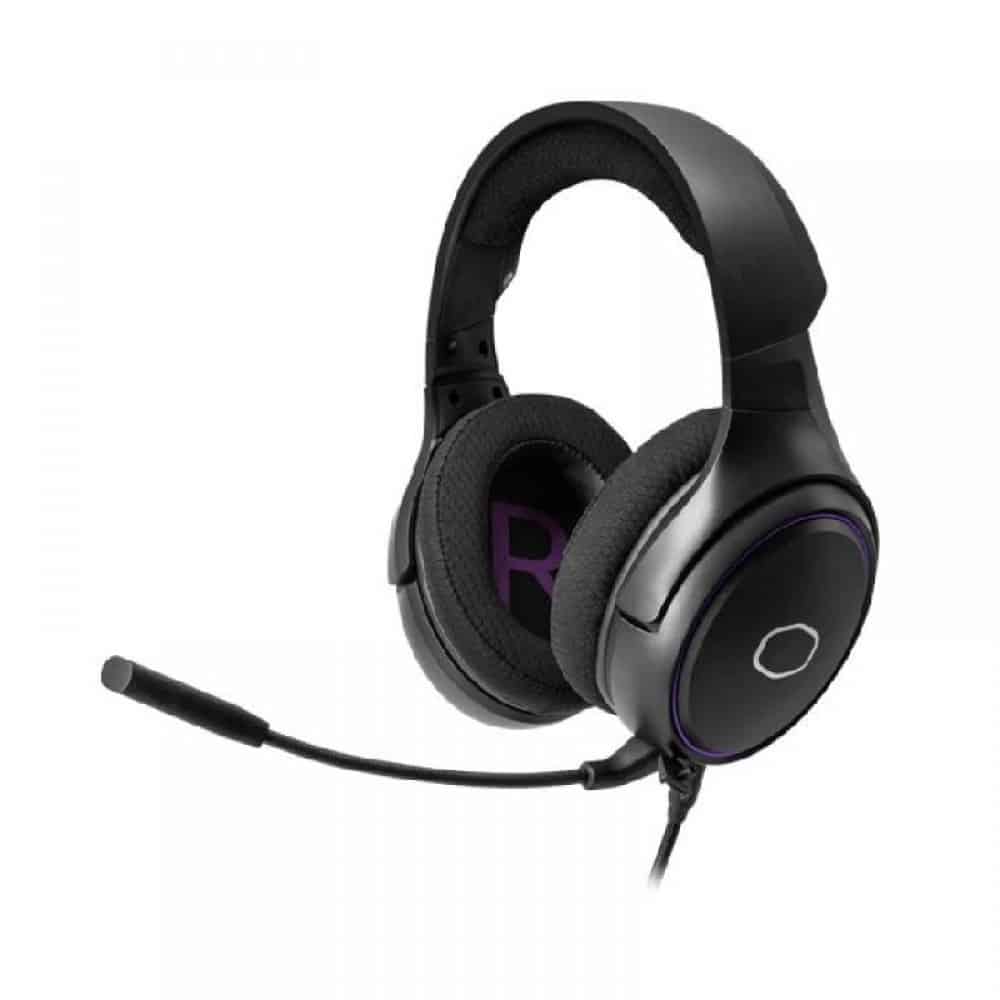
Cooler Master MH650 Gaming Headset with RGB Illumination, Virtual 7.1 Surround Sound, Durable Aluminum Frame, Detachable Omni-Directional Boom Mic, USB Connectivity (MH-650): Buy it now
Related Posts

Tech Reviewer & Product Analyst
Định Bia has spent over 10 years testing consumer electronics with a focus on smart technology. He work as a product advisor at Biareview where he helped customers find the right devices for their needs. He personally tests every product featured on this site using a consistent evaluation framework covering quality, durability, and value. All reviews are based on experience, not influenced by the manufacturer.