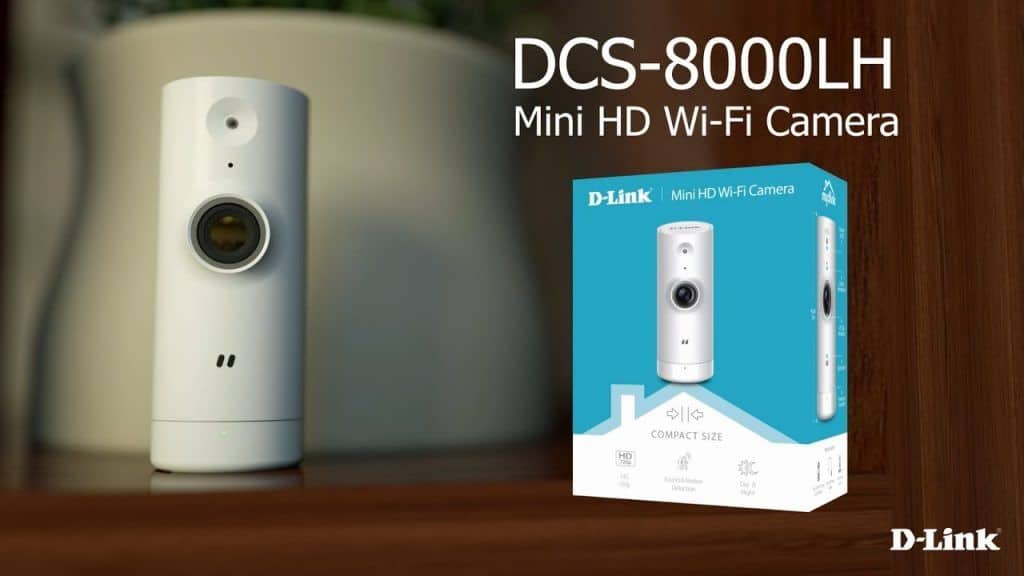

This brand new D-Link wireless surveillance camera allows users to easily view the apartment or office remotely via the mydlink Lite application on a mobile phone or tablet.
At first glance, make sure you also look like me when mistakenly thinking of the D-Link Mini HD Wi-Fi. The DCS-8000LH is a kid’s toy with a cylindrical shape of compact size (9, 2cm, diameter: 3.5cm) and very light weight (57.7gm).
The D-Link Omna 180 Cam HD, which was introduced shortly thereafter, only supports Wi-Fi connectivity, and for many users, the D-Link Omnia 180 Cam HD is a “minus point”, but it is fair to say that with the universality and convenience of wireless networks in all offices, apartments you can completely ignore this “small” criteria.
The D-Link DCS-8000LH has a simple design, using only white tones. The front of the DCS-8000LH is a f / 2.4 aperture focal-length lens with CMOS sensor, support for 720p HD video recording (30 frames per second), wide viewing angle up to 120 degrees, and remarkable. Most important is the ability to shoot night vision efficiently with the help of a specialized infrared LED – precisely that the infrared LED is mounted independently of the main lenses.
According to the manufacturer’s announcement, the infrared light has a range of 5 meters, and is capable of automatically activating when ambient light conditions change.
Below the camera cluster is the light sensor, and finally the status light of the D-Link DCS-8000LH.
Meanwhile, the power jack through the charging adapter is hid at the back, and at the bottom of the device is a hole that activates the hard reset feature.
At the edge / bottom of the DCS-8000LH, you will also see the device’s corresponding parameter tag, mydlink code and the QR code to use when necessary, such as when installing equipment that you previously Loss of technical documentation (paper sheets).
D-Link DCS-8000LH is designed to fit in any modern space, on the shelf, desk, TV cabinet or bar. As long as the area has the presence of an AC power supply.
D-Link Mini HD Wi-Fi Camera 2-Pack – HD Resolution – Night Vision – Remote Access – Indoor – White (DCS-8000LH/2PK): Buy it now
D-Link Mini HD Wi-Fi Camera – HD Resolution – Night Vision – Remote Access – Indoor – White (DCS-8000LH): Buy it now
Easy configuration
The DCS-8000LH is easy to install with the intuitive technical documentation.
Specifically, you first download and install the mydlink Lite (free) app for smartphones or tablets from the App Store or Google Play.
Then power the DCS-8000LH and launch myDlink Lite on the mobile device.
Perform the tutorial, and after about 5 minutes you can finish and the DCS-8000LH is ready to “work” to see the space you have previously set.
Note that you need to create a mydlink account, or use my previous shared mydlink account to conveniently centrally manage devices on the mydlink cloud service.
During the installation process, it will be required to open the Bluetooth feature on the smartphone or tablet, as this is the original and mandatory connection channel between the mobile device and the D-Link DCS-8000LH.
Basically, there are two ways to identify the D-Link DCS-8000LH, which is to perform a QR Code scan, or manually scan the listed list. In the second, you need to enter the corresponding mydlink code of the camera you are using.
After the installation is completed, from the mydlink Lite main interface, you will see all the devices being managed through the mydlink cloud, and of course the DCS-8000LH camera, installation is complete.
At this point, just click on the camera name – for example, DCS-8000LH, then the console will immediately – monitor the camera will appear.
From this management screen, you can perform real-time viewing with good video and audio quality, take snapshot or record video to The work of archiving or creating evidence. The Lab test found that photos and videos are saved directly to the memory (or memory card) of your phone or tablet running mydlink Lite.
If you want, you can take advantage of the advanced features on the DCS-8000LH such as Sound Detection and Motion Detection via the Settings menu.
Noticeably, you can dynamically set up a specific “identification” for the observation space as well as the pitch of the sound intensity (in dB) to activate the alert feature. When DCS-8000LH detects motion in the grids or sounds around the camera, it immediately sends a warning message to the mydlink Lite, or to the mobile device itself of the user.
Performance and Video Quality
Resolution and sensor
It shoots 720p. That’s behind the times now — most competitors are at 1080p or better — but for basic “is someone at the door” monitoring, it’s fine. Don’t buy this one expecting to zoom in and read a license plate.
Field of view
120 degrees, which covers most rooms from a single corner mount. One camera instead of two in a lot of cases.
Night vision
IR LEDs get you about 5 meters. Enough for a hallway or bedroom at night — not enough to light up a yard.
Video and compression
H.264 keeps the files manageable, which matters more than people think if you’re storing a lot of footage or streaming it over a slow connection.
Motion detection, audio, storage
Motion detection works and you can tune sensitivity and zones to cut down on the “cat walked past” alerts. Two-way audio lets you actually talk through the camera — telling a delivery driver where to leave a package, or just checking on a dog. Storage is flexible: cloud through mydlink, or local on a microSD card up to 128GB if you don’t want a subscription.
App and smart home
Everything runs through the mydlink app live view, playback, alerts, settings, all of it. It also plays nice with Alexa, Google Assistant, and IFTTT, it’ll fit into whatever smart home setup you’re already running.
Setup
Mount it, connect it to Wi-Fi through the app, done. Not much of a learning curve, though keep the manual around if you’re not particularly tech-comfortable.
How it stacks up
The Ring Stick Up Cam, Arlo Essential, and Wyze Cam v3 all beat it on paper — 1080p instead of 720p, and in Wyze’s case, color night vision too. This isn’t the camera you buy if you’re chasing specs. It’s the one you buy because it’s cheap and it works.
Where it’s strong
Small, unobtrusive, wide field of view, real two-way audio, flexible storage, and it plays nice with Alexa and Google Assistant.
Where it falls short
720p is dated. Night vision won’t reach far. It’s plastic, not metal. Motion detection is basic and will occasionally cry wolf. You’re stuck using the app — there’s no getting around that.
Bottom line
This isn’t the camera for someone chasing top image quality or a long feature list. It’s for someone who just wants something cheap, easy to set up, and good enough to catch who’s at the door.
Related Posts

Tech Reviewer & Product Analyst
Định Bia has spent over 10 years testing consumer electronics with a focus on smart technology. He work as a product advisor at Biareview where he helped customers find the right devices for their needs. He personally tests every product featured on this site using a consistent evaluation framework covering quality, durability, and value. All reviews are based on experience, not influenced by the manufacturer.