Advantage:
– Flexible design, hinged 360 degree turn.
– loud sound quality.
– Get Windows 10 license
Disadvantages:
– The keyboard is small, the feel is not very comfortable.
– Average level of completion.
Comment
Designed for young people who are active, who love the compact and handy. Dell Inspiron 11 (3169) is an ideal product for young people who like to schedule or travel frequently want to use products bearing personal mark. Besides, the machine is also included with Windows license with stable performance will also be an advantage.
Design
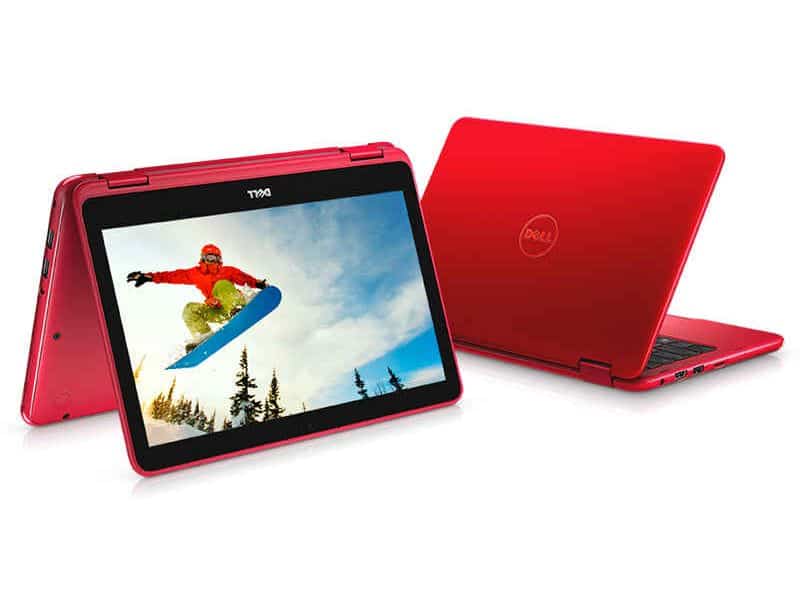
The first thing to say is the special design of this Inspiron 3169. It’s not like any other Dell product before. With special appearance, finishing from hard plastic with curved soft edges. Color is also the reason for the machine looks like a toy laptop, quite “lovely”.
In addition to Tango Red, Dell also launched two equally colorful colors including Bali Blue and Alpine White.
29.16 – 20.19 – 2.08 cm (Length – Horizontal – Thickness) and weight 1.27 kg should look inspiron is quite compact, easy to carry and suitable for people who regularly move
The flexible double hinge provides aesthetics that allow the machine to rotate 360 degrees of flexible rotation, creating multiple stacks of use, but without the certainty needed.
Dell Inspiron 3169 basically has a pretty broad set of connectivity ports. Manufacturers removed connections they considered unnecessary, like VGA, or even optical drives, just to cut costs and also make the machines more streamlined and lighter.
The left side has a power port, HDMI, 1xUSB 3.0 and an SD card slot.
Right edge is the appearance of more with Kensington lock, 2xUSB 2.0, 3.5mm audio combo jack.
The power button and volume up and down keys are also located here, similar to other hybrid laptop.
Monitor and Sound
A compact hybrid laptop. The Inspiron 3169 has a screen that’s kinda small, about 11 inches, with HD resolution 1366 x 768 pixels, suited for mid-range colors and generally good display quality. The horizontal viewing angle is pretty wide, up to 178 degrees, but the vertical aspect feels less good, so sharing what’s on the screen with friends won’t be completely smooth, or at least not as perfect as you might hope.
Also, as the touch screen, the machine will not be coated Anti-Glare anti-glare to support outdoor display. Similar to other hybrid laptops.
Sound, audio experience on the Dell Inspiron 3169 is quite good when the sound is relatively large, but the bass is slightly lacking, and the midrange treble is moderate. However, the loudspeaker volume is relatively large, able to fill the auditorium of 15 square meters.
Display
The Dell Inspiron 11 3169 comes with an 11.6-inch HD (1366 x 768) LED-backlit touch panel, which at first glance feels a little modest. Honestly the resolution isn’t as sharp as what you see on some premium laptops, but for this particular device and its intended use, it stays quite enough. The touchscreen works responsively and in a pretty accurate way, so even when you switch into tablet mode or use touch apps, everything feels smoother, less frustrating, if that makes sense.
In terms of image quality the display is decent overall, you get vibrant shades and solid brightness levels, especially if you’re mostly indoors. Still, it can get a bit annoying outside, because the glossy screen reflects light, and the brightness is limited. Viewing angles are generally acceptable too, mostly because of the IPS panel approach, so colors don’t totally fall apart when you look from different angles.
Also the smaller screen size is kind of the point here, it’s easy to handle, good for casual browsing, watching media, and doing everyday productivity work. It probably won’t satisfy people who want heavy graphic design or serious video editing, mainly due to the lower resolution, but for normal life use it holds up well—streaming videos, web browsing, and handling documents.
Keyboard and Touchpad
On the Dell Inspiron 11 3169, the keyboard feels pretty well done , with a comfortable layout and keys that are about the right size. Even though the notebook is kind of compact, the keys seem nicely spaced out and they give you enough travel that typing stays comfortable for longer stretches. The tactile feedback is also decent, but it doesn’t feel as bold or crisp as you’d get on more expensive, higher end units.
The touchpad is sized fairly well and it responds quickly. You can use multi-touch gestures , like pinch-to-zoom and two finger scrolling, and they work reliably. Inputs are registered accurately and the whole navigation motion feels smooth. The built in buttons at the bottom are straightforward to operate, though some people may still wish for separate, physical buttons.
When you switch into tablet mode, the on-screen keyboard remains responsive and feels easy to work with, mainly because the touchscreen is accurate . Moving between laptop mode and tablet mode is smooth, not clunky, so it’s simple to go from typing to touch interaction without any fuss.
Connectivity and Ports
The Dell Inspiron 11 3169 has a decent set of ports and connectivity choices, for what is kind of a budget laptop. If you look at the left side of it, there is a USB 3.0 port, an HDMI output, and also a microSD card slot. On the right side, you get a USB 2.0 port, a headphone microphone combo jack , and the power button.
Having an HDMI port is a welcome detail too, because it makes it easier to link the laptop to external monitors for slides, or just media viewing. The USB 3.0 port is there for quicker data movement with external drives, while the USB 2.0 port works well enough for smaller things like a mouse or a keyboard.
The microSD card slot is handy for widening the limited internal capacity, so you can tuck away extra files and photos or whatever media you have. Also, the system supports Wi‑Fi and Bluetooth connectivity which helps keep wireless connections steady for internet access, and for peripherals like headphones.
Audio Quality
For something this size , the audio quality on the Dell Inspiron 11 3169 is pretty decent within its price tier. It comes with stereo speakers sitting at the bottom , and somehow they manage to sound pretty clear for everyday use. You know, you probably wont get much deep bass, and the max volume might feel a bit more restrained than you’d hope, but it still does hold up for watching videos, playing music, or just jumping into video calls.
For a more enhanced audio experience, it is best to use headphones or external speakers, i guess. The laptop’s headphone/microphone combo jack helps ensure compatibility with a wide range of audio accessories, and it gives noticeably better sound quality for music along with movies.
The built-in microphone holds up pretty well for video calls and voice recording , kinda getting clear sound with only a little bit of background noise. When you pair it with the HD webcam , the Dell Inspiron 11 3169 turns into a decent option for virtual meetings and online classes.
Software and Features
On the Dell Inspiron 11 3169 , you get Windows 10 Home already installed, which makes the day to day feel familiar and kind of easy to navigate. Windows 10 includes all sorts of useful features and applications to boost productivity and entertainment, like the Microsoft Office suite, the Edge browser, and access to the Microsoft Store for additional programs and games.
Dell also throws in its own software tools , including Dell Update for driver and firmware updates. There is also Dell Mobile Connect, that enables smoother integration between your laptop and your smartphone. Overall these extra utilities and helpful add-ons assist in optimizing performance and making the laptop easier to use.
The laptop’s 2 in 1 functionality is honestly one of the more standout things, it gives you this flexible way to toggle between laptop, tablet, tent, and stand modes. Because of that, it fits a bunch of different situations , from typing and quick browsing, to media watching and even sketching. The responsive touchscreen , plus the solid hinge mechanism helps you go from one position to another , pretty smoothly which in turn makes the whole experience feel more fluid.
Upgradeability and Maintenance
The Dell Inspiron 11 3169 is built as a budget friendly, go anywhere type of device, so it doesn’t really include many upgrade paths. Most of the time the RAM and storage are soldered right to the motherboard, so upgrading those parts becomes more or less impractical. Still, you do get a microSD card slot, which gives you a simple way to add storage capacity without too much hassle.
For routine care, the bottom cover can be removed by loosening a few screws, then you can reach the inside components. Cleaning the cooling fan and the air passages every now and then helps keep performance steady, and also cuts down the odds of it running hot. When you do any inside work, try to handle internal parts carefully, because it’s pretty easy to accidentally nudge or harm something if you’re not cautious.
Dell i3169-0010BLU 11.6″ HD 2-in-1 Laptop (Intel Core M3, 4GB, 500 GB HDD, Windows 10) – Blue: Buy it now
Dell i3169-0011RED 11.6″ HD 2-in-1 Laptop (Intel Core M3, 4GB, 500 GB HDD, Windows 10) – Red: Buy it now
Dell i3169-0013GRY 11.6″ HD 2-in-1 Laptop (Intel Core M3, 4GB, 500 GB HDD, Windows 10) – Gray: Buy it now
Dell i3169-0012WHT 11.6″ HD 2-in-1 Laptop (Intel Core M3, 4GB, 500 GB HDD, Windows 10) – White: Buy it now
Performance
As for storage, the Inspiron 11 3169 often shows up with 32GB or 64GB eMMC storage. At first glance that feels tight compared to traditional hard drives or even standard SSDs, but honestly it matches what you’d see in cheaper budget notebooks. The eMMC setup can deliver snappier start ups and quicker access to apps you use often, however it still falls short of full SSD performance, especially when you’re moving lots of data around.
On graphics duties, the laptop leans on integrated Intel HD Graphics. They’re pretty workable for everyday visual tasks and casual gaming, but again, they’re not built for current demanding titles or anything heavy like big 3D rendering. You may be able to run older or less resource-hungry games, but you’ll likely need lower settings.
Game
Hard to ask at Dell Inspiron the perfect gaming capabilities. However, there are still some good games like WarCarft III or FIFA 2006, etc. FPS ranged from 47 to 53 fps. Rather, once you have decided to buy this laptop, then your needs are not gaming. However, you can still have fun on the machine with a few Games Store Windows 10 including Asphalt 8 or Pikachu, …
Battery Life
A real stand out point for the Dell Inspiron 11 3169 is honestly the battery life, it tends to last way longer than you might expect. Inside there is a 2-cell , 32Wh battery and it can go for roughly 8-10 hours on one charge. Of course it depends on how you use it, but in general this kind of runtime makes it a solid fit for both students and working people who want a dependable machine for the whole day without, constantly hunting for a socket.
Another reason it holds up so well is the Intel processors that get paired with a screen setup thats not too heavy. When you do lighter tasks, like web browsing, editing documents, or streaming, and media playback, the system uses less power. That means the charge stretches out. Still, if you push it harder, like with demanding apps, or you keep using the touchscreen nonstop, the battery can drop a bit faster, no big surprise.
Also it supports fast charging, so when you start getting low, you can top up quickly. This is especially handy for people who are always moving around, and might not have access to an outlet for a long spell.
Related Posts



Tech Reviewer & Product Analyst
Định Bia has spent over 10 years testing consumer electronics with a focus on smart technology. He work as a product advisor at Biareview where he helped customers find the right devices for their needs. He personally tests every product featured on this site using a consistent evaluation framework covering quality, durability, and value. All reviews are based on experience, not influenced by the manufacturer.