For those unfamiliar, Stream Deck is a unique product from Elgato. This device features mini OLED displays on the buttons, allowing users quick access to pre-set features/effects while streaming, enabling streamers to operate independently without the need for post-production support as in traditional methods.
The high level of integration and customization of Stream Deck, along with the buttons with displays, has made it very attractive to streamers, but that’s where it all ends.
Therefore, with Elgato Stream Deck+, Elgato demonstrates its ambition to expand its user market with a more versatile product, not just for streamers but also for other user groups, including content creators, thanks to a fresh design and upgraded software with many unique features.
The most noticeable changes are in the appearance, with the addition of a touchscreen strip and rotary knobs below the familiar on-screen button strips, as “shown” on the box.
As for the main part of the product, similar to other products from the “pirate house,” the Elgato Stream Deck+ is also built with incredibly impressive hardware quality, unlike some of the “sloppy” copycat products that appeared later.
Overall, all the components are housed within a very sturdy protective casing, with a base that also supports the product in a comfortable usage position.
The case enclosure has been designed with exact button and LCD screen cutouts which create an uninterrupted design that protects the small screens which are used for button operation.
The buttons use rubber dome technology which lets them identify user input from off-center button presses while providing players with feedback during active gameplay.
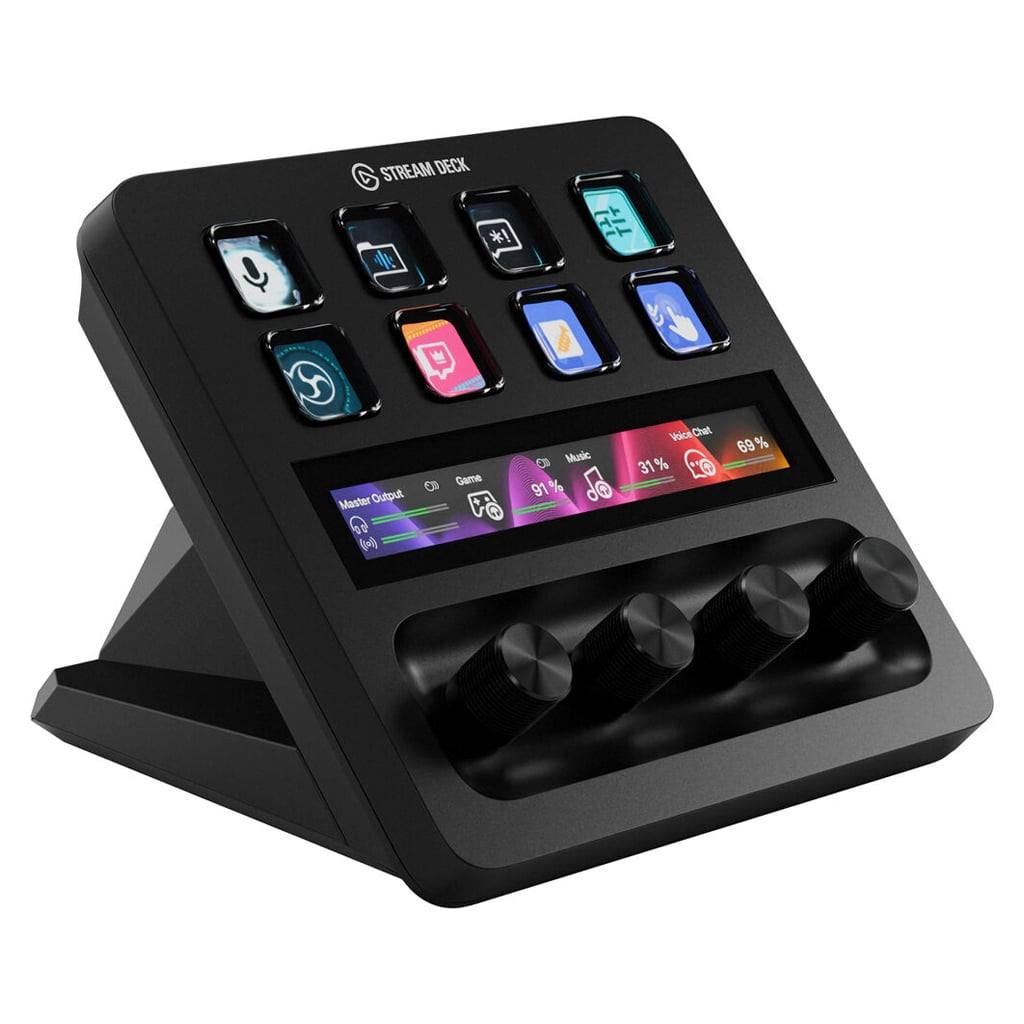
The touchscreen sits below the product’s surface level which creates an unobstructed basic touch experience while the knobs find space in a separate area that decreases their height for easier handling by people with different hand sizes.
The knobs provide users with very small tactile feedback which enables them to notice every single adjustment point which makes the knobs appropriate for adjusting settings that need exact measurement.
The Elgato Stream Deck+ shows Elgato’s best design abilities which create a high-quality product that maintains its premium appearance when used on expensive desks or paired with high-end gaming computers.
The streamer products from other brands cannot achieve this level of performance.
Elgato delivers its strongest value through software which enables users to operate their control programs and plugins that offer practical solutions for professional use.
The touchscreen and control dials of the device function according to logical patterns which users can operate through their previously learned quick access buttons from earlier Stream Deck models.
The touchscreen displays information about the functions of the four dials below and allows users to turn these features on/off with a single touch, or quickly switch to different profiles for different tasks with a swipe.
The completely new dials on the Elgato Stream Deck+ can be used for various purposes, primarily to change values/parameters as desired.
You can use these dials to increase/decrease volume when using music/movie settings, similar to the scroll wheels on Corsair gaming keyboards; to increase/decrease the brightness of the Elgato Key Light; to change the color temperature; or to change the color palette in the style of the famous Surface Dial knob from Microsoft’s Surface Studio machines used for design.
Therefore, streamers can use this product template to stream more professionally, for convenient entertainment, or for application in content creation software.
Beyond its built-in features, users can also access the built-in plugin store within the device’s control software to access and display parameters for various games, control smart home ecosystem devices, or monitor system parameters and settings…
Furthermore, these features will gradually expand in the future with the contributions of a large user community, demonstrating Elgato’s ambition to not limit itself to the world of streamer accessories, but to reach a larger user community with the Elgato Stream Deck+.
The Elgato Stream Deck+ combines its excellent design and construction with its effective innovative software solutions to challenge its ability to maintain permanent market presence beyond the streaming industry.
The Stream Deck Mini and Stream Deck MK.2 already provide basic functions which satisfy casual streamers thus making it hard to persuade them to purchase the premium option.
The plugin store will continue to expand its offerings, but the company has not yet decided on the future development of its store.
The keyboard backlight control through iCUE delivers exceptional performance, but only a few games such as Far Cry 6 and Uncharted: Legacy of Thieves Collection support it. The gaming community has not yet adopted this technology at the level which Corsair anticipates.
The Elgato brand targets streamers as its main audience, which creates obstacles for other user groups who want to explore this new product.
Elgato Stream Deck+ cable placement creates difficulties for users of rigid cables, but relocating the connector to the base would improve product usability through increased flexibility.
Elgato Stream Deck +, Audio Mixer, Production Console and Studio Controller for Content Creators, Streaming, Gaming, with customizable touch strip dials and LCD keys, works with Mac and PC:
Elgato Stream Deck + White – Studio Controller with LCD Keys, Dials, and Touch Strip for Post Production in Adobe Premiere Pro, Photoshop, DaVinci Resolve, Final Cut Pro – Workflow Automation:
Elgato Stream Deck +, Audio Mixer, Production Console and Studio Controller for Content Creators, Streaming, Gaming, with customizable touch strip dials and LCD keys, works with Mac and PC:
Elgato Stream Deck + White – Studio Controller with LCD Keys, Dials, and Touch Strip for Post Production in Adobe Premiere Pro, Photoshop, DaVinci Resolve, Final Cut Pro – Workflow Automation:
Elgato Stream Deck + White – Studio Controller with LCD Keys, Dials, and Touch Strip for Post Production in Adobe Premiere Pro, Photoshop, DaVinci Resolve, Final Cut Pro – Workflow Automation:
Related Posts


Tech Reviewer & Product Analyst
Định Bia has spent over 10 years testing consumer electronics with a focus on smart technology. He work as a product advisor at Biareview where he helped customers find the right devices for their needs. He personally tests every product featured on this site using a consistent evaluation framework covering quality, durability, and value. All reviews are based on experience, not influenced by the manufacturer.