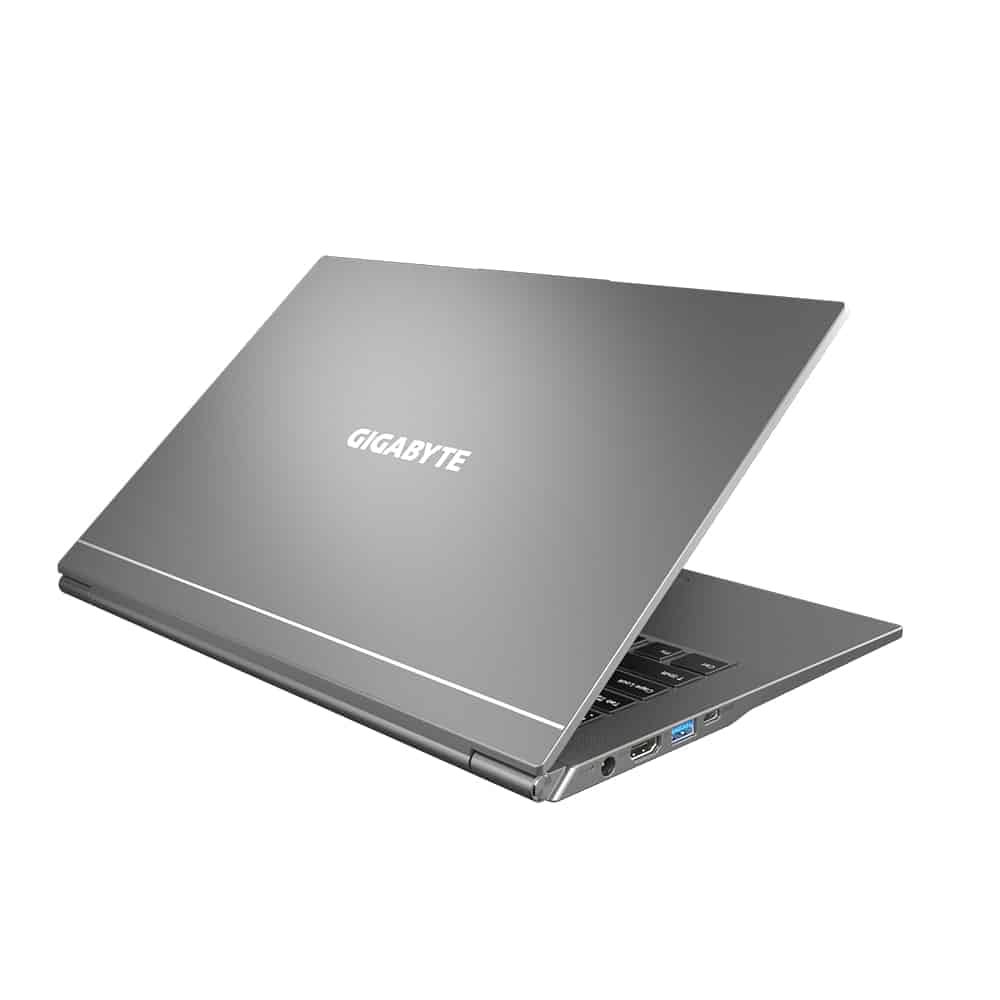
POWERFUL PERFORMANCE MEETS WORKING DEMAND
– With such a thin and light laptop, the configuration is extremely optimized by Gigabyte using the extremely powerful 11th generation Intel core I chip to help you create and work comfortably quickly without fear of shock.
The device is equipped with high-speed DDR4 3200MHz ram to help you comfortably surf the internet, and use multiple applications and multiple tabs at the same time, switching between tabs becomes smoother than ever you can multitask.
The hard drive is equipped with a high-speed Nvme SSD that makes turning on and off tasks quick, you can comfortably store large data files at high speed without having to worry about running out of space. In addition, the laptop is also equipped with an additional slot so you can easily upgrade to more storage for yourself.
GENERAL DESIGN FULL OF Aesthetics
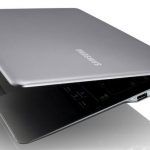
– With such a high configuration, U4 has been optimized in the best way, as evidenced by the fact that the machine weighs only 999 grams, this can be one of the lightest laptops on the market today. With a square design, simple but extremely delicate, making the user more personal, attracting all the eyes of the opposite person.
The machine is designed according to the military standard MIL-STD-810G and can work in the harshest environments, heat resistant, moisture resistant, high-temperature shocks, and vibrations when you are on the go, providing good protection the data in all environmental conditions.
SUPER-Slim Screen, Vivid Image
The 14-inch laptop screen has a thin border, has an outstanding screen-to-body ratio of 83%, in addition, with 100% sRGB color ram, the anti-glare screen helps you work in different areas. Where there is high light intensity, it is easy to work to improve efficiency.
Besides, the machine can also rotate 180 degrees so that you can use it with different postures to avoid fatigue, and adjust the color at any screen origin to optimize the user experience.
GIGABYTE ULTRABOOK TOUCHPAD KEYBOARD
– The keyboard is also designed in a sophisticated way, the deep key shape creates bounce and helps users not get tired when using it for a long time, equipped with a white backlight that can work in different conditions in low-light conditions accurately, in addition, waterproof technology protects the device when drinking water is spilled on the keyboard.
– The touchpad is equipped with a wider area for high accuracy, convenient for dragging and hovering, and switching between tabs and applications is much easier, so you can multitask and do many things at the same time on the laptop easily, quickly, and conveniently.
MODERN COMMUNICATION PORTS QUICK CONNECTION
The connection port is fully equipped with an HDMI port, 2 USB 3.2 thunderbolt 4 ports, an Audio™ 3.5mm combo jack and an SD reader card, and a power port, helping you connect to multiple devices at the same time.
WIFI STANDARD, BLUETOOTH QUICK CONNECTION, AUDIO AND SPEAKERS INCREDIBLE
– Laptop with Wifi 6 802.11 ax connects to powerful wifi devices quickly and can connect to surf the web and look up information more smoothly.
Besides, the device also uses Bluetooth 5.2 so you can easily connect to peripheral devices.
DTS: X Ultra technology delivers high-quality stereo sound so you can focus on conferences, online box presentations, and live music listening experiences.
STABLE BATTERY LIFE & LIGHTWEIGHT HIGH FLEXIBILITY
– GIGABYTE U4 UD 36Whrs battery helps you work throughout the day when the battery life can be used up to 8 hours, With 8 hours of continuous use, this is quite an impressive number, you can bring it to work at the company, coffee shop without fear of running out of battery.
In addition to battery life, the GIGABYTE ultrabook 4D is also considered the lightest laptop in the world today, with a weight of only 999 grams.
GOOD HEAT DISTRIBUTION SYSTEM TO HELP THE MACHINE ALWAYS COOL
The cooling system and fan integrated into the typing area are kept cool and comfortable to help you use and work for a long time, keeping the machine cool without fear of overheating.
Performance
Under the hood , the Gigabyte U4 is driven by the 11th Gen Intel Core i7-1195G7 processor, which sits inside Intel’s Tiger Lake lineup. It’s a quad-core, eight-thread CPU, with a base clock of 2.9 GHz , and it can turbo boost up to 5.0 GHz so you get plenty of headroom for different kinds of work. If you’re juggling several applications at once, doing content creation, or just playing lighter games, the U4 keeps things moving without too much fuss, mostly.
On the graphics side , you get integrated Intel Iris Xe Graphics which ups the visual output compared to earlier generations. It’s not really meant to replace a dedicated GPU , but it’s still quite capable for photo and video editing, streaming high-definition content, and running less demanding games on medium settings, more or less.
For memory and storage , the laptop can come with as much as 32GB of LPDDR4x RAM, so multitasking stays smooth and memory-hungry apps get handled in a sensible way. Storage is via PCIe NVMe SSDs , with configurations reaching up to 1TB. With that mix of quick RAM access and fast solid-state drives, you usually notice quicker boot times , faster app openings, and that general responsive feel you want from a modern laptop.
Thermals and Noise
Getting thermals under control is honestly a big deal in ultrabooks, especially ones that squeeze serious specs into that slim, almost too-compact body. The Gigabyte U4 uses a pretty elaborate cooling approach, it leans on dual heat pipes and a high-efficiency fan. With that, the machine stays relatively cool while you’re pushing it, so you don’t see as much thermal throttling, and performance feels steady over time.
Day to day stuff like web browsing, typing documents, and watching media it’s pretty much quiet most of the time. The fan may kick in now and then, more like a gentle reminder than anything else. When things get heavier , like video rendering or running more demanding apps, the fan noise climbs a notch and becomes noticeable. Still, it never turns into something intrusive. The whole cooling solution does a solid job moving heat away, and even the keyboard and palm rest zones stay comfortable to the touch, including after long stretches of use.
Battery Life
Battery life matters a lot for any laptop, but for ultrabooks it basically becomes the whole point of carrying it around. The Gigabyte U4 includes a 55Wh battery, which isn’t the biggest option in its category , but it still delivers decent stamina. In regular routines, like surfing the web, writing work, or streaming videos, the U4 typically runs about 8-10 hours per charge. That kind of endurance makes it workable for a full day of classes or office tasks without hunting for a socket every few hours.
For more demanding things like video editing or gaming, battery time tends to drop, and in practice the laptop gives something like 4 to 5 hours of real use. The included 65W USB-C charger supports fast charging, so the battery can get to roughly 50% in about 30 minutes . Yeah, that quick top up matters when you are out and you need power quickly, not after a whole hour of waiting or whatever.
Connectivity and ports
On the connectivity side the Gigabyte U4 is pretty solid and it should cover most modern day needs without much fuss. You get a mixed bag of options, including two USB 3.2 Gen 1 Type-A ports , one USB 3.2 Gen 2 Type-C port (with Power Delivery and DisplayPort 1.4 support), an HDMI 2.0 output, a microSD card reader , and a 3.5mm audio jack. Together, this lineup makes it easier to plug in peripherals and also hook up external monitors or screens, so the laptop feels more flexible.
Wireless is pretty much covered by Intel’s Wi-Fi 6 (802.11ax) and Bluetooth 5.1 , so the idea is to keep things quicker, more even, and with steadier pairing for headsets, mice, and other gadgets. Having Wi‑Fi 6 specifically is also a nice detail , particularly if you’re somewhere that has a lot of devices on at the same time , because it helps performance stay more fluid and keeps latency a little lower.
Audio and Camera
So the Gigabyte U4’s audio setup is using dual speakers, they’re on the bottom of the laptop. For casual listening, video calls, and normal media consumption it’s pretty adequate, but it doesn’t have that deeper, richer feel you tend to notice on some higher-end laptops. The output is still clean and understandable, although the bass presence is kinda limited, so if you’re after immersive music or movies, it feels a bit flat. For a more enhanced, sort of “bigger sound” experience, external speakers or a pair of high-quality headphones are the safer bet.
As for the webcam it’s basically a standard 720p HD camera. It works fine for video conferencing, and online meetings. The picture looks decent, clarity is acceptable and colors are handled well. Still, in low-light scenes the camera starts to struggle, you’ll see more noise and less fine detail coming through. A built-in privacy shutter would have been a nice touch and honestly, people would like that. But you can still cover it manually when you’re not using it, so it’s not completely missing.
Keyboard and Trackpad
On the Gigabyte U4, the keyboard is honestly one of the better parts here. It has a full sized layout, and the keys are well spaced or at least close enough , plus there’s a comfortable amount of travel along with tactile feedback. The backlight is also adjustable with a few brightness levels so it stays readable in different lighting conditions. Overall typing on the U4 feels pleasant, you can go for longer stretches without that annoying fatigue , which is kind of the whole point.
The trackpad is pretty generous in size, it gives smooth and accurate tracking, not jittery or anything. It supports Windows Precision drivers, which helps with precise gestures, and multi finger inputs. The surface feels smooth to touch, and the clicking is responsive. It might not match the feel of premium trackpads like you get on a MacBook, but for an ultrabook in this price band it performs admirably.
Software and Security
Out of the box , the Gigabyte U4 ships with Windows 10 Home or Pro , depending on the specific configuration. Gigabyte seems to keep pre-installed bloatware pretty low, so the overall experience feels clean and sort of streamlined. The included Gigabyte Control Center tool gives a good selection of customization options, users can tweak performance modes , keep an eye on system metrics, and handle firmware plus driver updates without too much fuss.
On the security side, there’s a fingerprint reader built into the power button, which makes logging in fast, and also pretty secure. The U4 also supports Windows Hello facial recognition through the webcam so you get that extra biometric layer. All of this together makes the laptop feel more convenient, while still aiming for solid protection.
Price and Value
The Gigabyte U4 is priced competitively , and it lands in that nice spot between performance, portability, and useful features. Depending on the configuration, the cost can shift a bit , but the laptop typically sits in mid-range territory. Because it’s lightweight , packs capable hardware, and includes a quality display, it often feels like a strong value for the money.
When you compare it to other ultrabooks like the Dell XPS 13 or the HP Spectre x360, the U4 manages to hold its ground. It can offer similar performance but usually at a more affordable price. It doesn’t necessarily bring the same premium build vibe or top-tier brand recognition , yet it still delivers where it really matters, so it comes off as a solid option in its category.
Conclusion
The Gigabyte U4 is kind of a well-rounded ultrabook that really does well in key areas like performance , portability , and display quality. It has a lightweight build, solid internals, and a vibrant screen, so it feels like an appealing choice for professionals , students, and everyday users too. Sure it has a couple of small issues, like audio that sounds a bit average , and no option for a higher-resolution display, but honestly it dosnt pull much away from what it’s offering overall.
GIGABYTE U4 UD – 14.0″ FHD – i7-1195G7 – Intel Iris Xe Graphics – 512 GB PCIe SSD – Laptop (U4 UD-70US823SH): Buy it now
GIGABYTE U4 UD – 14.0″ Thin Bezel FHD IPS-Level i5-1155G7 Intel Iris Xe Graphics 512 GB PCIe SSD Win 11 Home Laptop (U4 UD-50US823SO): Buy it now
Related Posts



Tech Reviewer & Product Analyst
Định Bia has spent over 10 years testing consumer electronics with a focus on smart technology. He work as a product advisor at Biareview where he helped customers find the right devices for their needs. He personally tests every product featured on this site using a consistent evaluation framework covering quality, durability, and value. All reviews are based on experience, not influenced by the manufacturer.