Design and Build Quality
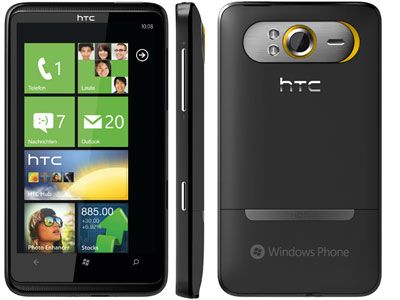
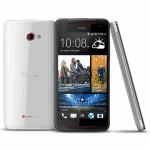
The HTC HD7 really stood out , for its design and build quality and it was clearly trying to give that premium, sort of solid feel in a bigger-screen smartphone… you know the idea. Even if some people might not call it “pretty,” it still looked and felt well made.
Dimensions and Build
In terms of size the HD7 came in at 122.4 x 68 x 11.2 mm, and it weighed about 162 grams, so yeah, it was a bit sizable. That mass kinda matched what you’d expect from a phone built around a large display and a tougher frame. The mix of metal and plastic, felt sturdy enough , and not flimsy under normal use. On the front, the main attention went to a 4.3-inch TFT LCD panel, and at that time it was among the larger smartphone screens you could find.
Display
The screen resolution sat at 480 x 800 pixels, it worked fine for that 4.3-inch size. it wasn’t as crisp as the later high-definition screens, but it still managed to display clear and fairly lively images, especially for the Windows Phone 7 interface. The HD7 also had a capacitive touchscreen, so multi-touch gestures were supported, and in day to day scrolling it felt quick, and responsive. For multimedia stuff, that bigger view was a real plus—videos looked good, web pages were easier to read , and apps were more comfortable to use. Color accuracy and brightness were decent too, even if it couldn’t compete with the more punchy, higher-resolution displays that came afterwards.
Design Elements
The front of the HTC HD7 leaned into a minimalist style. Under the display, you got physical keys , for Home, Back, and Search. On the right side was the power button along with the volume rocker, and the rest of the ports were placed in a straightforward way. The 3.5mm headphone jack was on the top edge, while the micro-USB port showed up on the bottom edge, so plugging things in was pretty consistent.
The back of the device had this sleek, pretty smooth finish, with a metallic accent that wrapped around the camera module, kinda neatly done. The 5-megapixel rear camera came with an LED flash, and it was placed pretty centrally on the back, right where you’d expect. The battery cover was removable so you could get to the battery, the SIM card slot, and also the microSD card slot.
Overall , the HTC HD7’s design and build quality felt solid and kind of upscale, which matched its place as a high-end phone within the Windows Phone 7 lineup.
Display and Touchscreen
The HTC HD7’s 4.3-inch display was one of those standout things, giving users a large sort of working space for dealing with the Windows Phone 7 operating system.
Screen Size and Resolution
That 4.3-inch TFT LCD panel did give a good amount of screen space for media playback, gaming, and everyday multitasking , so it felt pretty practical. The resolution was set at 480 x 800 pixels and overall it worked well for that size, even if it wasn’t super crisp compared to later high definition screens. The pixel density was around 217 pixels per inch , so clarity was decent, though if you leaned in a bit , you could sometimes spot individual pixels.
Touchscreen Performance
The HD7 came with a capacitive touchscreen, it felt pretty responsive and it did multi touch moves too, like pinch to zoom, and swiping through pages. The touch feel stayed smooth enough , and it was mostly precise, with little or no noticeable lag when you’re interacting. This responsiveness mattered a lot for the fluid navigation of the Windows Phone 7 interface, because the whole thing kinda relies on quick touch feedback.
Display Quality
The display, offered pretty good color reproduction and brightness which made it suitable for a bunch of different tasks, you know like looking at photos, watching videos, and using applications. Still, it kind of missed that extra depth in contrast and the overall vibrancy that you get on later AMOLED panels and high resolution displays. As for sunlight, the screen stayed viewable, and visibility under direct sunlight was okay, but in really bright conditions it could get somewhat tricky.
Microsoft has also unveiled the Windows Phone 7 operating system, the Windows Mobile platform, with many new improvements and new features, with little or no contact with the older version.
HTC HD7 is one of the first 10 models published, this is also the first device to use Windows Phone 7 officially available in market. The handset owns a large 4.3-inch screen and inherits the design of the HTC HD2, with a sturdy, slim, sturdy frame. Not much to upgrade, so it is easy to see HTC HD7 is a HTC HD2 running Windows Phone 7 instead of the old platform with 10 years old.
Camera Performance
The HTC HD7 came with a 5-megapixel rear shooter, plus an LED flash, and honestly it felt like a solid sort of deal back then. not the best thing around but it worked , and it did what most people expected
Image Quality
That 5MP unit managed to pull off decent-quality images with decent detail and respectable color accuracy. When the light was good , the pictures usually looked sharp and pretty clear, even if they didn’t quite have the extra depth and richness you’d see on more premium camera phones. Also the lens being fixed-focus kinda reduced the range, especially for close-up stuff where you want more flexibility
In darker scenes the LED flash offered a bit of help, but the results were still pretty limited. In low-light shots you’d often notice more noise , and the finer details kinda didn’t show up as much. There were also a few shooting modes in the mix—auto, portrait, landscape, and macro—so you had some room to adjust for different little moments or setups
Video Recording
For video the HD7 maxed out at 720p. The footage looked decent overall, with smooth frame rates and a level of clarity that made sense for its era. But because it didn’t include newer extras like optical image stabilization, or higher-definition recording options, the video experience stayed kind of capped
Front Camera
On the front there was a VGA camera, mainly built for video calling. It handled basic needs , like video chats and simple self-portraits, but the resolution and overall look were clearly not on the same level as the rear camera.
Performance and Hardware
So, the HTC HD7 was built with hardware meant to feel pretty smooth and snappy while using Windows Phone 7. It wasn’t just “good on paper” either, it was mostly about daily responsiveness, like you’d expect from a mainstream phone at the time.
Processor and RAM
Inside, the HD7 ran on a Qualcomm Snapdragon QSD8250 chip clocked at 1 GHz. That processor seemed like a solid match for Windows Phone 7, and it handled the usual smartphone stuff without too much fuss. Along with it, the device had 576 MB of RAM, which was enough to keep multi window behavior feeling fairly fluid, and it also helped app performance stay steady. Again, not magic but usable, and kind of reliable for that era.
Storage
For storage, the HTC HD7 included 16 GB built in, giving you room for apps, music, videos, and the typical pile of files people collect. However, there was no microSD card expansion, so you were basically stuck with what you had inside. That missing feature can feel limiting compared to some competing models, but for most users it still worked, mainly because the overall package wasn’t trying to be a storage monster.
Battery Life
Battery wise, the HD7 used a 1230 mAh removable lithium-ion battery. In practice, it offered a fairly decent compromise between everyday power and how long it would last. With normal use like web browsing, watching media, and making calls, it would usually get you through the entire day on one charge. But if someone is going harder, lots of gaming, heavy streaming, lots of screen time, then a mid day recharge might become necessary.
The HD7s battery life, was pretty decent compared with other phones back then, but yeah it really wasn’t something special. Having a removable battery was a nice touch because it let users bring along a spare and keep going longer, which made it a bit more flexible for people who wanted extended usage.
Software and User Interface
The HTC HD7 ran on Windows Phone 7, and that was a big deal because it was a major rework of Microsofts mobile operating system. The idea was to feel new, and kinda fresh, with an inventive user experience.
Windows Phone 7
Windows Phone 7 brought in a redesigned user interface built around a tile based Start screen. Those live tiles were updated with current info from apps, so the screen didn’t feel static at all. The OS also leaned into a clean and good looking style, with fluid movements and animations that made the whole experience feel smoother than before.
On the HTC HD7 you still get that core Windows Phone 7 signature vibe, like the Start screen, the People hub, and those Microsoft services that were built right in. The Start screen, for example, lets you tweak the live tiles, so you can hop into apps, contacts, and other functions fast. it kind of made the device feel more responsive, and sort of lively too, not just flat and stuck.
HTC Customizations
HTC also tweaked the Windows Phone 7 experience a bit, including preloaded HTC applications and widget add ons. The goal here was to improve day to day features, plus give users extra tools they could use right away.
Some of the HTC specific touches were enhanced widgets for the Start screen, added options for personalizing the device, and HTC Hub. HTC Hub basically acted like a curated doorway to a collection of apps and services that HTC selected.
Application Ecosystem
Windows Phone 7 kind of had this growing ecosystem of apps and services, so you could reach the Windows Phone Marketplace to download more applications, and that part worked well. At first the app lineup felt a bit smaller than other platforms, but still there was a decent mix of popular , practical apps for work like productivity, plus entertainment, and social networking. Not everything was there immediately, but what existed was mostly useful and pretty mainstream.
Also there was a solid link to Microsoft services, like Xbox Live, Bing, and Office Mobile, which added extra functionality and a sense of connectivity. With Xbox Live integration, users got gaming-related stuff , like features tied to games and achievements. Then Office Mobile gave tools for productivity and handling documents, basically for editing and viewing on the go. It was not the most powerful suite ever, but it was functional.
Connectivity and Network
The HTC HD7 offered several connectivity options, so users could stay online and reach different services without too much hassle.
Network Connectivity
It supported GSM networks on the 850 900 1800 , and 1900 MHz bands, and for 3G it used the 2100 MHz band, so in a sense it worked with a pretty wide set of carriers, and it aimed to keep voice calls plus data transfer stable. In practice it was meant to be reliable across many regions.
Wireless Connectivity
For wireless options, the HD7 had Wi‑Fi 802.11 b/g/n support. That sorta helped people hook up to Wi‑Fi for quicker browsing, and on top of that it reduced mobile data usage, overall. It also came with Bluetooth 2.1, so pairing with wireless accessories like headphones, and speakers was possible, and in general it behaved like a pretty normal Bluetooth experience.
GPS and Navigation
For location, the HTC HD7 came with aGPS, which supports location services for navigation and location-based apps. The device also leaned on Bing Maps, so users could access mapping and navigation basics. Still, the navigation experience was a bit simple, compared to standalone GPS devices, or to today’s modern smartphone apps that are more polished , and smarter about routing.
Multimedia capabilities
The HTC HD7 was kind of built for a solid multimedia vibe, you know, with a bunch of features meant to improve how you consume media, music, video etc. It didn’t try to be the absolute best at everything, but it did what it needed to do in day to day use.
Music and audio
On the device you got a built in music player that supported a range of audio types, MP3, AAC, and WMA being the big ones. The player had a pretty direct interface too, for managing and playing your tracks. You could make playlists, and also browse through your library by artist, album, or genre. In other words it was simple, but it worked.
As for sound, the audio quality was acceptable for an entry level phone, with clear output from the internal speaker. Plus there was a 3.5mm headphone socket , so listening privately was easy. Supporting several audio formats also helped with compatibility, meaning more files would play without much fuss.
Video playback
For video, the HTC HD7 could handle playback up to 720p, so high definition content was mostly in the comfort zone. The 4.3 inch screen looked fairly good for videos, with decent color reproduction and brightness that didn’t feel too dim in normal conditions.
That included video player could handle things like MP4 , H.264, and WMV. In general the playback stayed pretty smooth, but sometimes you’d notice a bit of stuttering or slight lag, and it was more obvious when the video bitrate was on the higher end. The HD7 also allowed streaming video through apps and services found in the Windows Phone Marketplace.
Gaming
Gaming on the HTC HD7 kind of depended on the specific title , because the phone’s hardware plus software seemed to match quite well with the games that showed up on the Windows Phone 7 platform. The large screen helped a lot, and the touch controls felt responsive, so the whole experience felt more immersive. Still, performance could shift from game to game, particularly when complexity increased or when graphics demands were higher.
The way it integrated with Xbox Live let users tap into a bunch of games and extras, achievements and leaderboards included. The gaming library was kind of small at the start compared with other platforms but it still had well known titles and some casual games that felt pretty fun on the HD7’s hardware.
User Experience and Performance
The HTC HD7 was meant to feel fast and responsive, basically leaning on Windows Phone 7 along with what the device could do.
Operating System Performance
Windows Phone 7 was built to be fluid and pretty easy to use, with those smooth movements and little animations. Its tile style interface made it convenient for quick app access and information too, and overall the HD7 hardware was usually able to keep things feeling responsive enough.
That 1 GHz Qualcomm Snapdragon chip, paired up with 576 MB RAM kind a helped it keep up with normal chores and that multitasking juggling, without too much pause. But well, sure, some people probably noticed those sluggish beats, mainly when more than one app was running, or when the heavier workloads rolled in all together at the same time.
Multitasking and App Performance
On the HTC HD7, multitasking was more on the basic side, so you could jump between apps and keep things moving while doing different tasks. The multitasking performance was mostly fine , but it really depended on how many apps were left active and how much load they put on the hardware.
As for app performance, most applications worked in a satisfactory way, running smoothly most of the time, no big drama. The phone had 16 GB of internal storage which gave a decent amount of room for apps and user data, and that pretty much supported a good overall experience.
Battery life
The 1230 mAh removable battery in the HTC HD7 seemed to hit that decent middle ground between performance and battery life. With day-to-day use, like web browsing , listening to multimedia stuff, and regular phone calls, it could usually carry you through a full day on just one charge.
But if someone was using it harder, like long stretches of video playback , or gaming, then the battery life could feel noticeably shorter, kind of less forgiving. Still, because it was a removable battery, you could toss in a spare battery for those longer hours out , so there was more flexibility if you really needed extra endurance.
Conclusion
The HTC HD7 was a standout smartphone, in a way it mixed together design, performance, and software features that felt pretty compelling. That big 4.3 inch display, paired with solid hardware, and the whole Windows Phone 7 integration, made it a premium style experience for people who wanted a high end phone with a modern operating system.
While the HD7 was getting some serious competition from other flagship devices and various operating systems, it still managed to stand out—mostly because of the big screen, a responsive touchscreen and the way everything felt smooth when you used it. The way it sort of affected the Windows Phone ecosystem, and how it helped show what Windows Phone 7 could do, is what made it matter back then in the early smartphone scene.
In general, the HTC HD7 ended up being a pretty well made device, you know, it reflected HTC’s focus on putting out high quality smartphones and it added something useful to the Windows Phone 7 lineup. Its look, the overall performance, and the software abilities made it a solid contender for its time and it left a pretty durable impression on the smartphone market, even later on.
HTC HD7 Windows Phone 16GB – T-Mobile: Buy it now
HTC HD7 Unlocked Global Smartphone – Window 7, 1 GHz processor, GPS, WiFi (Unlocked): Buy it now
Related Posts

Tech Reviewer & Product Analyst
Định Bia has spent over 10 years testing consumer electronics with a focus on smart technology. He work as a product advisor at Biareview where he helped customers find the right devices for their needs. He personally tests every product featured on this site using a consistent evaluation framework covering quality, durability, and value. All reviews are based on experience, not influenced by the manufacturer.