Design and Build Quality
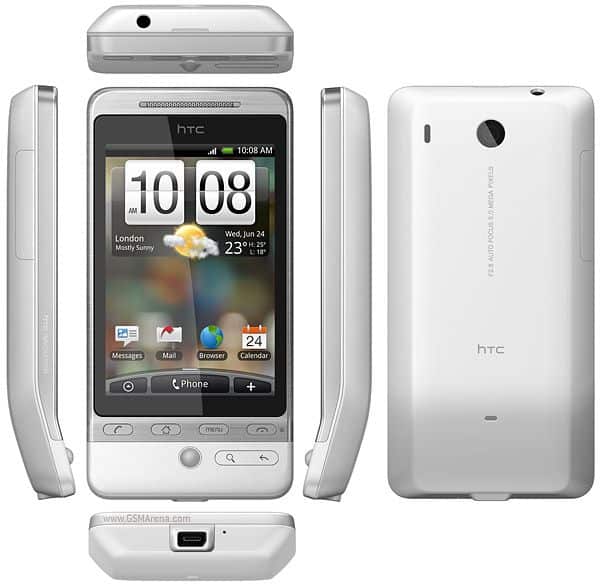
The HTC Hero was a pretty striking departure from how the earlier smartphones looked, especially if you lived in the Android ecosystem. One of the things people noticed right away was that “chin”, you know, that small curve along the bottom of the device that kinda angled the screen upward. It wasn’t only for looks either, it was sort of functional in the hand, made the phone easier to grip and use, more comfortable during calls too. And that same little chin helped guard the screen from scratches when you tossed it face down.
Inside, the Hero had a 3.2-inch capacitive touchscreen, with a resolution of 320×480 pixels. Back then this was kinda normal, a standard sort of deal, even if now it feels modest. Still, in 2009 it was more than enough for most daily tasks. The display came off bright and colorful, with decent viewing angles, although it did struggle a bit when you were in direct sunlight, like outdoors kind of situations.
The body was plastic, sure, but it had this solid, premium feel to it, mostly because of that soft-touch finish. It came in multiple colors, like white, brown, and graphite. The white variant in particular was kind of famous, not just for the color, it had a Teflon coating which made it more resistant to smudges and scratches.
Then there was the physical trackball sitting below the screen, which at the time was a fairly common feature. That trackball made navigation feel more precise, it was especially handy when you needed to select text or move through menus without fighting the interface. Around it, there were also real buttons for home, menu, back, and search, plus the call and end buttons. So you got touch together with physical control , which made the Hero feel very friendly to use, especially if you were coming from feature phones, the kind that didn’t have all this touchscreen life yet.
The HTC Hero is made from good materials. Except for the LCD screen, the whole case is made of dull metal, which is great to hold on the hand. In addition, the Hero does not sweat or dust, the size of the machine is 112 x 56.2 x 14.4 mm, weighs 135 grams, not thin compared to most other smartphones.
When HTC introduced the first images, many people were hesitant about designing the curved display below the screen. Although, this design has previously appeared on Dream (G1) and Magic, but the Hero is more pronounced. Actual use shows, the tilt up does not reduce the friendliness of the hand, put in the pocket, pants. Unknown to HTC, but the Hero is a distinctive feature, compared to straightforward smartphones today.
Below the screen, there are up to 6 shortcut buttons including call, menu, back and trackball with the ball will light up. Hero’s key system works better than Magic.
Like many of HTC’s mobile phones, the two charging lines and connecting to the computer are via the miniUSB interface. However, the Hero can plug a standard 3.5mm headphone jack at the top. The left side of the machine is the volume up and down keys.
Hero’s 3.2-inch screen, HVGA 320 x 480 pixel resolution, capacitive touch. This size is equivalent to Magic, but adds dust resistance.
Compared to the configuration, the Hero is almost identical to the HTC Magic. The machine runs on GSM networks, supports 7.2 Mbps HSPA download speeds and 2 Mbps uploads. In addition, users can also use Wi-Fi, Bluetooth and GPS.
The difference from Magic is that the Hero possesses a Sense interface. Instead of the Android home screen with 3 pages sliding across, the new model allows the scroll pan to the left, right to go into the shortcut just like TouchFLO.
In addition to the shortcuts, HTC also equipped with new widgets on the Sense interface, in the first version of the default table, users can use the first 12 different widgets from social networking Twitter to weather, Wi- Fi, GPS, Bluetooth …
HTC Hero 3G WiFi Android Smartphone Grey Sprint NEW: Buy it now
HTC Hero G3 A6262 Black Unlocked GSM Smartphone Google Android Touchscreen Mobile Cell Phone, GPS, Wifi, 5 Megapixel Camera, Compass, MicroSD: Buy it now
HTC Hero 200 – (Sprint) Smartphone: Buy it now
HTC HERO 200 GRAY (Sprint): Buy it now
Like HTC’s TouchFLO, HTC is refreshing the Hero’s contact list. Users can see the full details of phone numbers, addresses, and details of incoming calls, as well as messages, emails, even Facbook, Twitter, and Flickr with different tabs.
Technology that HTC uses on the Hero is capacitive touch similar to the iPhone, but the operating system does not support multitouch. But the actual test shows that the web browser supports multitouch in the two-finger zoom, but other apps do not appear.
However, it can be seen that Hero’s browser is nothing more than Safari on the iPhone at finger speed and ability to control, the display is slightly dark and does not have the sharpness as Apple’s mobile. However, the Hero browser supports flash, users can watch live video and play flash games.
Like other Android mobile models, the Hero is equipped with many Google features such as Gmail, calendar, contacts sync or watch movies on YouTube with the accompanying gadget. In addition, users can go to the Android Market app store to download other programs.
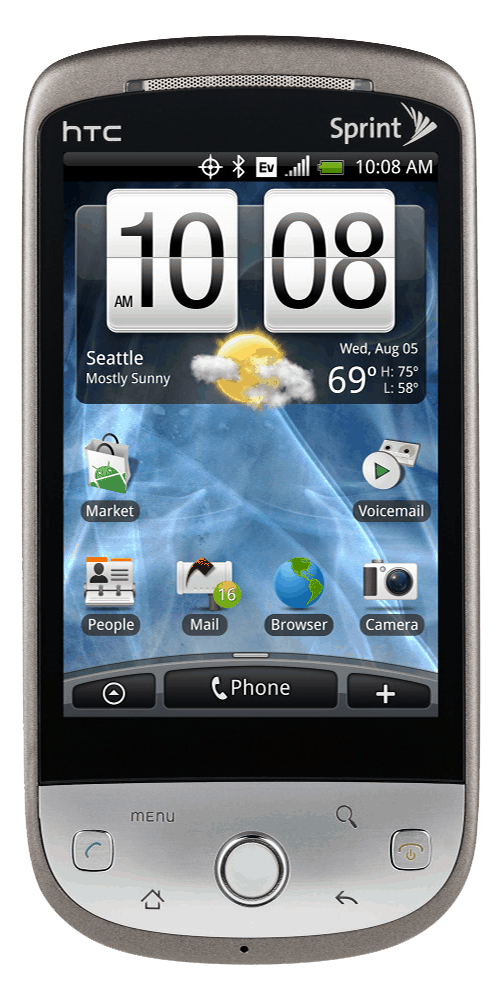
The 5 megapixel camera on the back of the camera supports autofocus. Photographs were relatively good, but the camera was slow, especially under some light conditions, which required a firm hold, avoiding shake to reduce blur.
Hero has 512MB internal memory and can be expanded with SDHC memory card. The card slot is located behind the battery cover.
One of the surprising is that the Hero has 288 megabytes of RAM, using a pretty heavy Sense interface, but runs very smoothly. It’s only a little slower when using many applications like HTC Clock or Peep Twitter, but it’s not that great.
Pin on the machine more impressive than the Magic. It takes two days to recharge even when using a variety of battery-consuming gadgets like browsing, downloading, playing Twitter. However, users should turn off automatic modes like Gmail sync constantly.
User Experience
The HTC Hero sort of gave a user experience that felt ahead of its time in quite a few ways. Putting HTC Sense alongside Android offered a really rich, adjustable space to play in, and it seemed to fit both tech enthusiasts and more relaxed, casual users too. The overall look, with that noticeable chin and a comfortable, easy-to-hold shape, made it more doable to use it one-handed. That mattered a lot back then, when smartphones were stretching bigger and bigger, pretty fast.
The capacitive touchscreen was responsive, and it could be precise enough that navigating felt simple and direct, and even using apps was mostly smooth. Then you had the physical buttons, plus the trackball , which added to how usable it was, because people could interact in more than one way. That kind of flexibility especially helped with things that need control, like editing text, or tapping/selecting small items on the screen.
A big highlight on the HTC Hero was how it handled social networking stuff. With HTC Sense it kind of pulled together contacts, messages, and various updates coming from different places, and turned it into one connected communication flow. In a way, it was an early hint of the deeper social media blending that would later become normal, in subsequent Android releases and in other mobile operating systems as well.
The Hero also had this decent sort of web browsing experience, mostly because it came with a WebKit-based browser. Sure, it wasn’t as quick or as loaded with features as newer, modern browsers but it was still more than fine for most sites, even the ones with tricky layouts, multimedia stuff and the usual “it just works” moments. On top of that, Flash Lite support meant it could show a bit of Flash content, but it was kinda limited. Whenever Flash was involved the whole thing would tend to move a little slower, sometimes noticeably.
Still, the HTC Hero wasn’t exactly flawless. As the Android ecosystem kept changing and growing, the Hero’s hardware started to feel older. With that limited RAM and processing muscle, newer apps and more demanding tasks could really give it trouble. Switching between things wasn’t always smooth either, multitasking could feel sluggish, and people often had to babysit their running apps so the device wouldn’t run out of memory in a hurry.
There was also the bigger problem of official software updates. After Android 2.1, there basically weren’t any, at least not from HTC. The Android community tried to help by building custom ROMs that brought newer Android releases to the Hero, but these unofficial updates weren’t supported by HTC. They also often introduced their own drawbacks, like weaker stability, occasional bugs, or missing features that users kinda expected to get.
Strength
– Beautiful interface and professional
– Robust design, good material
– 3.5 mm connector
– Multi-touch browser
– Battery healthy
Weak
– Slow camera
– Not yet supported for video calling
Related Posts




Tech Reviewer & Product Analyst
Định Bia has spent over 10 years testing consumer electronics with a focus on smart technology. He work as a product advisor at Biareview where he helped customers find the right devices for their needs. He personally tests every product featured on this site using a consistent evaluation framework covering quality, durability, and value. All reviews are based on experience, not influenced by the manufacturer.