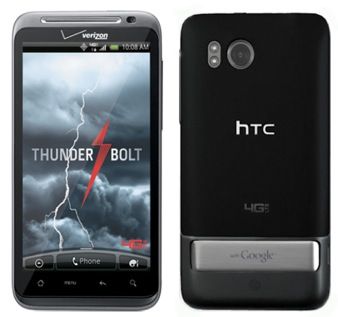
Design
Thunderbolt design with soft plastic shell covered most of the back, at the bottom with a piece of metal encased speaker protection Google logo engraved. Metal pieces can be opened and made into the rack helps Thunderbolt can stand on your desk while you open this tripod to reveal huge loudspeaker of Thunderbolt. Thunderbolt’s design makes removing the battery is extremely difficult, so make sure the battery inserted and is somewhat too hard. Fortunately, the machine comes with 32GB microSD card available to most of us probably do not need to bother to remove so to replace the memory card.
Screen
Visibility of the Thunderbolt can say is excellent, with a 4.3-inch WVGA screen. The colors on the screen appear brilliant and honest value, very wide viewing angle. Even the fastidious users also can not help but admit that the Thunderbolt display too great.
With a resolution of 480 x 800, the Thunderbolt screen is pretty much ideal for browsing, or just looking at photos, in the real world you know. And sure, HTC Sensation already hit qHD, 540 x 960 (and the iPhone 4 sits at 640 x 960) so it kinda looks like qHD was the newer “standard” for fresh HTC phones at the time, but still… you can not exactly complain about what the Thunderbolt display delivers.
Display
The HTC Thunderbolt came with a 4.3-inch TFT capacitive touchscreen, 480 x 800 pixels in total, and that works out to roughly 217 pixels per inch (PPI). Now yeah, by today’s expectations, that resolution sounds kind of low, but back in 2011 it was pretty normal for premium smartphones.
Honestly, the display was one of the most standout parts of the Thunderbolt. It had bright, lively colors, and the viewing angles were actually good , so it was great for media watching, web surfing, and gaming sessions. Also the screen size felt large enough for the era, giving users plenty of space for content, without that “everything’s cramped” feeling. Color accuracy was decent too, though it usually pushed things a bit too far, so colors looked slightly oversaturated, which was a pretty common HTC thing around that timeframe.
Where the Thunderbolt display really shined, was outside use. The panel stayed bright enough that you could still make it out in direct sunlight, which is a huge deal if you’re always on the move. Besides that the capacitive touchscreen was responsive and kind of precise, so scrolling, tapping, and general navigation stayed pretty smooth while you were moving through the interface and apps.
However, the display’s resolution did have its limitations. Text and images were not as sharp as they could have been, especially when compared to devices with higher-resolution displays that began to emerge shortly after the Thunderbolt’s release. Despite this, the screen was still one of the better ones available in the early 4G smartphone market.
Speaker and battery
The sound quality of the speakers which are pretty good, but when using the rack, the volume dropped drastically. The conversation through the speakers is fairly easy and completely user can hear sounds clearly. Thunderbolt battery life slightly less, in standby machine can only operate in about 4 days. Unlike the EVO, the user can not manually adjust the tuner off mode 4G for only CDMA network in order to save battery. Thunderbolt uses an auto-detect function and tuner. For some people, it is not easy to calculate much affected, but would have many users expressed dissatisfaction know this function when consumed a significant battery life.
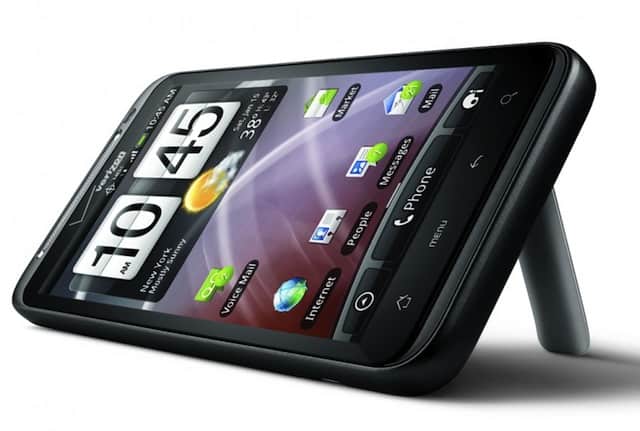
HTC Thunderbolt 4G Verizon 8MP: Buy it now
Camera
HTC Thunderbolt is equipped with an 8 megapixel camera, outperformed the EVO 4G, HTC Thunderbolt. But there are still some defects in photography software. In macro mode, users have difficulty in focusing. And there are a few problems with light measurement, it seems HTC use the light measurement full-screen mode, so will face some major problems when users want to shoot backlit.
In movie mode, Thunderbolt allows for high-definition video shoot very well, without interference. But in this version there is no autofocus mode, but you can focus manually by pointing to the focus point on the screen.
Performance
Under the hood, the HTC Thunderbolt ran on a 1 GHz Qualcomm Snapdragon MSM8655 processor, matched with 768 MB RAM. Back when it came out, that setup felt pretty powerful, even if it wasn’t, you know, the very top of the line. The processor being single-core meant it could still push through most things pretty smoothly, like web browsing, social media, and basic juggling between apps, more or less without drama.
Day to day the Thunderbolt felt nice and quick, especially when you were moving around inside the Android interface and using everyday applications. Still, it didn’t take long before it started showing its age, mainly when you tried more demanding apps or games, the ones that really want serious processing muscle. Once new apps kept landing with heavier needs, the single-core situation became obvious fast, because it just couldn’t keep up the way newer hardware could.
Another place where it kinda struggled was, multitasking. With 768 MB of RAM, you could keep a couple of apps open at once, but bouncing between multiple more heavy ones, might bring noticeable lag, and, sometimes even stutters. You’d really notice it with the browser when there were multiple tabs, or with apps that eat memory, like games, or even media editors that keep doing more than they should.
Even with all that, the Thunderbolt stayed a reasonable machine for regular stuff, especially considering when it was released. It was among the faster Android devices around at the time, and for people who weren’t chasing the absolute fastest compute power, it did the job more than well enough.
Software and User Interface
The HTC Thunderbolt came out of the gate with Android 2.2 Froyo, then later on, somewhere in the middle of its life cycle it got an upgrade to Android 2.3 Gingerbread. HTC’s own Sense UI was stacked on top of the Android operating system, sort of acting like a layer, and it gave a pretty specific, and very noticeable feel compared with other Android phones.
People at the time usually said HTC Sense was among the nicer custom Android skins. It had a clean, polished look with pretty smooth animations, plus a home screen that you could tweak, and a bunch of widgets for quick info, like weather, news, and social media style updates. And the Sense UI didn’t stop there, there were multiple ways to change how everything looked and behaved, so you could make your device feel more personal , instead of stuck with a default setup.
One of the most talked about bits of HTC Sense was how it kinda managed social media integration. The handset shipped with apps like Friend Stream, which basically gathered posts and updates from a few different social networks into one combined, unified feed. That meant it was easier to stay in touch with friends and family, without jumping between several apps every few minutes. Another strong point was the People app too, which acted like a central hub for contacts and it also tied in social profiles plus the communication history, so everything was more or less in one place.
Still, the Sense UI wasn’t perfect, it had some downsides. Yes it brought a lot of useful features and options for adjustment, but it also added bloatware and extra background processes that could end up dragging things down as time went on. On top of that, the more complex customization meant updates could show up slower , because HTC had to modify the newer Android releases so they would play nice with their custom interface layer.
Despite these issues, HTC Sense was mostly well received, and it gave the Thunderbolt a kind of polished and friendly interface, which felt better than the basic Android setup in quite a few ways. The added features, and the freedom to tinker around , was something a lot of people liked. Still, if you wanted things more streamlined, and light on the eyes, Sense could end up feeling a bit overwhelming, like too much going on at once.
Battery Life
One of the biggest headaches for the HTC Thunderbolt was its battery life , plain and simple. The phone came with a 1400mAh battery, which seemed rather small, especially when you consider the strong hardware inside and the whole 4G LTE deal. So yeah, battery life ended up being one of the most talked about points by users and reviewers, over and over.
Bringing 4G LTE to the Thunderbolt was a bit of a double-edged situation. Sure, the data speeds were impressive and really quick, but the power drain was also brutal. In real use, people who relied heavily on LTE for browsing , video watching, and downloading media , would see the battery drop fast. Very often it would need a recharge by mid-afternoon, or not much later than that.
Even with a more moderate use, the Thunderbolt kinda struggled to make it through the whole day on just one charge. Because of that, battery management became a big deal pretty fast. A lot of users ended up just carrying spare batteries, messing around with battery saver apps, or flipping the LTE connection off when it wasn’t really needed, so the battery would last longer.
HTC did try to smooth things over with software updates, plus some small optimizations, yet the core problem stayed, which was basically the small battery capacity versus the pretty high power demands the device had. Some folks even bought extended batteries, and sure, that gave more power but of course it came with the trade-off of added thickness and bulk, so it didn’t feel as sleek.
All in all, the Thunderbolt’s battery life was kind of one of its weakest spots, you know? Yeah, you could still make it work around it, with careful power use and a few extra accessories but for a lot of users it turned into this steady frustration. Especially for the folks who picked the device specifically because of its 4G LTE capabilities, and not some other thing.
Operating system
The Thunderbolt runs on the Android 2.2 operating system, and it comes with the HTC Sense interface. Even if the Thunderbolt’s HTC Sense feels a little bit different, compared to products like the network unlocked Desire HD and Desire Z, it still keeps an extra feature called “Fast Boot” , like those two models. When Fast Boot is enabled, it’s kinda similar to the computer standby mode, so every time you shutdown, the Thunderbolt will not really go all the way off. Because of that the boot process turns into extremely quick, it takes just over 9 seconds, instead of about 58 seconds when Fast Boot is off.
Another thing that many users are not happy with is that some of the software that is built into the Thunderbolt can not be removed, for example Adobe Reader, City ID, Kindle, … also maybe other preloaded apps. The use of Bitbop—well, what software people want really depends on their preferences, and the manufacturer should not push this on the user, because it can easily lead to negative reactions toward the product.
Overall, the HTC Thunderbolt is a quite outstanding handset. It has a compact design, the screen looks nice and sharp, and the camera works well. So if these are the kinds of criteria you have when searching for a new mobile device, then this is certainly a great choice.

Tech Reviewer & Product Analyst
Định Bia has spent over 10 years testing consumer electronics with a focus on smart technology. He work as a product advisor at Biareview where he helped customers find the right devices for their needs. He personally tests every product featured on this site using a consistent evaluation framework covering quality, durability, and value. All reviews are based on experience, not influenced by the manufacturer.