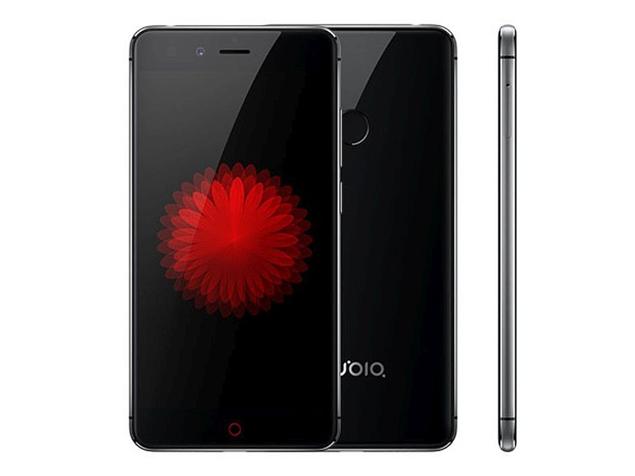
Design Nubia Z11
The Nubia Z11 basically has almost no visible screen borders on both sides. You get a 5.5-inch display, and still the screen ratio on the front comes to 75.2% ,so it feels similarly compact to a 5-inch phone. Honestly the Nubia Z11 feels like one of the most impressive looking design phones around right now.
In terms of materials, the Nubia Z11 uses a metal frame that feels firm, luxurious and does not suffer from fingerprints like glass-backed machines. The machine is very high finishing when the details, the seams are made seamless, very smooth.
Nubia says the Z11 series aluminum alloy 6000 series has extremely high durability and has overcome many harsh tests. Of course, no one will dare to “test” the durability of the machine, but this information also makes you feel more secure during use.
Screen
The bezel “screen” is probably the one we pay the most attention to on the Nubia Z11. The screen almost occupied the front, making the Nubia Z11 experience “real-wonderful”. This screen is 5.5 inches, with a Full HD resolution, and it uses IPS LCD screen technology for impressive views though. The Nubia Z11 max brightness sits at 513 nits, so its comfortable to use even when you are under the sun. At the same time the minimum brightness is only 0.43 nits , which is pretty low, and kind of neat for darker rooms.
However, the screen of Nubia Z11 is not without disadvantages. In order to have a “non-edge” screen, Nubia slightly curves both sides of the screen, so that when we look at the two sides along the side, we see the image in this area slightly deformation. This does not affect the process of using and also does not make you uncomfortable, it is a little “trade off” so we have an impressive screen.
Performance
Processor and RAM:
The Nubia Z11 comes with the Qualcomm Snapdragon 820 processor , which at the time was one of the stronger chipsets around, honestly it was pretty impressive back then. This Snapdragon 820 is built as a quad core setup on a 14nm process, it has two Kryo cores focused on speed running at 2.15 GHz, and then another pair of Kryo cores that are more power frugal set at 1.6 GHz. Together they kind of mix raw power with better energy savings, so the Z11 can juggle a lot of daily stuff and heavier tasks without too much fuss.
For RAM, the phone is offered in two versions: one variant has 4GB of RAM along with 64GB of built in storage ,and the other bumps it up to 6GB RAM with 128GB storage. That extra memory basically helps keep multitasking fluid, so jumping between apps and running background jobs feels smooth, with no obvious lags.
Gaming Performance:
Graphics are handled by the Adreno 530 GPU built into the Snapdragon 820 ,and it does a solid job with games. The Nubia Z11 can run popular games like Asphalt 8, PUBG Mobile, and Modern Combat 5 pretty responsively ,even when you choose higher settings. On top of that, the big screen plus the edge to edge layout makes gameplay feel more immersive, like you get pulled into the action more than usual.
It also seems to manage temperatures well. Even after longer gaming stretches there’s minimal heat buildup, which matters a lot because overheating often leads to slow performance later. With the Z11, the device is less likely to throttle when things get demanding for extended periods.
Benchmark Scores:
When you run the benchmark tests, the Nubia Z11 kind of looks really good, and yeah it shows off that high-end hardware vibe. On AnTuTu, it ends up around 140,000 points, sorta close to the same ballpark as other flagship models from back then. On Geekbench, the Z11 gets roughly 1,800 points for single-core performance and about 4,200 for multi-core results , and that kind of thing really makes it feel more solid overall.
Everyday Performance:
Day to day, the Nubia Z11 feels reliable , with app launches that don’t drag, scrolling that stays smooth, and response times that are actually quick. Whether you are browsing the web, jumping between social apps, or streaming videos, the Z11 handles the routine tasks without much fuss. Pair that with the Snapdragon 820 processor, enough RAM, plus a software layer that’s been tuned, and you get a user experience that stays fluid, with hardly any lag or stutter.
Storage Options and Expandability:
Like we said before , the Nubia Z11 shows up with two storage versions: 64GB and 128GB. Both models give you a good amount of room for apps, pictures, videos and the rest of your files. Also, the phone lets you use expandable storage via a microSD card, so you can add up to 200GB more. It is handy , if you tend to gather media and stuff like that or if you prefer keeping everything on-device, rather than depending too much on cloud storage.
Camera
Rear Camera:
On the Nubia Z11, you get a 16MP rear camera, plus a Sony IMX298 sensor and an f/2.0 aperture , so the setup is pretty solid. It also brings phase detection autofocus (PDAF), optical image stabilization (OIS), and a dual-LED flash, and these bits work together to help you end up with images that look both sharp and pretty well-balanced even when the lighting isn’t that cooperative.
Image Quality:
When the light is good, the Nubia Z11 rear shooter tends to impress. Photos come out with vivid colors, solid contrast , and a lot of real-world detail. On top of that, the dynamic range feels strong, because the camera manages bright areas and deeper shadows in a smooth way, keeping the overall exposure fairly even. The optical image stabilization is a big helper too, it reduces blur from hand movement, especially during low light sessions or if you’re using slower shutter speeds. So overall, the Z11 feels like a dependable companion for anyone who wants crisp, lively shots across different scenes, not just in one kind of setting.
Low-Light Performance:
With low-light photography, the Nubia Z11 does manage to hold its ground, but yeah, it also shows some limits— pretty typical for smartphones in this category. The f/2.0 aperture lets in a decent slice of light toward the sensor, and thanks to optical image stabilization, the camera can still turn out pictures that look usable when things get dim. Still, once the lighting drops a lot, you’ll spot a bigger jump in noise, plus the images start to give away a bit of fine texture and sharpness. The dual-LED flash can bail you out, yet it often makes the whole scene feel a little flat, so colors and depth can look less natural than you’d expect.
Pro mode, though, is where it gets more interesting. The camera includes a “Pro mode” option which gives you manual authority over settings like ISO, shutter speed, focus, and white balance. For people who already know their way around photography, this becomes a handy lever, letting you adjust things to chase a cleaner result when the lighting is not exactly friendly.
Dynamic Range and HDR:
On the Nubia Z11 side, the dynamic range is decent, and most of the time it keeps a fairly good compromise between highlight areas and shadow zones in everyday scenes. Its built-in HDR mode is especially good at blending multiple exposures into one, so you get extra nuance, and the exposure feels more even across the frame. You’ll really notice it during high-contrast moments like landscape shots, where the sky is bright , but the foreground stays darker— HDR kind of stitches that gap together, without everything looking overdone.
Front Camera:
The front-facing camera on the Nubia Z11 is, kind of an 8MP shooter , with an f/2.4 aperture and an 80-degree wide angle lens. Basically it’s built to grab decent selfies and keep video calls looking good and fluid. That wide angle part is also handy for group selfies, so you can fit more people into the shot without having to extend your arm so far, or do that awkward “half reach” thing.
When the lighting is decent, the front camera does pretty well, producing sharp selfies with fairly natural skin tones. Still, once you move into low light , the results dip a bit, and you can start noticing a little noise show up in the images. There is a beautification mode inside the camera app too, it smooths skin tones and makes facial details more pronounced, but you can dial it down or just switch it off if you want things to look more untouched.
Video Recording:
For video, the Nubia Z11 can record 4K footage at 30fps, also it does 1080p Full HD clips at 30fps plus at 60fps. Overall the video output tends to feel solid, the scenes look crisp and rich in detail, and the optical image stabilization really helps things stay steady, even when you move around a bit, so it’s less jumpy. On top of that, the camera includes slow-motion capture, you can record 720p video at 120fps, which is kind of nice if you’re into small creative clips or stylish motion shots.
Audio while filming is okay, the built-in microphones pick up sound pretty clearly. But, like most phones, the Z11’s audio quality isn’t as strong as dedicated external microphones, so if your project really needs studio level sound, it may not be the best option.
Camera App and Features:
The camera app on the Nubia Z11 is quite feature heavy , and it feels like it tries to cover a lot of needs for different kinds of shots. You get a bunch of shooting options and modes, plus the usual extras to tweak your photos a bit while you are capturing them. For example you’ll find Pro Mode, which basically hands you manual command over things like ISO, shutter time, and focus, so you can get that more controlled look. There is also HDR Mode , it boosts the dynamic range by stitching multiple exposures together. Panorama Mode is there too, letting you make wide shots across a bigger scene, and then Night Mode, which helps a lot with low light conditions by adjusting the camera settings intelligently. For video, Slow-Motion records slow-motion clips at 120fps, and Time-Lapse helps you build time-lapse videos by capturing frames at set intervals.
On top of that, the app comes with a set of filters and effects you can apply right away while previewing, so you can try different moods, color tones, and little “styles” without having to wait. The overall interface is simple, quick to use, and pretty friendly , with the main functions easy to reach and not buried too deep in menus.
Conclude
If the design is something you actually care about before buying a phone, the Nubia Z11 is honestly a device you can not simply ignore. It has a pleasing look and a solid build quality, especially if you pick the black model. Also, the Nubia Z11 display gives you a really great experience whether you are browsing the web, watching movies, or just playing a game.
Original Nubia Z11 5.5″ Cellphone 6GB RAM 64GB ROM Mobile Phone Snapdragon 820 Quad Core 16.0MP Fingerprint NFC: Buy it now
ZTE Nubia Z11 Max 64GB 6.0 Inch Android 5.0 Smartphone, MSM8976 Octa Core, 4GB RAM GSM & WCDMA FDD-LTE (Gold): Buy it now


Tech Reviewer & Product Analyst
Định Bia has spent over 10 years testing consumer electronics with a focus on smart technology. He work as a product advisor at Biareview where he helped customers find the right devices for their needs. He personally tests every product featured on this site using a consistent evaluation framework covering quality, durability, and value. All reviews are based on experience, not influenced by the manufacturer.