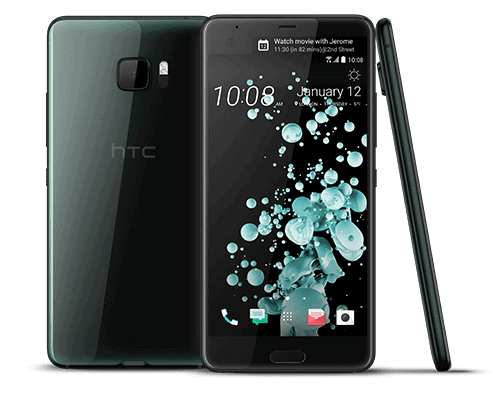
Design and Build Quality
From the moment you first get your hands on the HTC U Ultra, you can pretty much tell it was made to be noticeable, like it doesn’t even try to blend in. HTC has always leaned hard into design and feel, and the U Ultra keeps that trend going. There’s this eye-catching glass rear that HTC calls “Liquid Surface,” and yeah it looks elegant, but also kinda flashy, in a good way. The glossy finish catches and throws back the light differently, depending on the angle, so the whole look shifts as you turn it around, or as you walk, or just move your grip a bit.
As for build quality, it’s really solid—there’s a strong metal frame that gives it this premium weight in your palm. Still, that glass back, pretty as it is, tends to collect fingerprints and small smudges quickly. So unless you’re constantly wiping it down, or you slap on a case, the phone can start looking a bit lived-in fast. And it’s not exactly small either: you get a 5.7-inch main display plus a secondary 2-inch display, which at the time put it among the larger options out there. That might be a win for people who like big screens, but it also makes it a little awkward if you’re trying to use it with just one hand, you know, like when you’re out walking or juggling stuff.
One design-related letdown is the lack of water and dust protection. A lot of flagship phones at the time were already carrying IP67 or IP68 type ratings, so missing that piece on the U Ultra feels kind of glaring. And on top of that, the glass rear although visually satisfying, does make it more vulnerable to damage if it slips out of your grip and hits the ground.
Display
The HTC U Ultra kind a shows off a 5.7-inch Super LCD 5 display, running at 1440 x 2560 pixels, so you get a pixel density of 513 PPI. In day to day use it comes across as sharp and lively, and the color accuracy is pretty solid. The Super LCD setup is meant to push out deeper blacks and stronger contrast compared to older style LCDs. Plus, with that high resolution, text, pictures, and video end up looking crisp and super detailed. And honestly, the big screen makes it really handy for media time, like watching movies, running games, or just scrolling through the web.
On top of the main display, there’s also that extra 2-inch secondary screen perched above it. That smaller panel sits at a resolution of 160 x 1040 pixels, and it’s basically there for notifications, quick shortcuts, and other contextual stuff without forcing you to break focus on whatever is happening on the big screen. It feels a lot like the idea you see on the LG V20, and it can be helpful if you want fast access to certain features, without constantly leaving the app you’re already inside. Still, the secondary screen, while neat, doesn’t always feel truly woven into the overall experience. Some people might call it more of a gimmick than a must have, especially because the primary display is already huge, and it can handle the majority of tasks anyway.
Performance
Under the hood, the HTC U Ultra is run by the Qualcomm Snapdragon 821 processor, which was kind of a high end chip back when the phone first showed up. It’s matched with 4GB of RAM, plus either 64GB or 128GB of internal storage, depending on which variant you buy. The Snapdragon 821, even if it wasn’t the absolute newest thing around, is still a pretty capable brain, and overall it keeps things feeling snappy, smooth, and responsive for day to day stuff.
Apps open fast, and multitasking feels easy, like no big deal at all. The U Ultra can also chew through heavier things, such as gaming or video editing, without that obvious stutter or slow down. That said though, when the Snapdragon 835 was already kind of lingering on the horizon around the same period some people might say HTC kind of missed a chance by not going with the newest, top tier option. But realistically, most buyers will probably find the Snapdragon 821 totally fine, and they may not really notice a meaningful difference during regular use.
On the audio side, the handset includes a dedicated DAC ( digital-to-analog converter ) aimed at getting cleaner sound quality. This is the sort of detail that audiophiles, or “hi fi” fans, often like because it can deliver more faithful playback. With a decent pair of headphones the U Ultra can produce audio that feels richer and more detailed than what you typically hear from most other smartphones. Still, keep in mind it does not include a 3.5mm headphone jack , so you’re basically left with USB-C headphones, or you go wireless instead.
Software and User Interface
The HTC U Ultra boots on Android 7.0 Nougat right away, with HTC’s Sense UI sitting on top. Sense UI has, been a bit of a staple for HTC devices for years now and it tends to feel clean, and pretty intuitive. The whole interface looks organized enough, with this minimalistic design that makes it easy to get around. HTC also seems to keep the bloatware more under control, which is kinda a welcome shift compared to some other makers that drop in a bunch of apps you probably never asked for.
One of the bigger highlights in the software is HTC’s Sense Companion, which is basically an AI driven helper that picks up on how you use the phone and then gives more personalized suggestions as time goes on. Like, it can nudge you to charge your phone before you leave in the morning if it sees your battery is already running low. That said, even if this is a decent addition, it still doesn’t feel as mature or as tightly integrated as other AI options, such as Google Assistant or Apple’s Siri. Because of that, some people may feel it doesn’t really add a whole lot of value to their daily experience, or at least not enough to justify the attention.
The U Ultra also comes with a bunch of customization options,so people can kind of tune the look and overall feel of the interface exactly how they want. Themes, icon packs, and wallpapers can be swapped out rather easily, so users get the liberty to make the handset feel like their own. On top of that, the secondary display can be adjusted too, to show a few different kinds of info, for example your favorite contacts, app shortcuts, or even some kind of personal note.
Still, there’s one place where the software kind of stumbles a bit, especially with updates. HTC’s history is a little mixed when it comes to timely software rollouts, and the U Ultra follows that same pattern. It did manage to get Android 8.0 Oreo updates, but it wasn’t among the very first devices to receive them, and realistically it’s probably not going to see any additional big upgrades past that. For anyone who really cares about fresh features and security patches, this becomes a pretty big downside.
HTC U Ultra owns a 12MP rear camera with UltraPixel 2 technology, aperture of f1.8 lens and 1.55 microns of pixel size. In addition, U Ultra supports low light 2-tone dual flash, incorporating OIS optical image stabilization, laser focus and phase focusing, while the front camera has a resolution of 16MP.
HTC U Ultra photography interface is not much change, is still very familiar if users upgrade from the latest version is HTC 10 up. HTC has only two HDR options and flash LEDs in addition to the screen capture, left hidden in the menu on the left, while sliding through will have more customizable motion capture modes, Pro shooting (professional), panorama shooting, … The article will focus on Auto mode and Pro.
Focal-plane and snapshot camera in daylight, with a camera focus of up to 26mm, the angle of the image is so wide that it is suitable for hobbyists.
Natural color photos, clear separation. But sometimes the white balance of the machine is not really good, some cases have a slight prple hint.
Capture in complex lighting conditions
In terms of lack of light or complexity, the HTC U Ultra’s camera still offers sharp focus and good color quality.
Photos in the house, the evening
With a large f / 1.8 camera aperture, shooting in low light conditions is also easier. The ability to handle noise is negligible but does not detract from the details, and the image color is correct in comparison with reality.
Close-up – HDR – Professional Mode – Selfie
Thanks to its large f / 1.8 camera aperture, HTC U Ultra is capable of capturing very good fonts (for small subjects). The nearest focusing distance is about 10cm, making it easy to take close-up shots in a variety of conditions.
HDR on HTC U Ultra is not impressive. Snapshot before and after HDR turned on virtually no obvious difference, except that the dark areas of the image were raised slightly.
HTC U Ultra also comes with a professional shooting mode (Pro), which allows person to customize parameters such as ISO sensitivity, EV compensation, manual focus and exposure time. Unlike its predecessor, the HTC 10, U Ultra allows up to 16 seconds of exposure time. However, perhaps due to the software’s algorithmic processing ability is not stable so the results are not very impressive in terms of details of the image.
The 16-megapixel front-facing camera produces more “selfie” images, smoothing out the effect just enough for sharing on social networks. The color of the human face when shooting with the camera is very similar to the reality, not too much virtual phenomenon compared to the current selfie smartphone.
HTC U Ultra Factory Unlocked Phone – 5.7″ Screen – 64GB – Black (International Version – No Warranty): Buy it now
HTC U Ultra (U-1u) 5.7-Inch 4GB RAM / 64GB ROM 4G LTE Dual SIM FACTORY UNLOCKED – International Stock No Warranty (INDIGO BLUE): Buy it now
HTC U Ultra Factory Unlocked Phone – 5.7″ Screen – 64GB – Pink (International Version – No Warranty): Buy it now
HTC U Ultra (U-1u) 5.7-Inch 4GB RAM / 64GB ROM 4G LTE Dual SIM FACTORY UNLOCKED – International Stock No Warranty (ICEBERG WHITE): Buy it now
Conclude
HTC U Ultra is an ideal smartphone for those who are passionate about photography on the phone because it owns a camera system, including fast capture speed, accurate color reproduction, wide angle and wide angle. Professional custom, meet most of the needs of today’s photography such as ordinary life, landscapes, people and objects of all kinds … With a price of about $900, users have many options High-end smartphones with good, high-performance camera. However, the HTC U Ultra is still a worthy choice, apart from the camera, it’s also a smartphone with a lot of first-class smartphones, which are artificial intelligence.
Advantage
– Speed is fast
– The color is correct
– Good auto illumination
Disadvantages
– Pro mode is not optimal
– HDR shooting is not impressive
Related Posts

Tech Reviewer & Product Analyst
Định Bia has spent over 10 years testing consumer electronics with a focus on smart technology. He work as a product advisor at Biareview where he helped customers find the right devices for their needs. He personally tests every product featured on this site using a consistent evaluation framework covering quality, durability, and value. All reviews are based on experience, not influenced by the manufacturer.