Elegant design
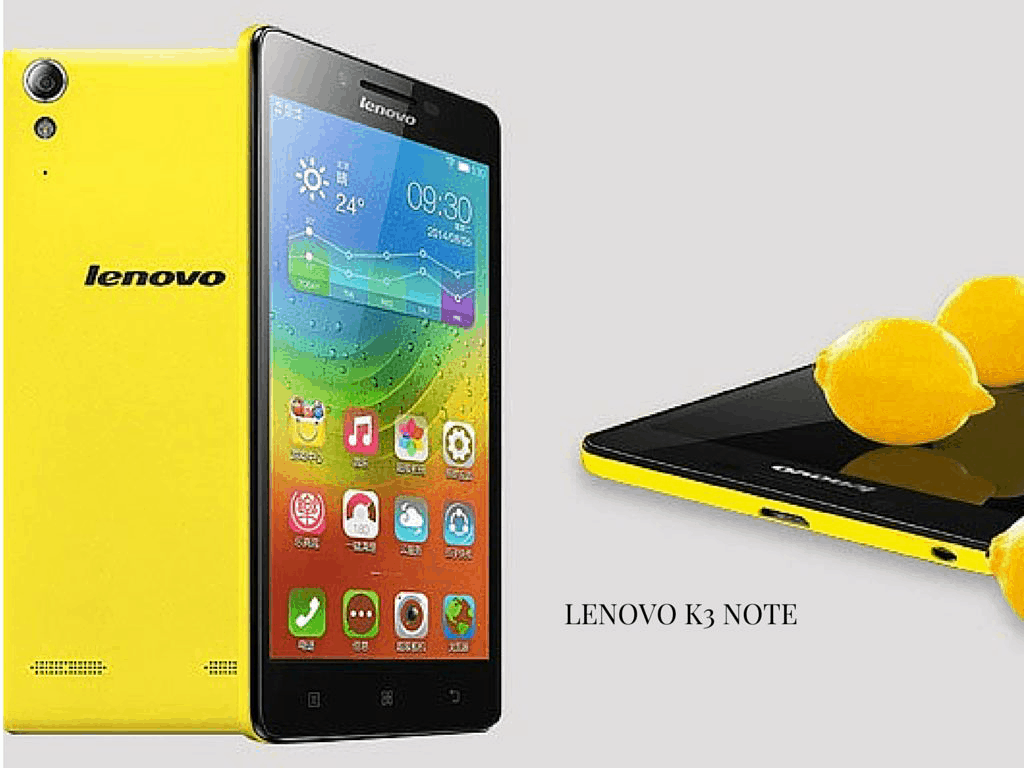
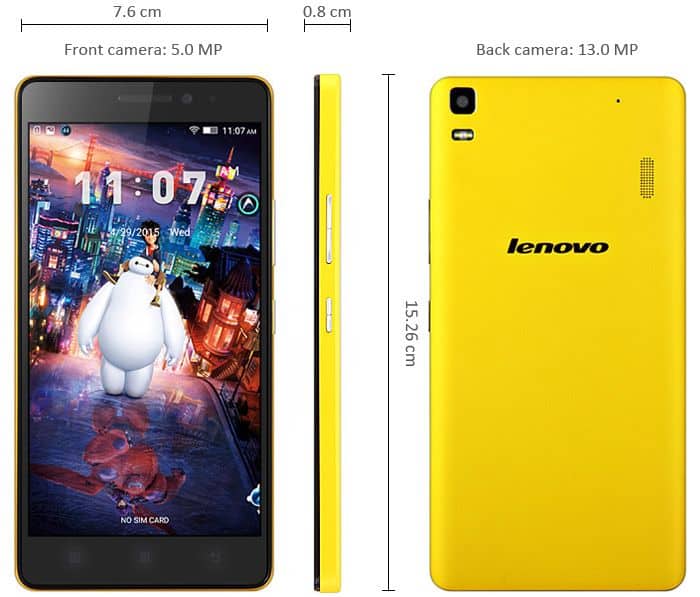
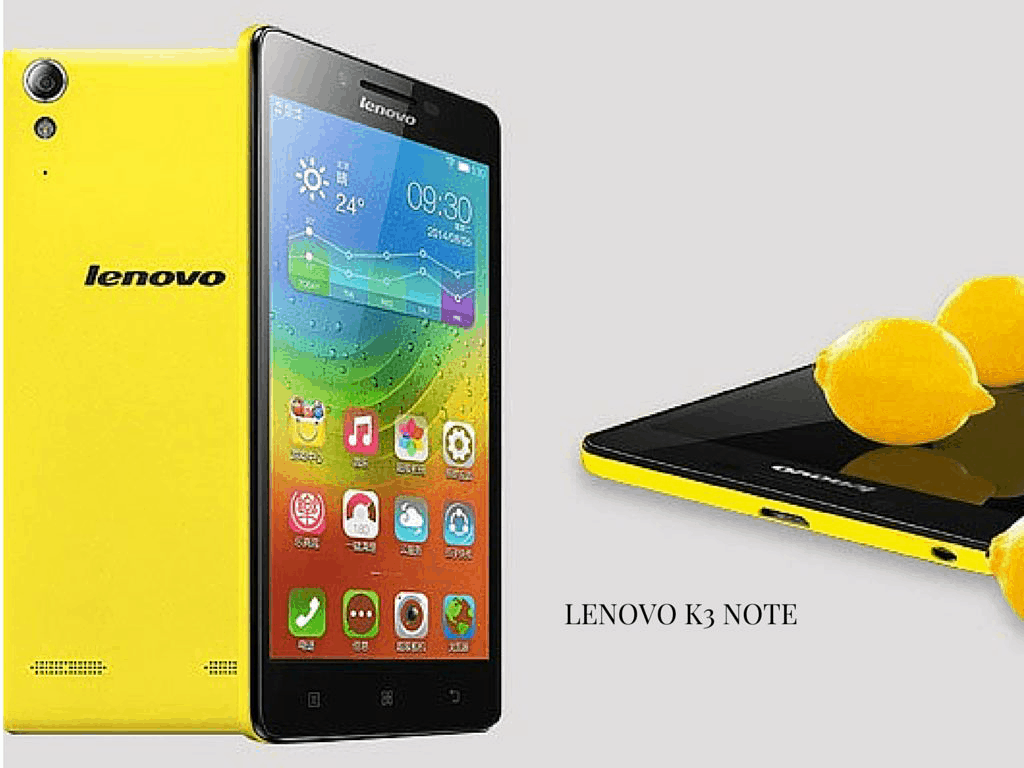
Lenovo K3 Note inherited most of the features of mid-range mobile phones with the design in the four corners rounded, compact design and rough plastic back cover against fingerprints.
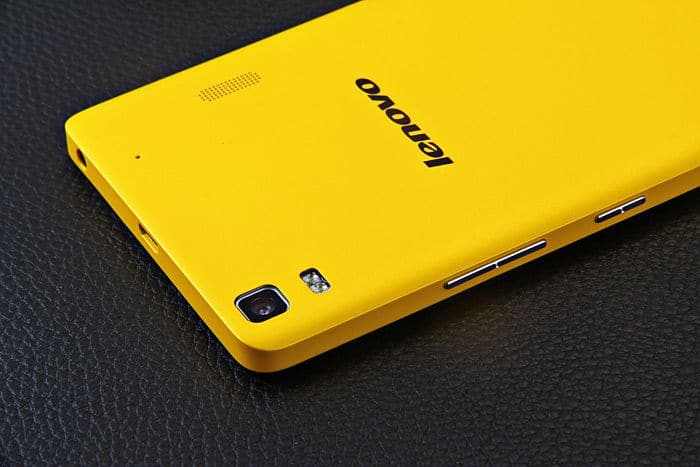
Accordingly, the layout of Lenovo K3 Note pretty simple. The front panel is factory speaker clusters, selfie camera and lights. The back is the main camera, LED flash, speakerphone and logo. Cluster machine is next to the power button and increase / decrease the volume. Meanwhile, the top edge contains a 3.5mm headphone jack, microUSB port.
Some highlights of the K3 Note can mention as motifs on the hard key learning from ASUS ZenFone line for a good bounce; 2 sides are slightly bevelled cause users to use comfortable; machine relatively thin and lightweight; back cover and the battery is removable, slot 2 SIM card fits on the back of the machine to help save area.
Monitor a good experience
In terms of display, have to admit one thing, the screen 5.5 inch Full HD resolution, pixel density of 400 ppi on K3 Note than the actual experience is very good. The screen is very spacious, with high brightness, good contrast, especially when using equipment under harsh sunlight, we can still observe most of the content on the screen.
In addition, the machine also for wide viewing angles, even changed position during use, but the color on the screen remains clear and easy to see. Furthermore, the K3 Note also displays colors quite accurate, sufficiently detailed and did not flatter the eye.
A plus point on the screen of the Note K3 is quite warm tones, not cause users to feel sore or tired eyes during use. Especially, if used at night for smartphones, gaming, reading newspapers, books, machines also bring pretty amazing experience. It is the fact, this is one of the few mid-range phablet has good screen.
Lenovo Lemon K3 Note 5.5 inch IPS Screen 4G Android OS 5.0 Smart Phone, MT6752 Octa Core 1.7GHz, RAM: 2GB, RAM: 16GB, Dual SIM WCDMA & GSM (yellow): Buy it now
Lenovo Lemon K3 Note 5.5 inch IPS Screen 4G Android OS 5.0 Smart Phone, MT6752 Octa Core 1.7GHz, RAM: 2GB, RAM: 16GB, Dual SIM WCDMA & GSM (white with 16GB TFcard): Buy it now
Lenovo Lemon K3 / K30-W 5.0 inch TFT IPS Screen Android OS 4.4 Unlock Smart Phone, Qualcomm Snapdragon 410 MSM 8916 Quad Core 1.2GHz, ROM: 16GB, RAM: 1GB, GSM & WCDMA & FDD-LTE( (yellow): Buy it now
High-performance, smoother
On the hardware configuration, the Lenovo K3 Note is equipped with 8-core processor MediaTek MT6752 clocked at 1,7Ghz, 2GB RAM, 16 GB of internal memory, supports expansion via microSD memory card, battery and storage 3.000mAh Lollipop Android 5.0 platform running the latest, customized according to the manufacturer’s interface, which allows conversation 2 SIM.
Through the use of time, we can see the effects, moving on to the feeling of smooth, fast similar to what we find in high-end smartphones. In particular, Lenovo K3 Note tested strength in applications and achieve results AnTuTu more than 46 thousand points, equivalent to some top Android smartphones like the Samsung Galaxy S5, HTC One M8, LG G3.
In addition, if often use smartphones to play games, listen to music, underlying performance was relatively stable, no lag hiccups. If simultaneously run multiple applications or use continuous shooting camera, K3 Note only warm near camera without warm machine.
Regarding battery life, Lenovo continued to assert smartphone throne “good battery” with capacity 3000 mAh. For users who regularly work with the entertainment on the smartphone, the machine can survive on a day, even if you just use your computer to surf the web, check e-mail, texting, listening to calls or sometimes pose image then may 2 days need to charge the battery once.
Camera incommensurate
If the hardware and the screen of the Note K3 are the strengths for the user to select the machine, then the camera is “difficult to correct bad” on this product. In terms of parameters, Lenovo K3 Note integrated 5 MP front camera to take a selfie serve the needs of users, while the camera after reaching 13 MP resolution, dual flash support for Lowlight needs.
However, through the use of the camera after the photo quality is not commensurate with those “megapixel” that manufacturers offer. Accordingly, 13 MP camera from K3 Note often lack detail or color is not true, because the camera’s shutter speed is pretty long, especially when using HDR photography mode.
In return, with macro shots at close range, the image quality quite well received, but also renewable HDR shots are most detailed image, but sometimes burned bright. Also, if using dual flash, shots are acceptable, the color is not “fake” and finally photographed interface also intuitive and easy to use.
Battery Life
What about the Lenovo K3 Note, and honestly the first thing you notice is the battery life. It had a 3000 mAh, non-removable lithium-ion battery, and for what you paid it felt pretty generous. The capacity was meant to cover all day usage , even if you weren’t exactly gentle with the phone, so yeah it became sort of a safe choice for people who care about endurance more than anything.
In real life, the battery performance looked good too. With normal everyday habits like web browsing, scrolling social media, and then some occasional gaming, the device typically made it through a full day, without you hunting for a charger. And if you used it more lightly, like mostly texting and calling, it could even stretch into the second day, which is nice even if you dont think about it right away.
Now when you do the battery-draining stuff, like heavy games or long streaming sessions, things obviously go faster. Still, it usually held up pretty well, often managing several hours of straight use before you had to plug in. That’s why it felt suitable for users who spend time on intensive activities, without needing to panic about power, every few minutes.
Also there were basic power-saving options to squeeze out extra runtime. Lenovo included a battery saver mode that let you rein in background processes, tweak the screen brightness, and shut off features you don’t really use. It was not as sophisticated as some newer battery management tools on modern phones, but honestly it gave practical levers for users who want to maximize battery performance with less effort.
Charging Time
Charging the Lenovo K3 Note was honestly pretty straightforward i mean, you just plug it in and go. The phone used standard charging via the microUSB port, and it didn’t have anything like fast charging , so don’t expect quick refills or anything. Because of that, the charging speed was pretty normal for phones back then, with a full charge taking around 2 to 2.5 hours, from 0% all the way to 100%.
Compared to other smartphones from the same time period, this kind of time was sort of average. It wasn’t exactly rapid, but it still felt fine for the device , especially if you charge it when you have time. If someone could kind of schedule charging around their day, then yeah, this speed was usually acceptable.
Software Experience
Operating System and User Interface
When the Lenovo K3 Note first released, it shipped with Android 5.0 Lollipop. At that time, it was basically the newest Android version you could get for a phone like this. On top of Android, Lenovo added their own skin, you know, the Vibe UI, which made the overall look and feel different than plain stock Android.
Vibe UI was made to feel nice to look at and also easy to use. It leaned toward simple navigation, with a home screen layout that looked clean. You could set up widgets and adjust app icons, and the notification area made it easy to reach key settings without too much effort.
One thing that stood out about Vibe UI was that there was no app drawer. Instead of hiding apps in a separate screen, all installed apps were shown straight on the home screens. The idea was to make the experience simpler, but for people who install a lot of apps, it can end up looking a bit cluttered and messy.
Performance and Usability
On the whole, Vibe UI felt fairly quick and fluid , like it stayed responsive through most everyday stuff, and there wasn’t much lag or that nasty stutter you sometimes see. The layout also seemed kind of intuitive, with the frequently used bits and settings easy to reach, not buried in some endless menus. The extra customizations plus the added utilities from Vibe UI kinda improved the experience overall. Still, a few users seemed to prefer the bare bone simplicity of stock Android, which is kinda fair.
Lenovo’s software package also came with a bunch of pre-installed apps and services, for example Lenovo’s app store, security tools, and productivity apps. These were mostly handy but some people may have felt they were overkill or just not needed, and because of that the app drawer could look a little cluttered. But in general the software experience on the Lenovo K3 Note was positive, smooth, and responsive with some genuinely useful tweaks. Even though not having an app drawer , and a handful of preloaded apps, might not match everyone’s taste, most users still seemed satisfied.
Connectivity and Additional Features
Connectivity Options
The Lenovo K3 Note delivered a solid mix of connectivity options, so it works well for different network and data needs. Some of the main connectivity points were:
Dual SIM Support: The K3 Note let users run dual SIMs at the same time, so you can juggle two SIM cards simultaneously. For many, this was great if you want to keep work and personal calls separate, or just take advantage of different carrier deals.
4G LTE: The device also supported 4G LTE on both SIM slots, which was a real plus in places where mobile networks are more advanced. That usually meant quicker data for browsing, streaming, and downloading, rather than waiting around.
Wi-Fi: The device came with Wi-Fi 802.11 b/g/n so it was supposed to give steady connectivity for internet access, both at home and in some public hotspots. Overall Wi‑Fi felt stable like, good signal strength most of the time, and speeds that were pretty consistent.
Bluetooth: Bluetooth 4.0 showed up too, for pairing a bunch of wireless gadgets like headsets speakers, and smartwatches. The Bluetooth side was solid, the range stayed decent and it connected without too much fuss.
GPS: Lenovo K3 Note also added GPS, so users could navigate and use location based services with decent accuracy. GPS performance was, in general satisfactory , meaning location tracking and navigation worked in a reliable way.
FM Radio: The phone even had an FM radio, which was kind of a handy extra for people who like tuning into local stations.
Additional features
Even if the Lenovo K3 Note didn’t really bring a lot of top tier stuff, it still had some extra elements that made the daily use feel better:
Stereo speakers: The K3 Note has dual front facing speakers, giving you that stereo type audio while watching media. The sound quality was decent for a budget phone, clear enough and loud, at least for typical listening.
Expandable storage: There’s a microSD card slot , and it lets users grow the internal storage up to 32 GB. For extra apps photos, and videos this was pretty valuable.
Customizable themes: Through Lenovo’s Vibe UI you could change themes and wallpapers, so you can tune the style of the device. This customization part is one of those little things many people actually like.
Gesture controls: It also supports gestures like double tap to wake and flip to mute. That little convenience made the phone feel more responsive and practical, sometimes it helped without thinking too much.
Pros and cons
Pros
Big Display: The 5.5-inch Full HD panel had vibrant colors, and the text looked pretty crisp , so it felt good for videos, and also for multitasking i guess.
Battery that lasts: The 3000 mAh battery gave you all day use in normal routines , and if you enabled power saving it could stretch even longer.
Okay-ish speed: The MediaTek MT6752 chip paired with 2 GB RAM kept things smooth enough for everyday chores, and light games too.
Storage can grow: With a microSD card slot you can add more storage, so more apps, photos , and media aren’t such a pain.
Dual SIM + 4G LTE: Having dual SIM support and 4G LTE made it more flexible, with faster data speeds for browsing and streaming.
UI can be tweaked: Vibe UI comes with a bunch of customization features, letting you adjust the phone in a way that matches your taste.
Cons
Camera gets messy at night: In low light the camera performance dropped , images ended up noisy, and details were not very impressive.
Not a fast charger: Since it doesn’t support fast charging, the charging time is pretty slow, and you basically wait.
No app drawer: There’s no app drawer in Vibe UI so apps pile up on the home screens, which can feel crowded if you install a lot.
Mostly plastic body: The K3 Note uses plastic , and it doesn’t have the same premium feel as metal or glass, maybe that’s a deal breaker for some.
No water or dust rating: There’s no official water or dust resistance spec, so durability in messy places is kinda limited.
Conclusion
The Lenovo K3 Note, was kind of a fairly well-rounded budget smartphone, it had this nice blend of features and overall performance that matched its price pretty well. With its big Full HD screen, a capable processor and battery life that was actually decent, the K3 Note felt like a serious option back then, especially in that budget smartphone space. Dual SIM support, plus 4G LTE connectivity made it a useful fit for people in emerging markets, and the expandable storage alongside a customizable interface really added a bit of extra worth.
The K3 Note wasn’t perfect. It had some downsides like camera results in low-light situations, not that impressive and there was no fast charging either. Still, it stayed popular among users who wanted something dependable and affordable, rather than constantly worrying about whether it would keep up. In general, the device delivered a good balance: if you wanted a larger display, solid battery endurance , and decent day-to-day performance without going broke, it made sense.
In today’s market, the Lenovo K3 Note may look pretty outdated compared with newer models, but it still kind of works as an example of how Lenovo can produce good value-for-money phones in the entry level and budget category. So if someone is looking for an entry-level smartphone with a large display, and stable performance, the Lenovo K3 Note, is still worth considering, at least as a reference point.



Tech Reviewer & Product Analyst
Định Bia has spent over 10 years testing consumer electronics with a focus on smart technology. He work as a product advisor at Biareview where he helped customers find the right devices for their needs. He personally tests every product featured on this site using a consistent evaluation framework covering quality, durability, and value. All reviews are based on experience, not influenced by the manufacturer.