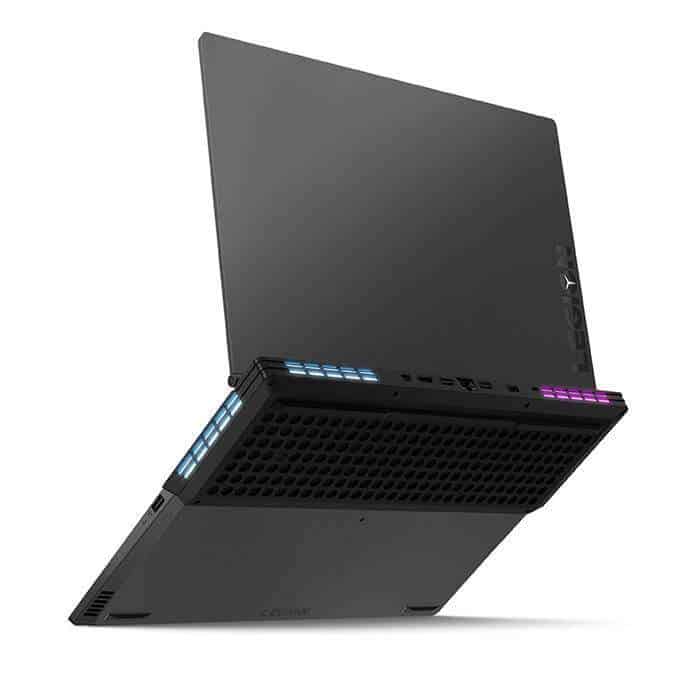
Lenovo’s design choices have always been excellent. Its previous Legion Y920 followed the sci-fi-inspired design language and resemblance of Alienware and other gaming laptop makers. The Legion Y740, though, is different. It looks plain and simple, with its aluminum finish and slate effect more reminiscent of a ThinkPad than a gaming laptop. Coming to the Gray color, there are also no angular finishes or flashy colors. That means that the Legion is a gaming laptop that won’t attract much attention if you take it out in public.
It’s also very strong as the lid doesn’t bend excessively, nor does the keyboard deck press too deeply into the aluminum frame. Even the backlit Legion Logo on the lid is subtle, sticking out with a slightly glossy finish.
Different from the design, the Y740 is still modern. It comes with a slim display that eliminates the overall footprint of the laptop. Visually, the bezels are almost on the same level as the Razer Blade, an improvement from the 17-inch Legion version with thick edges and the screen.
That comes at the expense of the webcam, as it is moved to the bottom part of the screen. Once a major issue with the older XPS 13, that meant awkward face-to-face camera angles during Skype calls. But since this is a gaming laptop, it’s probably a worthy trade-off for most gamers.
Pack the 15-inch Legion Y730 is an RTX 2070 Max-Q graphics card and all the power gamers need.
The Legion Y740 comes in at about 4.8 pounds, and at its thickest point it’s around 0.8 inches. It’s kinda more hefty and thicker than most other gaming laptops, you know. Just to line things up, the Razer Blade is closer to 0.7 inches and 4.5 pounds, while the 17-inch Zephyrus S (GX701) lands at 17.7 inches and 5.95 pounds. It’s also bigger than a regular 15-inch laptop like the XPS 15, which sits around 4 pounds and only about 0.4 inches thick. So yeah even if it’s a little more chunky than some of the competition, it still feels pretty mobile, especially when you put it next to older gaming laptops.
Connectivity includes two USB 3.1 ports, a USB 3.1 Gen 2 port, Thunderbolt 3, HDMI 2.0, a Mini Display Port, and an ethernet jack. It’s a nice mix, with the most important USB and ethernet ports at the rear for efficient cable management. All ports at the back are lit for convenience, making it easy to find in the dark.
Keyboard not for typing in Microsoft Word
When we think of gaming laptops, we usually think of mechanical keyboards, but that’s not what can be found on the Y740. Instead, its keyboard is a bit soft, with flat keys and a group of macro keys on the left side. That makes the layout a bit annoying and awkward in our day-to-day typing. Like the Legion Y730 before it, the layout of the main keyboard is shifted slightly to the right, so it takes time to adjust.
Everything is not lost though Lenovo includes touches that serious gamers will appreciate. The keyboard, for example, has 100 percent anti-ghosting technology. There’s even customizable zone backlighting via Corsair’s iCUE software. While most gamers generally prefer per-key lighting, you can still use software to get interesting effects when pressing the keys. Even the color on the side vents can be changed to your liking.
Another important element of any gaming laptop is the touchpad. While the Legion Y740 on board is a bit small compared to what you’ll find on the Razer Blade, its surface won’t register unintended inputs. While the touchpad doesn’t have the glass surface we’re used to finding on gaming laptops; its mylar polyester material is still very smooth. It even supports Microsoft precision drivers, which means you can enjoy Windows 10 gestures.
G-Sync monitor to get the most out of games
Our Legion Y740 version has a 15.6-inch 144Hz G-Sync 1080p matte IPS display. At the moment, that’s the only choice Lenovo provides. It’s not all that rare to spot a laptop with G-Sync, but this pairing means, honestly, we didn’t run into frame drops while gaming, like not really.
When we tested with our colorimeter, brightness on the Legion Y740 climbed to roughly 300 nits, which is pretty much what we see on most laptops that use matte screens. The contrast ratio is also weaker than what competing models manage, like the Asus ROG Zephyrus S. And the average color error lands a little higher than we’d like, if we are being picky.
The Legion Y740 keeps everything simple, and the overall look feels close to a ThinkPad.
Gaming wise, we didn’t catch reflections of overhead light from most angles. In Assassin’s Creed Odyssey, those night scenes look crisp, with good color and lots of fine detail. But outside of gaming, the panel on the Legion Y740 becomes a headache for content creators who really want a more color-faithful screen, and higher contrast too.
As for the sound, it is powered by a Dolby Atmos speaker system. Two speakers are located on the bottom left and right sides of the system and provide a great audio experience. When we turned the volume up to maximum, and during our gameplay, the speakers never squeaked or blew out. That means we don’t need to reach for the headset while gaming.
Lenovo Legion Y740 15-Inch Iron Grey Laptop (81UH0001US) Intel i7-9750H, 16GB RAM, 256GB SSD, 15.6-inch FHD 1920×1080, NVIDIA GeForce RTX2070, Win10 Home, 720p Webcam, RGB Backlit KB, 230W SlimTip AC: Buy it now
Fast processor and storage
Inside the Legion Y740, the real muscle kind of comes from Nvidia’s RTX 2070 graphics card paired with an Intel Core i7-8750H CPU that has six cores. This combo is pretty familiar for a lot of high-performance laptops, and it tends to feel very responsive for regular stuff like web surfing, and yes, multi tasking too.
In our unit, we got 16GB of RAM, and Lenovo says you can go up to 32GB, storage can also be pushed as far as a 512GB SSD if you configure it that way with them. And still , both are upgradeable after purchase. You just unscrew a few screws on the back, and then you can swap things out.
Okay but, specs aside. Let’s talk Geekbench 4 for a second, because it shows the Legion Y740 strength in single-core performance. In short, it manages to outpace both the Asus ROG Zephyrus S and the Razer Blade. But it can’t exactly hang with the Acer Predator Helios 500, which uses a more powerful Intel Core i9-8950HK processor. Still, the Legion holds its ground pretty well in multi-core benchmarks too, those are the ones that lean into more compute heavy operations. Overall, it lands with a score that tops 22,000-ish, especially when you look at that high end result.
For storage, the 256GB NVMe Samsung PCIe SSD already inside the Legion turns in read speeds of about 3,422 megabytes per second. In practice, that’s faster than most of the gaming laptops we’ve tested so far. Then in our tougher encoder video tests, the Legion Y740 handled 4K video in 145 seconds, which is close to the 138-second record posted by the ROG Zephyrus S GX701.
The Legion Y740 is a capable multi-tasking machine and can complete any of your tasks without issue.
Everything for Battlefield, Fortnite, and more
With a starting price of $1,670, the Legion Y740 can be configured with an RTX 2060 or an RTX 2070 with Max Q graphics cards. So, considering support for both ray tracing and DLSS on these GPUs. When taking part in our test set of games, we were impressed with the smooth and fast gameplay.
We start first with Fortnite. Playing on Epic settings on 1080p resulted in a frame rate of 142 FPS – ahead of the ROG Zephyrus S and the Razer Blade. In the much more graphics-intensive Battlefield V, the 1080p Medium setting resulted in a reading of 106 FPS – far ahead of the 103 FPS recorded by the Razer Blade. Likewise, in Assassin’s Creed Odyssey, 1080p high settings resulted in 49 FPS on Ultra. The only exception is Civilization VI, where the 1080p Ultra setting resulted in 101 FPS – after the ROG Zephyrus.
All these games not only play smoothly, but the system can also stay cool without throttling thanks to Lenovo’s Cold Cold cooling system. With fans with 70 individual blades per channel, this system keeps both the CPU and GPU cool.
The areas near the palm rest are not uncomfortable, and airflow is directed to the system’s rear rather than the front. The CPU’s temperature peaked around 60 degrees Celsius, and the GPU maxed out at 88 degrees.
Battery life
Inside the Legion Y740 is a 57-watt battery. That becomes standard on laptops like the Dell XPS 13, surprising since the Legion Y740 is a gaming laptop. Paired with the power-hungry G-Sync display, it all means the Legion is set up for battery life trouble.
In our looped, least demanding video loop test the Legion Y740 hung around for about two and a half hours. This sort of matches what we got on other G-Sync laptops like the Asus ROG Zephyrus S, though it sat behind the Razer Blade 2019 and the MSI GS75 Stealth. The Asus ROG only managed roughly an hour , which feels like a far cry from the five hours we saw on the MSI GS75 Stealth while just browsing the web.
However, enabling Optimus switchable graphics and disabling the Nvidia GPU favoring Intel’s integrated graphics leads to some improvements. That is a relatively easy task that can be accomplished through the Nvidia GeForce experience or the settings page on the boot Bios.
When enabled, looping a video lasts twice as long as before for a total of five hours. Web browsing also improved by up to four hours. That still slows it down after the six hours we recorded with the Razer Blade, which leads the RTX 2070-powered laptops in the battery life category.
Related Posts

Tech Reviewer & Product Analyst
Định Bia has spent over 10 years testing consumer electronics with a focus on smart technology. He work as a product advisor at Biareview where he helped customers find the right devices for their needs. He personally tests every product featured on this site using a consistent evaluation framework covering quality, durability, and value. All reviews are based on experience, not influenced by the manufacturer.