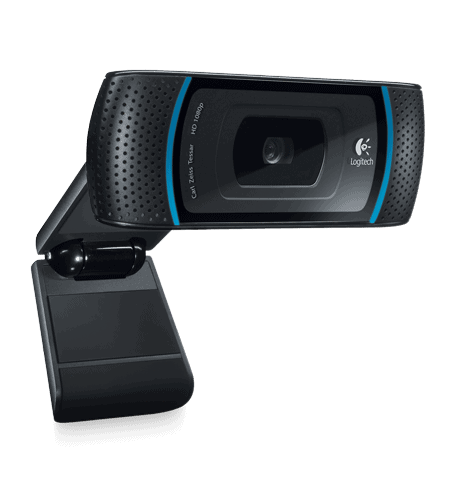
With the C910 you get Full HD 1080p video at 30 fps and photos up to 10 megapixels, all shot through a Carl Zeiss lens.
The camera is less than an inch (about 25 mm) thick. Its clip fits neatly over the top of a monitor or laptop, tilts to whatever angle suits you, and holds that position firmly.
Setup is simple if you already have Skype or Logitech Vid on your computer: connect the USB cable and start your call. The webcam is Skype-certified and also works with Logitech’s Vid HD service, which is the simpler of the two.
For HD calls, your internet download speed should be at least 1 Mbps. Recording 1080p video or making 720p calls requires Windows XP or later, a 2.4 GHz Intel Core 2 Duo processor, 2 GB of RAM, 200 MB of free disk space, and a screen resolution of 1280×720 or higher.
Logitech HD Pro Webcam C910: Buy it now
Logitech HD Pro Webcam C910: Buy it now
Logitech – Hd C910 Pro Webcam 10Mp Black “Product Category: Audio Visual Equipment/Cameras & Accessories”: Buy it now
With the onscreen controls of Logitech Webcam, you can easily zoom in and pan and pan in any direction to focus on a particular subject. In the test, the camera is best moved when the subject is teleported away.
In Skype and Vid HD calls, the C910’s webcams show no grain, but in standard Windows video capture, images are slightly grainy and light-sensitive.
The C910 handles extreme brightness changes extremely well. The autofocus feature adjusts according to different brightness and gives a nice color, although in the occasional test the color is slightly distorted and lighter when subjected to glare. The camera can still focus when the user is in normal sitting position or when moving fast.
Two microphones in the C910 capture the voice and other sounds very perfect and clear, even when away from the device. The C910 also makes it easy to upload videos to YouTube and Facebook. This webcam comes with Magix image and video editing tools.
Design and build quality
The C910 comes in black and silver, with the lens sitting in a matte black housing. It’s smart enough for a meeting room and doesn’t look out of place at home either.
Its clip flexes to fit a monitor or laptop, or you can stand the camera on the desk. Rubber pads on the clip stop it from slipping or marking the screen, and the angle adjusts smoothly without any wobble.
Build quality is a step above budget webcams. The plastic feels dense and well finished, nothing rattles, and it should hold up to years of daily use.
Video
Video goes up to 1080p (1920×1080) at 30 fps, with a 720p option for when your connection or disk space is limited. The jump from 720p is easy to see, especially in recordings and streams, less so on a quick call.
The Carl Zeiss lens does a lot of the work here, producing accurate colors with very little distortion. Thanks to autofocus, the image stays sharp when you shift in your seat, and a page held up to the camera stays readable.
At 78 degrees, the field of view is wider than on most rivals. You can fit two or three people in frame, or give viewers a glimpse of the room behind you.
In dim rooms the C910 does better than cheaper webcams. Logitech’s low-light correction lifts the brightness and limits noise, though good lighting still makes a visible difference.
Audio
The C910 has two microphones built in. They catch your voice clearly and cut down on some of the noise around you, which is plenty for meetings and casual videos. For voiceovers, or if you work somewhere noisy, a dedicated mic is still worth having.
Setup and software
Most computers recognize the C910 as soon as you plug it into USB, so you don’t need to install drivers. It works with Zoom, Microsoft Teams, Skype and OBS Studio on Windows and macOS.
With Logitech’s own software you can fine-tune brightness, contrast, saturation and white balance, as well as take photos and record video. The layout is easy to follow, and for simple recordings you won’t need anything else.
Pros and cons
Pros:
- Sharp 1080p video
- Carl Zeiss lens with autofocus
- Wide 78-degree field of view, good for small groups
- Dual mics with some noise reduction
- Sturdy build and a clip that won’t scratch your screen
Cons:
- No 4K, HDR or optical zoom
- Low-light video is improved but still not great
- Built-in mics can’t match a dedicated microphone
Verdict
The C910 is a clear step up from budget 720p webcams, especially for group meetings and recording content. If you don’t need 4K, it’s hard to find a reason to spend more.
Related Posts

Tech Reviewer & Product Analyst
Định Bia has spent over 10 years testing consumer electronics with a focus on smart technology. He work as a product advisor at Biareview where he helped customers find the right devices for their needs. He personally tests every product featured on this site using a consistent evaluation framework covering quality, durability, and value. All reviews are based on experience, not influenced by the manufacturer.