
Design
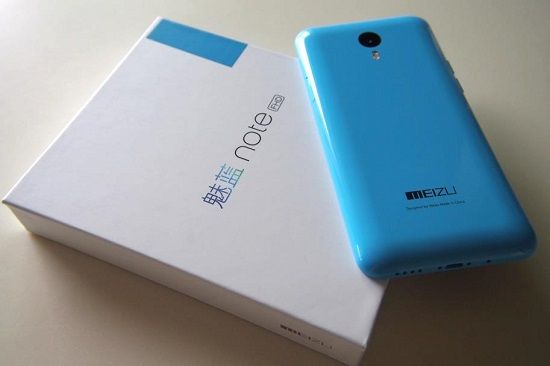
It would not be fair to comment that, Meizu M1 Note learn from Apple iPhone 5C, however, the fact that the machine has inherited the lines quite similar to the iPhone rather unattractive plastic shell. In terms of the review, M1 Note owns plastic unibody design with glossy polycarbonate material, the traditional circular home button is quite similar to the Apple iPhone 5C.
In addition, the layout of the hard keys are very similar to M1 Note plastic casing of the Apple iPhone when the top is the power button, the left edge is the key volume while the right side is the SIM slot. In general, the keys are quite careful processing, but rather hard-press, always a strong force press to activate and no less inconvenience caused to users during use.
The front of the machine is the secondary camera, speaker clusters, while the main camera on the back is dual flash comes clusters often appear only on high-end product lines. Speaking of the rear, the design of the back shiny that M1 Note looks stylish but offers more detrimental it is easy to pick up fingerprints, even, sometimes holding also becomes difficult.
In return, the back of the machine is very careful process and not bring a cheap sensation. And yet, the machine is also quite thin and light, so you will not have to worry to feel the heavy pocket. In summary, the design of the M1 Note is relatively youthful, fresh, suitable for dynamic users.
Display
Display Specifications:
The Meizu M1 Note comes with a 5.5-inch IGZO (Indium Gallium Zinc Oxide) screen, rated at a resolution of 1920×1080 pixels, which works out to around 403 pixels per inch PPI. This Full HD setup was kinda a big deal back then, for a mid-range smartphone. It gives sharp detail and crisp visuals, basically close enough to what you’d expect from higher-end models.
Display Quality:
Honestly the display quality is one of the best parts of the M1 Note. The IGZO panel, built by Sharp, delivers strong color reproduction, with tones that look vibrant yet believable so photos videos and even UI elements feel more rich and real like. On top of that, viewing angles are pretty solid, so when you tilt the device there’s only a small amount of color shift. That means the screen stays readable even if the lighting changes, or you’re not staring straight on.
Brightness wise, it’s fine for outdoors, but like most phone screens, direct sun light can still get annoying. Contrast is another plus, you get deep blacks and bright whites, which makes the whole experience feel more punchy. So whether you’re streaming, gaming, or scrolling through the web, the M1 Note’s display still feels satisfying and it definitely sits well above average for its price, you know, in practice.
Customization and Modes:
On Flyme OS, Meizu gives you some display customization bits, not a lot but enough. You can tune the color temperature and then pick different screen modes that match what you’re doing or how your eyes feel that day. There’s a “Vivid” mode, it boosts colors for a punchier, more saturated vibe, then there’s “Standard” for people who want calmer, more natural tones. Honestly it feels like a small but real layer of personalization, since you can adjust the screen until it looks just right to you.
Overall, the display on the Meizu M1 Note is pretty much among its best parts. It delivers strong sharpness, solid color accuracy, and decent viewing angles,so it works well for media time, plus everyday tasks.
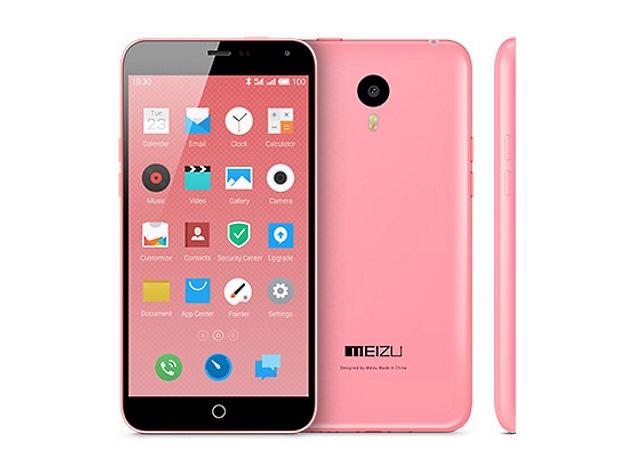
Meizu meilan m1 note 16GB: Buy it now
Performance and hardware
In terms of display, Meizu M1 Note owning up to 5.5 inch screen – the same size as the Apple iPhone 6 Plus, Full HD resolution, using the technology of Sharp IGZO screen improves pixel density to 403 ppi.
Over time experience, M1 Note screen is very bright and vivid, though, in some cases, the color displayed on the warmth and yellowing. In return, the machine for a wide viewing angle, you can view the screen in almost every position, even when gaming or watching movies.
On hardware, Meizu M1 Note use 8-core processor MediaTek MT6752, clocked at 1.7 GHz, Mali T760 graphics chipset, 2GB RAM and 3410 mAh capacity battery. Through the using time, we can see the effects, moving on to the feeling of smooth, fast similar to what we saw in the Flagships.
However, the only problem is really inadequate when we experience some heavy game by graphics chipset on the M1 Note still many limitations. According to the benchmark overall assessment points, M1 Note is not yet comparable to the blockbuster in 2014 as Samsung Galaxy S5, HTC One M8 or Xiaomi Mi 4. In addition, a further point of the machine the speaker is quite hard of hearing, when making calls in noisy places, the sound that the machine has received a lot of noise and quite difficult to listen to, even when you turn on the speakerphone.
Regarding battery life, over time, experience, despite owning up to 3,140 mAh battery, but also to withstand the machine in about 1 business day if used at full capacity as listening to music, playing games, reading the newspaper, surfing and photography. Of course, also need to say that, with the same high-performance large screen, the battery life of the plant is acceptable.
In terms of software, the Meizu M1 Note running Flyme OS customized based on Android 4.4.4. Pluses of this product is the eye-catching interface and very easy to use. Unfortunately that Flyme OS was not provided App Draw features for the machine, forcing users to group them into files just outside monitor.
Additional, Flyme OS on M1 Note frame Settings is quite unique with the left edge is the symbol representing the custom section, in which the right is the information accompanying the feature section.
Camera
For the majority of current users, the camera is considered to be one of the important features and equipment are appreciated. Reportedly, the rear camera of M1 Note up to 13 megapixels, dual LED light support, while front camera also achieving a 5 megapixel suitable for taking selfie.
For night mode with flash, dual LED clusters promoted almost own strengths, colors are very natural receiver, rarely burn brightly. Meanwhile, the camera mode as panorama and HDR standards, slow motion video capture and video quality is almost the best photography in the price range. Regrettably, in Manual shooting mode, M1 Note did not give us many options to customize.
Software Experience
Flyme OS Overview:
The Meizu M1 Note runs on Flyme OS, which is Meizu’s own Android flavored operating system. Back when the M1 Note came out, it shipped with Flyme OS 4.1, and that version was built on Android 4.4.4 KitKat. People often describe Flyme OS as clean and very minimalist, kind of pushing for simplicity, and yeah , a smooth everyday feel.
User Interface and Experience:
Flyme OS comes with a user interface that feels distinct from “stock” Android, not just a small tweak. There’s a flat look , with colorful icons and a layout that seems straightforward at first glance. One of the bigger differences is the lack of an app drawer, all apps are put right on the home screens, pretty much like iOS. That can make things feel easier at the start, yet for anyone used to the usual Android grid , it might take a bit of time to adjust.
The notification shade plus quick settings also feel thought through, giving quick reach to common tasks, not too many taps. The settings app itself is organized, and usually easy to browse, so finding and tweaking phone options doesn’t turn into a scavenger hunt. On top of that, Flyme OS offers various customization tools, including theme changes, wallpaper swaps, and icon pack choices , so you can tailor the look without much hassle.
Pre-installed Apps and Bloatware:
On the whole, the M1 Note arrives with a pretty light set of pre-loaded applications, mostly Meizu’s own tools made to fit the Flyme OS vibe. You’ll see things like the Music player, Gallery and the File Manager, they’re all usable and they feel well connected to the system. And unlike a lot of other brands, Meizu doesn’t really dump a ton of unnecessary bloatware on you , so the day to day use stays cleaner, kind of smooth and more straightforward.
Updates and Support:
Meizu’s history is actually decent when it comes to pushing software updates for their phones, and the M1 Note included. It launched with Flyme OS 4.1, then it moved along to newer Flyme OS releases. Those updates came with added features, some performance tuning, plus security fixes too. Still, it’s worth keeping expectations realistic, as the phone ages the update tempo can slow down, and at some point users may not land on the newest Android iterations.
Flyme OS comes with features that kinda improve the whole day to day experience. For example it has Smart Touch, basically a virtual button that you can drop anywhere on the screen, so shortcuts are right there, and it includes a one-handed mode that shrinks what you see, which makes the display easier to reach with just one hand. On top of that there’s a security center, pretty comprehensive, where you can control app permissions, monitor data usage, and tweak other settings tied to safety and privacy.
Also, the system supports gesture based navigation, so you can move around the phone using quick swipes and taps , which means you don’t always need the on screen buttons. The gestures themselves are adjustable too, so users get more room to bend the interface to their own habits, or well, their own way of doing things.
Related Posts





Tech Reviewer & Product Analyst
Định Bia has spent over 10 years testing consumer electronics with a focus on smart technology. He work as a product advisor at Biareview where he helped customers find the right devices for their needs. He personally tests every product featured on this site using a consistent evaluation framework covering quality, durability, and value. All reviews are based on experience, not influenced by the manufacturer.