
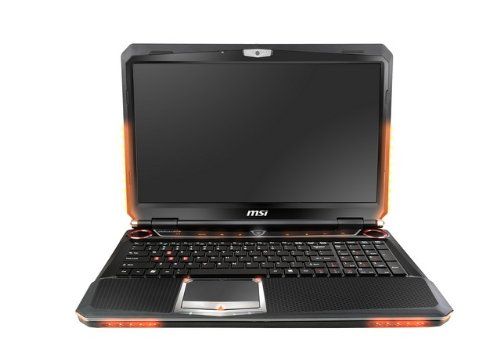
Beautifully designed, sporty design, hardware configuration no less competitive than desktop PCs, MSI’s gaming console makes it easy to complete tests at Test Labs with remarkable scores.
The MSI GT683DXR hardware configuration is based on a quad-core Intel Core i7-2630QM, running at 2.0GHz and featuring a 6MB L3 cache, and it can also auto-adjust up to 3.5GHz using Turbo Boost tech. Beyond that, the GT683DXR comes with a separate NVIDIA GeForce GTX560M graphics card, plus four RAM slots for 16GB total memory, and you also get two classic HDD drives, together providing 1TB of storage. The default operating system comes with Windows 7 Home Premium 64bit.
In addition to system performance evaluation tools such as WorldBench 6, CineBench R11.5, Test Lab also tested some of the heavyweights Far Cry 2 (DirectX 10), Lost Planet 2 (DirectX 11), Metro 2033 (DirectX 11) and Just Cause 2 (DirectX 1, Desert Sunri)
Overall, the test results kinda show that MSI’s “gaming machine” quietly completes the runs with pretty respectable scores. It’s powered by a quad-core Core i7-2630QM and GeForce GTX560M graphics cards, and with that the MSI GT683DXR lands at 146 on WorldBench 6. On the 3D side, for graphics tests using Cinebench R11.5 (64 bit) , the setup managed 4.35 points in CPU tests, and for OpenGL tests it hit 39.22 frames per second.
Equally impressive is the HDD component score at the ATTO test, which shows that the data access speed is comparable to that of a SATA 2 SSD with a read speed of 165.7 MB / S and 199.9MB / s.
On actual battery life, the GT683DXR reaches 3 hours 18 minutes when running multi-tasking with the MobileMark 2007 tool; Pretty good compared to the gaming laptop.
Besides the system performance evaluation tools, Test Lab kinda checked a few more heavyweights: Far Cry 2 (DirectX 10), Lost Planet 2 (DirectX 11), Metro 2033 (DirectX 11) and Just Cause 2 (DirectX 1, Desert Sunrise scenario).
For 1280×720, thats HD 720p, with the best quality graphics settings, plus 4xAA together with 16xAF, GT683DXR can kinda flip through most of the games, keeping average frame rates above 30 fps. In Just Cause 2 it hit 116.37 fps ,which is clearly above the benchmark of 3.88. Metro 2033 landed at 31.09 fps while the lowest showing was Lost Planet 2 with 26.9 fps.
MSI GT683DXR-423US 15.6-Inch Gaming Laptop – Black: Buy it now
Still keeping up that high quality graphics setting, 4xAA, and 16xAF, Test Lab pushed the resolution to full HD, 1920×1280. The average frame rate for Far Cry and Just Cause 2 was still sitting above 30 fps, y’know, basically playable. Metro 2033 however slid down to 24.68 fps, and Lost Planet 2 was only around 18.3 fps, which is kind of expected when you crank everything.
So with heavy games at full HD resolution, gamers can still tweak the graphic quality level, lower AA anti-aliasing, AF, or swap out other visual effects, to speed up the whole image processing in-game.
Keyboard and Touchpad
Keyboard
The MSI GT683DXR comes with a full-sized, chiclet-style keyboard, keys are well spaced and the travel feels right. The keys give a comfortable and responsive typing experience, so it works for both gaming and office type stuff. The layout also includes a dedicated numeric keypad. It’s a small thing but a welcome addition if you’re the kind of person who often deals with numbers, spreadsheets, and all that.
One big thing with the keyboard is the customizable backlighting. Users can adjust the backlight color and brightness. That helps a lot in low light conditions, and it also gives the laptop a bit of personalization, not just “it’s there”, but actually useful too.
Touchpad
On the GT683DXR the touchpad feels pretty generous, like not tiny at all. It does the usual multi touch gestures , two finger scrolling , pinch to zoom, and even a three finger swipe or slide thing too. The surface is smooth, and it answers quickly, so the cursor doesn’t seem to lag , or at least nothing that really stands out to me. The built in mouse buttons sit down at the bottom of the touchpad, and they give a solid click each time you press down so you always feel kinda confident it registered.
For gamers , there’s a touchpad disable button, and honestly it’s one of those small features that can help way more than it sounds. It stops that annoying accidental cursor drift when you’re in intense games . Especially since, in a lot of situations people go with an external mouse anyway.
Connectivity
Ports and Slots
The MSI GT683DXR offers a pretty solid selection of connection options, so it can work with different peripherals without much fuss. If you check the left side of the notebook, you’ll find these ports:
HDMI port: for linking up to HDTVs and other HDMI compatible devices
VGA port: for hooking up to outside monitors and projectors
Two USB 3.0 ports: for faster data movement with gear that supports it
E-SATA / USB combo port: for external storage connections
3.5mm audio jacks: for headphones, mic, and line in audio
On the right side of the laptop, there’s:
Two USB 2.0 ports: for extra peripherals
RJ-45 Ethernet port: for a stable wired internet link
Optical drive: a DVD-RW drive for reading, writing, and generally handling CDs and DVDs
Kensington lock slot: for keeping the laptop secured in public areas
Additionally, the laptop has a multi format card reader along the front edge, so it can handle SD, MMC and MS cards , which is pretty handy for moving files from digital cameras and other bits of gear.
Wireless Connectivity
For wireless stuff, the GT683DXR comes with 802.11b/g/n Wi‑Fi and Bluetooth 3.0, giving stable access to the internet, and also letting you link up Bluetooth enabled devices, like smartphones , headphones , and speakers.
Audio
Built-in Speakers
The MSI GT683DXR’s audio quality is a pretty strong side of the whole thing, mainly because it uses Dynaudio speakers. It includes a 2.1 speaker system, with two speakers sitting above the keyboard , and a subwoofer on the bottom panel. Together they push out sound that’s full, clean, and bassy enough to cover the usual stuff. It works well for gaming, movies, and also music playback.
At normal use the sound gets loud enough to fill a medium sized room, and the detail doesn’t fall apart even when you turn it up. That built in subwoofer does add some depth, which makes the listening experience feel more complete.
Audio Enhancement
It also includes THX TruStudio Pro, and that one aims to improve audio with virtual surround cues, tighter bass response, and vocals that feel clearer. You can tweak the audio through the pre installed THX TruStudio Pro software, so the final result matches what you like, not just what it ships with.
Battery Life, kinda
Battery Performance maybe
Battery life is one of the most important things for any laptop, and the MSI GT683DXR manages a pretty decent outcome here. It uses a 9-cell lithium-ion battery, so you can get something like around 4 hours per charge, but the real figure depends a lot on how you actually use it and your power settings, naturally.
For normal chores like web browsing , office apps , and multimedia playback, the GT683DXR will usually last a few hours before it starts asking for the charger. But once you jump into bigger workloads such as gaming, or video editing, the battery drains much quicker, which is honestly pretty expected on high-performance machines.
Power Management
If you want to squeeze more time out of the battery, you can adjust power settings and enable power saving options when it’s appropriate. MSI also throws in an Eco Engine utility, which lets you switch between different power profiles, to stretch the battery time a bit longer when you really need that extra buffer.
Cooling and Noise
Thermal Management
The MSI GT683DXR has a cooling design meant to deal with the heat from its strong components. There are multiple vents along the bottom and sides, plus dual cooling fans, and together they push heat out pretty well. In everyday use the laptop generally stays on the cooler side, and the fans usually run at a low speed, so it doesn’t feel too noisy while you’re typing, working, or just browsing.
When you get into more demanding stuff like gaming or video editing the laptop temperature can creep up, and then the fans start to sound a little more obvious. Even so, the cooling system does a solid job of keeping the internal parts within safe temp limits , so everything stays protected. Still, you might notice the fan noise when the load is heavy ,and that’s basically the kind of compromise you expect with a laptop that packs high performance hardware.
Cooling performance
The GT683DXR cooling performance is pretty impressive, it helps the laptop stay steady and keep running at its best even when things are under pressure. Copper heat pipes are part of the setup, plus the airflow design is handled efficiently, so thermal throttling is less likely to show up. In practical terms, this means you can keep playing for longer stretches ,without those noticeable performance drops.
User experience
Overall usability
Honestly the overall user experience of the MSI GT683DXR is built around strong performance, a sturdy build, and a bundle of features that feel aimed at both gaming and everyday productivity. Below are a few more angles that make the experience feel better in daily use:
Software and utilities
The MSI GT683DXR includes a few pre-installed apps and utilities meant to smooth things out and make setup easier:
MSI Afterburner: this one helps you watch the GPU status and also overclock it, so you can tweak the performance to fit games and other intense workloads.
MSI Dragon Center: this centralized control utility gives you system monitoring, performance tuning, and access to multiple system settings. It also has gaming profiles, plus optimization tools that help squeeze out extra performance when you’re actually gaming.
THX TruStudio Pro: Like i was saying before, this kind of software kinda boosts the audio quality by throwing in virtual surround sound , and you get more punchy bass, plus vocals that feel more clear. Most people mess with the audio controls however they like , it’s pretty flexible though.
CyberLink PowerDVD: This one is basically a media player made for watching DVDs, and it also plays nice with a pretty big list of video formats. So the whole multimedia vibe feels more complete overall.
Norton Internet Security: It’s basically a trial antivirus, built to shield the system from malware and a bunch of online risks, you know, the usual internet stuff.
Upgradability
The MSI GT683DXR is built with upgradability in mind, so users can stretch out the life of the laptop by swapping out important parts, or at least doing some of that. There are a couple upgrade paths you can consider, depending on what you actually need:
RAM: It supports up to 16 GB of DDR3 RAM. Upgrading the memory is pretty straightforward, you just open the access area to the RAM slots underneath the bottom panel.
Storage: The dual-storage setup can be upgraded by replacing the existing hard drive or SSD with larger capacity options. The 2.5-inch drive bays take both SATA HDDs and SSDs, which gives you more freedom when you’re tuning your storage setup.
Conclusion
The MSI GT683DXR is kinda a well-rounded gaming laptop, it brings strong performance, decent build quality, and a pile of features that feel made for gaming and day to day productivity too. With that Intel Core i7 inside, plus the Nvidia GeForce GTX 570M graphics card, and then a dual storage setup, you basically get the kind of hardware that can push modern games as well as more demanding work applications without too much hassle.
Visually, it’s definitely aggressive and aimed at gamers, but there’s also this quiet refinement to it, like the matte finish and the sturdy construction holding up nicely. The keyboard backlighting is adjustable, connectivity is fairly comprehensive, and the cooling system works efficiently ,so overall day-to-day use feels smoother and calmer instead of loud and overheated.
Now, to be fair, the GT683DXR might not keep pace with the newest laptops that have the latest and greatest GPUs. But it is still a solid, workable pick for people who want a dependable machine, without paying the top price just for hype. Because it offers upgradability, dependable results, and good value for money, it’s worth a look for gamers who also tinker, and for power users who just want something capable.
All in all ,the MSI GT683DXR feels like a reminder that MSI can still put together high-performance gaming laptops for a broad crowd. Whether you’re chasing a powerful, immersive gaming session, or you need a robust and flexible tool for heavier tasks at work , the GT683DXR has the performance and feature set that should match what you’re trying to do.
Related Posts

Tech Reviewer & Product Analyst
Định Bia has spent over 10 years testing consumer electronics with a focus on smart technology. He work as a product advisor at Biareview where he helped customers find the right devices for their needs. He personally tests every product featured on this site using a consistent evaluation framework covering quality, durability, and value. All reviews are based on experience, not influenced by the manufacturer.