Introduction
The Nokia N97, rolled out in June 2009, was one of Nokia’s flagship smartphones during that period when the mobile phone industry was moving like crazy, always changing, kinda fast. It was positioned as a high-end device, made to be a sort of all around mobile computer, mixing the phone experience with a personal digital assistant (PDA) feel , and also acting like a multimedia device. Back then Nokia was still a big deal in the mobile market , but it was starting to get serious pressure from new smartphone ecosystems, especially Apple’s iPhone and Google’s Android.
The N97 was talked about for a bunch of things, including its physical build, with a big touchscreen, plus a sliding QWERTY keyboard, then there was its Symbian OS, and of course the wide set of functions meant to draw in both business users and tech lovers. Still, even with all that ambition, the N97 got criticized for a few gaps that then, sort of, affected how people received it and how it’s remembered now.
Design and Build Quality
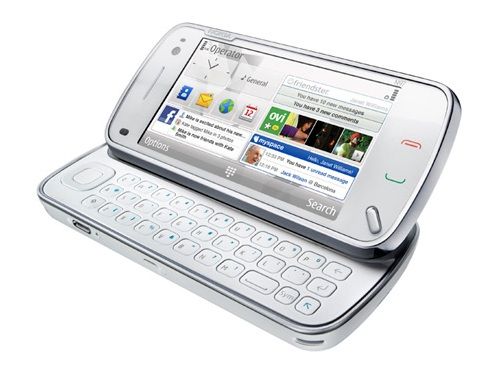
In terms of design, the Nokia N97 really stood out. When it launched, the N97 was definitely a large device, measuring 117.2 x 55.3 x 15.9 mm , and weighing in around 150 grams. Sure, it can look bulky by today’s standards but at the time it matched a lot of smartphones from that era, mainly the ones that came with physical keyboards.
The N97’s look was mostly shaped by its 3.5-inch resistive touchscreen, with a resolution of 360 x 640 pixels. For that time it felt really impressive, giving visuals that looked crisp and fairly vibrant too. And the display was paired with a full slide-out QWERTY keyboard, which was basically one of the main reasons people bought it. That keyboard made the N97 especially attractive for people who liked tactile buttons for typing , like business users who often sent emails or wrote documents while traveling, on the go, you know.
The sliding mechanism on the keyboard was well-engineered, it felt satisfying with this click when it snapped into place. When slid open, the screen sort of tilted at a 35 degree angle, which made it easier to see content and type at the same time. The keyboard itself was spacious enough and gave a solid tactile response, but some users thought the keys were a little cramped, especially people with larger hands, you know.
On build quality, the N97 felt solidly put together ,a mix of plastic and metal parts that gave it a premium vibe. The body had a matte finish, and that kind of thing helped it resist fingerprints, also it made for a comfortable grip. Overall the design of the N97 was sleek and professional, it matched its role as a high end smartphone, no doubt about it.
Still, the phone’s size and weight sparked debate for some users. Even though the keyboard was a really useful extra, it also made the device feel bulky, so it was less pocket friendly than other touchscreen devices that were starting to show up around that period. Also the resistive touchscreen ,while it worked, needed a bit more force to operate compared to capacitive screens that would soon become normal across the industry.
Display
The Nokia N97 showed up with a 3.5-inch TFT resistive touchscreen, pushing 360 x 640 pixels, which puts it at roughly 210 ppi. It was, you know, not mind blowing by todays standards, but back then most people treated it like a high quality display . it really gave crisp visuals and vivid colors, pretty decent for both video playback and the usual day to day tasks too.
The resistive touch technology inside the N97 was one of those things where the device kind of started to show its age. Compared with capacitive touchscreens , which react when you touch them with a finger, resistive screens basically depend on pressure so people often had to press down more firmly or use a stylus just to get things done. Because of that, some everyday tasks, like typing on the on-screen keyboard or moving through the menus, could feel a bit less smooth, and honestly more of a chore, than on phones that used capacitive touch instead.
Still, the N97 display wasn’t “bad” by any stretch. The colors were pretty faithful, and the brightness level was high enough that you could use it comfortably in most everyday situations. That said, when you were in direct sunlight, the visibility was noticeably weaker. The screen size, though , was a real plus for watching videos, checking the web, and looking at photos, which were pretty central to what the N97 was meant to do.
There was also this weird upside to resistive: it could be more exact for certain jobs, especially where you need careful control, like drawing or trying to pick tiny bits of interface. But the flip side is that the whole user experience felt less immediate , less reactive, compared to those newer capacitive screens that were spreading fast in higher end smartphones.
In the end, the Nokia N97 display was kind of mixed , you know, in practice it did deliver solid visuals and it handled multimedia pretty well, but that resistive touchscreen thing also made it feel a bit less responsive, a little harder day to day. Then once capacitive screens basically became the standard across the whole industry, this mismatch got more obvious, and the N97 started feeling a tiny bit dated compared with newer devices, like it was hanging behind.
The Nokia N97 ran on Symbian OS v9.4, and on top of that Nokia used the S60 5th Edition interface setup. At the time, Symbian was still one of the most common mobile operating systems, especially across Europe, also in Asia, and people appreciated it for being flexible—plus it had this huge menu of features. But when the N97 finally showed up, Symbian kind of seemed older than it really should have, especially once iOS and Android started looking more modern and cleaner, with smoother screens and a better overall flow.
The S60 5th Edition interface tried to make good use of the N97 touchscreen. So the main home screen could be changed around with widgets, quick shortcuts, and these live information streams. That customization aspect was a real selling point, because you could shape the home screen around what you needed day to day. Like if you cared more about work stuff, or entertainment, or messaging and calls, you could set it up accordingly.
Still, the user interface of the N97 was not totally perfect. At times, the touch navigation could feel a bit clumsy, mainly because the resistive display really wanted firmer, more careful presses. Also, the whole layout could come off as slightly crowded, with tiny icons, menus, and all, that were kinda harder to operate well through touch. So instead of being super intuitive, it could feel more fiddly than it should.
The phone did support a bunch of applications too, largely due to the Symbian app community being quite broad. You could find productivity tools, games, and more. Yet the overall app quality and how available things were on Symbian, started to trail behind iOS and Android, since those platforms were getting momentum fast, and developers were moving there in growing numbers.
Another area where Symbian OS showed its age was, in the general speed and quickness of the interface. While the N97 hardware looked good for its era , the mix of the operating system with the user interface would often end up causing clear lag, like when you were multitasking or trying to push more demanding apps. It was kind of a big problem for a device that was positioned as a high end smartphone.
Performance
Deep down, the Nokia N97 was using an ARM 11 processor, 434 MHz, and it was paired with 128 MB RAM. On paper it might sound a bit disappointing compared with what people expect now , but back then it was pretty common for top tier smartphones. The phone also shipped with 32 GB of built in storage, which became one of the more impressive points, since in 2009 that was a pretty generous amount for a smartphone. On top of that, there was an option for extra storage through a microSD card slot, letting users tack on up to 16 GB more.
For everyday work the N97 could manage the usual stuff , like placing calls , sending messages, using the web, and playing or using multimedia applications. Still, when you moved into heavier tasks it started to wobble, especially with multitasking, because that would bring slowdowns and lag that you could actually notice. With the RAM being limited and the processing headroom being kind of modest, the device was often less snappy and slower than several competing smartphones.
One of the key issues with the N97s performance was the not so great optimization of Symbian OS and the S60 5th Edition interface. The operating system wasn t as efficient, nor really as streamlined, as the newer platforms like iOS and Android, which were basically built from the ground up to make full use of touchscreen inputs and modern hardware. So, the N97 often felt kinda sluggish, especially when moving through menus, or when you tried running multiple applications at the same time .
Another place where the N97 performance was lacking was web browsing, which is kinda ironic because most people expected it to be smooth. It had a built in web browser, but it was slow , and it often struggled to load or render complicated websites, especially the ones packed with multimedia stuff. The limited processing power, plus the missing support for more modern web standards meant that using the internet on the N97 was, frankly, annoying more often than not.
Overall, the Nokia N97 might do the basic smartphone tasks, but the whole thing was often kind of held back by hardware limits ,and also by the inefficiencies found in Symbian OS. It was a real downside for a device that was sold as a high end smartphone , especially when you line it up with the newer, more responsive options, and in many places simply stronger devices that competitors were pushing out.
Multimedia Capabilities
One of the big selling points of the Nokia N97 was its multimedia capabilities, meant for people who wanted a do everything kind of device for consuming and creating content while out and about. The N97 came with a 5 megapixel camera featuring Carl Zeiss optics , autofocus ,and an LED flash. Basically it was among the better set up camera phones at the time, even if the rest of the experience didn t always match that promise.
On the N97, the camera could take pretty high-quality pictures, mainly when the light was good and steady. The Carl Zeiss optics made images that look sharp, plus the colors stayed pretty accurate, not too washed out or off. Also there was an autofocus system which sort of quietly did its job to keep what you pointed at, in focus. The LED flash came along too, it helped in darker places, though, it still felt a bit weaker than the Xenon flashes you’d see on a few other top-tier camera phones.
Besides taking still photos the N97 could record video too, but it was VGA resolution, meaning 640 x 480 pixels, at about 30 frames a second. This was okay for the period, but honestly the video look was not on the same level as some later smartphones that offered more advanced video modes. Not having high-definition video recording was a real limitation , especially since HD started turning up everywhere on rival devices. Still, for casual moments the output was acceptable, but it didn’t have the crispness and fine detail you might expect from a flagship smartphone.
The N97 also came with a dedicated music player, which was a big part of its multimedia side, pretty much. It supported a whole lot of audio formats, like MP3 WMA WAV and eAAC+ too, so it could manage different music files, with not much fuss. The music player look and feel was kinda simple, easy to navigate around, with options to make playlists, line up tracks by artist or by album, and even use the built in equalizer to tune the sound profile, more or less.
The sound quality on the N97 was usually pretty good, especially if you went with higher quality headphones. It had the normal 3.5mm headphone socket, which felt like a good, and honestly welcomed, thing for audiophiles who just like using their own headphones instead of whatever is included. The N97 also did stereo Bluetooth, (A2DP) so you could toss music over wirelessly to devices that actually supported it, no big drama.
About video playback, the N97 could handle a bunch of video types, like MP4, WMV, and 3GP. The 3.5 inch screen gave a decent way to watch stuff while moving, but the lower resolution, and that resistive touchscreen situation, made the whole experience a bit less immersive than on some other units. Also, when the video was higher resolution, the device kind of struggled. Often you had to reconvert the file down to something smaller, so it would run smoother.
The N97 came with an FM radio too, which was pretty typical for Nokia phones around that era. The radio supported RDS, Radio Data System, so you could see station details and even the song info while it was playing. That was a pleasant feature, particularly for folks who still listened to regular FM, but it started to matter less as streaming services became more of the everyday choice.
Another notable multimedia thing about the N97 was its support for photo and video editing, kinda like you could do small changes right there , without always needing some bigger program. It came with basic editing tools that let users crop, resize, and add filters onto photos. For video, you could trim and splice clips too, so it wasn’t only “watching stuff” , but also a bit of tinkering. Of course it was not really as capable as dedicated editing software, but for quick edits when you are out, it was pretty handy.
All in all , the multimedia capabilities of the Nokia N97 were solid, especially considering it released back in 2009. The camera and the music player were the real standouts, with good overall performance and a decent spread of options, for people who wanted to consume media, and also create small bits of content, right on the phone. Still, there were some obvious limits, like weaker video recording quality, the resistive touchscreen, and that comparatively lower resolution display. Because of those parts, the N97 didn’t quite match a few of the newer, more advanced multimedia smartphones that were starting to show up around that time.
Connectivity and Networking
The Nokia N97 was build to be this flexible communication device, kind of in general, with many ways to keep connected while you’re moving around and not stop. It supported quad-band GSM (850/900/1800/1900 MHz) and tri-band UMTS (900/1900/2100 MHz), so in practice it could work across a broad bunch of mobile networks worldwide.
For data connectivity, the N97 supported HSDPA (High-Speed Downlink Packet Access) up to 3.6 Mbps. That speed might not have been the absolute top mobile data back then, but it was enough for browsing , downloading apps, and streaming music or video. In places where 3G wasn’t around, it could fall back to GPRS and EDGE, which helped keep things running even when the network situation was less than ideal.
Beside that cellular link stuff, the N97 also brought Wi-Fi (802.11b/g) for getting onto wireless networks. It was kinda handy, especially if you were in spots where the cell signal is weak, or when you want to cut down on data usage. In general the Wi‑Fi worked pretty well, with steadier connections and solid speeds for regular browsing and streaming, not super amazing but definitely usable.
Then there’s Bluetooth 2.0, and it had A2DP support too. That meant the N97 could pair with a bunch of Bluetooth devices like headsets, speakers, and even those car kits. The A2DP part was the nice one, because it let you stream music without wires, straight to any Bluetooth audio gear that supports it.
Also, the phone had a microUSB port, which you’d use for charging, and for data transfers between the N97 and a computer. A microUSB port was pretty standard on many smartphones back then so syncing with a PC or a Mac felt pretty straightforward and reliable, no drama most of the time.
Finally, the N97 included a built-in GPS receiver, and it was tied in with Nokia Maps, Nokia’s own navigation and mapping software. GPS was really one of the N97 strong points, it could track your position fairly accurately and also support turn by turn directions. Nokia Maps itself came with a bunch of extras, like places points of interest, voice guided navigation, and offline map coverage too, so it ended up being a practical companion for travelers and commuters, especially when you don’t have great connectivity.
On the whole, for software connectivity, the N97 really covered a decent range of ways to message or get mail, like SMS, MMS, and email through POP3 , IMAP , and Microsoft Exchange. It also had built in support for instant messaging too, things along the lines of Windows Live Messenger and Yahoo! Messenger, so people could stay in touch with friends and colleagues without much hassle .
That said , there was one area where the N97 felt a bit less generous, mainly around third party apps and services. Even though Symbian OS had a pretty big app ecosystem, it was starting to trail behind the fast growing app storefronts we were seeing on iOS and Android. So the catalog of apps on the N97 ended up being more limited, especially for newer services, and social media platforms, which were moving so quickly at the time.
Battery life
Battery life always mattered a lot for any mobile device, and the Nokia N97 was not really an exception to that rule . The N97 shipped with a 1500 mAh lithium-ion battery, which was pretty typical for smartphones during that period. Nokia stated that the N97 could reach up to 6.6 hours of talk time on a 3G network , and up to 17 days of standby time.
In real world usage, the battery life of the N97 was generally pretty good, but honestly it could swing a lot depending on how the device was being handled. Like, for everyday stuff—making calls, sending texts, and yes browsing the web—it could pretty much stretch to a full day, sometimes more on a single charge. Still, when you start doing heavier things, the battery would deplete faster, for example when the GPS was running, when music or video was streaming, or if you were running multiple apps at the same time, that kind of.
One neat advantage of the N97’s design was that the battery was removable, so users could keep a spare battery around, or just swap it out if it slowly started to lose capacity. At the time, this was becoming less common in smartphones, because more and more models were moving toward sealed, non removable batteries, so yeah.
Also, the N97 had a few power saving tricks built in. You could reduce the screen brightness , turn off Wi‑Fi and Bluetooth when they weren’t needed, and switch the phone into a power-saving mode that would cut down on overall power use. These options were pretty useful if someone was out of reach from a wall outlet for a while, and wanted the device to last longer.
For charging, the N97 used the microUSB port and it supported regular charging speeds. There was no fast charging, and no wireless charging either, since those were still kinda emerging at the time. But even so, charge time was fairly reasonable, with the phone usually needing about a couple of hours to go from empty to fully charged.
Overall, the battery life of the Nokia N97 was one of its strong points, specially for people who needed something that could just last through a full day of actual use. The battery was removable, and the power saving options, kind of made the whole thing feel more dependable. So yeah it ended up being a solid pick for both casual users and the ones who push the device hard.
Software and Applications
Because it ran on Symbian, the Nokia N97 shipped with a bunch of built in software and applications. A lot of those were made to really use what the hardware could do. Beyond the basic phone duties, the N97 also had productivity features, multimedia apps, and several connectivity functions.
The home screen was customizable, which meant you could toss on widgets, quick shortcuts, and those live information bits. This flexibility was a real thing Symbian did well, and it let users set up the phone to match their own habits. On that main screen you could see stuff like weather updates, email alerts, or social media feeds, so you didn’t always have to open separate apps just to check what was going on.
Also, the N97 came with a complete set of office related applications. That included a document viewer for Microsoft Office formats, a PDF reader, and a calendar that could sync with Microsoft Exchange. Those tools made it a pretty capable phone for business users who wanted to stay productive while on the move.
On the multimedia side, the N97 sort of had, a music player, video player, and photo gallery, all tied into the phone’s hardware features in a pretty direct way. The music player covered a decent range of audio formats, and it also came with things like playlist creation, album art display, and an equalizer. The video player could handle multiple video formats, but it still felt somewhat hemmed in by the device screen resolution and processing power, like it was doing its best but not fully keeping up.
The N97 also rolled with Nokia’s Ovi Store, basically the company’s app shop for grabbing extra software and games. Even if the Ovi Store had a fair sized selection of apps, it wasn’t really as stocked or as smooth to use as the app stores you’d see on iOS and Android. Because of that, N97 users often had fewer ways to locate and install new apps, especially once developers started shifting attention toward the bigger, growing iOS and Android ecosystems.
Another important piece of the N97’s software was support for social networking. The device included built-in apps for common platforms like Facebook and Twitter, so users could stay in touch with friends and family. Still, the overall experience felt a bit limited, compared with other devices, mainly as social media apps kept getting more advanced and demanded stronger hardware plus better software, and the N97 ended up a step behind.
One of the criticisms of the N97s software was that it felt kinda dated , clunky too, especially when you compare it with the more modern and intuitive user interfaces coming out on iOS and Android devices. The Symbian OS, even if it was sturdy and feature rich , was also starting to show its age, and you could really feel it in day to day use. The user interface often asked for multiple steps just to do what should’ve been simple tasks, and the resistive touchscreen, well it didn’t feel as smooth or quick as the capacitive touchscreens on other contemporary handsets. It was less fluid in practice, like it was a half beat behind you.
Then there is the N97s browser, which also felt like it was behind the curve. It could do basic web browsing , sure, but the whole experience wasn’t as refined or as brisk as what you’d see on competing smartphones. Pages would sometimes take a while to appear, and the lack of support for newer web standards made a bunch of websites kind of annoying , difficult to navigate , or just awkward to use properly. The inclusion of Flash Lite was a bit of a win, because it let the browser show some Flash content. Still, the implementation was pretty limited and it didn’t really match the desktop experience at all.
Also , the N97 supported multitasking, so users could run multiple applications at the same time. However , the hardware limitations meant multitasking could end up making things feel slower, particularly when several demanding apps were running together. Symbian OS did app switching in a way that was decent enough, but it still wasn’t as seamless, or as natural feeling, as what newer operating systems delivered.
The email client on the N97 , yeah it supported multiple accounts and it worked with the usual suspects like Gmail Yahoo Mail and Microsoft Exchange, mostly without much drama. Setting up the email accounts was pretty straight forward and the reading and sending experience was decent. Still, the small screen , and that need for stylus input (since the touchscreen is resistive ) made writing longer emails kind of annoying compared with devices that have larger capacitive touchscreens, and better virtual keyboards. So you know, short messages were fine but longer stuff felt slower.
Nokia Maps was the standout app though, with robust navigation features that actually felt reliable. It gave turn-by-turn directions, offline maps , and a big variety of points of interest. The map data and navigation were generally accurate and dependable, but the user interface could be a bit clunky, especially when you line it up against the newer Google Maps experience on Android devices. But if someone needed offline route guidance that just works, Nokia Maps was a pretty solid thing to have.
The N97 also came with several utility apps , like a voice recorder, calculator, and a notes app. They were all fairly basic, in terms of features, but they did the job for everyday tasks. The voice recorder was handy for quick memos or capturing small meetings, while the calculator handled basic arithmetic without pretending to be anything fancy.
About gaming , the results were kind of mixed because of the hardware limits. The Ovi Store had some games, but the resistive touchscreen plus the limited processing power meant a lot of games were either simplistic, or they struggled to run smoothly. Classic games like Snake and Tetris were there and they played well enough, yet the N97 can’t really match the richer gaming feel from newer platforms, like the iPhone or Android devices.
One of the more standout parts of the N97 was that it let users tinker around with a bunch of personalization stuff, like themes and ringtones. People could download, then apply different themes to kind of shift the whole look, and the phone also handled a fairly broad set of ringtones plus notification sounds. This kind of tailoring was, honestly pretty liked by a lot of users, but it still didn’t completely cancel out that growing feeling that Symbian OS was slowly getting old.
All in all, the Nokia N97 software vibe was kind of a mixed situation. On the one side, it brought plenty of features, plus customization choices, so it worked as a more flexible gadget for power users. On the flip side, the interface and day to day feel started to look dated, especially when you compare it to newer platforms that were becoming more popular and seemed easier to use. The Symbian OS constraints ,and also the N97 hardware limits, meant it could do a lot, yes, but it wasn’t as sharp as it needed to be in that fast moving smartphone scene.
Nokia N97 Unlocked Cellular Phone with 5MP Camera, Touchscreen, 32GB Storage, 3G, GPS, WiFi – International Version with No Warranty (White): Buy it now
Nokia N97 Quad-band Cell Phone – Unlocked: Buy it now
Related Posts

Tech Reviewer & Product Analyst
Định Bia has spent over 10 years testing consumer electronics with a focus on smart technology. He work as a product advisor at Biareview where he helped customers find the right devices for their needs. He personally tests every product featured on this site using a consistent evaluation framework covering quality, durability, and value. All reviews are based on experience, not influenced by the manufacturer.