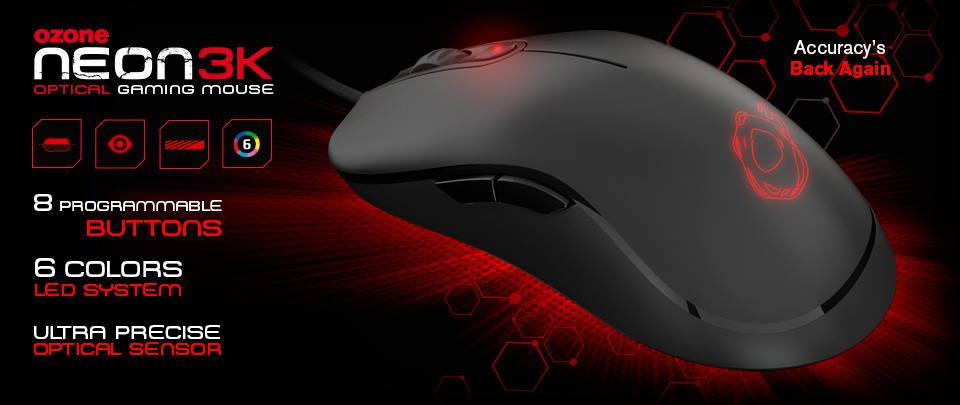
Neon 3K – a refreshed version of the Neon series. Although there are not many improvements compared to the old version, the renewed mouse components will bring performance to help gamers “big hands” in their battles.
Compared to the old version, the sensor of the mouse has been changed from Avago ADNS-9500 to Pixart 3320, and the LED is also easier to adjust and more colorful than before… The rest of the details and elements of the Neon series are still maintained such as height, weight, internal memory, or characteristics of the cable, and jack. Let’s see the differences and changes of Neon 3K compared to the previous version through the article below.
Although the box has a different design compared to the old version, the color and layout of the two versions are still similar. Still, the mouse is placed in the middle with a dark tone that does not stand out much. The lower right corner is the outstanding features of the mouse introduced by Ozone: symmetrical design, 3500 DPI optical reader, rubber coating, and customizable 6-color LED.
The outstanding features of the mouse are repeated many times, before, after, and inside the box.
The side panels of the mouse have a simple, uncluttered design
Above are all products and accessories that come with 3K, nothing too special. The kit also only includes the mouse, user manual, and sticker.
Still has the same design as the Neon version, but the mouse is a little different, the logo is pushed in the middle, and the previous border with white, red, blue, or black colors is now only a black tone.
The Neon 3K offers 8 buttons that can be programmed via vendor software. Gamers can change, edit and store up to 5 profiles on the mouse, which makes it easier for gamers to switch to use following the purpose and type of game they play.
The mouse surface with rubber coating gives users better control of the mouse and a firmer grip. Along with that is 2 feet as large as Teflon for smooth performance and experience on many touchpad surfaces.
The design as well as the cable and jack material is a plus point for Neon 3K, the wire wrap is not broken, although a bit stiff but no problem, and the jack surface is gold plated to enhance contact and resistance. Features that a hardcore gamer loves.
The LED mouse on this new version is much more beautiful than the old version, not haunted, and loses color like the old version. Although there are only 6 LED colors for you to change, if you are not too picky, this is also a pretty good number.
Ozone provides the same utility software as Razer, SteelSeries makes it easier to install and edit the mouse, the interface is designed quite intuitively, and users can quickly set up the necessary things even when they first start using it.
The fact that gamers have a low budget, Neon 3K is a product worth adding to the reference list. The mouse has a beautiful design, is suitable for many users, highly customizable, and handy. The Pixart 3320 reading eye is a good mid-range reader, providing reliable accuracy for gamers.
Ozone OZNEON3K Neon 3K 3500dpi USB Optical LED Gaming Mouse in Black: Buy it now
Design and Build Quality
a. Aesthetic and Build
The Ozone Neon 3K comes with a sleeker modern look, mixing matte , and glossy touches in a way that feels pretty clean. In general the build quality seems made for real sessions, like the kind where you play longer then you planned. The shell uses solid looking materials so the mouse feels firm and “put together” when it sits in your hand, instead of feeling flimsy or springy.
Dimensions and Weight: the Neon 3K has a balanced size and weight, so it works with multiple grip styles. Also the weight is adjustable which lets people tweak the overall heft to match how they prefer to hold it.
Build Materials: it uses ABS plastic together with rubberized sections. That mix gives you a decent grip and a more comfortable surface feel during use, specially if your hand tends to get warm.
b. RGB Lighting
The Neon 3K’s RGB is one of the more attention grabbing parts, and it’s fully customizable. It includes multiple lighting zones, and you can change them using the included software.
Lighting Effects: there are several effects to pick from, like breathing , color cycling and static colors. Honestly it helps the overall vibe, but it also gives you a chance to personalize the look so it can blend with other RGB gear or a gaming setup you already have going on.
Performance and Sensor Technology
a. Sensor Specifications
The Ozone Neon 3K uses a high-precision optical sensor, with a max DPI of 3,200. The idea here is accurate tracking and solid responsiveness, which matters a lot for high-speed games where small movements count.
DPI Settings: DPI can be adjusted through the software, so you can jump between sensitivity steps quickly, right while you’re playing. That kind of on-the-fly flexibility is pretty handy for gamers who often need to re-tune their aim during matches, like switching from close fights to longer range moments.
b. Tracking and Accuracy
The Neon 3K sensor is built to keep up consistent and accurate tracking on lots of surfaces. So whether you’re playing on a mousepad or just, yk, using the desk, the sensor still handles it pretty well. It helps reduce that cursor jitter thing ,and makes sure movements stay really precise.
Polling Rate: the mouse has a high polling rate, so it feels more responsive. Basically a higher polling rate means the mouse is chatting more often with your computer, which usually results in smoother cursor motion ,and overall better accuracy.
Customization Options
a. Programmable Buttons
The Ozone Neon 3K includes multiple programmable buttons, and you can change what they do using the Ozone Neon 3K Software. They’re positioned in a way that makes them pretty quick to reach mid-match, without fuss.
Button Mapping: you can set different functions, commands, or macro sequences to these buttons. This improves gameplay flow, and it lets you run complicated actions with basically one click, kinda like a shortcut.
Macro Recording: the software also includes macro recording, so you can build detailed command chains. Then those chains can be triggered with a single press, which is pretty handy when timing matters.
b. DPI Adjustment
The Neon 3K gives you a lot of DPI tuning options. Users can create several DPI profiles, each one having its own sensitivity level, and then switch between them whenever it makes sense.
On-the-Fly DPI Switching: this feature lets gamers change DPI while they’re still playing. It’s especially useful when you’re jumping between different tasks, like switching from sniping to movement in an FPS, or when you’re moving around a strategy map, fast.
c. RGB Lighting Customization
The RGB lighting on the Neon 3K can be customized using the software and honestly that matters a lot, because users can pick from a variety of colors. The lighting effects are also pretty flexible, so you can end up with a personalized look that feels kinda coordinated with your whole setup, not just “whatever” brightness.
Synchronization: With the software you can sync it with other RGB-enabled peripherals, and then the whole thing looks more cohesive and visually striking, especially during fast scenes in games.
Software and Compatibility
a. Ozone Neon 3K Software
The software that comes with the Ozone Neon 3K is pretty much essential, it’s what lets you access and set up the mouse’s advanced features. You get a user-friendly interface for tweaking DPI, remapping buttons, and changing lighting effects without too much hassle.
Interface: The interface is intuitive and it’s easy to move through, so even if someone isn’t super tech-savvy, it still feels manageable.
Configuration: The software supports detailed configuration of the mouse’s settings. You can create multiple profiles too , for different games, or different apps… and just switch when you need.
b. Operating System Compatibility
The Ozone Neon 3K Software works with several Windows versions, including Windows 10 and Windows 11. For macOS, compatibility may be limited, so people should check the official website , for the most current updates and support options.
Ergonomics and Comfort
a. Design and Grip
The ergonomic design of the Ozone Neon 3K is built to stay comfortable during long gaming sessions, because after a while you really notice strain if the shape is wrong. The mouse form is made to sit naturally in the hand, which helps reduce strain and encourages a more natural grip.
Grip Style: It supports multiple grip styles, like palm, claw, and fingertip grips. The shape and button placement are arranged in a way that fits those different styles , so it can feel right whether you grip it gently or more aggressively.
b. Comfort Features
Rubberized Surfaces: The rubberized side grips improve comfort, and they also help avoid slipping , even when you are in one of those intense gaming sessions that feels never-ending.
Weight Adjustment: With the adjustable weight system , users can tweak the mouse’s weight, which makes the overall handling more “yours” and honestly more comfortable over time.
Performance in Various Gaming Genres
a. First-Person Shooters (FPS)
In FPS titles, precision and quick response matter a lot. The Ozone Neon 3K’s high DPI profiles and steady sensor are pretty well matched for this style of play. Also the on-the-fly DPI tweaking lets you switch sensitivity fast , and that helps with both aiming and keeping track of enemies.
b. Multiplayer Online Battle Arena (MOBA)
For MOBA games, the Neon 3K’s programmable buttons plus macro recording are really useful. Players can set up complicated sequences or ability activations , and put them right on the mouse buttons. That tends to improve in-game efficiency , without you having to stop and hunt through menus.
c. Real-Time Strategy (RTS)
In RTS games, quick commands and unit management are kind of everything. The Neon 3K’s customizable buttons and DPI settings give a small but noticeable advantage here. Because the mouse stays accurate and responsive, it’s easier to steer your in-game actions precisely when every second counts.
Comparison with Competitors
To see where the Ozone Neon 3K sits in the market, it helps to compare it against other gaming mice from top brands.
a. Logitech G502 HERO
Features: The Logitech G502 HERO comes with a higher ceiling DPI of 16,000, along with a similar set of programmable buttons. It’s also recognized for strong build quality and sensor tech that feels consistent in practice.
Comparison: Even though the G502 HERO gives you a bigger DPI range, the Neon 3K still delivers competitive day-to-day performance with its 3,200 DPI sensor and flexible customization options , which might come at a more reasonable price , depending on the store and the moment.
b. Razer DeathAdder V2
Features: The Razer DeathAdder V2 comes with Razer’s Speedflex cable and a Focus+ Optical Sensor, with a DPI rating up to 20,000 . People often talk about its ergonomic build, and how it keeps tracking steady at a high level , too.
Comparison: The Neon 3K’s RGB lighting and those customizable options might feel more appealing for folks who care a lot about looks, button programmability , and less about chasing the absolute higher DPI that the DeathAdder V2 can push.
c. Corsair M65 RGB Elite
Features: The Corsair M65 RGB Elite includes an 18,000 DPI sensor and a customizable weight setup. Basically it’s made for accuracy plus long-term durability, so it doesn’t just feel fast , it also holds up.
Comparison: The Neon 3K counters with an adjustable weight system and customizable lighting, which makes it a solid alternative to the M65 RGB Elite , especially if you want customization plus a balanced set of features, not just “numbers”
Overall Value and Conclusion
The Ozone Neon 3K gaming mouse gives a pretty good mix of features, performance, and personalization at a competitive price. With its ergonomic shape, customizable RGB lighting, and flexible on-use performance , it stands out pretty clearly as a strong option in the mid to high-end gaming mouse scene.
a. Strengths
Customization: This software gives really broad control over DPI settings, button mapping, and RGB lighting too , so players can adjust the mouse around what they actually need in game.
Performance: The optical sensor feels high-precision, and with the adjustable DPI you get steady tracking and quick response, which matters a lot for different gaming styles.
Ergonomics: The shape is pretty ergonomic, plus there’s an adjustable weight system , and it helps maintain comfort even after long sessions.
b. Areas for Improvement
macOS Compatibility: Better macOS support would likely bring more people in, especially those who live in Apple land and want plug-and-play style features.
Advanced Customization: The Neon 3K is already decent at customization, but if they added more advanced controls, or pushed higher DPI options , it could attract competitive gamers who want that top-tier edge.
In summary, the Ozone Neon 3K really comes off as a flexible and well-rounded gaming mouse, and honestly it delivers good value for the money. Between the customizable side, dependable performance, and the comfortable ergonomic build , it works for both casual players and the more serious crowd. Even with a couple small spots to polish, the Neon 3K is still a solid pick for anyone after a dependable, feature-rich mouse.
Related Posts

Tech Reviewer & Product Analyst
Định Bia has spent over 10 years testing consumer electronics with a focus on smart technology. He work as a product advisor at Biareview where he helped customers find the right devices for their needs. He personally tests every product featured on this site using a consistent evaluation framework covering quality, durability, and value. All reviews are based on experience, not influenced by the manufacturer.