Design
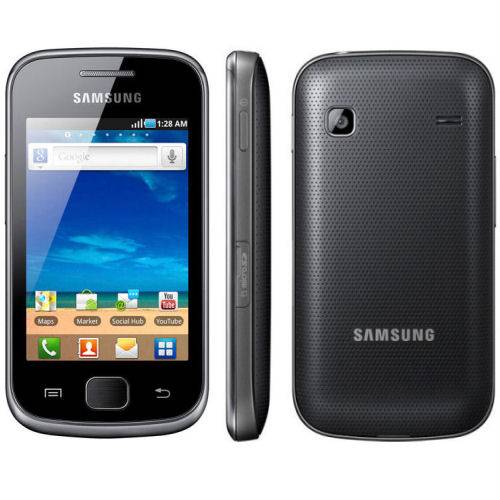
Galaxy Gio 110.5 x 57.5 size x 12.2 mm, weight 102g and the shell is made of plastic. Designed of Samsung Galaxy Gio quite simple, front panel is a 3.2-inch screen with 3 buttons commonly used by Samsung. At the back, the surface of the machine with a lot of small holes, in order to create friction can help users hold the device firmly. Speakerphone and camera are placed fairly close together.
Both sides has volume control keys, Power key and microSD memory card slot. In the above 3.5mm headphone jack, whereas the underside with a USB port that allows the exchange of data and charging.
Touch screen
Galaxy Gio has a 3.2 inch touch screen works pretty well and sensitivity, brightness and good color. 320×480 display resolution can meet these requirements are not too demanding. But rather limited viewing angle, only slightly tilted a little, you may notice the screen is sharp turn and lost detail. Anti-glare capabilities are also appreciated.
Display
The Samsung Galaxy Gio showed up with a 3.2-inch TFT LCD display and its resolution was running at 240 x 400 pixels. Now sure, the screen size plus the actual resolution can feel kinda small and mehhh compared to modern phones, but it was mostly built to deliver a pretty fair experience for the intended audience they had in mind.
Brightness and clarity:
In indoor situations it was bright enough, though outside in direct sunlight it kinda fell apart, mostly because its brightness levels weren’t all that high. With 240 x 400 pixels, the pixel density comes out to about 176 PPI, and yeah that’s on the low side when you compare it to newer flagships. With that lower pixel density, text and pictures looked less crisp, not as sharp as on devices that pack in more pixels.
Color reproduction:
As for colors, the Galaxy Gio’s display did a solid job, colors looked fairly true to what you’d expect. Still, the TFT LCD tech in the Gio didn’t deliver that same punchy vibrancy and stronger contrast you often get from AMOLED screens on other smartphones.
Viewing Angles:
The viewing angles of the Galaxy Gio’s display were limited, with noticeable color and contrast degradation when viewed from extreme angles. While the display remained usable for most typical viewing angles, it was not as versatile as higher-end displays with better viewing angles.
Outdoor Visibility:
In bright outside conditions the display was a bit limited , mainly because the brightness levels are on the lower side. Some users might have felt it was annoying to read or check content in direct sunlight unless they first bumped up the screen’s brightness manually.
Overall, the Samsung Galaxy Gio’s display felt like a basic yet usable setup, good enough for its entry-level audience. It really didn’t stand out for higher brightness, color accuracy or even viewing angles. Still, for everyday chores and quick tasks it delivered adequate performance, just not more than that.
Operating system
Samsung Galaxy Gio using OS Froyo TouchWiz tutoring for a menu bar located below the screen is very similar to iOS. You can edit the location of applications, or shrink the page and set on a single screen for easy searching. The phone book is synchronized and highly intuitive interface. Operations on the machine runs smoothly and almost did not encounter an error
The web browser is always a strong point of Android, fast, intuitive interface and error. The operations are done browsing smoother on Galaxy Gio, screen large enough to display the content pages. Unfortunately no browser supports Flash, so your only way to watch youtube is using Youtube app.
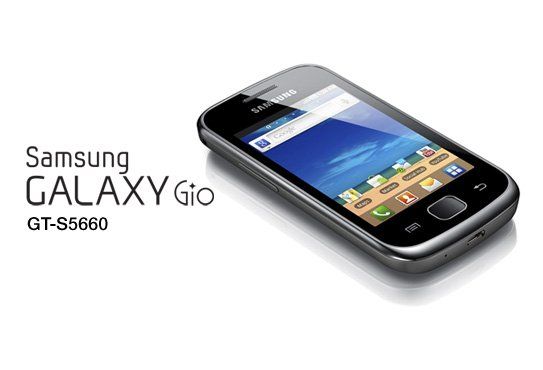
Samsung GALAXY Gio – GSM Android Phone S5660 (Silver) – International Version No Warranty: Buy it now
Camera
Only 3.2 megapixel camera but the quality of Galaxy Gio photography pretty good, the picture resolution up to 2048 x 1536 pixels. But not bundled camera flash but has other interesting features like autofocus, face recognition. A minus point is that Galaxy Gio does not capture button on the machine, the user must perform this operation on the touch screen.
Very good image quality than a 3.2megapixel camera, contrast and color fairly well, the image for higher resolution detail and the ability to remove noise at an acceptable level.
Video recording is limited point of this device, the camera which recorded only QVGA video with 15 frame / sec, the quality is quite bad.
Performance
The Samsung Galaxy Gio was powered by a 800 MHz single-core processor and 278 MB of RAM. This hardware configuration was designed to offer a basic level of performance for entry-level users.
User Experience:
The Galaxy Gio’s performance was pretty okay for day to day stuff like calling, messaging, and basic web surfing. It had an 800 MHz processor and 278 MB of RAM, so yeah it did give enough grunt for ordinary tasks, but some people may have run into that feeling of lag or a sort of slow motion when more than a couple apps were running at the same time, kind of at once.
Multitasking:
Because the RAM and the processing power are limited, the whole multitasking angle on the Galaxy Gio is… well it’s constrained. You can still juggle a few applications together, yet things can get noticeably worse if multiple heavy or demanding apps are open. Users would usually need to keep an eye on the apps that are still open and not push it with big multitasking if they wanted the device to stay smooth.
Web Browsing:
For web browsing, the Galaxy Gio can handle the basics and you can reach most websites and interact with them. Still, the lower resolution plus the modest processor speed means web pages may load, or simply appear, slower and not as clearly as they would on higher end smartphones. It works for browsing, but the overall smoothness might be weaker compared with stronger devices, so it’s more “usable” than “great”.
Gaming:
The Galaxy Gio can run simple games and some lighter titles you could get from the Android Market (now the Google Play Store). But for graphically intense games, performance tends to fall short. It isn’t really set up as a gaming phone at all, so if you’re after a proper gaming experience, this might feel a bit underwhelming, not to mention more than a little restrictive when things get visually demanding.
Benchmarking:
When the Galaxy Gio was put under benchmarking tests, it turned out the overall performance was pretty much in the same ballpark as other entry level smartphones from that period. It didn’t really keep up with the faster, more premium models but it still managed to feel usable, especially for people who wanted something budget friendly.
In the big picture, the Samsung Galaxy Gio basically gave a straightforward performance kind of experience for entry level users. Because the hardware was naturally limited, multitasking , and anything heavy, tended to get capped pretty quickly. Still, for day to day tasks it worked in a reasonably effective way, nothing fancy but it did what it needed to do.
Software and User Interface
The Samsung Galaxy Gio was first shipped with Android 2.2 Froyo , and back then it was kinda seen as a broadly used version of Android. It also had Samsung’s TouchWiz user interface sitting over the top, so you got added features and a few customization possibilities, even if it was nothing too fancy.
Android Froyo:
Android 2.2 Froyo brought in a set of improvements compared to older releases, like better overall speed, stronger app support, plus upgrades to the user experience. Froyo felt steady and practical in daily use, but it didn’t include certain advanced capabilities that show up later in newer Android builds.
TouchWiz User Interface:
Samsung’s TouchWiz added yet another layer of personalization and functionality over Android Froyo. The interface came with a collection of widgets , and themes, together with custom icons, so users could tweak how things looked. TouchWiz also included things like extra home screen customization, live wallpapers, and quicker access to apps people used often, so it was more “ready at a glance” than stock setups.
Customization:
The Galaxy Gio gave people a bunch of ways to customize it, you could swap wallpapers, themes, and even fiddle with the widget layout. So the whole look and basic function could be tuned to match what you liked. It also came with Samsung’s own apps and services, these kinda thing gave extra convenience, and yeah it made day to day use feel smoother.
Updates:
There were software updates that moved the phone toward newer Android builds, like Android 2.3 Gingerbread. Those updates added some extra features and little upgrades, which helped overall performance and made things easier to use day to day. Still, the Galaxy Gio didn’t get updates for the later Android versions, so over time it became less friendly with newer apps, and some newer features just wouldn’t play nice.
App Compatibility:
In general, the Galaxy Gio worked with a lot of apps from the Android Market. Users could grab apps for different needs, productivity stuff, entertainment, social media, you know the usual. But because the hardware and software resources are pretty constrained, some newer or heavier apps might not run as smoothly, or they may feel laggy depending on what it is.
Overall:
So, the software side and the user interface on the Samsung Galaxy Gio felt like a real, usable setup with customization that actually mattered. The mix of Android Froyo and TouchWiz gave a fairly stable base, plus multiple personalization options. At the same time though, the software support didn’t last like on newer phones, which meant compatibility and capability were kinda limited later on.
Battery life
Equipped with 1350mAh battery, standby time of up to Gio has 460 hours and talk continuously for 11 hours. We can say Samsung Galaxy Gio is a phone rather save battery because the screen is not too big and configure only passable.
Epilogue
Samsung Galaxy Gio is part of the strategy hit the mid-range market segment. What strengths do not have outstanding but also not too disappointed, the evaluation 1 handset is good or not depends on its price. This is a phone that is suitable for those new to Android or not asking too much of the high-end features.





Tech Reviewer & Product Analyst
Định Bia has spent over 10 years testing consumer electronics with a focus on smart technology. He work as a product advisor at Biareview where he helped customers find the right devices for their needs. He personally tests every product featured on this site using a consistent evaluation framework covering quality, durability, and value. All reviews are based on experience, not influenced by the manufacturer.