Design
Samsung is the phone company opens mobile phablet trend and so far it has become a trend to be very many manufacturers to follow. However, after nearly a year appeared Samsung Galaxy Note 2 is still a role model without many big-screen phone model can compete both in terms of functionality or battery life. Samsung galaxy Note 3 launched with responsibility for its users to see remarkable even with brother excelled Note 2. The initial impression was also shows us this.
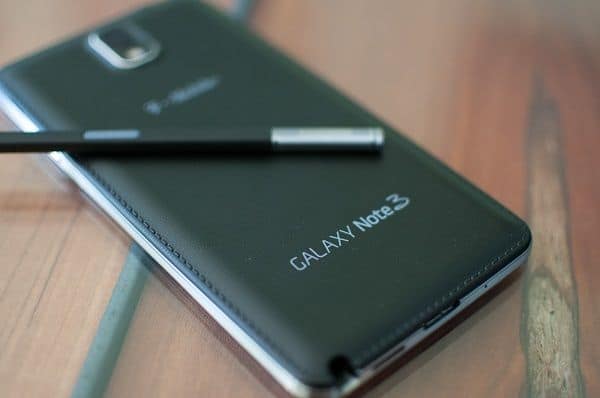
The first improvement is on the design of the machine, do not have much to complain about Samsung has changed the overall design Note 3. square more machines, like the Samsung Galaxy SII, thereby feeling cheap or uncertainties as Samsung Galaxy SII and Samsung galaxy Note 2 has disappeared. With thin bezel edges, size and weight of Note 3 (8.3 mm thick and weighs 168 g) is also considerably streamlined compared to Note 2 (9.4 mm thick and weighs 183 g).
Plastic parts around the screen Note 3 does not smooth the ridges that ripple will pull over as we think of the metal surface, quite right to say when combined with black or white. However the pink version is the problem, the combination of design alchemy comes feminine color tone is unlikely to be of much. When observers to the edge, we again could mistake this is the metal rim, but ultimately they are still plastic, perhaps Samsung still prefer to use plastic material in Samsung galaxy Note 3 to try weight reduction to a maximum machine.
On the back of the Samsung galaxy Note 3, the cluster intelligent camera design is also the religious highlight the beauty of the machine. Both the camera and LED flash are all-inclusive in a plastic contour very prominent alchemist. 13 MP camera is a bit protruding a little more should be easily scratched. In addition, Note 3 is also equipped with the technology in favor of 4K video recording, but only in version Snapdragon 800 chip Exynos 5 Octa longer version will not support this feature. 4K technology will produce video clips at 30 frames / sec and can only be achieved with strong processor. The quality of this video is also very high, but it is in case you have an output device actually play modern. Otherwise Note 3 camera also supports 1080p video capture at 60 frames / second or 720p reaches 120 frames / sec is enough to bring smoother footage.
Unlike the unibody aluminum design, users can remove the back cover to replace the battery, insert the SIM card or microSD card. 2 slots are arranged, stacked to save space just like on the Galaxy Mega 6.3.
Screen
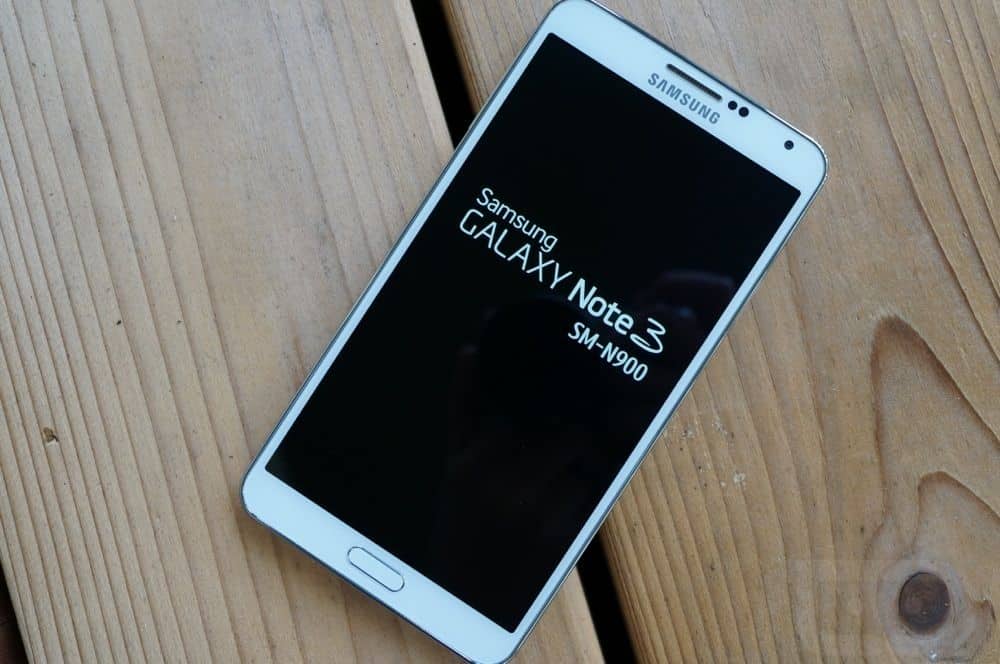
Samsung Galaxy Note 3 is equipped with a Super AMOLED screen 5.7 inch 1080p quality display are almost identical to the Samsung Galaxy SIV. With a pixel density is enhanced up to 386 ppi, everything becomes excellent much smoother when placed beside Samsung Galaxy Note 2. Even if you open the text, it is difficult to detect the sub-pixels as observers the average distance. Besides, viewing angle, color depth of Note 3 also excelled, while brightness is temporarily sufficient. Diseases inherent screen AMOLED still not completely overcome, white when viewed still feels slightly green, this will cause discomfort for some users initially.
Samsung Galaxy Note 3 N900A Unlocked Cellphone, 32GB, Black: Buy it now
Samsung Galaxy Note 3 N900V 32GB Unlocked GSM 4G LTE Quad-Core Smartphone – Black: Buy it now
Samsung Galaxy Note 3 (SM-N900V) – 32GB Verizon + GSM Smartphone – White (Certified Refurbished): Buy it now
Samsung Galaxy Note 3 N900A 32GB White – Unlocked: Buy it now
Accessories
If concerns about the durability of the leather cover behind or want to better protect the screen, you can choose for themselves staging colorful tiles covered with leather or plastic material dim that Samsung offers. In particular, the Flip is kind of cover is made of premium leather with two models that have carved front window or not gouged.
S-Pen stylus
The experience around the Samsung Galaxy Note 3 is focused very much around the pen S-Pen. Samsung also introduced a series of new features that the user can do with his pen. You just press the button on the S -Pen hard to open the menu features Air Command with 5 symbols corresponding to Action Memo, Scrap Booker, Screen Write, S Finder, and Pen Window.
Performance
The Samsung Galaxy Note 3 runs on a Qualcomm Snapdragon 800 chipset in most places, or else it uses Samsung’s Exynos 5420 in other regions. In either case, you still get 3GB of RAM, which at the time felt pretty hefty for a smartphone, not just “okay”.
Processor and RAM:
On the Snapdragon 800 side, it’s a quad‑core setup, set to 2.3 GHz. The Exynos 5420 goes the opposite way, it’s an octa‑core design with four Cortex‑A15 cores at 1.9 GHz, plus four Cortex‑A7 cores at 1.3 GHz. Both of these chips still feel quick in daily use and they manage heavy stuff, including multitasking without much fuss.
And those 3GB of RAM help keep things steady , so apps don’t get shoved away too fast. Basically it’s the kind of phone that works well for power users who want active switching and consistent background handling.
Storage Options:
The Note 3 arrives with either 32GB or 64GB of internal storage, giving you enough room for apps, pictures, clips and all that media. On top of that, you can add a microSD card up to 64GB, so storage isn’t locked in stone.
Graphics Performance:
When it comes to graphics, the Snapdragon build runs with the Adreno 330 GPU , while the Exynos counterpart sticks to the Mali‑T628 MP6. Both handle visually heavy games pretty well , plus you get smoother performance with creative apps as well, so you should notice fewer moments of slowdown and less stuttering when the screen work gets really graphically intense.
Benchmark Scores:
When it came out, the Note 3 actually put up some pretty standout benchmark scores, kind of showing off its strong hardware. And when you look at how it behaves day to day, that effort shows up as smooth, quick reactions across a lot of different activities, from web browsing, streaming videos , all the way to gaming, plus productivity style apps.
Honestly, the Samsung Galaxy Note 3’s performance was top-tier around that period , so it quickly turned into one of the more powerful smartphones you could get back in 2013.
Camera
Samsung paired a 13-megapixel rear camera with a 2-megapixel front facing camera for the Galaxy Note 3. Somehow this setup still comes out pretty decent, so it sort of held its ground as a sturdy option in the smartphone camera scene back then.
Rear Camera:
That 13-megapixel rear unit comes with a BSI sensor , autofocus, and an LED flash. You can expect photos that look sharp, with decent fine-grain detail, steady color, and a decent level of dynamic range, too.
In a bunch of lighting situations, it does well, including dim environments, mainly because the BSI sensor helps along with the image processing behind the scenes. On top of that, HDR mode tends to lift photo quality by balancing exposure and pulling out more detail, especially in high-contrast moments.
The camera also includes a handful of shooting modes, like Burst Shot, Panorama, and Best Photo, so users get different choices depending on what they’re trying to capture. There’s also 4K video recording available up to 30 frames per second, which was kind of a big deal back then, and it gives clean, detailed footage for the era.
Front Camera:
Camera Interface:
On the Note 3, the camera app feels user friendly ,and kind of feature heavy without being confusing. The layout is intuitive so you can hop between shooting modes and tweak settings without too much hassle. There are filters and extra effects too, which makes it easier to edit photos in a more creative way, while you’re right there in the app.
Overall, the camera performance of the Samsung Galaxy Note 3 is actually quite impressive, you get solid photos and videos that were competitive back in its flagship era.
Battery Life
For battery, the Samsung Galaxy Note 3 comes with a 3,200 mAh removable battery, and that was pretty big for the time. Honestly ,battery life is one of the strong points, since it gives longer daily use from a single charge.
Battery Performance:
In normal routines, like web browsing plus social apps, some gaming here and there, video watching, and calls, the Note 3 can usually get you through the whole day without trouble. If you’re a more moderate user it can even slide into a second day, and you still won’t necessarily need a recharge.
That good battery efficiency is helped by the Snapdragon 800 or Exynos 5420 processors, and also by Samsung’s software optimizations, so everything stays fairly power sensible.
Power Saving Features:
The Note 3 kind of includes a bunch of power saving options, like a dedicated Power Saving Mode, that cuts down screen brightness , leans on lower CPU performance, and also trims network usage, so you can extend battery life when it actually matters.
Also the AMOLED display can turn off individual pixels to show real blacks, and that helps a lot save power when you’re using apps with dark themes. Plus, when the screen is mostly black content it tends to be even more efficient, kind of, you know.
Charging Speed:
The Note 3 supports fast charging, so users can recharge quickly. Sure it doesn’t line up with the fastest charging found on newer devices, but for its era it was still competitive.
And there’s the removable battery too, which is honestly a huge win , since people can keep a spare battery handy and swap it out whenever. So you are not stuck waiting for a charger, ever.
Battery life:
The battery life of the Samsung Galaxy Note 3 was a standout feature, it felt dependable for users who had demanding routines and needed the phone to keep going without constant worrying.
Connectivity
Connectivity-wise the Samsung Galaxy Note 3 really covers a lot, so users can stay online in different ways, pretty much as needed.
Network Support:
The Note 3 comes with backing for 4G LTE networks, which basically means pretty quick data speeds for things like web browsing , streaming, and downloading. It’s also set up for 3G, and 2G networks too so it stays compatible with a ton of carriers around the world or at least globally.
It even includes a broad range of LTE bands, so it works across more regions and you get solid coverage, plus decent signal strength, instead of feeling kinda boxed in or limited.
Wi-Fi and Bluetooth:
The Note 3 has dual-band Wi-Fi 802.11 a/b/g/n/ac, so you get wireless internet that feels quick, and also pretty dependable. There’s Wi-Fi Direct too ,which makes it easier for compatible devices to trade files fast ,without jumping through too many steps.
On the Bluetooth side , Bluetooth 4.0 is included for broad accessory compatibility, like earbuds headphones, portable speakers, and smartwatches. Bluetooth Low Energy , aka BLE , is supported as well, which helps when you need connections that stay efficient and don’t drain power.
GPS and NFC:
The phone brings GPS with A-GPS and GLONASS, which supports steadier location tracking and smooth navigation. It’s really handy for map apps and services based on where you are.
Then there’s NFC, Near Field Communication, and it opens the door for things like mobile payments and quick pairing with other NFC enabled devices. Samsung’s S Beam takes advantage of NFC for swift file sharing, you just tap two devices together ,and it should go from there.
Ports and Expandability:
For cables and add-ons the Note 3 includes a USB 3.0 port, so data transfer is faster than the USB 2.0 style you might be used to. It also supports USB On-The-Go ,OTG ,letting you plug in USB peripherals such as flash drives and even keyboards.
Storage expansion comes via a microSD card slot, giving you extra room when you want to grow beyond the built in space.
Overall, the Samsung Galaxy Note 3 connectivity options are meant to cover a lot of bases, so you can stay connected through cellular networks, Wi-Fi, or Bluetooth, depending on what you’re doing at the moment.
Efficiency
So, I tested some of the basic benchmark for the Samsung Galaxy Note 3, on the version that runs the Snapdragon 800 at 2.3GHz. It comes with Adreno 330 graphics core and 3GB of RAM, and honestly the real results are pretty impressive. The Note 3 seems to confirm the handset with the most powerful hardware available today.
Also, the hardware feels almost too powerful, plus the RAM is plentiful. When several applications are open at the same time, the performance still doesn’t really degrade much, like at all. The whole interface is smooth and the response is quick, you open the “app” with less latency. That said, maybe because of the fine tune of the application software , the camera which is rather noticeably delayed. It can even take longer than when you turn on the application of the Apple iPhone 4S camera.
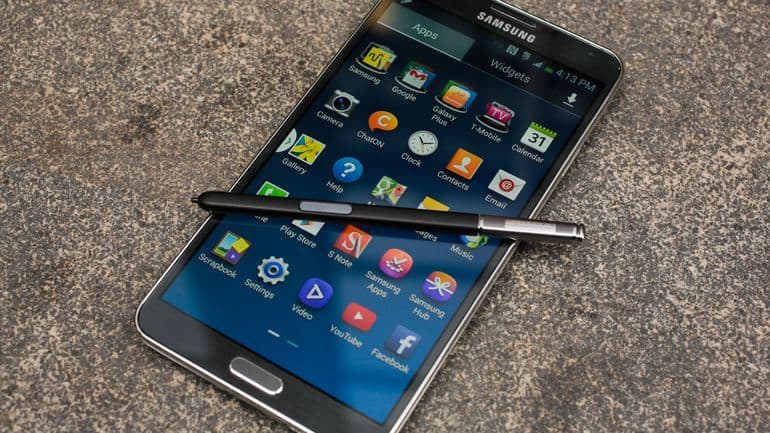
Overall, the Samsung Galaxy Note 3 gives you a kind of user experience that felt exceptional back then, and honestly it still holds up pretty well, even years after it first showed up.
Productivity and multitasking:
That big 5.7-inch display, the strong hardware, and the S Pen together turn the Note 3 into a serious productivity tool. Being able to jot notes, do quick sketches, and directly nudge the interface with the S Pen adds this extra dimension that you just don’t get on many other phones.
Then there’s Multi Window, which makes multitasking feel a bit more natural. You can run two apps next to each other, and swap between them with very little fuss. It’s especially handy when you’re taking notes while looking something up , or when you’re watching a clip while chatting with friends.
Media consumption:
The bright Super AMOLED screen, plus the overall performance, makes it a solid choice for media stuff. Whether you’re watching videos, playing games, or just flipping through photos, the phone generally looks good doing it.
For audio, the built-in speaker is decent enough for playback, but you know … if you want the best sound, headphones or an external speaker are the safer bet.
Customization and features:
Samsung’s TouchWiz UI gives quite a lot of customization options. You can shape the device around your preferences, and that’s nice, though the sheer number of settings can be a little overwhelming, for some people, at least. Still, if you’re the type who pokes around, there’s real value in there.
The S Pen isn’t just a gimmick. The related features, like Air Command, Action Memo, and Screen Write are practical , and they work in a pretty smooth way. It basically supports creativity, and keeps productivity moving along without feeling forced.
Longevity and Software Updates:
The Note 3 got updates for Android 4.4 KitKat and later Android 5.0 Lollipop, and that really helped stretch its software support so it stayed kind of relevant for a bunch of years after it showed up. Even if it won’t see more official releases , it still works day to day because the hardware is solid, and the feature set is honestly pretty extensive.
Overall, the user experience with the Samsung Galaxy Note 3 feels pretty strong and upbeat , since it mixes productivity tools, media enjoyment ,and a lot of customization options that suit different kinds of people, from casual users to those who tinker.
Conclusion
The Samsung Galaxy Note 3 was, at launch, a real game changer, it set fresh expectations for productivity, speed, and overall innovation in the smartphone scene. That big bright display , the capable internal parts, and the distinct S Pen experience make it a standout option for power users, and for anyone who cares about getting work done efficiently.
Pros:
You get this Large and lively Super AMOLED display , which honestly looks really crisp even after a while. The performance is pretty strong too, thanks to Snapdragon 800 or Exynos 5420, though some users might notice slight differences depending on the variant. There’s also a lot of S Pen functionality, like more than just drawing stuff, more productivity minded things. Battery life feels solid , and fast charging support is there when you need it. For cameras , the device handles 4K video recording in a way that still feels impressive for its time. Connectivity is broad , plus expandable storage helps if you’re the type that keeps media everywhere.
Cons:
The TouchWiz UI can feel a bit bloated and overwhelming, like there’s too much going on at once. The plastic build might not be everyone’s vibe, especially if you’re chasing that more premium materials feel. And there’s the big drawback , no official software updates beyond Android 5.0 Lollipop, so you’re kind of stuck with what you get.
Overall:
The Samsung Galaxy Note 3 still feels like a major step, a real milestone in how smartphones evolved, because it brought feature heavy and versatile experiences that were ahead of its time. That legacy is still kind of visible today, in the way modern phones handle design and features , especially the whole stylus and productivity angle. So whether you’re into work stuff, media consumption, or just everyday use, the Galaxy Note 3 offers a rounded experience that stays enjoyable and manages to hold up , at least enough, over the years.
Related Posts

Tech Reviewer & Product Analyst
Định Bia has spent over 10 years testing consumer electronics with a focus on smart technology. He work as a product advisor at Biareview where he helped customers find the right devices for their needs. He personally tests every product featured on this site using a consistent evaluation framework covering quality, durability, and value. All reviews are based on experience, not influenced by the manufacturer.