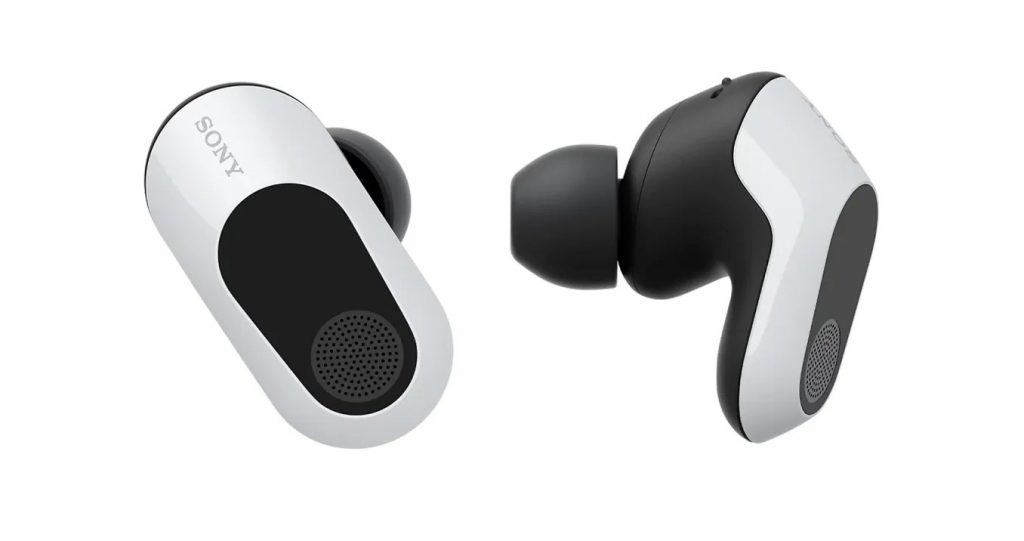
The Sony INZONE Buds function as a completely new type of wireless earbuds which no one has ever experienced before. The INZONE Buds function as a computer and gaming console audio solution because their design does not focus on phone music playback.
The Sony INZONE Buds use a USB receiver that plugs into a PC or PS5 gaming console, then the earbuds establish a 2.4 GHz wireless connection with the receiver, which provides better performance because it uses 2.4 GHz wireless to connect with the receiver.
This review evaluates the sound performance during gaming and other content, the latency results, the efficiency of noise cancellation, and the duration of battery life, while also identifying the weaknesses of Bluetooth wireless connections.
Design and Comfort
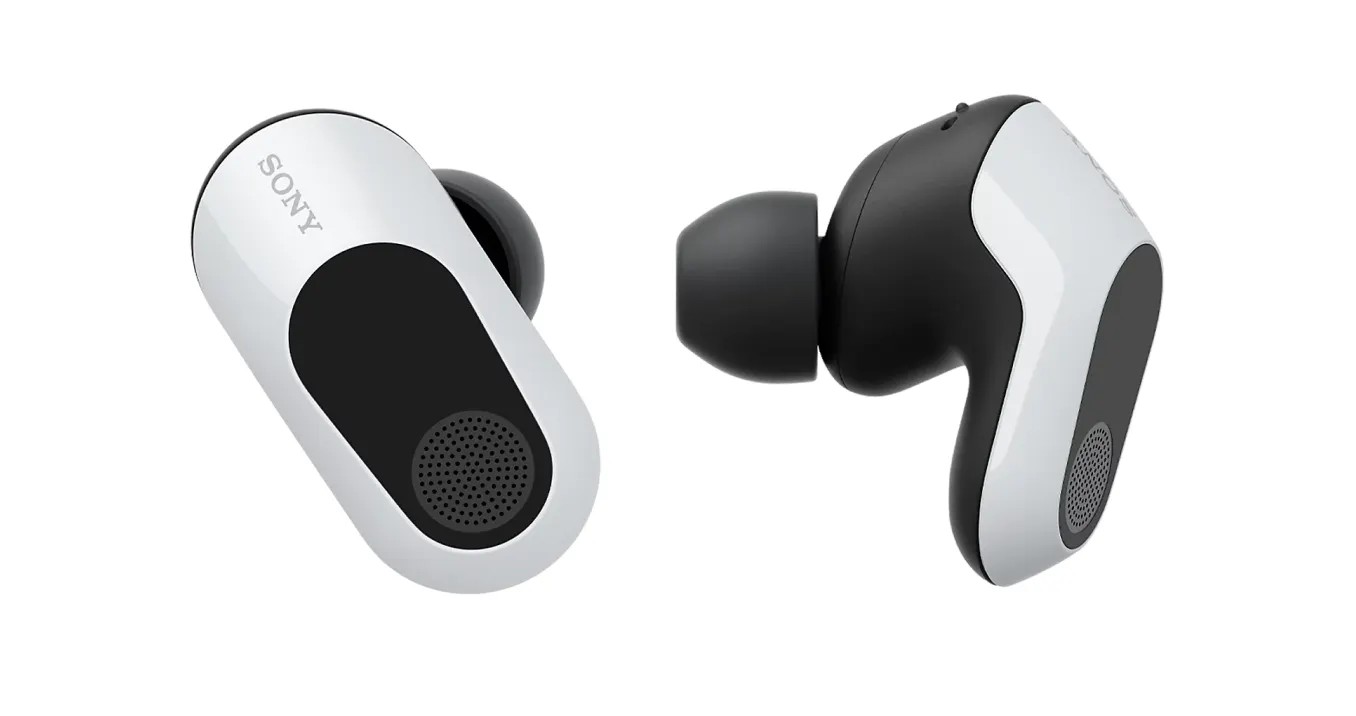
The INZONE Buds use a standard in-ear design together with a common charging case, which contains essential differences. The earbuds have a larger size yet their design remains comfortable for public use because they do not create excessive visibility. The white model in our hands has a two-tone finish, with a glossy black and white exterior and a matte black interior. The earcup includes a large touch area which enables control through touch, while the microphone grille occupies most of the surface area.
The IPX4 rating of the earbuds allows them to resist both sweat and light rain, which makes them suitable for use during outdoor exercises.
The charging case has a design very similar to a ring box. The back side of the case contains both the USB charging port and the Bluetooth pairing button. The case lid shows some misalignment at various points, yet the overall construction maintains its high quality.
The case contains both the earbuds and the USB dongle inside it. The USB dongle features a sliding switch that enables users to switch between PC mode and PS5/Mobile mode. The device includes a pairing button together with an LED light which shows the current status of the pairing process.
The USB dongle from Sony maintains its small size but its design prohibits users from inserting it into a USB port without it extending beyond the port boundaries. Users must exercise caution because any accidental contact with the device will result in damage to both the USB dongle and the USB port used for connection.
The implementation of a USB-C connector makes sense because USB-C ports exist on PC cases but they are not common on PC cases today. Sony recommends against using a USB-A to USB-C dock or adapter but we successfully operated an adapter which provides a solution for users without a front-facing USB-C port on their PC case.
The earbuds rest at a shallower position compared to most noise-canceling earbuds because of their design. Sony created the earbuds with minimal ear contact design to enable users to wear them throughout the day.
The INZONE Buds provide comfort because their design prevents deep ear canal insertion which would cause discomfort to users. After wearing the device for some time users will experience difficulty recalling their current state of wearing it. The lightweight design of the earbuds allows users to wear them continuously for multiple hours without experiencing any discomfort.
The INZONE Buds provide superior comfort when users wear them compared to standard over-ear gaming headphones. The device requires less head coverage which helps users maintain dryness while preventing hair tangles. The design prevents users from facing a microphone which extends forward into their field of vision.
Sony INZONE Buds Wireless Gaming Earbuds, Perfect for PlayStation® 5, for PC/PS5/Switch/Mobile, 48Hr Battery with Case, Noise Canceling, 360 Spatial Sound, 2.4GHz USB-C Dongle, WF-G700N Black:
Software and Features
The INZONE Buds function with Sony’s INZONE Hub software which runs exclusively on Windows operating systems just like all other Sony INZONE products.
The application provides users access to multiple features which include basic functionality through its ten-band equalizer and users can control dynamic range and volume and microphone level and active noise cancellation (ANC) and active noise cancellation (ANC) within the application. The application also provides users with settings to control Sony’s spatial audio function.
Users can activate spatial audio through a toggle switch, but Sony recommends that users should first create a calibration of their head and ear dimensions. First, you need to log in or create a Sony account. The system will direct you to download an application which uses your phone’s camera to take pictures of your ears and create an HRTF profile based on your head and ear dimensions. The user uploads their HRTF profile to the INZONE Hub application.
The process for calibrating 360 Reality Audio with these Sony headphones operates in the same way as all other Sony headphones. The system adds unnecessary complexity to everything. You can skip this feature depending on your needs.
The INZONE Hub application enables users to create their own touch control features which will operate with their earbuds. The earbuds become unusable through the USB dongle connection because users cannot perform basic functions like play/pause or track skipping during USB music playback and audio continues to play after users take off their earbuds. The system needs to assign default gestures which only control volume and ANC.
The earbuds can only play sound through Bluetooth using playback controls. INZONE Buds support Bluetooth audio through Bluetooth LE Audio but their only compatible audio codec is LC3.
The Windows system shows two audio sources when you connect in PC mode which includes one source for Game audio and another for Chat audio. The system lets you dedicate one source for gaming sound while you can use the second source for voice communication. The PS5/Mobile mode allows only one audio source but users can still use the microphone function.
The USB dongle appears as a 7.1 channel audio source in Windows when PC mode is active. The headset can receive native 7.1 channel audio from compatible sources but users will not hear the LFE channel because it is muted by default. The INZONE Hub app requires users to activate spatial audio to access all eight channels.
The PS5/Mobile mode provides surround sound when the source device supports it. The PS5 system processes 3D audio internally before sending the output through two audio channels.
Bluetooth pairing disables the USB dongle which causes the headset to function in standard stereo mode.
Sound Quality The same 8.4mm drivers found in WF-1000XM5 headphones power INZONE Buds so this product serves as a gaming-oriented alternative to those high-end in-ear headphones.
The INZONE Buds produce sound that resembles WF-1000XM5 audio because both headphones create warm sound with low deep bass. Vocals deliver good tonal quality and detail but the midrange area has bass which creates a minor recess in vocal performance. The system will cause users to experience missing airiness and clarity when listening to female voices and some male voices.
Spatial sound activation through INZONE Hub application makes all existing constraints vanish. The sound signature produces a smoother, brighter sound that shows slight bass enhancement. The mix shows a higher level of midrange sounds that show complete absence from the track.
Sony’s spatial sound functions showed only basic performance after I completed the setup process which involved capturing my ear images. The soundstage remained unchanged because all sounds occupied locations that made listeners perceive sound as coming from inside their heads.
Games today provide built-in spatial sound which eliminates the need to depend on Sony spatial sound processing. The sound improvement becomes evident when you disable Sony spatial sound and use Dolby Atmos in Overwatch 2. The default sound of the earbuds presents a more neutral audio profile which enables better audio signal visualization. Atmos enables elevation channel simulation which lets you locate enemies above your position while Sony spatial sound fails to achieve this function.
The best way to use INZONE Buds in games is to start with standard stereo headphone mode and then activate spatial audio through the game itself.
This primarily applies to PC. If you’re using INZONE Buds with a PS5, the experience will be different. The PS5 processes 3D audio itself before sending the signal through the stereo channel to the headphones. Most PS5 games also support native 3D audio, so the audio processing is better than with the PC INZONE Hub software.
Additionally, the Bluetooth performance issue needs to be addressed. The frequency response when using Bluetooth is slightly different from when using the USB dongle. There’s more presence in the midrange, and the sound is generally a bit dull and less detailed. It’s not drastically worse, but there’s definitely a difference, and it’s unclear to what extent this impact comes from the LC3 codec or the built-in DSP.
Microphone
INZONE Buds have good microphone performance when using the USB dongle. Voices sound clear with natural tones and offer fairly good ambient noise cancellation without any noticeable interference.
Unfortunately, for a pair of gaming headphones, the noise cancellation can’t handle keyboard sounds well. So your teammates will still hear you typing every time you speak.
Latency
Latency performance is paramount for gaming audio, and the good news is that the INZONE Buds perform very well. Sony claims a latency of 30ms with the USB dongle, and while it’s difficult to verify such a low number, as seasoned Overwatch players, we can say that we didn’t perceive any latency in the audio at all, despite being used to wired headphones. If you don’t play games well with these headphones, rest assured that it’s not the fault of the headphones.
The INZONE Buds become unfit for use in outdoor environments because their Bluetooth connection only enables music playback. The INZONE Buds’ Active Noise Cancellation function provides effective sound blocking which removes indoor sounds from fans and air conditioners and computer cooling fans. The ANC performance of the headphones matches their outdoor use requirements but falls short when compared to the WF-1000XM5. The INZONE Buds develop a problem because their ear fit design does not achieve the same deep connection which other in-ear headphones provide thus increasing external sound intrusion which Active Noise Cancellation fails to handle.
The INZONE Buds provide top-notch wireless performance through their USB dongle connection. The testing process showed no instances of temporary connection losses. The connection maintains higher strength than Bluetooth strength which endures through home walking while passing through walls.
The process of using Bluetooth connectivity proves to be somewhat challenging. Only recent Pixel models among our devices offer support for LC3 while the iPhone 15 Pro lacks any codec support.
The user needs to press both earbuds together to change between USB and Bluetooth modes, but the system sometimes malfunctions by connecting one earbud through Bluetooth and the other through USB. The INZONE Buds provide high battery life through their published specifications, which Sony supports by stating that the device operates for 11 hours with USB and 18 hours with Bluetooth LE. The Bluetooth LE connection provides 24-hour battery life and the USB connection offers 12-hour battery life when ANC remains disabled.
The testing team concentrated on testing ANC because most users will utilize the earbuds this way. The testing showed that ANC produces 12 hours and 13 minutes of battery life, which exceeds the 11-hour product claim.
The Bluetooth results exceeded our expectations. The testing showed that we could play content for 20 hours and 35 minutes without interruption, when ANC was active. This is the highest we’ve ever tested on any pair of earbuds.
Sony also claims that charging for 5 minutes results in 1 hour of playback capacity. The testing with USB produced more than 1 hour of playback time, while Bluetooth LE produced 1 hour and 23 minutes of playback time.
Conclusion
The Sony INZONE Buds function as gaming earbuds which provide users with comfortable listening experience throughout their gaming sessions. The earbuds produce good sound performance with almost no delay and efficient microphone capabilities. The battery life of this device delivers outstanding performance which surpasses all other wireless earbud models we have tested.
The current spatial audio system which Sony developed for its INZONE Hub application requires both performance enhancements and simplified installation procedures. Bluetooth connection capabilities are currently restricted because Bluetooth LE Audio lacks widespread market adoption.
The headphones have minor flaws which do not affect their primary function. The INZONE Buds available at $140 price point provide better gaming performance than most premium Bluetooth headphones which are currently on the market. Their performance exceeds that of most specialized gaming headsets. The INZONE Buds serve as your primary gaming solution when you accept their in-ear design and price requirement.
Related Posts


Tech Reviewer & Product Analyst
Định Bia has spent over 10 years testing consumer electronics with a focus on smart technology. He work as a product advisor at Biareview where he helped customers find the right devices for their needs. He personally tests every product featured on this site using a consistent evaluation framework covering quality, durability, and value. All reviews are based on experience, not influenced by the manufacturer.