Table of Contents
What is a gimbal?
A gimbal, stabilizer stick, or vibration-proof handle are all the names of a device that supports phones, cameras, camcorders, dashcams that take photos or videos on the go with stability and sharp high.
Common types of gimbal
Gimbal, currently on the market, has many different models. To classify, you can rely on some criteria such as:
Depending on the device used: We can easily divide the vibration gimbal into categories such as phone-only gimbal, camera/camcorder gimbal, drone / flycam gimbal.
Based on the technology used: The gimbal can be divided into two types: mechanical vibration gimbal and electronic anti-vibration gimbal. Compared to a motorized gimbal, the electronic gimbal has the most widely used level.
Based on structural characteristics: Gimbal is divided into common types as 2-axis anti-vibration gimbal, 3-axis anti-vibration gimbal, and multi-axis anti-vibration gimbal. In general, 3-axis anti-vibration gimbal is the most common and will also be Mentioned mainly in this writing.
One thing that can be understood is that the 3-axis anti-vibration Gimbal is a solid design line that offers high reliability and often incorporates many advanced technologies.
Should you buy a gimbal for your phone?
For professional photographers/videographers, having a gimbal stabilizer is essential. But should you use a gimbal for phones?
Although compared to other photographic equipment such as selfie sticks or phone tripod, the price of the phone gimbal is relatively high, but in return, this device will support better and bring stability when taking pictures. or video recording.
Experience choosing the best anti-vibration gimbal
A. Choose gimbal with convenient design, flexible design
Design is the most important criterion when choosing to buy a gimbal. A sleek, luxurious, and versatile gimbal, foldable for a convenient pocket, is something we all want to own.
Also interested in the materials used, choose products with sets made from high-quality materials to ensure durability; Simultaneously, the handle design provides ruggedness and slip resistance during handling.
Usually, the gimbal frame will be made from bearing metal such as aluminum alloy and covered with an electrostatic coating resistant to dust, oxidation, and corrosion.
B. Interested in water-resistance if needed
Depending on the needs, the purpose of use, you can consider water resistance when choosing a gimbal. Especially for tourists, you will probably be very interested in water resistance so you can take photos/videos freely even in the rain.
C. Ability to connect to phones, tablets
No longer complicated wired connections, most of the gimbal lines available on the market today support convenient wireless Bluetooth connectivity to help you quickly connect to Android-based smartphones/tablets/iOS.
Through this Bluetooth connection, you can remotely control operations, set gimbal modes on your phone or tablet.
D. Usage time is not too low.
Gimbal’s built-in high capacity battery will give you a longer usage time instead of the low capacity product line. Make sure your gimbal anti-shake handle can work continuously for a minimum of 10 hours.
Comes with a common USB charging port so that you can charge when the battery runs out; in some cases, the gimbal may also be integrated with an additional USB out port to replace the backup battery.
E. Many features and utilities to use
If possible, you can consider choosing a gimbal equipped with many features, modern technology, and advanced besides the basic features to support you better during use.
1. Gimbal Zhiyun Smooth 4
Zhiyun Smooth 4 is one of the most popular and kind of sought after product lines on the market, for Gimbal anti-vibration handles for smartphones. If you want to buy a Gimbal, you really can’t ignore this quality lineup.
The product looks sleek and, kinda luxurious in that black mainstream style; it stands out a lot with the Zhiyun brand logo. The parts are made from high-quality durable materials, and they also have a scrubbed surface so the user gets a firm grip.
The overall design has been improved quite a lot , and the handle can rotate smoothly to the left and right. There’s also a focus adjustment feature built right into the hand, so you can do it directly without going through the phone screen.
With diverse functions used, Zhiyun Smooth 4 feels equipped with many practical buttons, like focus adjustment, brightness adjustment, and a Flash toggle mode. They are quite convenient, to serve other purposes together.
Zhiyun Smooth 4 uses a lithium ion battery with a relatively high capacity, and it can run continuously for up to 12 hours. The controller also includes an LED battery life indicator, plus 2 charging ports, to help prevent the device from being shut down while you’re using it.
Zhiyun Smooth 4 3-Axis Handheld Gimbal Stabilizer YouTube Video Vlog Tripod for iPhone 11 Pro Xs Max Xr X 8 Plus 7 6 SE Android Smartphone Samsung Galaxy Note10 S10 S9 S8 S7 Q2 Smooth-Q 2019 New Black: Buy it now
Zhiyun Smooth 4 3-Axis Handheld Gimbal Stabilizer Compatible FiLMiC Pro for iPhone Xs Max/Xs/X/8 Plus/7/SE Samsung Galaxy S9+/S8/S7 etc Smartphones(Gopro Adapter/Charging Cable/Counterweight Included): Buy it now
Introduction
Using gimbals to add that professional edge to a level of quality in filming and photography with a mobile device, sure, that’s kind of the point , and Zhiyun Smooth 4 is often named as a solid example. It comes with lots of features, it feels sturdy, and it’s fairly user-friendly, so it gets described as a bit of a game changer for a beginner videographer at the very least . In this full review we’ll go through pretty much everything about the Zhiyun Smooth 4 , the features, how it performs , how easy it is to use, and whether the value for money holds up.
Design and Build Quality
The Zhiyun Smooth 4 gives a first impression that feels polished, like it’s made for people who take shots seriously. Most of the body is plastic, which keeps things light but still gives decent durability. When it comes to the appearance, it has a modern look with matte black paint . It also feels solid in the hand, largely thanks to the ergonomic design, and that matters a lot when you end up shooting for long stretches, not just a quick few seconds.
Designing Wondrously
A big part of what stands out is the control setup. Instead of being governed by a touchscreen, or only through a smartphone app, the Smooth 4 does have a more advanced selection of physical controls . You’ll find things like a large focus pull and zoom wheel, a mode switch button, a trigger on the back, plus several other buttons for quick access. Because of this, you don’t really have to rely on the phone for basic adjustments, and that makes the whole experience more seamless, or at least less distracting.
Going further , on the bottom there’s a common 1/4 screw thread , so you can mount accessories on tripods without much fuss. The arm also adjusts to fit practically any smartphone size, and the clamp holds it firmly in place.
Features and Capabilities
Stabilization
Zhiyun Smooth 4’s three-axis stabilization system sits right in the middle of its setup to neutralize unwanted motions and vibrations. This system performs remarkably well, bringing a smooth and steady flow of video even under tough conditions. Whether one is walking, running, or moving through a crowd, Smooth 4 never fails to lend stabilization worthy of a professional.
Focus Pull and Zoom
One of the most prominent capabilities of the Smooth 4 is its ability to focus pull and zoom. The large wheel mounted on the side of the gimbal gives one the ability to manually adjust focus and zoom to cinematic levels. It is valuable when one needs to highlight some splendid changes in focus and zoom, which are typical to professional filmmaking.
PhoneGo Mode
The Smooth 4 houses a PhoneGo mode that allows the gimbal to respond instantly to movement. This mode is particularly suited to shooting fast action scenes or when quick shot reframing is required. Once turned on, the gimbal moves at an extraordinary speed following your actions so that you are able to capture the moment gone before your eyes.
Object Tracking
There is the object-tracking feature-the Smooth 4 can follow and keep the target selected on your phone screen in the frame automatically. It becomes especially helpful for bloggers or filmmakers who need to keep themselves or other subjects in focus without constantly moving the gimbal.
Time-lapse and Motion-lapse
The Smooth 4 does time lapse, but also motion-lapse, and yeah it’s pretty nice. these modes let you put together real scenic sequences that show motion across a long stretch of time. motion-lapse is kind of like time-lapse but with an extra twist since it keeps adding moving camera shots, so the whole video feels more alive.
The Vertigo Effect
Inspired by Alfred Hitchcock’s dolly zoom, the Vertigo setting lets smartphone users create a similar kind of distortion. basically, using the zoom wheel together with the contrasting movement from a gimbal, you can end up with an extreme perspective shift, and it gives your videos that oddball, unique flavor, like it’s bending the scene a bit.
Performance
Battery Life
The Zhiyun Smooth 4 can run for about 12 full hours before needing a recharge. this extra battery endurance is probably the biggest win for long sessions, because you dont have to keep checking the level, or stop mid-capture just because power is running out. the gimbal includes a USB-C port, so it can be used for charging, and it can also double as a power bank to charge your phone even while you’re actively using it.
Motor Strength and Responsiveness
On the Smooth 4 the motors are powerful and somehow still really responsive, like they don’t hesitate much. They can handle much heavier smartphones without that tired feeling. Even if you use a bigger phone or add extra gear, like external lenses or a microphone, the gimbal stays steady. You notice the motor responsiveness most in PhoneGo mode, because faster reactions become kind of essential when you are chasing super dynamic scenes where things move a lot.
Compatibility
It’s pretty universal, the Smooth 4 basically supports almost every smartphone you can throw at it, whether you’re on iOS or Android. The gimbal works together with the ZY Play app. That app brings extra controls, plus a few more options that feel practical. The app is updated fairly often, so newer phone models and operating systems are not left behind, at least most of the time.
Useability
Setup and Balancing
The Zhiyun Smooth 4 setup is actually easy. The adjustable clamp fits most phones, and the balancing process is not complicated. After you mount the phone, you use the balancing arm to spread the weight the right way. This part is important , because when it’s not balanced the gimbal just puts extra stress on the motors, and that can mess with performance and battery life. So yeah, do it, even if it takes a minute.
Control Interface
Honestly, the control interface might be the best part of the Smooth 4. The physical buttons feel right, and you get feedback that makes actions feel natural. The big focus pull wheel and the zoom wheel, they are easily the highlight, letting you dial in really precise control over key cinematography details. Also, the trigger on the back lets you switch modes fast and run other functions, which makes the whole gimbal easier to use when you’re working quickly.
The ZY Play App
The ZY Play app sort of acts like the doorway for the Smooth 4, it really does, because it gives you a lot of features and tweak options like calibration, firmware updates, and some advanced shooting modes. The graphical user interface (GUI) feels clean and mostly simple, the instructions are easy enough to grasp on the first go. Also the ZY Play app has tutorials and little tips, so gimbal users can get more out of it, which makes it a really solid go-to for the beginner , but also for the more experienced gimbal user too , so yeah, it’s useful either way.
Shooting Modes and Options
The Smooth 4 comes with several shooting modes, basically made to cover different filming needs. The modes include:
Pan Following (PF): The camera pans to the left or right and it follows along with the movement of the gimbal handle. This mode is all about smooth horizontal motion.
Locking (L): The camera direction stays locked so you keep the same angle, no matter what the gimbal handle does. This is the kind of mode you want if you care about steady shots, and you want it calm.
Full Following (F): The camera follows the gimbal handle in every direction so it can track your movement in a complete, comprehensive way. This one’s for when you want the whole scene to respond.
PhoneGo Mode: As said before, this mode provides quick response to handle movements, which is great for action scenes. It’s basically built for instant, reactive control.
Real Use Cases
Vlogging
For any vlogger, the Smooth 4 would certainly come with a whole bevy of features that kinda feel like they’re made for the job. Object tracking and face tracking, in fact ensure that you stay in the frame even as you move along. Its ergonomic design and lightweight build make it easy to carry and use for longer hours, while the different shooting modes let you shoot creatively, and kinda dynamically too.
Mobile Filmmaking
Amateur filmmakers can use the Smooth 4 to craft videos that look almost pro-level. The focus pull and the zoom wheel help you nail the shot with real precision, while media time-lapse and motion-lapse bring those cool cinematic-ish effects into your projects. And yeah stabilization on-the-go keeps everything smooth and steady , like, for every filmmaker who wants a gimbal that doesn’t get in the way.
Travel and Adventure
The Smooth 4 works like a trusty grab and go camera set, built for travelers and adventurers. With such long battery life it basically means you can capture from morning until night. Ergo, no battery drama. Plus it’s compact so it slides into some little nook of the backpack without fuss. Stabilization and PhoneGo mode also support capturing a mix of disparate dynamic scenes, be it hiking, biking, or wandering around a new city.
Pros and Cons
Pros
Excellent Stabilization : the three-axis stabilization system delivers smooth, stable footage in pretty much any situation.
Full Control Interface: Physical buttons plus a big focus pull/zoom wheel gives an intuitive, precise kind of control.
Additional Features: Object tracking, time lapse, motion lapse, and the Vertigo effect add that extra versatility and creativity to your shots.
Battery Life: With 12 hours of charge,it gives you plenty of time for shooting, and it feels pretty dependable for a long session.
Compatibility: It works with most smartphones and it syncs nicely with the ZY Play app.
Build Quality: The frame is light, yet it still feels kind of repetitive in a good way, ergonomic in design and easy to handle.
Cons
Learning Curve: Most users will likely get a bit overwhelmed by the amount of features and controls, honestly it’s not instantly intuitive.
Its Size: It’s a little on the bulky side when you compare it to the majority of smartphone gimbals on the market.
App Dependence: The ZY Play app is required for some functions,so if you like stand-alone operation this may be a mild drawback.
Conclusion
In short, the Zhiyun Smooth 4 gimbal really leaves a mark on the mobile filmmaking world thanks to its loaded feature set and impressive overall output. With three-axis stabilization, it delivers steady, smooth footage that looks more professional than you might expect. The control layout is made to help the operator, and it stays accurate and easy when you’re switching between functions. Features like object tracking, time-lapse capture, and the Vertigo effect are also included,so you get lots of creative possibilities, and it becomes an easy recommendation for people doing hands-on work in different kinds of situations.
Still, the learning curve might be steep, especially if you want to master the whole range of functions quickly. But the videography upgrades you can get from it are worth the effort. Between strong battery performance, support for many smartphones,and a sturdy but featherlight build, the gimbal fits well into the day-to-day of videographers, vloggers, and even people who chase adventure outdoors.
2. Gimbal DJI Osmo Mobile 2
DJI Osmo Mobile 2 and Zhiyun Smooth 4 are 2 product lines of anti-vibration gimbal for phones that are often compared to each other. So, what are the outstanding features of the DJI Osmo Mobile 2 gimbal?
Products have quite sophisticated designs, two main colors, black and gray, for users to choose according to personal taste. The outer shell is made of sturdy synthetic plastic and has good bearing capacity; The shell is roughened and gives us a more solid feeling when holding to manipulate.
In addition to the two inherent modes of Active Track and Time Lapse, DJI Osmo Mobile 2 has an additional built-in hyper-lapse mode to accelerate your shooting and video recording experience. Extend the length of the handle with the included 1/4 inch tripod mount.
Compared to Smooth 4, Osmo Mobile 2 is equipped with DJI’s high capacity battery of up to 2600mAh to meet a continuous operating time of about 15 hours. That is considered a significant improvement, given that the older versions of Osmo Mobile use only removable batteries and only 1/3 the capacity.
With two charging ports, including one micro USB port for charging and 1 USB out port that functions as a backup battery. In some cases, you can use this port to charge the smartphone battery is quite convenient.
DJI osmo Mobile 2 Handheld Smartphone Gimbal (Single Unit): Buy it now
DJI Osmo Mobile 2 Handheld Smartphone Gimbal Stabilizer Must-Have Bundle: Buy it now
Introduction
The DJI Osmo Mobile 2 is, honestly, one of the more celebrated smartphone gimbals out there when it comes to making mobile video come out smoother. It’s basically the next incarnation of the Osmo Mobile, but with a few alterations and some new things added so the results look cleaner, and more “professional” in a sort of straightforward way. In this review, we’ll look at pretty much every angle of the DJI Osmo Mobile 2, like design and features, performance, day to day user experience, and whether the value for money part really holds up or not.
Design and Build Quality
Looks and Materials
The DJI Osmo Mobile 2 has a clean , modern look. The main body is made using tougher nylon, so it ends up feeling light but also durable. The matte gray finish helps it look sharp and professional, and also the gimbal does feel sort of heavier in the hand than you might expect. Sure, it is plastic , but it doesn’t give that obvious cheap vibe. From the moment you open the box, it feels well-built, like it was put together with care, rather than rushed.
Ergonomics
Ergonomics is one of the strong points. The handle is gently rubberized, which makes the grip feel secure even if your hands are a little tired or sweaty. The buttons and controls are placed in a way that you can pretty much run everything with one hand, without really hunting around. The joystick, mode button, and record button all sit right under your thumb , so the motions feel natural. Not awkward , not stiff, just… there when you need it.
Portability
Portability is a big deal here. Weighing only 485 gm, it’s lighter than a lot of other gimbals in the same category, so carrying it around for longer stretches feels less annoying. The arms fold down nicely into a more compact shape. Honestly this makes it easier to slide into a bag , or even manage it like it belongs in a large pocket, which is a real advantage for travelers and road vlogger types.
Mounting and Compatibility
It has an adjustable clamp , so the Osmo Mobile 2 can handle both small and bigger smartphones like an iPhone 11 Pro Max or a Samsung Galaxy S20 Ultra. The clamp holds the phone firmly, so you do not get those worries about dropping it while filming , which is honestly the whole point. At the bottom there is a standard 1/4-inch screw thread. That means mounting becomes pretty easy on tripods and other add-ons you already own.
Features and Functionality
Three-Axis Stabilization
The good three-axis stabilization system is basically the core of the DJI Osmo Mobile 2, and you feel it right away. It evens out unwanted jerky movements and those random vibrations, so your shots stay steady even when the situation is not exactly easy. If you’re walking , running, or shooting from some moving vehicle , the Osmo Mobile 2 keeps things controlled and calm.
Intelligent Shooting Modes
ActiveTrack
This ActiveTrack is the feature that sort of puts the Osmo Mobile 2 on the map. When you pick a subject on the phone screen, the gimbal follows that subject automatically , so they remain framed in the shot. For vloggers and single-person creators, it’s a real helper , because you’re not constantly nudging the gimbal just to stay centered or properly composed.
Timelapse and Motionlapse
The Osmo Mobile 2 supports timelapse and also motionlapse photography. Both kinds really give you long term sequences of motion, kinda like, slow unfolding movements over time. Motionlapse adds a special kind of effect to timelapses, with movements that are super smooth and well controlled, so the resulting video looks a lot more appealing.
Hyperlapse
This mode takes timelapse a step further because it lets the camera move while recording. So it is ideal for dynamic moments, like when you want a busy street, a skyline, or anything active captured and then sort of “injected” with motion into your timelapse.
Panorama
With the panorama feature on the Osmo Mobile 2 users can shoot wide angle photos by automatically stitching and merging multiple images. It’s especially good for landscapes, and it gives you that ability to grab wider scenes without the usual fuss, or fiddly manual steps.
Zoom Control
The zoom-level slider placed on top of the Osmo Mobile 2 handle lets the user get steady, clean zooming. It’s commonly used when you want more dramatic effects, and you want to bring attention to tiny details, that kind of close in emphasis.
Battery Life
The Osmo Mobile 2 comes with a high capacity rechargeable battery that can deliver up to fifteen hours of uninterrupted continuous use on one charge. That long lasting power is pretty handy during long shooting sessions because there are times when running out of power could mean losing that footage forever, and honestly that would be terrible. The gimbal recharges via a micro-USB port and can also charge your mobile phone while you are using it, which is, convenient.
DJI GO App
That DJI GO app is kinda a must-have sidekick for the Osmo Mobile 2, honestly it just fits right in. With it you get access to a bunch of features and settings for the Osmo Mobile 2, like calibration, firmware updates, and the fancier shooting modes. The interface feels pretty friendly too, you know, not crowded, and it gives you clear instructions. There’s also a navigation menu that’s easy to follow with tutorials and handy tips so you can squeeze the most out of your gimbal, for beginners and more experienced users alike it ends up being a really useful little resource.
Performance
Stabilization
The Osmo Mobile 2 does the stabilization job as it should. The shake, jitters, and little unwanted movements get mostly eliminated, and with a three-axis gimbal you end up with smooth results, more “pro” looking footage. Slow panning shots feel nicely under control, and for fast-paced action it still holds up well, with very good overall stability.
Motor Strength and Responsiveness
Inside, the Osmo Mobile 2 comes with motors that feel powerful and quick to react. Even with heavier smartphones it handles them without any obvious hiccup. It really never gives you that laggy or shaky feeling, like the system can’t keep up. When you move to bigger devices with added stuff it still clears the test: external lenses, microphones, the whole setup. Plus ActiveTrack helps the motors react faster which is something you often need, if you want the subject to stay framed the whole time.
Usability
Setup and Balancing
Setting up the DJI Osmo Mobile 2 is pretty intuitive. The adjustable clamp is meant to fit most smartphones, and the balancing process is simple enough. Once you lock your phone in place, you use the balancing arm to get the weight dialed in properly. This is kinda crucial because a well balanced gimbal puts less pressure on the motors, which can help both your performance and your battery life too.
Control Interface
The control interface is maybe one of the best things on the Osmo Mobile 2. You get physical buttons and a joystick controls that feel tactile , and they let you manipulate the device in a pretty intuitive way. The zoom slider is especially handy ,because it gives smooth kind of control and also very precise adjustments over different zoom levels. Then theres the mode button, which makes it easy to jump between shooting modes quickly, so the overall usability stays at that high level that the gimbal is known for .
Shooting Modes and Options
Osmo Mobile 2 comes with quite a lot of shooting modes, so it can cover almost any filming need ,or at least most of what people ask for:
Basic Mode: normal stabilization, for straightforward recording.
Sport Mode: the gimbal reacts faster ,for quick action and sudden movements.
ActiveTrack Mode: track and keep following a subject you pick, more or less automatically.
Timelapse/Motionlapse/Hyperlapse Mode: you can capture those dramatic sequences where motion is handled with respect to time.
Panorama Mode: it stitches multiple photos together on its own, giving wide-angle style shots.
Urged Use Cases
Vlogging
For vloggers ,the Osmo Mobile 2 provides a set of tools that keep it feeling like an ideal companion. ActiveTrack and face tracking help keep you in frame and in focus ,even if you move around a lot. The ergonomic design sits nicely in the hand, so extended sessions are easier. And when you add the shooting modes, you end up with more ways to play, create ,and get dynamic footage without too much hassle.
Mobile Filmmaking
If you are a budding filmmaker, you can use Osmo Mobile 2 to capture and produce videos that look more professional. The zoom control plus those intelligent shooting options let you shape the shot with intention , not guesswork. Meanwhile , timelapse , motionlapse, and hyperlapse modes bring that cinematic mood to your projects. Stabilization itself is a major deal for a gimbal, because without it, the little shakes would quickly spoil the entire take.
Traveling an adventure
So, for people who wander around, and do that kind of adventure stuff, the Osmo Mobile 2 could be kinda like a handy portable answer for saving memories. Long battery duration means you can film all day long, without having to stop and plug it in all the time, and it’s small enough to fold into your bag , or just take it along pretty easily. Stabilization plus ActiveTrack really shine for snapping those quick moving moments , whether you are hiking, doing mountain biking, or just meandering through fresh neighborhoods and brand new cities.
Pros and cons
Pros
Stabilization that helps a lot: The gimbal smooths out shaky hands and gives you fluid, “buttery” smooth clips in most normal situations.
Control that feels direct: You get physical buttons and a joystick, so you can guide things with more certainty and dial in exact inputs.
Smart capture modes: ActiveTrack, timelapse, motionlapse, hyperlapse, and panorama modes bring options, for experimenting with different looks.
Battery endurance: Up to around 15 hours of charge for long shoots, whatever the subject is.
Easy to carry: Lightweight and compact, so it stays practical for on-the-go use.
Construction quality: It’s built solidly enough, with an ergonomic feel that makes holding it more natural.
Cons
Older charging setup: It uses Micro-USB charging, not USB-C, which can feel a bit dated.
App reliance: Some functions need the DJI GO app , and that might not match what everyone wants.
Bit of a learning curve: There are a fair amount of features and controls, so beginners might feel slightly swamped , at first.
Conclusion
So, this DJI gimbal is basically the worlds number one in mobile videography, no debate, with this kind of wow repertoire of features and honestly phenomenal results. The three-axis stabilization claims unshaken, buttery smooth footage which is pretty much on par with anything a professional would expect, while the full control interface is also totally intuitive so you can handle things precisely. And then you get those extra touches like ActiveTrack, timelapse, motionlapse, hyperlapse, and panorama modes, which really push the creative boundaries and make it versatile across a bunch of different shooting scenarios.
Now the Osmo Mobile 2 will, yeah, test your patience a bit while you learn all the tricks, but overall it has enormous potential to level up your videography. The long battery life, mixed with high portability and solid durability, makes it a strong candidate for almost any vlogger, filmmaker, or adventurer out there.
3. Feiyu Vimble 2
If you want to find a cheap, compact gimbal for your phone, Feiyu Vimble 2 might be the product to consider. The device is relatively light with a weight of just 428g; it can withstand loads of around 210g.
In addition, Vimble 2 owns an extremely flexible design with features extending to more than 18cm in length, similar to a selfie stick. That is a useful feature when the group wants to take a selfie or expand the rotation angle to 320 degrees to live stream.
The control buttons are conveniently arranged so that users can easily manipulate them. Diverse shooting modes can control the movement or time-lapse Timelapse easily through settings installed in the Vicool application.
One of the biggest disadvantages of Feiyu Vimble 2 comes from the battery capacity; compared to other gimbal models in the same segment, such as Smooth 4 or Osmo Mobile 2, Vimble 2 is only equipped with a relatively low capacity by Feiyu manufacturer maximum only about 5 hours.
However, this problem can be easily overcome with two micro USB charging ports conveniently located on the side and top of the handle.
Feiyu Vimble2 3-Axis Handheld Gimbal Stabilizer for Smartphone Like iPhone x 8 7/Samsung Note 8 Note7 with Extendable Handheld, Face Tracking,Object Tracking,Time-Lapse Photography (Grey): Buy it now
Introduction
The Feiyu Vimble 2 is this adaptable smartphone gimbal made for people who record video and take photos on mobile. It comes with a draw of some really complicated stabilization work and an ergonomic feel, so overall the Vimble 2 brings a pretty neat angle—an extendable arm that lets you capture footage that looks smooth and almost “pro level” even when you are just walking around. In this review I will go through the whole thing, from the look and the build quality to the features, how it performs, and whether it’s actually worth the money or not.
Design and Build Quality
Aesthetics and Materials
The Feiyu Vimble 2 has a clean modern vibe in general, and it is sold in three color options, black, white, and pink. Most of the body is built using high quality plastics, which helps keep it light, while still giving it decent durability. The matte finish gives it this suave sort of character, and when you hold it, it feels polished, and kinda solid too, like it should not just feel flimsy.
Ergonomics
In terms of comfort, the Vimble 2 feels like one of the better thought-out gimbals. The handle shape is sculpted to fit in the hand naturally, plus there’s just enough grip texture to create friction—though, the thing is, the interface can be prone to slipping when your hands are wet, so yeah, that matters. The button placement is straightforward, and most controls are reachable for single hand use, not that you constantly have to switch grips. Also, it is well balanced in terms of weight distribution, which helps reduce hand fatigue even during longer sessions.
The Feature of Portability
Portability is probably one of the big reasons people talk about the Vimble 2. Weighing in at only 428 grams it is lighter than many other gimbals in this same tier. And the gimbal arm can be extended by 18 cm, which basically turns it into a sort of mini selfie arm. That’s not super common in smartphone gimbals, and it definitely adds flexibility. Because of that extendable arm, the Vimble 2 becomes a practical companion for vlogging, travel, and those quick “let’s get this shot” moments.
Mounting and Compatibility
The Feiyu Vimble 2 arrives with an adjustable clamp for fitting different phone dimensions like the iPhone 12 Pro Max, and Samsung Galaxy Note series too. The clamp grabs your phone pretty firmly so it won’t just slip out of the mount mid use, which is kind of important when you’re walking around. On top of that, the gimbal has the usual 1/4-inch screw thread on the bottom, so you can mount it on tripods or various other add ons without hassle.
Features and Functionality
Three-Axis Stabilization
Basically the core of the Feiyu Vimble 2 is its three-axis stabilization system. It’s not just “stabilization” as a marketing word, it actually works to prevent drift or annoying vibration, so you end up with smooth and steady video even in less friendly conditions. You’ll get a more reliable calm result when you’re strolling, running, or filming while you’re inside a moving car.
Extendable Arm: Unique Feature
There’s also an extendable part on the arm, and when it opens up it reaches about 18 cm, which makes different shooting angles possible, plus perspectives you might not get otherwise. This is especially useful for selfies, group photos , and those high-angle views that are hard to reach in the normal way. Also, the gimbal brings an extra bit of functionality here, which helps keep it flexible depending on what you’re shooting.
Intelligent Shooting Modes
Face/Object Tracking Facility
The Vimble 2 includes strong face and object tracking. If you put the person or target on your phone screen, the gimbal will follow and keep tracking them within the frame on its own. This is very handy for vlogging, or when you’re filming solo , because you don’t have to keep fiddling constantly just to keep the subject centered in the composition.
Timelapse & Motionlapse
The Vimble 2 supports timelapse and motionlapse photography . In practice, these modes give the user the ability to record lovely sequences of motion over long periods of time. A motionlapse does it one more step, by moving the camera in a controlled manner during the time-lapse, while keeping the movement smooth , so your footage ends up looking a lot more beautiful and honestly more fun too.
Panorama
With Panorama mode the Vimble 2 can grab wide-angle shots by stitching multiple photos together. This works really well for landscape photography , so it gives you an effortless way to show huge scenes without fuss.
Hitchcock Mode
The Hitchcock mode lets the user make a dolly zoom effect, the kind Alfred Hitchcock became famous for in his films. The visual result is a dramatic change in perspective , so the video feels intense and it also brings a special kind of flair.
Battery Life
It’s powered by a high-capacity rechargeable battery unit. Under continuous use it can run for almost 5 hours, which should fit most shooting sessions though it has a shorter life span than some competitors. Recharging the gimbal is done through a micro-USB port, and you can even use it while it’s charging. That’s a very convenient feature , especially for longer shoots.
Feiyu ON App
The Feiyu ON app is basically a must-have for the Vimble 2. It opens up a bunch of features and settings, like calibration, firmware updates, and advanced shooting modes. The interface feels clean and welcoming , and it’s pretty clear with instructions, so you can move through the menus without getting stuck in annoying jargon . Plus it has tutorials and helpful tips, which makes it a solid resource whether you’re a beginner or you’ve done this before.
Performance
Stabilization
Alright, so the Feiyu Vimble 2 kind of does what it’s supposed to do, as in: stabilizing a shot. The three-axis gimbal works like magic removing those annoying shakes and tiny jitters from the footage, then you end up with shots that look smooth, and honestly pretty professional. Slow panning or that fast-moving action stuff, the Vimble 2 still shows real competence, even with all the movement, and well, it keeps things stable in a way that feels solid.
Motor Strength and Responsiveness
The Vimble 2 motors are strong, and also pretty quick to respond, handling weightier smartphones without much drama. The gimbal stays composed even when you’ve got a larger device plus extra evil add-ons, like external lenses, or microphones, you know the kind of stuff people attach. But in face or object tracking mode, it can feel slightly demanding, like the motor responsiveness has been challenging. Basically, it needs quick reactions to keep your subject framed correctly, and when the motion gets unpredictable, you notice it.
Usability
Setup and Balancing
Setting up the Feiyu Vimble 2 is, not gonna lie, rather simple. The clamp is adjustable so it fits most smartphones and the balancing part is not too hard to get right. After your phone is mounted, you swing the balancing arm into place, and that helps ensure the weight is distributed fairly evenly. This step is kind of paramount, because a well-balanced gimbal puts less strain on the motors, which also ties into performance and even battery life.
Interface of Control
The control interface of the Vimble 2 is really the strong point, no question. Those physical buttons on the control side give you a tactile, intuitive way to steer the gimbal functions. Also, the extendable arm makes the whole device more usable, since you can shoot from more angles, and more perspectives too. And switching between modes mid-shooting, using the mode button , also makes the experience smoother, because you’re not stuck doing just one style the whole time.
Shoot Modes and Options
Vimble 2 offers different modes of shooting fitting for different filming requirements:
Standard Mode: Base test of stabilizations for some everyday shooting.
Face and Object Tracking Mode: Tracks and follows a chosen subject on its own.
Time Lapse/Motion Lapse Mode: Allows capturing of breath-taking sequences of motion over a period.
Panorama Mode: Automatically stitched wide-angle shots from multiple photos.
Hitchcock Mode: Allows a horizontal dolly zoom effect to be created.
Practical Use Cases
Vlogging Applications
For vloggers, the Vimble 2 has a bunch of useful features. Its face and object tracking capabilities keep the recording subject in focus while moving around. Ergonomically designed, lightweight build means it is easy to carry around for long durations and offers a variety of shooting modes for some really creative captures. The extending arm is great for making it easy to take selfie shots or work with a group.
Mobile Filmmaking
Aspiring filmmaker may want to use advanced Vimble 2 options in order to create professional videos. Employ Hitchcock and intelligent shooting modes to align the shot perfectly. Meanwhile, the timelapse and motionlapse modes bring in cinematic effects into the project. With gimbal stabilization keeping the footage smooth with no jerks in between, the tools indeed do make an excellent addition to any filmmaker’s goods.
Travel and Adventure, kinda
The Vimble 2 should end up as a trusty and go anywhere buddy for making memories with travelers and adventurers. It is kind of convenient to pack and carry because it stays light, plus it has that extendable arm , while the face tracking and object tracking modes get really useful when you’re filming action parts. The stabilization and the different shooting modes basically help you grab great footage no matter if you’re hiking , biking , or just strolling around new neighborhoods and cities you haven’t seen before.
Pros and Cons, though
Pros
Great stabilization: The three axis stabilization system keeps the footage calm and smooth even in tricky situations.
Extendable arm: This one is notable because the extendable arm gives better flexibility, plus slightly wider viewpoints for your shots.
Smart shooting modes: You get face tracking, object tracking, timelapse, motionlapse, panorama, and those Hitchcock style modes which add a bit of spice to filming.
Lightweight , easy to move: The light build and compact size makes it simpler to bring along without thinking too much.
Full control interface: Physical buttons along with a joystick make the control feel both straightforward and accurate.
Cons
Battery stamina: Battery life is up to around 5 hours, which is less than some other competitors , so long shoots might feel a bit limiting.
Micro USB charging: You charge it through a Micro USB port , not the newer USB C that many people expect now.
App dependent options: Some features only show up properly when you connect it to the Feiyu ON app, and yeah , some users might not love that arrangement.
Conclusion
For mobile video production, the Feiyu Vimble 2 is the gimbal that really stands out, with a load of features and genuinely strong performance. Its three-axis stabilization keeps your footage steadier and gives it this more “pro” looking finish. The extendable arm is the thing that makes it different, because it lets you get more flexible compositions, and yeah, it encourages creativity in the shots, not just the safe ones. You also get pretty advanced options like face tracking, object tracking, timelapse and motionlapse , panoramic, plus Hitchcock style shots, and together they make the Vimble 2 feel like a real working tool in many filming situations.
Battery life wise, it doesn’t really compare to a few competitors, but the improvements added with the Vimble 2 would still make you feel like every second you shoot is worth it. Overall, it’s lightweight and comfortable in the hand, so if you are a vlogger, a filmmaker, or just constantly moving around as a traveler, this is a must-have.
4. Zhiyun Crane Plus
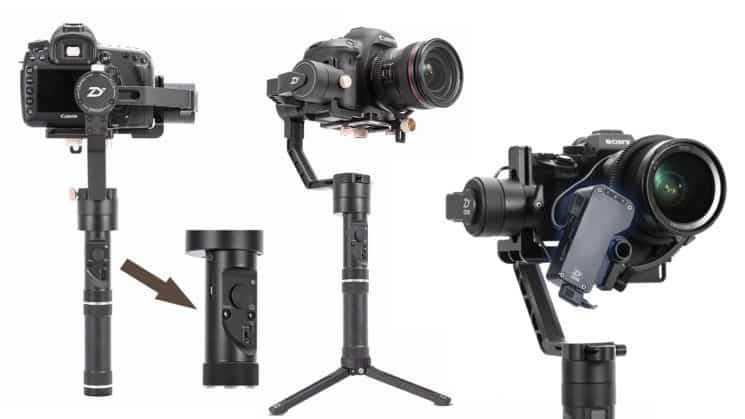
Zhiyun Crane Plus, with a relatively affordable price and is packed with many useful features, is the camera gimbal that you are looking for. The device is compatible with both mirrorless and DSLR cameras.
Especially with 3-axis stabilized tripod to ensure the ability to withstand the camera with a lens weighing up to 2.5kg while enhancing stability when taking photos or filming.
Gimbal has a very scientific design and flexible 360-degree rotation, besides the power button on the bottom has an additional 1/4 “-20 hole for users to attach more monopods or other photography support devices. Filmed another.
Through the Zhiyun-Tech application, Crane Plus allows you to perform wireless control when connecting the gimbal directly to smartphones running Android and iOS via a Bluetooth connection port.
Due to the support from Crane Plus, photos and videos created from your camera will be sharper and smoother than ever. Comes with POV view mode that allows the gimbal to move flexibly in the direction of your movement.
In addition to the basic features, Zhiyun Crane Plus is also integrated with many other utilities such as MotionMemory used to set the camera’s movements; SmartFollow is for tracking objects; NightLapse supports night photography.
Zhiyun Crane Plus 3-Axis Handheld Gimbal Stabilizer for DSLR and Mirrorless Camera compatible Sony Panasonic LUMIX Nikon Canon POV Large Payload Timelapse Object Tracking New Version zhi yun Crane V2: Buy it now
Zhiyun Crane Plus Zhiyun Crane V2 Upgrade Version in 2018 3-Axis Handheld Gimbal Stabilizer 5.5lb Payload FPV Mode Intelligent Object Tracking Motion Memory Nightlapse: Buy it now
Zhiyun Crane Plus (Official) 3-Axis Handheld Gimbal Stabilizer for DSLR and Mirrorless Cameras: Buy it now
Introduction
The Zhiyun Crane Plus is basically a high-end handheld gimbal for DSLR and mirrorless cameras, kind of like it was made for people who want smooth moving shots without thinking too much. Because the build is sturdy, the stabilization is noticeably improved, and it also comes packed with a bunch of intelligent extras, the Crane Plus ends up feeling like a very tempting option for any videographer, amateur or professional. In this detailed review I’ll touch on several parts of the Zhiyun Crane Plus, like the look, the features, how it performs, and whether the value actually matches what you pay for it.
Design and Build
The Aesthetic Choice and Its Materials
Visually, the Crane Plus has that clean professional design where it feels like you just want to grab it and go. It is made from aluminum alloy, so the construction manages to be durable while still keeping a relatively light feel. Even the matte black finish does a lot, it adds some understated aesthetic charm, and it gives the gimbal a more premium presence. The overall build appears very solid and it should give you the impression of reliability pretty fast, even the first time you lift it.
Ergonomics
The Crane Plus is shaped with ergonomics in mind, so it’s comfortable during longer shooting sessions and not just for a quick test. The handle is textured, chosen on purpose to help it stay secure in your palm during long days of shooting. The controls are laid out in a way that the operator can reach them without breaking flow, meaning you can keep your grip and still make adjustments. The joystick, the mode button, and the record button can be used with your thumb, without really removing your hand from the handle, which is kind of neat and also practical in real use.
Portability
Even though it feels sturdy, the Crane Plus has a kind of relative portability. When you’re not using it together with the camera, it lands at around 950 grams, so that should be manageable for most operators even if the filming session is super long. The gimbal includes a carrying case too, and that helps portability, plus it keeps the gimbal more protected while you’re moving it around. The size is also compact enough that it can slide into basically any camera bag, so it kind of becomes an easy choice for the traveling videographer.
Mounting and Compatibility
The Zhiyun Crane Plus has a standard 1/4-inch screw thread on the bottom so it can be mounted on tripods and other accessories, no big drama there. It also includes a detachable tripod base, which can work as a small stand or sort of an extension of the handle. As for camera matching, the gimbal supports a long list of DSLR and mirrorless camera models. You can load up to about 2.5 kg (5.5 lbs), depending on the setup. That payload rating is meant for multiple configurations, including add-ons like microphones, and LED lights, too.
Features and Functionality
Three-Axis Stabilization
The Zhiyun Crane Plus is really built around three-axis stabilization. It is designed to counter unwanted motion and those annoying vibrations, so the footage comes out smooth and steady. A mix of advanced motors and algorithms gives you a pretty precise degree of control in most everyday settings. Whether you’re walking, running, or filming from a moving vehicle, the Crane Plus tends to keep a consistent steadiness in its stabilization, all the time.
Smart Shooting Modes, MotionMemory
One of the Crane Plus highlights is MotionMemory. Basically this lets users do more advanced camera moves then , save those moves for later use. you can program a chain of actions, and somehow those complex shots can be repeated again with just a tap. For filmmakers this can be pretty useful, especially when you need the same view over different takes or at different locations, like you are trying to keep everything stable and repeatable without thinking too much.
POV Mode
The POV mode gives you kind of uncommon shooting angles by tilting the gimbal up to 45 degrees on each side. It creates lively, immersive footage that feels like it’s trying to copy the way a human eye actually moves. This mode fits best for natural perspectives, meaning, if you’re doing action scenes or you want bigger creative shots, it tends to work really well.
Intelligent Object Tracking
The Crane Plus also includes an Intelligent Object Tracking feature. When you tap the subject on your phone screen, the gimbal will automatically follow and hold it right in the middle of the frame. It’s especially handy for independent filmmakers and vloggers, because otherwise you might have to constantly correct the framing yourself, keeping the person centered all the time, which can get tiring.
NightLapse
NightLapse is another feature that makes a lot of sense. It lets you create good looking time-lapse videos even in low light. You can choose exposure adjustments, and it should help produce time-lapse clips that are smooth and clear, like for a cityscape at night or a starry sky.
MotionLapse
MotionLapse kinda blends time-lapse photography, with controlled camera movement, sort of a rhythm thing. It helps you make captivating time-lapse videos while still keeping the camera transitions looking silky smooth and steady. And if you add more waypoints then the operator can guide the gimbal along a set path, which gives extra dimensions to the whole time-lapse project, really.
Battery Life
The Zhiyun Crane Plus runs on two 26500 high-capacity rechargeable batteries, giving about 12-18 hours of continuous use after a full charge. That longer battery endurance matters because in long sessions you don’t want those abrupt interruptions when power runs out. It also opens up more flexibility, including a micro-USB charging option, plus it includes a charging dock so recharging is basically convenient and straightforward.
Zhiyun Play App
The Zhiyun Play app is basically made to pair with the Crane Plus. Inside you get a lot of choices for calibration, firmware updates, and advanced shooting modes. The menus are pretty simple , and the on-screen instructions are easy to follow, so people can get the gimbal setup done faster. There are also tutorials and suggestions to help you make better use of the gimbal, which works out well for both beginners and folks with more experience.
Performance Stabilization
The Zhiyun Crane Plus is kinda exceptional at doing exactly what it was built for: stabilization. With its three axis gimbal system it removes most shakes and jitter, and the resulting shots come off really smooth, like pro stuff. Whether you’re doing a slow pan, or action footage where things are flying by, the Crane Plus stays put in a steady way, even if your subject moves a lot.
Strength of Motors and Responsiveness
The motors inside the Crane Plus are strong, and they respond fast enough that you can mount heavier camera rigs without feeling like it’s struggling. The stability stays on point even when you use larger lenses or add extra pieces, external mics, monitors, that kind of thing. You can actually feel the responsiveness in POV mode too, because that direct feedback from the gimbal to your movements matters a lot when you’re trying to get those more dynamic takes.
Usability
Setup and Balance
Using the Zhiyun Crane Plus is pretty straightforward. The camera plate is adjustable, and it fits nearly all DSLR and mirrorless models, so getting the balance right is not a huge hassle. Once you lock your camera onto the gimbal, you still need to mess with the balancing arm to dial in the proper weight distribution. That part matters, it helps performance, and it supports battery endurance because a properly balanced gimbal makes the motors work less.
Control Interface
One of the best parts of the Crane Plus control interface is the hard buttons plus the joystick, it feels tactile, and it’s pretty intuitive to control the gimbal. The joystick helps you get smooth, precise motion and the mode button makes it easy to jump into shooting modes. There’s also that OLED display on the handle, and it makes life easier by showing real time details like battery life and mode selection, so you’re not guessing mid shoot.
Shooting Modes and Options
The Crane Plus comes with a bunch of shooting modes , for different filmmaking needs.
Standard Mode: basic stabilization , good enough for everyday scenes.
MotionMemory Mode : lets you set up and store more involved camera movements, then reuse them later.
POV Mode: gives you those lively shots by rotating the gimbal 45 degrees to each side. kinda makes it feel immersive.
Intelligent Object Tracking Mode: follows a chosen subject on its own, automatically keeps it centered or framed.
NightLapse Mode: especially useful for time-lapse footage in darker situations.
MotionLapse Mode: another option that merges time-lapse with deliberate controlled camera motions.
Use Case Scenarios in Reality
Professional Filmmaking
The Crane Plus is honestly a very flexible piece of equipment for working filmmakers, with its many functions and settings. You can create sweeping, cinematic camera moves with MotionMemory and POV , and you can dial in the vibe pretty cleanly. Also, the extended battery life gives you more room for longer shooting sessions without constant stops. On top of that, the stabilizer is built to keep everything smooth and looking professional.
Event Videography
For event videographers , the Intelligent Object Tracking and NightLapse modes can be a real advantage. The tracking feature helps you stay locked on your subject even when there are crowds, noise, or chaotic moments. Then NightLapse mode works like a charm for nighttime time-lapse videos, think weddings, birthdays , or concerts where the lighting changes all the time.
Travel and Adventure
The Crane Plus is a really good option for grabbing high-quality footage for expeditions ,and also those more spontaneous adventures. It ’s the kind of thing that feels worth it, especially since it is lightweight by nature and comes with a tidy carrying case, so packing and transport is way less annoying. With stabilization assurances you get smoother footage during hiking , biking, or even those city wanderings. You also get a bunch of shooting modes—like MotionLapse and POV—so you can pull off more creative, lively shots and honestly, that adds a little extra spark to your travel videos.
Pros and Cons
Pros
Strong Stabilization: the three-axis system does a smooth job keeping things steady in basically any situation.
Smart Modes: MotionMemory, POV, intelligent object tracking, NightLapse , and MotionLapse expand the list of options for more imaginative recordings.
Battery Duration That Actually Helps: the battery can last around 12-18 hours ,so you can stretch out longer shooting sessions without constant stress.
Durability: heavy gauge aluminum alloy gives real strength and a more premium feel.
Reliable Control: physical buttons, a joystick, and an OLED display make the experience both easy to understand and still pretty exact.
Works with Almost Every Camera Setup: nearly every DSLR and mirrorless camera is supported, which fits almost any setup you might think of.
Cons
Micro-USB Charging: it charges via micro-USB instead of the more current USB-C standard.
Learning Curve, Not Gentle: the sheer number of features and controls can feel intimidating for beginners.
Device Weight: even though it is a technical tool, it feels kind of heavy, like it adds strain to your “arm stamina” thoughts, which could tire you after long sessions of recording.
Conclusion
In the world of professional videography, the Zhiyun Crane Plus emerges as a great gimbal with the complete package of features offering the best performance. The three-axis stabilization mechanism produces sift and professional video, while the highs of the shooting modes, including Motion Memory, POV, intelligent object tracking, NightLapse, and MotionLapse, provide your projects with versatility and creativity. Crane Plus withstood build quality and longer battery life makes the device even more pleasant-to-use and reliable for any undertaking-an Amateur or professional.
5. Zhiyun Crane 3 LAB
For professional photographers or filmmakers, a high-end Gimbal product line like Zhiyun Crane 3 LAB would be suitable. The product has a high level of finishing in design, flexible structure, and rugged handle design.
Zhiyun Crane 3 LAB is one of the most advanced anti-shake camera gimbal brands of Zhiyun brand, particularly on the market in general. It is integrated with many modern and advanced technologies that we can not find in the popular product line, low price.
Such as:
Supported wireless image transmission technology for Full HD 1080P video quality is extremely sharp and has high contrast. Good compatibility with most phones and tablets running Android and iOS; DSLR cameras or camcorder lenses.
Features control focus and zoom smart synchronization system touch screen of a smartphone or tablet. In addition, the device also supports users to perform zoom and focus functions via the ViaTouch Media control system to handle small details.
In using the camera to take photos or videos, you can also easily connect the gimbal to a smartphone to perform motion sensor control or general control features, including modes such as transfer, control the camera and adjust settings on the camera gimbal.
Zhiyun Crane 3 LAB 3-Axis Handheld Stabilizer Gimbal Redefine Stabilizer 4.5KG Payload for All Almost Mirrorless Cameras DSLRs,Versatile Structure,Wireless Image Transmission ViaTouch(Standard Pakege): Buy it now
Zhiyun Crane 3 LAB 3-Axis Handheld Gimbal Stabilizer for DSLR Mirrorless Camera Sony Canon Panasonic Nikon (Creator Package – with Phone Holder,Zoom Focus Motor, Camera Belt, Quick Setup Kit, Monopod): Buy it now
Zhiyun (Official) Crane 3 Lab Handheld 3-Axis Gimbal Stabilizer for DSLR and Mirrorless Cameras: Buy it now
Introduction
The Zhiyun Crane 3 LAB is usually listed among the top handheld gimbals for professional filmmakers and videographers. It’s sort of the flagship model, packed with a lot of rich features, sturdy build, and that kind of innovative design thinking you can actually feel when you use it. This deep review will walk through pretty much every aspect of the Zhiyun Crane 3 LAB, from design and features, to performance plus value, so you get a clear idea of why people keep reaching for it in the professional scene
Design and Build Quality
Looks and Materials
The Zhiyun Crane 3 LAB has an appearance that seems mostly driven by function , and the form follows after. It pairs solid build quality with a lightweight aluminum alloy frame and reinforced plastic parts. The matte black finish feels, well, practical and professional at the same time, and the ergonomic shape helps you stay comfortable during long shooting sessions without that constant hand tension.
Ergonomics
The Crane 3 LAB leans into ergonomics with its sling mode approach. In practice it makes for a more relaxed , natural shooting experience, especially if you’re working low, or keeping the camera closer to the ground. The handle includes a rubberized grip so it doesn’t slide around, even if your hands get warm, or a little sweaty. And the controls are laid out in a pretty intuitive way, you know, you don’t really have to keep readjusting your grip just to reach a button or dial, which is nice when things move fast.
Portability
Even if it’s sturdy, the Crane 3 LAB still keeps a decent level of portability. It weighs around 1.88 kg (4.14 lbs) without the camera , so it’s there in the hands of a lot of users , not just studio setups. For transport , it can be taken apart, and it includes a carrying pouch that helps protect the gear while you’re traveling. The compact build fits into most camera bags, so it can work as a really viable choice for videographers who are always moving from location to location, sometimes literally last minute.
Mounting and Compatibility
The Zhiyun Crane 3 LAB comes with a lot of mounting points, not just one way, and it includes standard 1/4 inch and 3/8 inch screw threads to attach it to tripods, monopods, or other accessories. There is also a mini tripod that can be detached, kind of like it is meant for use as a stand, or maybe a handle extension if you want that. For the cameras, the gimbal plays nicely with a broad range of DSLR and mirrorless models, because it supports a payload up to 4.58 kg (10.14 lbs). So it ends up being pretty flexible for different camera builds , and for configurations that include extra stuff like external monitors, microphones, and lights.
Features and Functionality
Advanced Stabilization System
At the center of the Zhiyun Crane 3 LAB is an advanced stabilization setup, it is basically a three-axis gimbal system that counteracts unwanted motion and vibration to help smoothen and steadier your footage. The three motors, plus precise algorithms, give you strong control, even when conditions feel less than ideal. Whether you are walking, running, or shooting from a moving vehicle, the Crane 3 LAB stays steady , and not in a shaky way.
Intelligent Shooting Modes
ViaTouch Control System
Another noticeable feature is the ViaTouch control system, which lets you operate the gimbal and camera using your smartphone. If you connect your camera to the gimbal using HDMI and USB cables, the Zhiyun app can help you change camera parameters, check live view, or guide gimbal movements. Honestly, it feels like a solo film-maker’s tool, since it offers command without needing to keep touching the camera or the gimbal itself, and that is kind of the whole point.
SmartFollow 2.0
By using an object-tracking kind of technique, SmartFollow 2.0 will automatically keep up with the subject you selected. once you tap the subject on your phone screen, the gimbal stays with them and holds them in the frame, even while they wander around or shift position. honestly this feature feels really handy for vloggers and solo creators, especially when you want to stay in focus while pacing, turning, and moving through a scene, without thinking too much about it.
Sync Motion
Sync Motion is also one of the Crane 3 LAB’s fresh features. It lets you steer the gimbal movements using smartphone gestures. This simple and direct control style gives your clips a more expressive twist, because it makes certain shots easier to pull off that might be hard or even out of reach with normal handling.
TimeLapse, MotionLapse, and Long Exposure Timelapse
Crane 3 LAB doesn’t stop at one option it offers several timelapse variations, like TimeLapse, MotionLapse, and Long Exposure Timelapse. with these, you can catch gorgeous settings and see motion build up across time. MotionLapse is a little more involved than a standard timelapse, since it relies on controlled camera sweeps, rather than just static timing, and Long Exposure Timelapse is more about nighttime mood. it tends to bring out light trails, plus other long-exposure effects that look cinematic.
Battery Life
The Zhiyun Crane 3 LAB runs on three 18650 rechargeable batteries, and that setup supports up to 7.5 hours of continuous use on one charge. if you prefer longer sessions, the gimbal can also work with external power sources. charging happens through a USB-C port on the gimbal, and there’s a charging dock included, which makes the whole routine feel more tidy and less annoying.
Zhiyun Play Applicatio
The Zhiyun Play app is a bit of a key tool for the CRANE 3 LAB, honestly. It lets you get to a bunch of features and settings like calibration, firmware updates and some advanced shooting modes. You can also see the interface is pretty friendly, with instructions that feel clear enough and menus that are easy to wander through, even if you are not super experienced. On top of that, it includes tutorials, little tips, and guidance so users can squeeze more out of their gimbals. So yeah, it works for beginners, but advanced people can use it too, no big drama.
Performance
Stabilization
The Zhiyun Crane 3 LAB is clearly strong at stakeholder stabilization (though you know what I mean). The three-axis gimbal does a great job getting rid of shakes and those annoying jitters, so the footage comes out clean, smooth, and with a professional type of polish. Whether it’s slow, calm panning, or faster scenes with more motion, the Crane 3 LAB tends to keep things steady.
Motor Strength and Responsiveness
The motors feel strong and responsive, and they handle heavy camera builds without much fuss. It stays steady even when you add heavier lenses, or extra bits like an external monitor or microphones, and that’s pretty important. The responsiveness is especially noticeable when you’re working in Sync Motion and SmartFollow 2.0 modes, because the motor reaction has to be prompt, otherwise you lose the shot during dynamic moves, right.
Usability
Setup and Balancing
Setting up the Zhiyun Crane 3 LAB isn’t extremely hard, but it’s not “instant and done” either. It really asks for some patience, plus precision so you can balance properly. The adjustable camera plate fits most DSLR and mirrorless cameras, and once you mount it, balancing becomes pretty straightforward. You just adjust the balancing arms to align the weight distribution. And this part matters a lot: performance improves, battery life usually lasts longer too, because the motors don’t have to strain as much.
Control Interface
One of the Crane 3 LAB’s best features is its control interface. On the handle, there is a joystick, several buttons, and a touch screen, all combining to provide an intuitive and comprehensive means of controlling the gimbal. The touch screen is your fastest route through a myriad of settings and modes, while the joystick got you covered for precisely moving the gimbal. The OLED display further enriches this solid UI with useful information about current state—battery and mode selection to name a few.
Practical Applications
Professional Film Production
The Crane 3 LAB offers an array of features for professional filmmakers, making it an invaluable piece of equipment. Through ViaTouch control system and Sync Motion, complex and precise camera motions may be executed, lending a cinematic feel to your projects. The SmartFollow 2.0 feature allows you to track the object and keep it in view even as it moves around, while stabilization ensures smooth footage of professional quality.
Event Videography
For event shows, it is indeed an effective aid for videographers; object tracking and timelapse features are just the most basic uses. Using SmartFollow 2.0, you keep the subject in frame even when in animacy or crowds surrounding. The various timelapse modes record creative presentations of motion across time, aggrandizing your event video.
Travel & Adventure
With an agile and portable tool for really good shots, the Crane 3 LAB feels like a perfect partner for travelers and adventurers. It’s lightweight, and the carrying case helps you pack fast, move around easily, only kinda bothered by that whole enjoyable, on edge feeling from an advanced stabilization system, that promises smooth footage even when you’re action-hiking , biking, or just wandering through fresh new cities. Plus the multiple shooting modes, like MotionLapse and Long Exposure Timelapse , keep things lively and fun so your travel documentation gets even more thrill.
Pros and Cons
Pros
Excellent Stabilization: Three-axis stabilization keeps your footage calm, smooth, and steady, basically in most situations.
Intelligent Shooting Modes: With the ViaTouch control system, SmartFollow 2.0, Sync Motion, and a lot of time-lapse possibilities, you get plenty of variety plus room for creative experiments.
Innovative Design: The sling mode design gives the nicest relaxed grip for more natural capturing.
All in One Control Interface: Physical buttons, joystick, touchscreen, and OLED display all together, the controls stay intuitive and quick to respond.
Great Compatibility: Works with practically any DSLR or mirrorless camera, no awkward setup.
Battery Power: Up to 7.5 hours of runtime, and that includes the external power supply.
Cons
Weight: At 1.88 kg (4.14 lbs) without a camera, you might feel it during long recording stretches.
Learning curve: Beginners may find the wide mix of features and controls, slightly too much to take in at once.
Price: Since the Crane 3 LAB is a high end product, the cost might slow down purchase plans for some folks.
6. Feiyu G6 Plus
If you are a tourist and are looking to buy a gimbal for Gopro, do not miss Feiyu G6 Plus. With the new Feiyu ON Version 3.0 application, you can easily set parameters and motion modes as you like.
Besides GoPro Hero 7, the gimbal is also compatible with most mirrorless cameras, camcorders, dashcams, smartphones. There are two convenient ¼ inch screws on the gimbal so you can attach other devices such as GoPro Hero 3, Hero 4, Hero 5, Hero 6, or Xiaomi Yi cam 4K.
The body of the gimbal is integrated with OLED screen technology, which enhances the ability to display the specifications of both gimbal and camera such as mode, Wi-Fi connection, Bluetooth, battery life … clear and sharp than.
Not only beautiful, but the luxurious Feiyu G6 Plus also possesses good water resistance that allows users to use it even when it rains. The high battery capacity of about 5000mAh meets up to 12 hours of operating time and takes 3 hours of full charge time via USB with a 5V / 2A charger.
FeiyuTech Feiyu G6 Plus 3-Axis Handheld Gimbal Stabilizer with LCD Touch Panel Compatible with GoPro Hero Series of Action Camera/Smartphones/Mirrorless Cameras/Pocket Cameras, MAX Payload 1.75LB: Buy it now
Feiyu G6 Plus 3-Axis Brushless Handheld Gimbal Stabilizer Splash-Proof 800g Payload 12 Hours Running Time for Smartphone,Action Camera Gopro,Digital Cameras,with Tripod,Extension Rod and Phone Holder: Buy it now
Feiyu G6 Plus 3-Axis Portable Handheld Gimbal Stabilizer (G6 Upgrade Ver 2018) for Gopro,Xiaomi,Yi Cam 4K,Sony Rx0,iPhone X 8 7 Plus,Samsung S9 S8,and Any Cameras Within 800g,Splash Proof 12H Runtime: Buy it now
Introduction
Feiyu G6 Plus is this super-versatile yet minuscule 3-axis gimbal made for all kinds of devices, like cells, action cameras, and mirrorless setups. It’s basically a FeiyuTech elite-class product, so it leans hard into portability, solid performance, and plenty of useful features. That’s why it feels appealing to both hobbyists and working videographers. In this long-ish review we’ll walk through the entire Feiyu G6 Plus , checking the design, the features, the performance, and the price. By the end, you should have a complete grasp of why this gimbal still stands out in a crowded market.
Design and Build Quality
Aesthetics and Materials
The Feiyu G6 Plus has a clean, modern look, with a matte black skin and a compact build overall. It’s made with decent materials , including aluminum alloy plus hard plastics, and it ends up feeling solid, not flimsy. The matte finish also gives off that more professional vibe , and it helps your hand not to slip as easily when you’re in the middle of a shoot.
Ergonomics
Ergonomically it’s meant for natural handling, comfort, and smoother movement, so the G6 Plus gives users a dependable grip. The handle is shaped with an ergonomic form, plus a rubber coating, so you keep control even when you’re filming for a long stretch. The buttons and controls are placed strategically too, so you can manage the gimbal comfortably with one hand. And since it stays compact, it makes the whole thing more travel-friendly, which is pretty convenient for a moving cameraman, especially when space is tight.
Portability
The Feiyu G6 Plus really has more than a few tricks when it comes to portability. It only tips the scales at roughly 663 grams (1.46 lbs) without the camera attached, so it feels light enough to tote around without much hassle. Since it’s pretty compact, it should slide into most camera bags or backpacks ,and well, yeah it works as that reliable traveling buddy for adventure style filmmaking. Also included is a protective carry case ,which helps make sure it gets transported and stored in a safer, less worry-inducing way.
Mounting and Compatibility
As for mounting, the G6 Plus can handle most devices you’d throw at it, from smartphones, to action cameras, even mirrorless cameras. It uses a quick-release plate with a standard 1/4-inch screw, so mounting is pretty straightforward and holds steady. There’s also an adjustable bracket that fits different camera dimensions, so you can do some small, careful tweaks while setting up. In terms of capacity ,it can support a payload up to 800 grams (1.76 lbs). That kind of flexibility makes it useful across a bunch of filming situations and varying rig setups.
Features and Functionality
Advanced Stabilization System
The Feiyu G6 Plus stands out thanks to its advanced 3-axis stabilization setup. This gimbal helps cancel random movement and those annoying vibrations, so you get smoother, steadier footage. Using the combined force of high-torque motors plus smart algorithms, it delivers pretty refined stabilization even when conditions get rough. In the end ,the G6 Plus keeps doing that standout “keep it stable” thing, whether you’re walking, jogging ,or filming from inside a moving vehicle, and honestly it still aims for clean camera behavior.
Pan Follow Mode
Pan Follow Mode is meant for controlled horizontal movements. While panning gestures of the handle are tracked by the gimbal , its tilt and roll axes stay locked though. This setting makes smooth panning takes, and is kinda great for tracking a subject that s moving, or for sweeping slowly and steplessly in a cinematic style.
Follow Mode
In Follow Mode, the gimbal follows the handle actions on all three axes, pan tilt, and roll. You get a much more flexible and immersive kind of filming. It s useful in action scenes, where the camera has to shadow the user movements without getting weird.
Lock Mode
Lock Mode basically holds the camera in one fixed spot no matter what the handle does. It s for static setups, and for keeping a subject locked in, like always staying sharp on focus. It s also very fitting for time-lapse, plus other moments where a steady take matters most.
Selfie Mode
Selfie Mode lets the camera be flipped around 180 degrees, so you can take selfies or roll vlogs fast. Triple pressing the mode button activates this kind of rotation, and yeah it s especially handy when you re vlogging and moving around at the same time.
Battery Life
There s an in-built 5000mAh rechargeable battery, and the Feiyu G6 Plus can run for up to 12 hours of continuous use on one charge. You can charge it via the USB-C port on the gimbal while it also supports charging outside gear , like smartphones and action cameras, through its USB-A port. That means it s not only convenient for long shoots, keeping the gimbal powered, but it also keeps the connected devices alive through most of the day.
OLED Display
The G6 Plus arrives with an OLED display screen that shows bedside-ish status bits, like battery life details , shooting mode info, and the connectivity state. It sort of “lights up” with real brightness and crispness in pretty much every light setting, and especially when you’re out in daylight. The whole setup is made to improve the user experience by only putting the needed data on the surface, so you can keep focused on your recording , instead of constantly checking your smartphone or camera.
Feiyu ON App
This app is, in essence, for controlling the G6 Plus. It covers a pretty wide set of features and choices. The app layout feels straight forward and still kind of calming to use, not cluttered. Users can handle gimbal calibration inside the app, run a firmware update, and use extra advanced shooting modes such as time-lapse or panoramic capture. It also includes little tips, plus short tutorials, which helps you squeeze more value out of the gimbal. That’s handy whether you’re a beginner or you’ve already got years of experience.
Performance
Stabilization
Basically, the Feiyu G6 Plus is one of the stronger options for stabilization. The 3-axis gimbal system works abyssally well, neutralizing shakes and jitters so you get silky, smooth cinematography. For slow pans as well as quickly moving action, the G6 Plus keeps a tidy record for top-tier steadiness. The motors are high in torque, and the control algorithms stay tight, letting the gimbal react quickly and accurately to whatever movement happens next.
Motor Strength and Responsiveness
The motors inside the G6 Plus are quite strong and responsive enough to tolerate heavier camera setups without much fuss. The gimbal keeps its stability with its big lenses or when extra accessories, such as monitors or microphones, are balanced on. This motor responsiveness is vital for Follow mode and Pan Follow mode, which require quick reactions from the gimbal when performing dynamic shots.
Usability
Setup and Balancing
Setting up the Feiyu G6 Plus is fairly simple. However, it is important to maintain proper giving attention to balancing. The adjustable camera plate fits most cellphones, action cameras, and mirrorless cameras, and the balancing is fairly easy. Place your camera in the mounting, and then you want to balance it with the adjustment arms, which is critical for the best performance and battery life, as a gimbal that is well balanced will not have to work harder on the motors.
Control Interface
The control interface of the G6 Plus is among the best features that it has. Equipped with a joystick, buttons, and mode button on the handle, one can control all functions of the gimbal intuitively. We will use the joystick for moving the gimbal precisely and then switch modes with a click of the mode button. Other than that, the tiny OLED screen on the handle will also advise us what the status of the gimbal is at any time-for instance, showing battery percentage and what mode it’s currently on. That really adds to the ease of use.
Practical Use Cases
Being a vlogger, the Feiyu G6 Plus offers a massive range of features that make it an essential tool. The Selfie Mode enables quick switching between the front and rear cameras. The Follow Mode tracks the subject as they move if it is set to Follow. The gimbal is lightweight for all-day use and has long battery life so your on-the-go vlogging travel will continue with smooth professional-grade footage.
Action Filming
Action filmmakers shall love the results provided by the G6 Plus with its advanced stabilization system and strong motors. Fast sports or slightly chaoticAdventure flights are still smooth and steady with the gimbal. Some hard conditions are Pan Follow and Follow modes that allow you to control tracking of subjects and create dynamic shots with ease.
Travel and Adventure
For the travelers and adventurers, the G6 Plus is a good solution for high-quality footage, while very portable. Lightweight design coupled with a carry case makes this solution easy to pack and transport, and the advanced stabilization systems smooth the footage while hiking, biking, or exploring a new city. Plus, all modes of shooting like time-lapse or panorama will keep you creative for dynamic shots, so it will make your travel video even more exciting.
Pros and Cons
Advantages
Top Notch Stabilization: With a 3-axis stabilization system, you get very good steadiness in virtually every condition, even when things are a bit chaotic outside.
Intelligent Shooting Modes: Pan Follow, Follow, Lock, and Selfie modes kinda broaden the scene range and creative abilities for your footage.
Ergonomic Design: A comfort handle plus a clear and natural control layout, makes the day to day use feel smoother.
Okay-ish Interface Controls: Physical buttons, a joystick , and an OLED display work in sync so you can adjust settings quickly.
Great Compatibility: It can take a smartphone, an action camera, or a mirrorless camera, so it should fit a lot of setups.
Battery Life: Up to 12 hours of runtime, with the bonus of charging external devices as well.
Disadvantages
Weight Limit: The max load it supports is 800 grams. For some people with heavier camera rigs, this might turn into a real headache pretty fast.
Learning Curve: There are quite a lot of modes, features and controls. New users may get overwhelmed , before they even find their rhythm.
Price: The G6 Plus sits in the premium zone. That cost level can be off putting, for certain buyers.
7. Gimbal Zhiyun Weebill LAB
One of the most striking features of the Gimbal Zhiyun Weebill LAB is stability. With a well-balanced 2.0 system and axial lock, you can quickly and easily manipulate even a first-time gimbal.
The camera’s body is compact, flexible, but rugged, ensuring maximum loads of up to 3kg from Mirrorless and DSLR cameras. The handle is also covered with a layer of rubber that gives a firm feel to the handle.
Weebill LAB is fully integrated with the necessary features from Zhiyun manufacturers such as ViaTouch control system to handle small details, POV mode, high-definition wireless image transmission function, autofocus, and zoom …
iPhone mode with just one tap will bring speed and accuracy when shooting subjects. OLED display technology capable of displaying specifications, wireless connection status, Bluetooth, or battery life … is clearer and more intuitive.
Relatively high battery capacity for about 10 hours of use.
Zhiyun WEEBILL LAB 3-axis Handheld Gimbal Stabilizer for Sony A7S A7M3 A7R3 A7R2 A7S2 A6500 A6300 A6000 Panasonic GH5 GH5s Nikon Z6 Z7 Mirrorless Cameras (Standard Package – Only Gimbal,Tripod,Cables): Buy it now
Zhiyun WEEBILL LAB 3-Axis Gimbal for Mirrorless and DSLR Cameras Like Sony A6300 A6500 A7 GH5, Wireless Image Transmission, ViaTouch Control (Standard Package 2019 New): Buy it now
Zhiyun WEEBILL LAB 3-Axis Handheld Gimbal Stabilizer (Not Include Phone Holder and Servo Follow Focus) for Mirrorless Cameras,Smartphone,Max Support 3KG (Standard Package): Buy it now
Opening
The Zhiyun Weebill LAB is, like one of the most famous 3-axis gimbals you’ll see for mirrorless and DSLR cameras. And honestly the reason it gets so much attention is that it combines its functionality with a creative visual style , plus it stays relatively light , along with strong real world performance. That mix makes the Weebill LAB mostly chosen by filmmakers and videographers who want something steady, but not overly complicated. This thorough review covers practically every angle of the Zhiyun Weebill LAB, design aspects, features, performance , and, most importantly , value. So you get a complete understanding of why this gimbal rises above others, in a pretty crowded field of camera stabilization systems.
Design and Build Quality
Aesthetic View and Material Used
The Zhiyun Weebill LAB brings a sleek modern look, and it comes finished in professional black. It’s built using high-quality materials, including aluminum alloy and tough plastic parts. Because of that build choice, it’s known for rigidity and a kind of robust feel. The materials create a nice compromise, meaning lightweight yet still sturdy enough to support the usual modules of shooting situations. The Weebill LAB also has an aesthetic appeal that goes with practical design upgrades , like well-placed buttons and controls, for easier use in the moment.
Portability
The Zhiyun Weebill LAB is clearly made with portability as a focus. It weighs about 970 grams, with no camera mounted. So it feels fairly easy to carry around. Also, its compact build lets it slide into most camera bags and backpacks , which makes it convenient for travel and those unplanned, impromptu shoots. The gimbal is also simple to take apart for transport , and there’s an extra case included so it can be stored safely.
Mounting and Compatibility
The Weebill LAB has a bunch of mounting choices, like pretty different ways to attach it. It comes with a quick release plate that includes a standard 1/4-inch screw , and that one firmly mounts all sorts of cameras. It works with most mirrorless and DSLR models, with a payload of up to 3 kgs (6.6 lbs) which is pretty solid. Also the gimbal has multiple mounting points for whatever accessory you might want later on-down-the-road: things like monitors, microphones, and lights, for that really professional setup.
Features and Functionality
Advanced Stabilization System
The Zhiyun Weebill LAB has an advanced three-axis stabilization setup. It counters unwanted side to side movements and vibrations, so you get smooth stable footage. Good control is provided by strong motors and careful algorithms, even when you are shooting in demanding scenarios. Whether you are walking, running, or filming from a moving car, the Weebill LAB will keep delivering steady shots all the time.
Intelligent Shooting Modes
Pan Follow Mode
The Pan Follow Mode helps you get smooth horizontal motion. In this setting the gimbal tracks the pan actions of the handle, while keeping the tilt and roll axes locked. This mode is good for dynamic shots that need smooth panning , like following a subject as it moves , or creating cinematic sweeps.
Follow Mode
Under Follow Mode, the gimbal would follow the handle movements made both in the pan, tilt, and roll directions. This offers dynamic and immersive shooting opportunities and opens up the field for flexible shooting and more user control. Great for shots involving action, or even for vlogging, wherein the camera must mirror the user’s movements.
Lock Mode
Lock Mode will lock the camera in a fixed position regardless of what motion is applied to the handle. It is ideal for still shots while requiring the steady subject focus. Namely for time-lapse kinds of photography or other situations where a steady shot is needed.
POV Mode
POV (Point of View) mode lets the camera follow the gimbal movement in all three axes, creating an immersive, first-person view. It works superbly with action or highly dynamic shootings, ultimately letting the viewers feel like they’re in the middle of the action.
Vortex Mode
This mode lets your camera rotate in full 360 degrees along the roll axis, creating deep-moving, very artistic effects. Think of it as your way for pretty unique video shots with layers of cinematic nuances adorning your footage.
Battery Life
The Zhiyun Weebill LAB runs on two 18650 rechargeable batteries, and they provide usable power for around 10 hours between charges. Recharging feels pretty convenient too, since it uses the USB-C port on the gimbal, and if you want a faster kind of standby setup, there’s also a charging dock. With that kind of endurance, you and the gimbal can keep working for long sessions without that constant worry about power getting drained too soon, or at all.
OLED display
One more nice touch on the Weebill LAB is the built-in OLED display. It throws up quick status updates like battery life, your current shooting mode, and the connectivity situation. The screen stays bright, and it’s easy to read even outside. So overall it improves the day-to-day experience, because important info is right there, in front of you , rather than you hunting through a smartphone or checking a separate camera screen. That means you can focus more on filming, and less on searching for what’s going on.
ViaTouch Control System
ViaTouch is probably the Weebill LAB’s most standout feature. Through it, the user gets full control of both the gimbal and the camera using a smartphone. Once you connect , via HDMI and USB, the camera to the gimbal, you can then use the Zhiyun App to dial in adjustments, view the live preview, and manage the gimbal motion. This is especially handy for solo filmmakers, since it delivers a lot of control, without the need to keep touching the device itself—no camera grabs, no gimbal tweaking. It’s kind of a smooth, hands-off workflow.
Zhiyun Play App
The Zhiyun Play app feels like the necessary sidekick to the Weebill LAB, and it brings in a bunch of options… and little settings you can actually use. It is fairly easy to navigate, and the interface is clear, like it kinda walks you through everything, setup included. You can calibrate the gimbal, and also handle firmware updates from within the app, which is handy. Plus, it gives access to advanced filming modes ,think time-lapse ,and panorama and other similar “extra” styles. There are also tutorials and quick tips, so you don’t end up stuck after the unboxing, it’s useful for both beginners and more experienced people, just not in the same way of course.
Performance
Stabilization
The Zhiyun Weebill LAB really nails what it is supposed to do, stabilizing. The 3-axis system removes those annoying shakes ,and jitter , so your footage looks smooth and clean, almost like it has a pro level baseline. Basically whether you’re doing a slow, careful pan or you’re filming quicker, kinda hectic action, the Weebill LAB keeps the shaky moments away from the “usable” ones. There are high-torque motors paired with precise algorithms, so the response is fast and accurate, and that alone makes manual control feel more natural.
Motor Strength and Responsiveness
The motors in the Weebill LAB are strong and reactive, they can handle heavier camera configurations without stress. Even when you throw on bigger lenses and extra gear like monitors or microphones, it still holds onto a steady shot, no drama. This motor responsiveness is especially noticeable in Follow mode and Pan Follow mode, because in those cases the gimbal needs to react quickly, and if it’s even slightly late you’ll feel it. Here it keeps up, so capturing dynamic scenes stays consistent, rather than like, guesswork.
Usability
Setup and Balancing
The Zhiyun Weebill LAB is relatively easy to set up, but it still needs your full attention when it comes to complementing balancing. The adjustable plate can hold just about any mirrorless or DSLR camera you put on it so the balancing part stays pretty simple. After your camera is mounted for safety, you can start tweaking the balancing arms and dial in the weight distribution you want. This step is key for our performance, and yes, even to stretch battery life, because a well balanced gimbal kind of takes pressure off the motors, which matters.
Control Interface
The control interface is quite strong on the Weebill LAB. The handle has a joystick, multiple buttons and also a mode button, so it really comes across as a complete and intuitive way to interact with the gimbal. The joystick helps you maneuver the gimbal with utmost precision, while the mode button gives quick access to shooting modes. Plus, the OLED display on the handle provides ongoing real-time status info like battery life and which mode is currently selected, so in practice the gimbal feels easier to handle, not harder.
Use Cases
Professional Filmmaking
For professional filmmakers, the Weebill LAB includes a lot of features that boost it into being a near necessary tool. The ViaTouch control system and the Vortex Mode enable precise camera motions, plus movements that are dynamically varied, which adds a subtle cinematic flair to your projects. The overall tuning of the stabilization system also supports smoother, professional grade footage, keeping your shots calm, steady, and nicely finished.
Event Videography
The Weebill LAB will, honestly bring a lot of benefits to event videographers because of clever shooting modes and really solid battery life . With Follow Mode and POV Mode the main subject stays in frame even when the place gets crowded or things start moving fast, kind of chaotic , in a good way . Then the multiple timelapse options are just right for those stunning motion sequences over time, so your event clips end up feeling deeper and more alive, like you added another dimension.
Travel and Adventure
For travelers , wanderers and people that love getting out there, the Weebill LAB feels like a reliable yet easy to transport option for filming crisp footage. Its lightweight build together with the included carrying case, makes the whole setup simple to pack , and take along, without turning it into a burden. Meanwhile the advanced stabilization system helps keep everything smooth, so your shots look fluid during trekking , mountain biking , or even late night strolling through busy city streets. And yes, all those filming choices, from time-lapse all the way to Vortex Mode give travel videos that extra spark, plus creative , dynamic layers that you can actually feel.
Pros and Cons
Pros
Excellent stabilization: this three axis setup keeps the video pretty smooth, and steady even when life gets messy out there, like in real everyday shoots.
Smart capture modes: Pan Follow, Follow, Lock, POV, and Vortex give you a lot of creative angles , it almost feels like you are improvising on purpose.
User friendly design: the sling mode feels natural, and comfortable for filming through longer stretches without fighting the gimbal.
Intuitive control interface: physical buttons plus a joystick and an OLED screen, so managing everything is a bit easier, even if you are moving around.
High compatibility: it works with a wide range of mirrorless and DSLR cameras, so you can mix and match different rigs and accessory combos.
Long battery life: around 10 hours of runtime, and it can also charge the battery while you are traveling. so you have less chance of sudden cut offs during big sessions.
ViaTouch control system: if you film solo, this feature helps a lot , you can use your smartphone for control and live monitoring.
Compact and portable: it is lightweight enough to carry around, without turning it into a whole production.
Cons
Learning curve: the number of features, plus all those controls can feel like… a lot, especially for a beginner who just wants to start.
Balancing: depending on what you mount, the balancing stage can take some time, and honestly you have to watch small details if you want top gimbal performance.
Price: premium gear like Weebill LAB usually costs more than some people will want to spend, it is not exactly budget friendly.
Payload limit: it can handle a decent amount, but heavier builds, with big lenses, and extra weight for serious work will push the limit , and then it may start to struggle.
Related Posts



Tech Reviewer & Product Analyst
Định Bia has spent over 10 years testing consumer electronics with a focus on smart technology. He work as a product advisor at Biareview where he helped customers find the right devices for their needs. He personally tests every product featured on this site using a consistent evaluation framework covering quality, durability, and value. All reviews are based on experience, not influenced by the manufacturer.