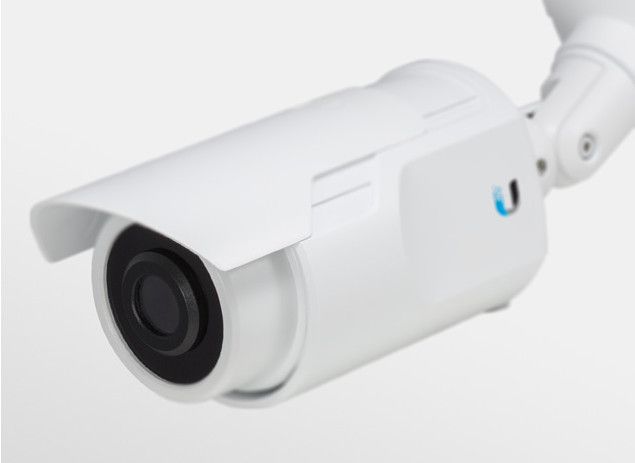
Designed for mounting on the wall, the IP Camera Ubiquiti airCam is suitable for the needs of attaching in and out of small offices or homes.
Camera IP Ubiquiti airCam is quite beautiful design with full white tone. Above the camera, there is a sliding cover that slides out as needed to reduce the glare of the camera when it is outdoors. The airCam measures 158 x 61.5 x 58.5mm and weighs 196g (excluding the leg attached to the wall).
The DSC-932L front lens assembly has a fixed focus of 4.0 mm, aperture F1.5 and fixed foucus.
The back of the device is a reset button and a 10 / 100Mps LAN port to plug in to the switch, router or directly to the computer and also to the power port for the camera (PoE standard).
Above the back is a bracket for attaching the base to the wall, the ceiling. The detachable design is probably only for wired operation as well as when the Reset button is pressed because the product does not come with a different base.
The base has two rotary joints (one horizontal, one vertical) to adjust the view of the camera as desired.
In case you do not have a Switch / Router that supports the PoE standard, you can still use the device with the included adapter to turn ordinary LAN ports into PoE LANs.
Ubiquiti Aircam H.264 Megapixel Indoor/Outdoor IP Camera (1): Buy it now
Ubiquiti Aircam H.264 Megapixel Indoor/Outdoor IP Camera, 3-Pack Package.: Buy it now
The airCam is Ubiquiti’s entry-level network camera. It’s wired, records at VGA resolution and slots into Ubiquiti’s recorder software or any ONVIF system. It isn’t built to impress on specs. It’s built to sit on a wall, stay connected and keep recording. If you’re putting together a budget camera system for a small building, that’s a reasonable thing to want. If you’re after sharp footage or a camera you can control from your phone, look elsewhere.
Look and build
The airCam is compact and plain, with clean lines and a white or grey housing that doesn’t stand out against most walls. Once it’s up, people tend to stop noticing it.
The housing is plastic. For the price it’s solid and should cope with everyday knocks, but it isn’t built for extreme conditions. Some versions are made for outdoor use and have a degree of water and dust resistance. Check the rating of the exact model before you put one outside, and add a protective enclosure if the spot is very exposed.
Picture
Inside is a 1/4-inch CMOS sensor recording at up to 640 x 480. In practice, you can see that someone walked through a door and roughly what they did. You can’t reliably tell who they were unless they came close to the camera. In ordinary light the picture is acceptable. In dim light it gets muddy, and it’s no match for cameras designed for low-light work.
The fixed lens is around 3.6mm, giving a field of view of about 65 degrees. That’s a moderate view, enough for a doorway or a small room. There’s no zoom and no focus adjustment, so the mounting position decides the framing for good. Hold the camera up and check the view on screen before you drill.
Network and power
Connection is by 10/100 Ethernet only. For a VGA stream that’s plenty of bandwidth, and a cable doesn’t drop out when someone starts the microwave. The catch is placement: every camera needs a network cable run to it.
Power is a second cable. The airCam uses a 5V DC adapter, included in the box, and doesn’t support Power over Ethernet. So each location needs both a network run and a nearby power outlet. On a multi-camera job that adds real cabling time. If you’d rather run a single cable to each camera, choose a PoE model from Ubiquiti’s range or another brand.
Software
Ubiquiti’s NVR software gives you live view, scheduled recording and playback across multiple cameras, and it’s easy to learn. If you already run a different recorder or VMS, ONVIF support means the airCam should work with it too.
What you won’t get is smart home integration or modern analytics. It doesn’t work with voice assistants, and there’s no phone app built around the camera itself.
Motion detection
The airCam can detect movement in the frame and start recording or send an alert. Sensitivity is adjustable, and it’s worth tuning in the first week. A busy corridor or a window with changing light will trigger it more often than you’d expect. It treats all movement the same. There’s no distinction between a person, a pet and a shadow.
Setting it up
Mount the bracket with the screws provided and angle the camera. Plug in the Ethernet cable and the power adapter. Then find the camera’s IP address and configure it, either through Ubiquiti’s NVR software or through your own ONVIF recorder. The settings that matter most at the start are motion detection and the recording schedule. Tweak video quality after you’ve watched some footage.
Other cameras to consider
For one or two cameras at home, the Logitech Circle 2 is easier to live with. It records 1080p with a 180-degree view, so a single camera can take in most of a room, and it works with or without a cable. Motion detection is smarter, and there’s a cloud storage option.
If you want to talk through the camera, the Arlo Essential Indoor Camera has two-way audio on top of 1080p video. Setup happens over Wi-Fi in the Arlo app. It costs more than the airCam, but the picture is far better.
The TP-Link Tapo C200 can turn and tilt on command, which lets one camera watch a whole room. It also records 1080p and sees in the dark. Being Wi-Fi only makes it easier to place, at the cost of the occasional dropout. Expect to pay a bit more than for the airCam.
The Arlo Pro 4 plays in a higher league. Its 2K video and color night vision are well ahead of the airCam, and it runs on battery, so there are no cables to run. It’s for people who want a sharper picture and a cable-free install, and are willing to pay for both.
Support and warranty
Ubiquiti’s website has setup and troubleshooting guides, and the community forum is a good place to search for common problems. If neither helps, you can reach the support team by email or phone.
The standard warranty lasts a year and covers faults in manufacturing and hardware. Physical damage and self-made changes aren’t included, and terms differ from country to country.
Verdict
The airCam is a sensible choice when you need several cheap, dependable cameras feeding a recorder and don’t need to identify faces. The low resolution, fixed lens and need for two cables per camera are real limits. For sharper video or an easier install, the 1080p cameras above are worth the extra money.
Related Posts

Tech Reviewer & Product Analyst
Định Bia has spent over 10 years testing consumer electronics with a focus on smart technology. He work as a product advisor at Biareview where he helped customers find the right devices for their needs. He personally tests every product featured on this site using a consistent evaluation framework covering quality, durability, and value. All reviews are based on experience, not influenced by the manufacturer.