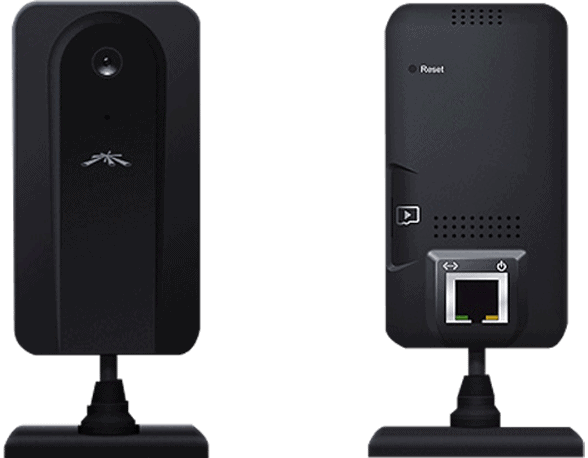
The Ubiquiti airCam mini is compact in size and is suitable for indoor and small office.
Camera IP Ubiquiti airCam mini is a compact, slim design, just a regular mobile phone. The camera body is made of plastic, and the heavy and heavy metal base allows the camera to stand on flat surfaces. The coupling between the ball body and the circular foot allows airCam mini to rotate (manually) in all directions with ease.
The front lens is 3.6mm fixed, F2.8 aperture, manual focus. Image sensor with 1MP resolution, can shoot movies with 720p HD resolution. Below the lens is the integrated microphone.
The right side is a microSD card slot for storing video directly on the card, handy in the event of network failure.
The back panel is a heat exchanger and reset button so you can easily restore the default settings as needed.
Below the back is a 100Mps LAN port to plug in to the switch, router or directly to the computer and also to the power port for the camera (PoE standard).
In case you do not have a Switch / Router that supports the PoE standard, you can still use the device with the included adapter to turn ordinary LAN ports into PoE LANs.
UBIQUITI NETWORKS AIRCAM-MINI UBIQUITI AIRCAM MINI, IP CAMERA, POE OUTDOOR: Buy it now
The airCam Mini is a small, wired, no-frills indoor camera. It records VGA video, plugs into your network with an Ethernet cable, and works with Ubiquiti’s own recorder software or any ONVIF-compatible system. It isn’t smart and it isn’t sharp, but it’s cheap, it stays connected, and it fits into a proper recording setup. That’s the whole pitch.
Design and build
The airCam Mini is a small white cylinder, roughly 55 x 60 mm (2.2 x 2.4 inches), weighing about 150 grams (5.3 ounces). Tucked into a ceiling corner, it’s easy to overlook.
It’s made of plastic, and it feels like it. Still, the parts fit together tightly and nothing creaks. The low weight means the bracket doesn’t have much to hold up, and a clear, scratch-resistant cover sits over the lens. There’s some resistance to moisture, but this is an indoor camera. Outside, it needs a proper weatherproof housing.
The included bracket tilts and swivels, so aiming the camera is easy. The hardware in the box is basic, though. Depending on the wall, you may need your own anchors or a different bracket.
Sensor and lens
A 1/4-inch CMOS sensor records at 640 x 480. That’s enough to see who’s in a room and what they’re doing, but not to read a face from across it or make out small details. In moderate light the picture is fine. In a dark room it gets noisy and murky quickly.
The fixed 3.6mm lens gives a field of view of about 65 degrees. That covers a small room or a corridor. It won’t take in a whole open-plan office from one corner, and there’s no zoom or focus adjustment, so where you mount it decides what you get.
Connectivity and power
The camera connects over 10/100 Ethernet only. There’s no Wi-Fi. That rules out spots without a network cable, but it also means no dropouts, no interference and no signal problems. For a camera that’s supposed to record around the clock, that’s a fair trade. 100 Mbps is more than enough for a VGA stream.
Power comes from a 5V DC adapter that’s in the box. It doesn’t support Power over Ethernet, so every camera needs its own power outlet nearby as well as a network cable. That’s one more cable to run, and it limits where you can put it.
Software
For viewing and recording, Ubiquiti’s own NVR software covers the basics: a live view, recording schedules and a playback screen. Someone who has never set up security cameras can get comfortable with it in an afternoon.
The camera isn’t tied to Ubiquiti’s software. It supports ONVIF, so most third-party recorders and video management systems will pick it up. That helps if you already own a recorder or run cameras from several brands. ONVIF support varies from system to system, so be prepared to set the video stream and motion detection by hand.
Motion detection
Motion detection is basic. The camera spots movement in the frame and can start recording or send an alert. You can adjust the sensitivity, and you’ll probably need to at first, to cut false alarms from things like a monitor flickering or a curtain moving. There’s no person detection or other smart analysis, so every movement counts the same.
Installation
Setup is simple. Mounting takes a few minutes. Fix the bracket to the wall, point the camera where you want it, then connect the Ethernet cable and the power adapter. From there you can set it up in a web browser using its IP address, or add it to Ubiquiti’s NVR software or any ONVIF recorder. Get motion detection and the recording schedule sorted first. Video quality can wait until you’ve seen how the footage looks.
Where it fits
At home, put it in a hallway or by the front door, where you want a discreet record of who came and went. Just don’t expect detail good enough to identify a stranger.
In a small business, it can cover a reception area, an office or a stock room. The wired connection makes it dependable, and the price means you can put several up on a tight budget.
For remote monitoring, you can reach the live feed and recordings from elsewhere through the NVR or VMS, as long as you have network access to it.
Good and bad
In its favor, it’s small, cheap and reliable, thanks to the wired connection, and the software options are flexible.
Against it are the VGA resolution, the fixed lens, basic motion detection, no Wi-Fi and no PoE. Every one of those limits either what you see or where you can mount it.
Alternatives
The Logitech Circle 2 records 1080p with a 180-degree field of view, and it works wired or wireless. It adds smarter motion detection and cloud storage. If you want a camera for a single room at home, rather than one piece of a recorder-based system, it’s the more capable choice.
Arlo’s Essential Indoor Camera is another 1080p option. It connects over Wi-Fi and has two-way audio, so you can talk to whoever is in the room. The Arlo app walks you through setup. You’ll pay more than for the airCam Mini, but the picture is much sharper, and you don’t need to run a network cable.
TP-Link’s Tapo C200 also records in 1080p, and the camera head pans and tilts, so one unit can cover more of a room. You can talk through it too, and it plugs into smart home platforms. Going wireless makes it simpler to put up, though a network cable remains the more reliable link.
Support and warranty
Ubiquiti publishes setup guides and troubleshooting articles on its website, and the user forum is busy. If you can’t find an answer there, support is available by email or phone.
Expect a one-year warranty in most places. It covers manufacturing defects and hardware failures, not accidental damage. The exact terms depend on where you buy, so read them at the time of purchase.
Verdict
The airCam Mini makes sense for a home or small business that wants cheap, reliable cameras feeding into a recorder, and can live with VGA. If you need more detail or want to put a camera where there’s no network cable, any of the 1080p cameras above is a better fit.
Related Posts

Tech Reviewer & Product Analyst
Định Bia has spent over 10 years testing consumer electronics with a focus on smart technology. He work as a product advisor at Biareview where he helped customers find the right devices for their needs. He personally tests every product featured on this site using a consistent evaluation framework covering quality, durability, and value. All reviews are based on experience, not influenced by the manufacturer.